Our Top Picks
The word “4K” on a capture card box can mean three very different things: the signal it passes through to your screen, the signal it records, or just a marketing flourish. Anyone shopping for a 4K capture card under 400 dollars needs to read past the headline and find the line that states the recording resolution and frame rate. Several cards in this price tier pass a 4K picture to your TV or monitor while saving only 1080p60 or 2K30 to your stream, and that distinction decides whether the card fits your setup.
The ten cards below are for console players who want to stream or record, streamers who run a single-PC or dual-PC setup, and creators who connect a camera to a computer for calls and live video. Some are premium and built for true 4K60 capture; the rest are budget devices with a 4K pass-through that keeps gameplay looking sharp on the big screen while the stream stays at Full HD. Based on the listed specs, here is how they separate in 2026.
Quick Picks

Elgato 4K S Capture Card for PS5, Xbox Series X/S, Switch 2 | 4K60 capture, 1440p120 or 1080p240 passthrough, HDR10 support, Near-zero latency, USB-C, Analog audio input
One of the consumer electronics options compared in this guide.
View on Amazon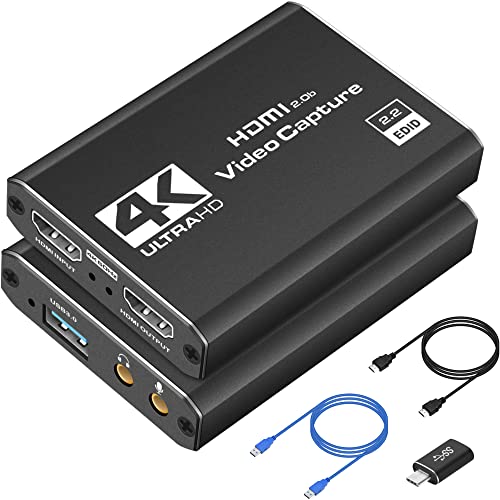
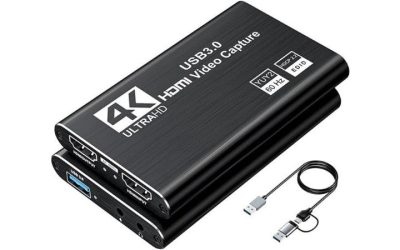
Capture Card 4K HDMI Video Streaming to USB 3.0 1080P 60FPS Capture Device | Audio Video Capture, 4K HDMI Loop-Out, Work for PS5/PS4/Switch/Xbox/PC/Camera/OBS, Game Screen Recorder Streaming Equipment
One of the consumer electronics options compared in this guide.
View on Amazon
Guermok Video Capture Card, 4K USB3.0 HDMI to USB C, 1080P 60FPS & 2K 30FPS | Capture Card for Streaming, Compatible with iPad Mac OS Windows, Quest 3, OBS, PS5/4, Switch2/1, Xbox, Camera (Silver)
One of the consumer electronics options compared in this guide.
View on Amazon
4K Capture Card Game Capture Card 1080P 60FPS for Streaming | Capturadora De Video For Game Recording Live Streaming Broadcasting Supports Microphone Input and 3.5MM Headphone Output
One of the consumer electronics options compared in this guide.
View on Amazon
Elgato Cam Link 4K Capture Card for DSLR, Camcorder, Action Cam | HDMI to USB 3.0, Stream in 1080p60 or 4K30/60, Ultra-low latency, Works with OBS, Zoom, Discord, PC/Mac/iPad compatible
One of the consumer electronics options compared in this guide.
View on Amazon
acer USB 3.0 HDMI Capture Card, 4K HDMI Loop-Out, 1080P 60Hz for Streaming | Low-Latency Audio Video Capture, USB Type-A & Type-C Ports, Compatible with Switch 2, PS5/PS4, Cameras, PC, OBS, Xbox
One of the consumer electronics options compared in this guide.
View on Amazon
Guermok USB 3.0 HDMI Capture Card, 1080P 60FPS & 2K30 Video Capture Device | 4K HDMI Pass-Through, Mic Input & Audio Output, USB Video Game Capture for OBS Streaming, PS5, Switch 2/1, Xbox1, Camera, PC
One of the consumer electronics options compared in this guide.
View on Amazon
Elgato 4K Pro Internal Capture Card, 8K60 Passthrough | 4K60 HDR10 capture, HDMI 2.1, Up to 1080p240 recording, VRR support, Ultra-low latency, Dual PC setup compatible
One of the consumer electronics options compared in this guide.
View on Amazon
Capture Card, 4K HDMI Capture Card for Streaming, Full HD 1080P 60FPS USB 3.0 Cam Link Game Audio Video Capture Card, Work with Camera/Switch/Xbox/PS4/PS5/PC/OBS (Black)
One of the consumer electronics options compared in this guide.
View on Amazon
Video Capture Card, 4K USB3.0 HDMI to USB C, 1080P60FPS HDMI Capture Card for Streaming, Gaming, Video Recording Compatible with Switch, Xbox, PS4/5, OBS,iPad Mac OS Windows,Camera, Zoom(Silver)
One of the consumer electronics options compared in this guide.
View on Amazon| Product | Best for | Key spec from the listing |
|---|---|---|
| Elgato 4K S | Console streamers wanting true 4K60 | 4K60 capture, 1440p120 passthrough, USB-C |
| 4K HDMI Loop-Out Capture Card (USB 3.0) | General budget multi-device use | 1080p60, 4K HDMI loop-out |
| Guermok 4K USB-C Capture Card | Mac, iPad, and Quest users | 1080p60 and 2K30, USB-C |
| Game Capture Card with Microphone Support | Simple recording with commentary | 1080p60, microphone support |
| Elgato Cam Link 4K | Cameras for calls and streams | HDMI to USB 3.0, up to 4K |
| acer USB 3.0 HDMI Capture Card | Laptops with Type-A or Type-C | 1080p60, 4K loop-out, low latency |
| Guermok USB 3.0 Capture Card | Streamers needing mic-in and audio-out | 1080p60, 2K30, 4K pass-through |
| Elgato 4K Pro Internal | Desktop PCs, high frame rate | 4K60 HDR10, 8K60 passthrough, HDMI 2.1 |
| Cam Link Style 4K HDMI Card | Cameras and older consoles | 1080p60, USB 3.0 |
| Video Capture Card, USB-C Edition | Switch, Xbox, PlayStation casual recording | 1080p60, USB-C |
How to Choose
Capture resolution versus pass-through resolution
Find two numbers on every listing: the highest resolution and frame rate the card records, and the highest it passes through to your display. A card that records 1080p60 but passes through 4K is fine for most streams, since platforms rarely carry 4K anyway. If you want to archive 4K60 footage, only a handful of listings qualify.
Interface and bandwidth
USB 3.0 gives enough bandwidth for 1080p60 and some 4K30 modes. A USB-C card is easier to use with modern laptops. An internal PCIe card, as in the Elgato 4K Pro, needs a free desktop slot but supports higher frame rates. Plug a USB card into a true USB 3.0 port, not a slower one.
Latency, HDR, and variable refresh
Near-zero latency matters if you play through the capture software; passthrough avoids the issue because the game goes straight to your screen. Check for HDR10 and VRR support if you own a recent console, and for 1440p120 or 1080p240 passthrough if you play competitive titles.
Compatibility and audio
Confirm support for your console: PS5, Xbox Series X/S, and Switch 2 each have quirks, including copy-protection behavior on some sources. Look for mic input or audio output if you want commentary mixed into a stream without extra gear. Skip cards that give no software or OS details.
The 10 Best Options
Elgato 4K S
The listing promises 4K60 capture, 1440p120 or 1080p240 passthrough, HDR10 support, near-zero latency, and a USB-C connection for PS5, Xbox Series X/S, and Switch 2. It is the choice for a console owner who wants real 4K60 recordings and high-frame-rate gaming on the same card. Because the passthrough rates are listed up to 1440p120 and 1080p240, it also keeps a fast monitor fed while the recording side runs in the background, which is the combination competitive console players look for.
- True 4K60 capture, rare at this tier.
- High-frame-rate passthrough keeps competitive play smooth.
- Trade-off: it sits in the premium tier of this roundup.
Skip it if you only stream at 1080p and rarely record.
4K HDMI Loop-Out USB 3.0 Capture Card
A generic budget card with 1080p60 capture and a 4K HDMI loop-out, working with PS5, PS4, Switch, Xbox, PCs, and cameras. It is an inexpensive way to get console gameplay onto a stream. The loop-out is the feature that matters most for a first purchase, because it keeps the game on your TV at full speed and leaves the capture side to the streaming computer.
- Loop-out lets you play on a TV with no capture lag.
- It works across consoles and cameras.
- Trade-off: recording is capped at 1080p60, despite the 4K label.
Skip it if you need 4K recordings.
Guermok 4K USB-C Capture Card
This card records 1080p60 and 2K30 over USB-C, and the listing names compatibility with iPad, Mac, Windows, and Quest 3. It targets people who work across several devices. A single card that can be moved from a Windows PC to a Mac or a headset session is useful for people who share gear with family members or switch between work and play machines.
- Apple and Quest compatibility is stated outright.
- The USB-C connection is easy for modern laptops.
- Trade-off: 2K recording tops out at 30 frames.
Skip it if smooth 2K60 matters to you.
Game Capture Card with Microphone Support
A basic 1080p60 card that supports a microphone, sold under a generic label. It targets casual creators who want to record gameplay with voice. It is the sort of purchase made by someone testing whether streaming is for them, where simple recording and a mic matter more than a long feature sheet.
- Microphone support enables simple commentary.
- 1080p60 covers standard streaming.
- Trade-off: the listing is thin on software and OS details.
Skip it if you want documented, well-supported tools.
Elgato Cam Link 4K
Designed for DSLR, camcorder, and action cameras, this HDMI to USB 3.0 device streams in 1080p60 or 4K at up to 60 frames in the listing, with ultra-low latency and OBS and Zoom support. It is aimed at video creators more than gamers. A teacher, a musician, or a small business owner can plug a camera in, open a meeting app, and get a cleaner picture than any built-in laptop webcam, so the card pays off outside gaming too.
- It is built for turning a camera into a webcam.
- Software support covers common streaming and meeting tools.
- Trade-off: no pass-through is described, so it is not ideal for console play.
Skip it if you need loop-out for a console.
acer USB 3.0 HDMI Capture Card
Acer offers a 1080p60 card with a 4K HDMI loop-out, low-latency audio and video, and both USB Type-A and Type-C ends. The two plugs help if you swap between laptops. It is a quiet, practical choice for office-and-gaming households that want one capture card to travel between a work machine and a personal one.
- Type-A and Type-C connectors cover older and newer machines.
- A familiar brand name eases support worries.
- Trade-off: recording remains at 1080p.
Skip it if you need 4K recording.
Guermok USB 3.0 HDMI Capture Card
A 1080p60 and 2K30 device with 4K HDMI pass-through, a mic input, and an audio output. The audio jacks make it handy for mixing your voice into a stream without an extra mixer. For first-time streamers, having those jacks on the card itself cuts the number of cables and boxes on the desk, which keeps the setup easier to troubleshoot.
- Mic input and audio output simplify commentary setups.
- 4K pass-through keeps the TV picture sharp.
- Trade-off: it uses the older USB Type-A style connection.
Skip it if you want USB-C only.
Elgato 4K Pro Internal
An internal card with 8K60 passthrough, 4K60 HDR10 capture, HDMI 2.1, recording up to 1080p240, VRR support, and ultra-low latency. This is the enthusiast’s option for a desktop PC. It makes the most sense paired with a modern graphics card and a console or second system that outputs HDR, where the extra bandwidth is actually used.
- HDMI 2.1 and VRR suit current consoles and high-end GPUs.
- Up to 1080p240 recording preserves competitive clips.
- Trade-off: it requires a desktop PC with a free slot and cannot move to a laptop.
Skip it if you stream from a laptop.
Cam Link Style 4K HDMI Capture Card
A generic USB 3.0 device that copies the Cam Link format: 1080p60 capture for cameras, Switch, Xbox, and PS4. It suits someone who wants a camera on a computer for the least outlay. Buyers should expect fewer polish touches in software and instructions than a name-brand product, so patience with setup is part of the deal.
- It is straightforward and works with several sources.
- USB 3.0 supports 1080p60.
- Trade-off: the brand is generic and support may be limited.
Skip it if software support is important.
Video Capture Card, USB-C Edition
Another generic 4K-labeled card that records 1080p60 over USB-C for Switch, Xbox, and PlayStation. It is for casual players who want to save a few clips. A casual player sharing a boss fight or a funny moment with friends rarely needs more than 1080p60, and this format covers that need without complication.
- USB-C works with recent laptops.
- It supports popular consoles.
- Trade-off: the title leans on a 4K label that only applies to the pass-through.
Skip it if you are building a long-term streaming setup.
Which One Fits Your Situation
You stream from a PS5 or Xbox and want sharp recordings
The Elgato 4K S is the most direct fit, with 4K60 capture and high-frame-rate passthrough.
You build a streaming PC and want the highest ceiling
The Elgato 4K Pro Internal gives HDMI 2.1, VRR, and 8K60 passthrough for a desktop.
You use a camera or camcorder
The Elgato Cam Link 4K is built for that job, and the Cam Link style generic card is the cheaper alternative.
You want something simple with a TV loop-out
The acer USB 3.0 HDMI Capture Card or the 4K HDMI Loop-Out card keep the TV picture lag-free.
Common Mistakes
- Assuming “4K” means the card records in 4K.
- Using a slow USB port that cuts the card to a lower mode.
- Forgetting that some sources block capture of protected content.
- Playing through the capture software on a console instead of using the loop-out.
- Buying an internal card for a laptop or compact PC.
Related guides
- Aio Liquid Coolers For High Performance Gaming
- How To Overclock A Gpu Safely With Msi Afterburner
- Which Motherboards Support Rtx 4090 And Rtx 5090
Frequently Asked Questions
Do I need 4K capture for streaming?
Not usually. Most platforms stream at 1080p, so 1080p60 capture with 4K pass-through is enough for most creators.
What is HDMI pass-through?
It sends your console picture to a TV or monitor at full quality while the card copies a version for recording. This avoids input lag on your screen.
Can I use these with a laptop?
USB models can. Pick a card with the right connector for your laptop and use a fast USB port.
Will the card capture HDR?
Only models that list HDR10 support. Other cards may display washed-out colors when HDR is on.
FAQ
Do I need 4K capture for streaming?
What is HDMI pass-through?
Can I use these with a laptop?
Will the card capture HDR?
More from Amazon
Programs that pair well with the guide above. Offers and eligibility are set by Amazon and may change.
Free shipping on eligible items, Prime Video and more. Eligible new members can start with a free trial.
Start a Prime free trialAd-free music streaming. Eligible new subscribers can start with a free trial.
Try Music Unlimited freeA Prime membership for ages 18-24 with a trial period. Eligibility is set by Amazon.
See Prime for Young AdultsAudiobooks and podcasts to listen to on the go. Eligible new members can start with a free trial.
Try Audible freeAs an Amazon Associate we earn from qualifying purchases.