Our Top Picks
A 4K webcam sounds like an easy upgrade until you notice how few video calls and streams actually carry a 4K picture. Meeting apps usually compress to 720p or 1080p, and many 4K webcams only reach 30 frames per second at their top resolution. So the decision behind a best 4K webcam under 400 dollars is less about the number on the box and more about the autofocus, the sensor, the field of view, and the microphones that come bundled with it. The extra pixels earn their keep when you crop, zoom digitally, or record content for later.
This list is for remote workers who want to look sharper on calls, streamers who need a clean face cam, and creators who record tutorials at a desk. Ten webcams are compared from their listed specs, and the field is wide: some name a specific Sony sensor, some boast 60 frames per second at 1080p, and some are barebones plug-and-play devices. As 2026 brings more apps that handle higher quality, the right pick depends on how you actually use the camera.
Quick Picks

EMEET NOVA 4K Webcam for PC, Ultra 4K HD, PDAF Autofocus, Dual Omni Mics | 73° FOV, Auto Light Correction, USB-A, Privacy Cover, Ideal for High-End Business Meetings&Live Streaming
One of the consumer electronics options compared in this guide.
View on Amazon
AOC 4K Webcam for PC, Streaming Computer Camera with Noise-Canceling Mic | 80° FOV, Privacy Cover, Plug & Play, Zoom/Skype/FaceTime Compatible, Works with Mac/Laptop/Switch 2, USB C-A Adapter Included
One of the consumer electronics options compared in this guide.
View on Amazon
Acer A640 4K Webcam with AI Noise Canceling Mic for Streaming Meetings | Sony 1/2.8" Sensor, PDAF Autofocus, 2K 1080P/60fps, A to C Adapter, Computer Camera for switch 2 Camera Teams Zoom Facetime
One of the consumer electronics options compared in this guide.
View on Amazon
Logitech Brio 4K Webcam, Ultra HD Web Camera with Autofocus 5x Digital Zoom | Ultra 4K HD Webcam for PC with dual Noise-cancelling mic, HD light correction, wide field of view, Windows, Mac, or ChromeOS
One of the consumer electronics options compared in this guide.
View on Amazon
Logitech MX Brio Ultra HD 4K Webcam for Streaming and Collaboration | Computer camera, 1080p 60 FPS, Show Mode, Works with Microsoft Teams, Zoom, Google Meet, Nintendo Switch 2, Graphite
One of the consumer electronics options compared in this guide.
View on Amazon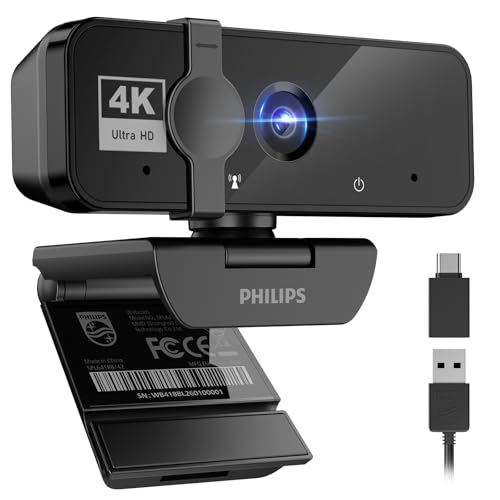
Philips 4K Webcam for PC with Microphone, Computer Camera for Meetings | Plug & Play USB Web cam with Privacy Cover, for Laptop, Desktop, Zoom, Teams, Skype, Video Conferencing, Streaming, Black
One of the consumer electronics options compared in this guide.
View on Amazon
VAKUNICE 4K Webcam for PC with Dual Microphones,UHD 30fps Web Camera,Autofocus USB Webcam with Privacy Cover,Tripod, Plug & Play Camera for Zoom, Teams, Skype, Streaming, Laptop & Desktop
One of the consumer electronics options compared in this guide.
View on Amazon
EMEET C960 4K Webcam for PC, PDAF Auto Focus, Dual Omni Mics, 73° FOV | Auto Light Correction, USB-A, Plug&Play, Web cam 4K with Privacy Cover, Webcam 4K Works for Zoom/Teams/Google Meet, Laptop/PC
One of the consumer electronics options compared in this guide.
View on Amazon
4K Webcam for PC,Auto Focus Streaming Web Cam USB,Dual Noise Reduction Mics | Privacy Cover,Wide-Angle Lens,Auto Light Correction, Plug & Play USB Webcam for PC,Laptop,Desktop,Mac,Zoom,Skype,Streaming
One of the consumer electronics options compared in this guide.
View on Amazon
EMEET S600 4K Webcam for Streaming, Sony 1/2.55'' Sensor, PDAF Autofocus | 1080P@60FPS, 2 Noise Reduction Mics, Built-in Privacy Cover, 73° FOV, Streaming Camera for Live Commerce/Gaming/Beauty
One of the consumer electronics options compared in this guide.
View on Amazon| Product | Best for | Key spec from the listing |
|---|---|---|
| EMEET NOVA 4K | Business calls with auto light fix | PDAF autofocus, 73 degree FOV, dual mics |
| AOC 4K Webcam | Wider framing for two people | 80 degree FOV, noise-canceling mic |
| Acer A640 | Sensor-minded streamers | Sony 1/2.8 inch sensor, 1080p at 60fps |
| Logitech Brio 4K | Established, versatile choice | 5x digital zoom, autofocus, dual mics |
| Logitech MX Brio | Collaboration and streaming | 4K, 1080p at 60fps, Show Mode |
| Philips 4K Webcam | Simple plug-and-play | Microphone, privacy cover, USB |
| VAKUNICE 4K | Desk or tripod flexibility | UHD 30fps, autofocus, tripod |
| EMEET C960 4K | Compact everyday calls | PDAF, 73 degree FOV, USB-A |
| Generic 4K Webcam | Wide-angle on a tight plan | Wide lens, dual noise-reduction mics |
| EMEET S600 4K | Stream-ready face cam | Sony 1/2.55 inch sensor, 1080p at 60fps |
How to Choose
Frame rate at the resolution you will use
Many 4K webcams run at 30fps in 4K and 60fps only at 1080p. For talking-head calls, 30fps is fine. For game streams with fast hand movement, look for 1080p at 60fps. Verify which mode the camera uses by default, since some apps fall back to 720p.
Autofocus and sensor
PDAF (phase-detection) autofocus tends to lock faster than contrast-only focus, which matters if you move or hold objects up. A named sensor, such as Sony 1/2.8 inch or 1/2.55 inch, is a good sign for low-light performance compared with unnamed chips.
Field of view and framing
A 73 degree view frames one person closely; 80 degrees or wider suits two people or a wider desk. Digital zoom, such as 5x, lets you reframe but reduces sharpness. Look for adjustable angles so you can crop out a messy room.
Microphones, privacy, and what to ignore
Dual mics are handy for emergencies, yet a separate microphone beats them for streaming. A physical privacy cover is a real feature. Ignore “AI” labels unless the listing says what they do. Cheaper models often skip software controls, so check for driver or app support.
The 10 Best Options
EMEET NOVA 4K
The NOVA lists Ultra 4K HD, PDAF autofocus, dual omnidirectional microphones, a 73 degree field of view, auto light correction, USB-A, and a privacy cover. It is pitched at professionals who want a polished image without a lot of tuning. Think of someone who joins client calls from a spare bedroom with a window behind the desk: the light-correction feature is meant to keep their face readable as clouds pass, and the privacy cover is a quiet reassurance between meetings.
- PDAF autofocus keeps your face sharp when you lean in and out.
- Auto light correction helps in rooms with inconsistent lighting.
- Trade-off: the 73 degree view is tight for shared frames.
Skip it if you often share the shot with a colleague or a whiteboard.
AOC 4K Webcam
This model lists a noise-canceling microphone, an 80 degree field of view, a privacy cover, and plug-and-play use with Zoom, Skype, and FaceTime. It suits a household that moves between meeting apps and wants a wider shot. A teacher recording a lesson with a classmate beside them, or a couple joining a family call from the sofa, gains more from the extra width than from any other spec on the sheet.
- An 80 degree view fits two people more naturally.
- It works across common apps without drivers.
- Trade-off: the listing shares little on sensor or autofocus type.
Skip it if you want documented focus technology.
Acer A640 4K
The Acer A640 names a Sony 1/2.8 inch sensor, PDAF autofocus, AI noise-canceling microphone, and 1080p at 60fps, plus an adapter for USB-C ports. A named sensor and fast autofocus make it attractive to streamers. The adapter detail matters for anyone on a modern laptop with only Type-C ports, and the AI noise filter is aimed at keyboard clatter and fan hum during longer sessions.
- 1080p at 60fps gives smoother motion for streams.
- The included A to C adapter widens compatibility.
- Trade-off: the 60fps figure is stated for 1080p, so full 4K may run at a lower frame rate.
Skip it if you only need basic call quality.
Logitech Brio 4K
A long-standing option that lists Ultra HD, autofocus, 5x digital zoom, dual noise-cancelling microphones, and light correction. It is for buyers who prefer a recognized brand and broad software support. Zoom-in framing is useful when you want to crop closer for a presentation, and the light-correction note suggests it is meant to stay usable in less-than-ideal rooms.
- 5x digital zoom allows easy reframing.
- Strong name recognition simplifies support and driver questions.
- Trade-off: the listing does not name a sensor, so low-light expectations are harder to set.
Skip it if the newest hardware is your priority or if you want a named sensor.
Logitech MX Brio
This Ultra HD 4K model targets streaming and collaboration, with 1080p at 60fps, Show Mode, and compatibility with Teams, Zoom, and Google meeting tools. Show Mode is the standout, designed for presenting objects on your desk. For teachers, designers, and sellers who hold up items or sketches, that single feature can be worth more than any resolution upgrade, because the camera frames the desk without moving the whole rig.
- Show Mode helps with product demos and sketches.
- 1080p at 60fps suits streaming.
- Trade-off: it is a premium-tier model, which is more camera than a casual caller needs.
Skip it if you never present physical objects.
Philips 4K Webcam
A basic 4K webcam with a microphone, privacy cover, and plug-and-play USB use with laptops and desktops. It is for people who want something that works and little else. It fits an office where several people share a single desk setup and nobody wants to open an app before every call.
- A privacy cover and mic are included.
- Works with Zoom and Teams.
- Trade-off: the listing offers few details on sensor or frame rate.
Skip it if you are picky about image tuning.
VAKUNICE 4K
Features dual microphones, UHD at 30fps, autofocus, a privacy cover, and a tripod. The tripod helps if the camera sits on a shelf or beside a screen. Moving the camera off the top of a monitor to a tripod can also give a more flattering angle, which many buyers underestimate.
- The tripod adds placement options.
- Dual mics are included.
- Trade-off: 30fps limits motion smoothness.
Skip it if you stream fast-moving content or want the sharpest autofocus.
EMEET C960 4K
A compact entry in the EMEET line: PDAF autofocus, dual omnidirectional mics, a 73 degree view, auto light correction, USB-A, and a privacy cover. It mirrors the NOVA spec list in several points. Choose it when the main goal is to replace a blurry built-in laptop camera with something noticeably better, and a wide-angle shot is not necessary.
- PDAF and auto light correction are listed.
- Plug-and-play setup is simple.
- Trade-off: the same tight 73 degree view.
Skip it if you want a wider shot.
Generic 4K Webcam with Dual Mics
An unbranded 4K webcam listing autofocus, dual noise-reduction microphones, a privacy cover, a wide-angle lens, and auto light correction. It is for buyers on the tightest plan. It is a gamble on paper-spec honesty, so treat it as a trial purchase and test focus, color, and microphone quality as soon as it arrives.
- Wide-angle lens helps with group framing.
- Feature list matches pricier models on paper.
- Trade-off: an unnamed brand brings uncertainty on support and software.
Skip it if you want dependable firmware updates.
EMEET S600 4K
Stream-ready on paper: a Sony 1/2.55 inch sensor, PDAF, 1080p at 60fps, two noise-reduction microphones, a built-in privacy cover, and a 73 degree view. It is the EMEET aimed at content creators. Pairing the sensor with 1080p at 60fps means hand gestures and quick head movements look smoother, which matters for a face cam in a game stream.
- A named Sony sensor suggests better low-light handling.
- 60fps at 1080p suits streams.
- Trade-off: the field of view is on the narrow side.
Skip it if you want a wide group shot.
Which One Fits Your Situation
You stream or record with fast motion
Choose the EMEET S600 or Acer A640 for 1080p at 60fps and a named Sony sensor.
You work from home and join many meetings
The EMEET NOVA or Logitech Brio gives dependable focus and light handling.
You present objects or sketches
The Logitech MX Brio, with Show Mode, fits that.
You need the simplest setup
The Philips 4K Webcam or AOC 4K Webcam is plug-and-play and does the job.
Common Mistakes
- Assuming 4K means 4K in every app; most meeting tools reduce it.
- Ignoring frame rate and finding 30fps jerky on a stream.
- Skipping lighting; a window or lamp helps more than extra pixels.
- Relying on the built-in microphone for a stream.
- Forgetting the USB type; a USB-A camera needs an adapter on some laptops.
Related guides
- Aio Liquid Coolers For High Performance Gaming
- How To Overclock A Gpu Safely With Msi Afterburner
- Which Motherboards Support Rtx 4090 And Rtx 5090
Frequently Asked Questions
Is a 4K webcam worth it for video calls?
Mostly for the optics and autofocus, plus the freedom to crop in without the picture falling apart. The apps often compress, but a good sensor still gives a cleaner picture.
Why does my webcam look dark?
Low light is the usual cause. Add a lamp facing you, and enable auto light correction if available. Light from behind, such as a bright window, makes any camera expose for the background and turn your face dark.
Do I need a USB 3.0 port?
For 4K, a fast USB port is recommended. Check the listing for exact requirements, and plug into a port on the computer itself instead of an unpowered hub.
Should I cover the camera when not in use?
A physical privacy cover is a simple way to prevent unwanted access, and unlike software settings it cannot be bypassed remotely. It is a feature worth having, especially on a shared family computer.
FAQ
Is a 4K webcam worth it for video calls?
Why does my webcam look dark?
Do I need a USB 3.0 port?
Should I cover the camera when not in use?
More from Amazon
Programs that pair well with the guide above. Offers and eligibility are set by Amazon and may change.
Free shipping on eligible items, Prime Video and more. Eligible new members can start with a free trial.
Start a Prime free trialAd-free music streaming. Eligible new subscribers can start with a free trial.
Try Music Unlimited freeA Prime membership for ages 18-24 with a trial period. Eligibility is set by Amazon.
See Prime for Young AdultsAudiobooks and podcasts to listen to on the go. Eligible new members can start with a free trial.
Try Audible freeAs an Amazon Associate we earn from qualifying purchases.