Key takeaways
- Use the USB-C or Thunderbolt port on the monitor that is labeled for upstream and power delivery.
- In macOS Displays settings, choose a scaled resolution such as “Looks like 2560×1440” for a 27-inch 4K screen.
- Set the monitor to 60 Hz; the MacBook Air does not benefit from higher refresh rates on most displays.
- Use a certified USB-C cable rated for video and the power level you need.
The best external monitor for a MacBook Air is a 27-inch 4K USB-C or Thunderbolt monitor with at least 65W power delivery, and the Dell UltraSharp U2725QE is the strongest all-round pick because one cable carries video, charging and a USB hub. The BenQ MA270UP is the Mac-tuned alternative, the Dell S2722QC covers tight budgets, and the Apple Studio Display is the premium choice if you want 5K and the most seamless macOS behavior. For travel, a 15.6-inch USB-C portable such as the ASUS ZenScreen MB16ACE is easier to carry than any desktop panel.
Quick comparison
| Pick | Best for | Size and resolution | Power to laptop | Connection |
|---|---|---|---|---|
| Dell UltraSharp U2725QE | Best overall | 27 in, 3840×2160 IPS Black | Up to 90W | Thunderbolt 4 hub, USB-C, DisplayPort, HDMI |
| BenQ MA270UP | Best for macOS color and text | 27 in, 3840×2160 | Up to 90W | USB-C, HDMI, DisplayPort |
| Dell S2722QC | Best budget | 27 in, 3840×2160 | 65W | USB-C, HDMI |
| Samsung ViewFinity S9 | Best 5K alternative | 27 in, 5120×2880 | Check model spec | Thunderbolt 4 and others |
| Apple Studio Display | Best premium | 27 in, 5120×2880 | Up to 96W | Thunderbolt 3 upstream, 3 USB-C downstream |
| ASUS ZenScreen MB16ACE | Best portable | 15.6 in, 1920×1080 | Bus powered by laptop | USB-C |
Specifications are taken from each manufacturer’s published listing; confirm the exact model code before buying because some brands sell several near-identical variants.
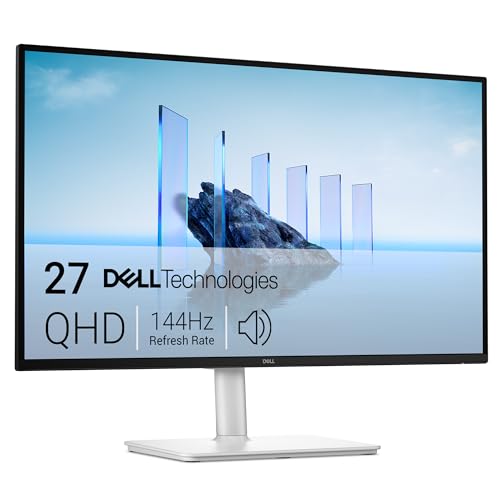
Dell 27 Plus QHD USB-C Monitor - S2725DC - 27-inch QHD (2560x1440) 144Hz 1ms Display, 2 x 3W Speakers, USB-C/HDMI/DisplayPort 1.4 Connectivity, Height/Tilt/Pivot/Swivel, AMD FreeSync - Ash White
Chosen because it specifies S2725DC and 27-inch QHD (2560x1440) 144Hz 1ms Display.
View on AmazonBest overall: Dell UltraSharp U2725QE
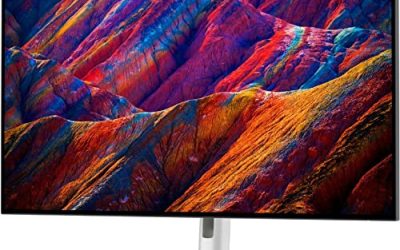
This 27-inch 4K panel uses IPS Black technology for deeper blacks than typical IPS, and its Thunderbolt 4 hub lets a single cable to the MacBook Air handle display, charging and peripherals. It is an easy desk setup for anyone with a keyboard, mouse and Ethernet to plug in. The trade-off is that 4K at 27 inches means macOS uses a scaled resolution, so text is sharp but not as pixel-dense as 5K.
Best for Mac color: BenQ MA270UP
BenQ designed the MA series for Mac users, with a P3-capable color gamut and Mac-friendly brightness and color tuning. It also offers 90W charging over USB-C, which keeps even a larger laptop topped up. It suits designers, photographers and anyone who edits images on a MacBook Air. It is less featured than the Dell as a dock because it does not use Thunderbolt.
Best budget: Dell S2722QC
The S2722QC is a 27-inch 4K IPS monitor with 65W USB-C power delivery, which is enough for a MacBook Air since its charger is 30W to 70W depending on model. It has built-in speakers and fewer ports than the UltraSharp, and its colors and stand adjustability are more basic, but it is a clean one-cable solution.
Best 5K option: Samsung ViewFinity S9 and Apple Studio Display
5K at 27 inches gives roughly 218 pixels per inch, which lets macOS use true 2x Retina scaling and produces the sharpest text. The Apple Studio Display integrates with macOS, includes a 12MP camera, a speaker system and up to 96W charging. The Samsung ViewFinity S9 is the alternative for people who want 5K without paying Apple’s price. The trade-off with either is cost compared with 4K models.
Best portable: ASUS ZenScreen MB16ACE
A 15.6-inch 1080p screen powered over a single USB-C cable is the simplest travel second screen. It adds working space for a MacBook Air in a hotel room or cafe. It is not a pixel-sharp display and it draws power from the laptop battery, so expect some reduction in battery life.
Worked example: does your MacBook Air support the display?
A 4K display at 60 Hz with 8-bit color needs about 3840 x 2160 x 60 x 24 bits, roughly 11.9 Gbps of raw video data, before blanking overhead. A USB-C port carrying DisplayPort 1.4 or Thunderbolt handles this comfortably. A 5K panel at 60 Hz needs roughly 21 Gbps, which is why 5K monitors rely on Thunderbolt or DisplayPort 1.4 with compression. Per Apple’s published specifications, the M1 MacBook Air supports one external display, M2 and M3 models can drive a second display only with the lid closed, and M4 models support two external displays with the lid open. Confirm your exact model on Apple’s tech specs page.
Decision matrix
| Situation | Choose |
|---|---|
| Desk dock with keyboard, mouse and Ethernet | Dell U2725QE |
| Photo and design work | BenQ MA270UP |
| Tight budget, one cable | Dell S2722QC |
| Sharpest text, no scaling | 5K Studio Display or ViewFinity S9 |
| Travel | ASUS ZenScreen MB16ACE |
Settings that make a difference
- Use the USB-C or Thunderbolt port on the monitor that is labeled for upstream and power delivery.
- In macOS Displays settings, choose a scaled resolution such as “Looks like 2560×1440” for a 27-inch 4K screen.
- Set the monitor to 60 Hz; the MacBook Air does not benefit from higher refresh rates on most displays.
- Use a certified USB-C cable rated for video and the power level you need.
Frequently Asked Questions
Can a MacBook Air run a 4K monitor?
Yes. Every current MacBook Air with an Apple silicon chip can drive a 4K monitor at 60 Hz over USB-C or Thunderbolt.
Do I need Thunderbolt?
No. USB-C with DisplayPort Alt Mode is enough for video and charging. Thunderbolt adds more bandwidth for hub features and daisy-chaining.
What size monitor is best for a MacBook Air?
A 27-inch 4K monitor is the most balanced choice. It gives plenty of workspace and works well with macOS scaling.
Is a 5K monitor worth it?
If you read and write text all day or edit photos, 5K is noticeably sharper. For general use, a good 4K monitor is more than adequate.
Can I use a gaming monitor with a MacBook Air?
Yes, but the Air cannot make use of 144 Hz or higher in games the same way a desktop GPU can, so a 60 Hz productivity monitor is usually a better fit.
FAQ
Worked example: does your MacBook Air support the display?
Can a MacBook Air run a 4K monitor?
Do I need Thunderbolt?
What size monitor is best for a MacBook Air?
Is a 5K monitor worth it?
Can I use a gaming monitor with a MacBook Air?
More from Amazon
Programs that pair well with the guide above. Offers and eligibility are set by Amazon and may change.
Free shipping on eligible items, Prime Video and more. Eligible new members can start with a free trial.
Start a Prime free trialAd-free music streaming. Eligible new subscribers can start with a free trial.
Try Music Unlimited freeA Prime membership for ages 18-24 with a trial period. Eligibility is set by Amazon.
See Prime for Young AdultsAudiobooks and podcasts to listen to on the go. Eligible new members can start with a free trial.
Try Audible freeAs an Amazon Associate we earn from qualifying purchases.