Key takeaways
- Monitor size and curvature: Confirm the strip or bar supports your exact panel width. Curved monitors need flexible or segmented designs like the Govee G1 or Quntis curved bar; flat panels work with most rigid bars.
- Smart-home ecosystem: If you already run Alexa, HomeKit, or Google Assistant, the Philips Hue Gradient Lightstrip slots in seamlessly via the Hue Hub. Standalone options like Govee and Quntis use their own apps and remotes instead.
- Color accuracy and eye comfort: Look for a high CRI rating (Ra95 or above) if you also edit photos or video at the same desk. BenQ and Quntis lead here with dedicated no-glare front lighting.
- Sync and scene depth: Screen-matching (Govee’s color camera, Hue Sync) creates immersion, while music-sync and preset scene modes (up to 123 on the G1) add variety without manual tweaking.
- Budget and hub requirements: Hue products require a Bridge and, for TV sync, a Sync Box. Govee and Quntis are plug-and-play, keeping total cost well under the Hue ecosystem price.
For most gamers and desk setups, the Philips Hue Gradient PC LED Lightstrip (24–27″) is the best overall Hue Play competitor for monitor backlighting, while the Govee Gaming Light G1 is the strongest runner-up if you want rich RGBIC effects without a hub. Both deliver immersive, screen-synced ambient lighting, but they serve different budgets and ecosystems.
Choosing a monitor backlight used to mean settling for a single-color LED strip taped behind your display. Today, the market offers smart, screen-matching, music-reactive alternatives that rival the original Hue Play system at various price points. This guide breaks down the five strongest contenders, explains what actually matters when shopping for monitor backlighting, and answers the questions buyers ask most before hitting “Add to Cart.”
Our top picks



As an Amazon Associate we earn from qualifying purchases at no extra cost to you. Ratings are shown as listed on Amazon.
🛒 Best Price Today on Amazon
Prime members get fast, free shipping on everything above, plus member-only deals. New members get a 30-day free trial — cancel anytime.
Quick Comparison
| Product | Best For | Standout Feature | Rating |
|---|---|---|---|
| Philips Hue Gradient PC LED Lightstrip (24–27″) | Full smart-home integration | Multi-zone gradient synced via Hue Sync app | 4.7 / 5 |
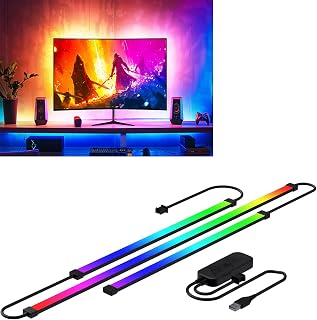
| Govee Gaming Light G1 (27–34″) | Budget RGBIC on a curve-friendly design | Double-strip beads with 123 scene modes | 4.5 / 5 |
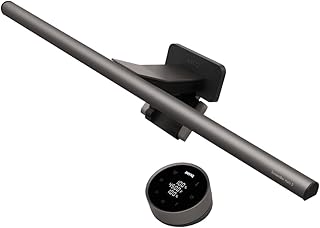
| BenQ ScreenBar Halo 2 | Premium eye-care and wireless control | Motion sensor, backlight, and no-glare front light in one | 4.8 / 5 |
| Quntis 17.7″ Curved Monitor Light Bar RGB | Curved and ultrawide monitors | Ra95 CRI with 23 RGB effects and music sync | 4.4 / 5 |
| Quntis RGB Monitor Light Bar with Remote | Flat and ultrawide displays on a budget | 15 modes, 4-color front light, and brightness dimming | 4.3 / 5 |
How to Choose a Hue Play Competitors for Monitor Backlighting
- Monitor size and curvature: Confirm the strip or bar supports your exact panel width. Curved monitors need flexible or segmented designs like the Govee G1 or Quntis curved bar; flat panels work with most rigid bars.
- Smart-home ecosystem: If you already run Alexa, HomeKit, or Google Assistant, the Philips Hue Gradient Lightstrip slots in seamlessly via the Hue Hub. Standalone options like Govee and Quntis use their own apps and remotes instead.
- Color accuracy and eye comfort: Look for a high CRI rating (Ra95 or above) if you also edit photos or video at the same desk. BenQ and Quntis lead here with dedicated no-glare front lighting.
- Sync and scene depth: Screen-matching (Govee’s color camera, Hue Sync) creates immersion, while music-sync and preset scene modes (up to 123 on the G1) add variety without manual tweaking.
- Budget and hub requirements: Hue products require a Bridge and, for TV sync, a Sync Box. Govee and Quntis are plug-and-play, keeping total cost well under the Hue ecosystem price.
The Best Hue Play Competitors for Monitor Backlightings Reviewed
Best Overall: Philips Hue Gradient PC LED Lightstrip (24–27″)
Designed for gamers already invested in the Hue ecosystem, this lightstrip projects a smooth, multi-zone gradient behind 24- to 27-inch monitors and syncs to on-screen action via the Hue Sync desktop app. It is the closest true Hue Play successor for PC setups that demand voice control across Alexa, HomeKit, and Google Assistant.
Best Budget: Govee Gaming Light G1 (27–34″)
The G1 packs RGBIC double-strip beads, 123 scene modes, and a color-matching camera into a package that undercuts Hue pricing by a wide margin. It is ideal for gamers who want vivid, adaptive backlighting on 27- to 34-inch panels—including curved displays—without buying a separate hub.
Best Premium: BenQ ScreenBar Halo 2
If eye strain during long sessions matters as much as RGB flair, the ScreenBar Halo 2 combines a wireless controller, adjustable color temperature, motion-sensing auto-dimming, and a dedicated backlight in one sleek unit. It suits professionals and hybrid work-and-play setups where no screen glare is non-negotiable.
Best for Curved and Ultrawide Monitors: Quntis 17.7″ Curved Monitor Light Bar RGB
Built to hug 17- to 34-inch curved and flat panels, this Quntis bar delivers Ra95 eye-care illumination up front and 23 RGB effects with music sync out back. Curved-monitor owners who also need webcam clearance will appreciate the compatible mounting design.
Best for Flat and Ultrawide Setups: Quntis RGB Monitor Light Bar with Remote
Targeting 20-inch-and-up flat or ultrawide displays, this bar offers 15 gaming backlight modes, a four-color no-glare front light, and full brightness dimming via included remote. It is a strong pick for home-office users who want subtle ambient lighting without smart-app complexity.
Frequently Asked Questions
Do I need a Hue Bridge for the Philips Hue Gradient PC Lightstrip?
Yes. The lightstrip requires a Hue Bridge for setup, app control, and voice-assistant integration. Without the Bridge, the strip will not pair or respond to Hue Sync.
Can the Govee Gaming Light G1 work on a 32-inch curved monitor?
It can. The G1 is rated for 27- to 34-inch monitors and its flexible double-strip design adapts to curved panels within that range.
Does the BenQ ScreenBar Halo 2 provide RGB ambient lighting like a Hue Play?
The Halo 2 focuses on adjustable white backlight and front task lighting rather than full RGB color effects. If multi-color ambience is essential, pair it with a dedicated RGB strip or choose the Hue Gradient Lightstrip instead.
Are Quntis monitor light bars compatible with ultrawide 34-inch displays?
Both Quntis models listed here support monitors up to 34 inches. The curved variant flexes to match panel curvature, while the flat-bar version uses adjustable clamps sized for ultrawide widths.
Final Thoughts
For seamless smart-home control and true gradient backlighting, the Philips Hue Gradient PC LED Lightstrip remains the benchmark. Gamers chasing maximum color impact on a tighter budget should grab the Govee Gaming Light G1, and anyone prioritizing eye comfort during marathon work sessions will find the BenQ ScreenBar Halo 2 hard to beat. Pick the option that matches your monitor size, ecosystem, and lighting priorities, and your setup will look—and feel—several tiers above stock.