Key takeaways
- Compare routers side by side the right way: maker spec pages, retailer tables, and comparison tools, plus checks that separate a good fit from a mismatch.
Choosing a router usually comes down to comparing two or three models that look almost identical on the shelf. The boxes promise similar speeds, similar coverage, and similar features, yet the router that works well in a small flat can struggle in a larger house with thick walls and dozens of connected devices. The real decision is not which model has the biggest number on the front, but which set of trade-offs fits the home it will serve.
This guide is for anyone who needs to replace a router or buy a first one: renters, homeowners, people who game online, and households where phones, laptops, televisions, and smart devices all share one connection. It walks through the places where routers can be compared side by side — maker spec pages, retailer comparison tables, independent comparison tools, and community discussions — and shows which details to line up so the comparison actually answers the question.
As an Amazon Associate we earn from qualifying purchases.
How to Choose
Start With Your Home, Not the Spec Sheet
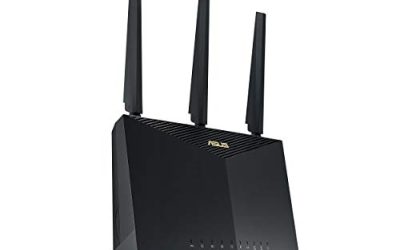
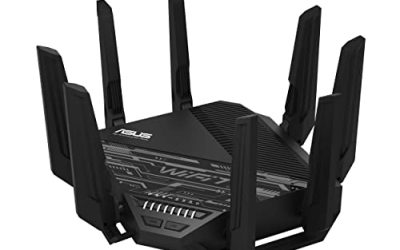
A router comparison only makes sense once you know what the router has to do. Start by listing the facts of your home: how many rooms the signal must reach, whether walls are brick, concrete, or plasterboard, how many devices connect at once, and whether anyone games online, streams video in high definition, or works from home over video calls. A household with two people and a dozen devices has very different needs from a household with four people, two game consoles, and a home office. Next, look at how you connect today. If your current router sits in a corner behind a television, its coverage problems may come from placement rather than age. If several devices share one crowded band, the fix may be a router that handles more simultaneous connections rather than a faster headline speed. Count the wired devices too: a desktop computer, a console, and a network storage box each need an Ethernet port, and many compact routers provide only two or three. When you finally open two spec pages side by side, you will know which lines matter and which can be ignored. A router with eight antennas is no help if it lacks the ports your desk needs, and a model built for a large house is wasted in a one-bedroom flat. Comparisons that start from the home end with a short list that actually fits; comparisons that start from the spec sheet often end with a router that looks strong on paper and disappoints in the hallway.
Line Up the Specs That Decide Real Performance
Once you know what your home needs, the next step is to compare the same details across models, and that means reading spec sheets the way makers write them. The Wi-Fi generation comes first: Wi-Fi 5, Wi-Fi 6, Wi-Fi 6E, and Wi-Fi 7 differ in how they handle crowded airwaves, and a newer generation usually matters more than a bigger headline speed figure. Check the bands each model offers — 2.4 GHz reaches further through walls, 5 GHz moves data faster over shorter distances, and 6 GHz adds a clean band on the newest models — and note how many streams each band carries, since streams decide how many devices a router can serve at once. Ports deserve the same attention: count the Ethernet ports, check whether any support multi-gigabit speeds, and confirm that the WAN port matches the connection your provider supplies. Processor and memory figures are worth a glance because they affect how a router handles many simultaneous connections, but do not compare them across brands, since makers measure and label them differently. The most important habit is comparing like with like. Headline speed figures are theoretical maximums measured in ideal conditions, so a model that advertises a larger number is not automatically faster in your living room. Line up generation, bands, streams, and ports in the same order for each model, and the real differences appear quickly.
Use Comparison Tables and Tools Carefully
Most shoppers compare routers in three places: retailer comparison tables, maker comparison pages, and independent comparison tools, and each has strengths worth using. Retailer sites let you tick two or three models and view their key details in one table, which is useful for a first pass, but their tables sometimes leave fields blank or copy details from a different variant of the same model. Maker comparison pages are usually the most accurate source for specs, since they come from the company that built the router, yet they only compare models from that one maker, so they cannot show you what a rival offers. Independent comparison tools and spec databases fill that gap by lining up models from many makers at once, and many let you filter by band, port count, or generation. Whichever place you use, confirm the exact model before trusting a row of the table. Routers often share a family name while differing by a suffix letter, and a table that mixes two variants will mislead you on ports, bands, or even Wi-Fi generation. Cross-check the result against the maker’s own spec page, use at least two sources before narrowing your short list, and keep a simple note of which model you compared, so you do not later confuse two similar names. A comparison is only as good as the model numbers behind it.
Check Support, Firmware, and Setup Before You Decide
Specs decide how a router performs on the first day; support, firmware, and setup decide how it performs in its second year. Before settling on a model, open the maker’s support page for that exact model and look at what is actually available: how to reach help, what the warranty covers, and how often firmware updates have been released. A router that receives regular firmware updates stays safer and keeps working well with new devices, while a model whose updates stopped long ago ages quickly, even if its hardware still looks strong. Setup matters too. Check whether the router is configured through a phone app or a web page, whether the app asks for an account, and whether advanced settings such as traffic prioritization or parental controls are easy to reach. If you may extend coverage later, confirm that the model can join a mesh system from the same maker, and check which add-on units it pairs with. Finally, look at the return terms of the place where you plan to buy, so a router that does not fit your home can go back without a struggle. None of these details appear in a headline speed figure, which is why they are easy to skip and expensive to discover later. A short check of support pages before buying saves far more trouble than any comparison table can.
Which One Fits Your Situation
Replacing the Router From Your Internet Provider
If your current router came from your internet provider, start by checking whether the replacement must include a modem or only a router. Many provider units combine both jobs, so a standalone router alone will not connect. Look for a model that matches the connection type your provider supplies, confirm bridge mode is supported if you keep the provider box for the line, and return the provider unit once the new setup works. Compare models by port count and band support rather than headline speed, since provider routers usually fail on coverage and device handling first.
A Small Apartment With a Few Devices
In a small apartment, a single unit usually covers every room, so the comparison should focus on the basics rather than on range claims. A dual-band model with enough ports for your wired devices is often enough, and a compact design that sits on a shelf beats a large model with antennas that dominate the room. Place the router near the center of the flat, away from thick walls and metal shelving, and compare models on how they handle a dozen or so simultaneous connections. Skip mesh systems unless the layout has a genuine dead zone, because extra hardware adds complexity without improving a space one unit already covers.
A Larger Home With Rooms the Signal Misses
For a larger home, compare routers by how they extend coverage rather than by how far a single unit claims to reach. Look for models that can join a mesh system from the same maker, so an add-on unit can fill a distant room later, and check whether the units connect to each other over a wired link, which keeps more wireless capacity free for your devices. Compare port counts as well, since a larger home often has more wired devices spread across rooms. Read the coverage figures as rough guidance, not promises, and plan on placing units where the signal actually fades rather than where the box suggests.
A Gaming Setup on a Shared Network
When gaming shares a network with streaming, video calls, and downloads, compare routers on the features that protect latency. Look for traffic prioritization settings that let gaming traffic go first, a wired port for the console or computer, and a band that stays clear of crowded household traffic. Compare how each model handles many simultaneous connections, since a router that slows under load will hurt a game even when its headline speed looks high. Test placement too: a router close to the gaming setup, connected by cable where possible, usually matters more than any single feature on the spec sheet.
Common Mistakes
- Comparing headline speed numbers alone, when Wi-Fi generation, bands, streams, and ports decide real performance.
- Treating two model variants as the same router, when a single suffix letter can change ports, bands, or Wi-Fi generation.
- Ignoring Ethernet ports and wired devices, then discovering the router has too few ports for the desk setup.
- Trusting one comparison table without checking the maker’s own spec page for the exact model.
- Forgetting support, firmware updates, and return terms, which decide how the router ages and whether a poor fit can be sent back.
Frequently Asked Questions
Where is the most reliable place to compare two routers?
The most reliable place is the makers’ own spec pages, opened side by side, because they list the exact details for each model without copying errors from a third party. Use a retailer comparison table or an independent comparison tool for a first pass, then confirm generation, bands, ports, and model suffix against the maker pages before deciding. If two sources disagree on a detail, trust the maker page and treat the other source as outdated.
Can I trust comparison tables on retailer sites?
Mostly, but with one important check: confirm the exact model number behind every row. Retailer tables sometimes mix variants of the same family, leave fields blank, or carry details from an older listing. They are useful for narrowing a short list quickly, and their filters help when you need to compare several models at once. Before buying, verify the short-listed models on the makers’ spec pages, where the generation, bands, and ports are listed for the precise model you will receive.
Which specs matter most when comparing routers?
Wi-Fi generation matters most, because it decides how the router handles crowded airwaves, followed by the bands it offers and how many streams each band carries. Port count and port speed come next, since they decide how many wired devices you can connect and whether the router matches your provider’s connection. Processor and memory affect how many connections the router can juggle at once, but compare them only within one maker, since brands measure and label them differently.
How do I compare routers for a large home?
Start by mapping where the signal actually fades, then compare routers on how they extend coverage rather than on single-unit range claims. Look for models that can join a mesh system from the same maker, check whether the units can connect over a wired link, and confirm port counts for the wired devices in each room. Read coverage figures as rough guidance only, and compare at least two models with the same approach so the differences in mesh support and backhaul options stand out clearly.
FAQ
Where is the most reliable place to compare two routers?
Can I trust comparison tables on retailer sites?
Which specs matter most when comparing routers?
How do I compare routers for a large home?
More from Amazon
Programs that pair well with the guide above. Offers and eligibility are set by Amazon and may change.
Free shipping on eligible items, Prime Video and more. Eligible new members can start with a free trial.
Start a Prime free trialAd-free music streaming. Eligible new subscribers can start with a free trial.
Try Music Unlimited freeA Prime membership for ages 18-24 with a trial period. Eligibility is set by Amazon.
See Prime for Young AdultsAudiobooks and podcasts to listen to on the go. Eligible new members can start with a free trial.
Try Audible freeAs an Amazon Associate we earn from qualifying purchases.