
Key takeaways
- Nintendo US Support: How to Charge the Nintendo Switch 2 Pro Controller
- Nintendo US Support: How to Charge the Joy-Con 2 Controllers
- Nintendo US Support: Pro Controller wired connection
- Nintendo US: Switch 2 official accessories
- Anker US: A82G2 listed variant and price
- Anker US: A8752 two-pack listed variant and price
- Anker US: A8758 10-foot listed variant and price
- Anker US: A82E2 listed variant and price
- Target US: Nintendo Joy-Con 2 Charging Grip
- Target US: Nintendo Switch 2 AC Adapter
If you want to buy Switch 2 controller charging cable accessories, first identify the controller and the power port you will use. The Nintendo Switch 2 Pro Controller takes a USB-C connection and already includes a USB charging cable when purchased new. Joy-Con 2 controllers are different: a loose cable cannot charge them directly. They charge while attached to a powered Switch 2 or to the separately sold Joy-Con 2 Charging Grip. Below are verified US product listings and a connector-by-connector decision guide, so you can buy only what you actually need.
Quick answer: choose the charging setup before the cable
The simplest purchase is usually a replacement USB-A-to-USB-C cable for a Pro Controller plugged into a powered Switch 2 dock. Choose USB-C-to-USB-C instead if your intended power source has a USB-C output and the controller or charging grip has a matching USB-C input. If you are trying to charge detached Joy-Con 2 controllers, get the correct Charging Grip rather than another cable. For a Pro Controller bought new, inspect the box before spending anything: Nintendo says a USB-C charging cable is included .
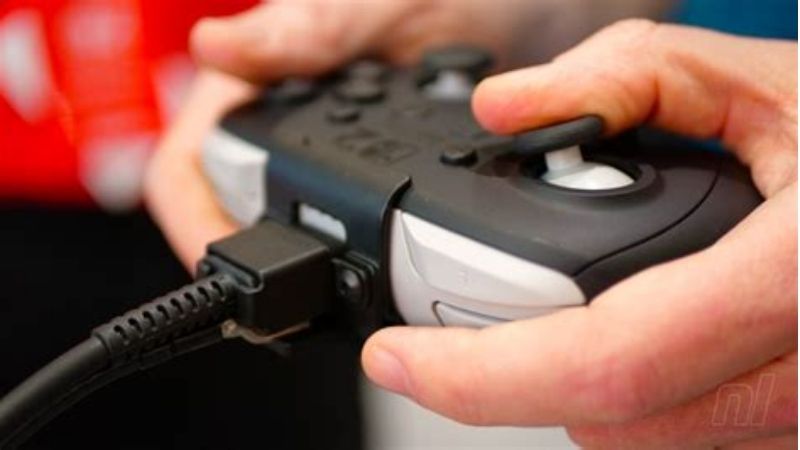
This buying guide is limited to controller charging accessories. It does not recommend a replacement video/dock cable for the console, and it does not treat the original non-charging Joy-Con 2 Grip as a charging accessory.
Controller and port compatibility at a glance
| What you own | Charging connection | What to buy | What not to buy |
|---|---|---|---|
| Switch 2 Pro Controller | USB-C on controller to a powered dock USB-A port | USB-A to USB-C cable if the included one is lost | A cable with the wrong port at the dock end |
| Switch 2 Pro Controller in tabletop mode | USB-C on controller to USB-C on Switch 2 | USB-C to USB-C cable with a data-capable specification if wired play matters | USB-A cable for a connection that has no USB-A socket |
| Joy-Con 2 pair attached to Switch 2 | Charging through the console’s controller connectors | Nothing extra if the console and adapter work | A standalone USB-C cable expecting to plug into the Joy-Con 2 themselves |
| Detached Joy-Con 2 pair | Attach to Joy-Con 2 Charging Grip; power the grip | Joy-Con 2 Charging Grip if you do not already own one | The standard Joy-Con 2 Grip supplied with the console |
Nintendo confirms the Pro Controller’s dock and AC-adapter charging methods , the Joy-Con 2 charging routes , and the different docked versus tabletop wired cable paths . An ordinary third-party USB-C cable may physically fit, but Nintendo does not certify every cable below for this console. Connector compatibility is not the same as a Nintendo-tested accessory claim.
Verified US buying options and prices
Price and stock check: October 28, 2026 (US). These are prices and availability labels directly displayed on the named seller pages during this research session, not checkout quotes for a specific ZIP code. Tax, shipping, promotional terms, selected variants, and final inventory may differ at checkout. Products labeled “In stock” were shown with a purchase action on the seller page.
| Exact product / SKU | Best use and connector | Seller / listed price (Oct. 28, 2026 US) | Stock status shown | Important limitation |
|---|---|---|---|---|
| Anker A82G2, Upcycled-Braided, black 3 ft | USB-A to USB-C replacement for dock USB-A connection | Anker US — $14.99 | In stock | Not a USB-C Power Delivery cable; Switch 2-specific testing not claimed |
| Anker A8752, two 3.3 ft 60W nylon USB-C cables | Short USB-C to USB-C charging spares | Anker US — $9.99 per 2-pack | In stock | Do not assume a wired-play/data guarantee from this listing alone |
| Anker A8758, 10 ft 100W nylon USB-C cable | Longer USB-C to USB-C reach; maker lists data support | Anker US — $9.99 | In stock | 100W is the cable rating, not a Switch 2 controller charging speed |
| Anker A82E2, 3 ft 240W USB-C to USB-C braided cable | Premium short USB-C cable usable with other USB-C devices | Anker US — $19.99 | In stock | Overkill solely for a controller; does not provide video output |
| Nintendo Joy-Con 2 Charging Grip (BEE-010) | Hardware required to charge a detached Joy-Con 2 pair by cable | Target US — $39.99 | In stock | Grip includes a USB cable; Joy-Con 2 controllers not included |
| Nintendo Switch 2 AC Adapter replacement | Official replacement power source if your adapter is lost | Target US — $34.99 | In stock | Buy only if power is missing, not merely because a controller cable broke |
There are four directly purchasable cable configurations here, plus the official charging grip and optional replacement adapter for different needs. The three Anker USB-C-to-USB-C offers are not Nintendo-branded Switch 2-certified products; they are identified by connector and the manufacturer-published cable specifications. Choose based on the power source and the controller, not on the biggest wattage figure.
What to buy for a Switch 2 Pro Controller
If you charge from the Switch 2 dock: USB-A to USB-C
Nintendo’s US support instructions say to power the dock with the Switch 2 AC adapter, connect the included USB charging cable to the Pro Controller, and use an available USB port on the dock. The console itself does not need to be docked for this charging method. The Anker A82G2 is a straightforward connector-matched replacement: one USB-A end, one USB-C end, and a braided three-foot configuration shown on its US sales page. Anker also publishes 480 Mbps data transfer for this model.
Buy it if: your original controller cable is missing or damaged and you want a replacement for the dock’s USB-A socket. Skip it if: your power source has only USB-C ports. Anker explicitly states that A82G2 does not support USB Power Delivery; that statement should not be confused with the separate Nintendo console power requirement.
If you charge or use wired play from a USB-C port
Nintendo documents a USB-C-to-USB-C connection between the top USB-C socket on the Switch 2 and the top socket of the Pro Controller in tabletop wired mode. A USB-C-to-USB-C cable is therefore the sensible form factor in that situation. The Anker A8752 two-pack is the low-cost option for a short charging lead; the listing verifies USB-C-to-USB-C, 3.3-foot length and 60W rating, but does not explicitly validate Switch 2 wired data operation. For charging only, its connector choice is reasonable; for a guaranteed data path, choose a cable with an explicit data specification.
The Anker A8758 10-foot cable is the more suitable candidate when you must sit farther from a power outlet or USB-C device. Anker explicitly lists up to 480 Mbps data transfer for A8758; that makes it a more evidence-backed data-capable option than an unmarked “charge-only” lead, although Switch 2-specific interoperability still was not independently researched here. Longer cables can clutter a couch setup and are easier to snag, so use the extra length only when necessary.
The Anker A82E2 240W cable is a legitimate alternative if you also share one USB-C cable with a laptop, but purchasing it for an ordinary controller alone would not unlock a 240W charging mode. Wattage is an upper limit supported by a cable under appropriate equipment conditions, not the amount of power the controller automatically draws.
What to buy for Joy-Con 2 controllers
Joy-Con 2 controllers do not expose the Pro Controller’s conventional USB-C cable socket. Nintendo describes two official charging arrangements: attach the pair to a Nintendo Switch 2 console that is connected to its adapter and powered on or in Sleep Mode, or attach them to a separately purchased Joy-Con 2 Charging Grip and power that grip.
The standard Joy-Con 2 Grip packed with the system is not the Joy-Con 2 Charging Grip . Nintendo specifically explains that the included grip cannot charge the controllers. The charging accessory is model BEE-010 and includes its own charging USB cable; purchasing only another USB cable will not turn the standard grip into a powered charger.
If you frequently rotate Joy-Con 2 pairs while playing, the official charging grip at Target solves the missing-hardware problem rather than only replacing a wire. To charge, slide both controllers onto the charging grip, then connect its bundled cable to the powered Switch 2 dock as Nintendo directs. The Nintendo support page also documents connecting the grip to the Switch 2 AC adapter. Its recharge light and the controller status display help verify that power is reaching the controllers.
Buy the grip if: you need detached Joy-Con 2 charging and do not already have the charging version. Skip it if: you only use the Joy-Con 2 pair attached to a functioning Switch 2 and do not mind charging through the system. At the October 28 price checked here, the official grip is a materially different purchase from a low-cost replacement cable.
Three checks before you place an order
Match both ends, not just the controller end
Draw a simple line between the power source and the accessory: dock USB-A to Pro Controller USB-C means USB-A-to-USB-C; USB-C port to Pro Controller USB-C means USB-C-to-USB-C. With Joy-Con 2, draw the connection to the Charging Grip , not to the controllers. Product listings that say only “Switch compatible” may refer to the original Switch generation, so inspect the exact connector and the accessory model.
Decide whether you need data or just charging
If the goal is merely replenishing a controller battery, a charging-capable cable with the appropriate connectors is the key requirement. For wired Pro Controller input or USB pairing, use a cable sold with documented data transfer support, because some generic USB-C products are charge-only. Nintendo confirms that a cable can be used to connect a Pro Controller in wired modes; this does not mean every third-party cable is guaranteed to work identically.
Do not buy excessive wattage for a controller
A 60W, 100W or 240W label on a USB-C cable identifies its maximum rating under supported charging arrangements. It does not establish a faster charging time for the Nintendo controller. Buy the needed length, reliable construction and appropriate data support first. Also check whether you already own the Nintendo adapter or the cable supplied with the Pro Controller or Charging Grip.
How to charge and verify your purchase
- Pro Controller from a dock: power the Nintendo Switch 2 dock using its Nintendo AC adapter; connect USB-A at the dock and USB-C at the Pro Controller. Give the controller time to charge. The Switch 2 console need not be inside the dock for this route, according to Nintendo’s support instructions.
- Pro Controller from the Nintendo adapter: Nintendo also supports direct charging using the Switch 2 AC adapter and the appropriate cable. Do not mistake the cable’s maximum watt rating for proof that an unrelated wall adapter meets Nintendo’s requirements.
- Joy-Con 2 using a Charging Grip: attach the Joy-Con 2 controllers to the designated charging grip; connect the grip with its supplied cable to a powered dock or use Nintendo’s documented direct adapter route. Look for the charging grip’s recharge indicator, then open Controllers on the Switch 2 HOME Menu and check that the expected charging symbol appears.
- Verify and stop: after a charging period, check whether the controller battery indicator has increased. If it has not, reseat the connectors, try the included Nintendo cable and known-good powered setup, and follow official support instead of buying multiple unverified cables. Do not force connectors or use a damaged lead.
Nintendo quotes approximately three and a half hours for a full Joy-Con 2 charge under its stated charging method. That is a Nintendo specification, not a benchmark of any Anker cable in this guide; charging time can vary with conditions. For a non-charging accessory, test the power source and controller contacts before treating the wire alone as the cause.
Where to buy and when to wait
For a dock-based Pro Controller replacement, the Anker A82G2 page directly displays a purchase action and its US price; that is the most relevant listing here for a USB-A socket. For a USB-C power setup, the short Anker A8752 pack or the longer A8758 gives a more direct match. For Joy-Con 2, the official Nintendo charging grip listed at Target addresses a hardware requirement the cables cannot.
Wait rather than purchase if your new Pro Controller box still contains its charging cable, the Joy-Con 2 controllers charge successfully when attached to the console, or a different part of the power chain is the actual problem. At checkout, reselect the exact length/pack/color used in the table, provide the delivery ZIP code, and confirm the final price, tax, shipping and inventory. This article does not claim a coupon or time-limited discount.
Frequently asked questions
Does a new Switch 2 Pro Controller come with a charging cable?
Yes. Nintendo’s US product page states that the Nintendo Switch 2 Pro Controller includes a USB-C charging cable. An extra cable is useful as a replacement or spare, not a required launch-day accessory.
Can I charge Joy-Con 2 controllers with a USB-C cable alone?
No. Joy-Con 2 requires attachment to the powered Switch 2 console or to a compatible charging accessory such as Nintendo’s separately sold Joy-Con 2 Charging Grip. A USB-C cable does not plug directly into the detached Joy-Con 2 controllers.
Is the grip included with Switch 2 a charging grip?
No. Nintendo distinguishes the basic Joy-Con 2 Grip included with the console from the sold-separately Joy-Con 2 Charging Grip. Make sure the package explicitly says Charging Grip if you need that feature.
Should I buy USB-A to USB-C or USB-C to USB-C?
Choose by the output port of your actual power source: USB-A to USB-C for the dock’s USB-A port; USB-C to USB-C for a USB-C source or Nintendo’s documented tabletop wired setup. The Pro Controller end is USB-C in either case.
Will a 100W USB-C cable charge the Pro Controller faster?
A high wattage rating alone does not prove a speed advantage. It describes the cable’s supported power capability, not the controller’s charging electronics. The listed 100W cable may be useful for its ten-foot reach and documented data transfer, not because the controller needs 100W.
Do the third-party cables here have official Nintendo Switch 2 certification?
No such certification was established in the researched manufacturer listings. Their stated connector layouts and charging specifications support a conditional purchase recommendation, but only Nintendo’s own accessories and instructions are cited as official Switch 2 support. If certainty is paramount, start with the cable supplied by Nintendo or contact Nintendo Support for a replacement pathway in your region.
Final thoughts
First check the cable and charging hardware you already own. Replace a lost Pro Controller-to-dock cable with the matching USB-A-to-USB-C lead; use USB-C-to-USB-C for a verified USB-C setup, selecting documented data support if wired play matters. If your actual goal is charging detached Joy-Con 2 controllers, buy the official Charging Grip rather than a cable alone. Before payment, verify the selected connector, US checkout price and local delivery availability once more.
Sources and verification
- Nintendo US Support: How to Charge the Nintendo Switch 2 Pro Controller
- Nintendo US Support: How to Charge the Joy-Con 2 Controllers
- Nintendo US Support: Pro Controller wired connection
- Nintendo US: Switch 2 official accessories
- Anker US: A82G2 listed variant and price
- Anker US: A8752 two-pack listed variant and price
- Anker US: A8758 10-foot listed variant and price
- Anker US: A82E2 listed variant and price
- Target US: Nintendo Joy-Con 2 Charging Grip
- Target US: Nintendo Switch 2 AC Adapter
