
Key takeaways
- Platform: The listing explicitly says Nintendo Switch 2 / Joy-Con 2, not only Nintendo Switch, Switch OLED, or Lite.
- Identity: Prefer the genuine Nintendo Joy-Con 2 Straps set of 2, SKU 123689, UPC 00045496886011, or verified merchant equivalent.
- Quantity: Confirm you are paying for the complete official pair rather than one used strap or a controller without its accessories.
- Condition: Prefer new for a safety-related wrist attachment; inspect any used component carefully.
- Stock: Look for an actual Add to cart/in-stock indicator tied to the store or ZIP code you will use.
- Price: Compare delivered total, including shipping, sales tax, and relevant return conditions. Do not mistake a cart-level offer for an automatically available discount everywhere.
- Delivery: If needed soon for a party or motion-based game, choose confirmed pickup or delivery rather than waiting on a backorder.
If you want to buy Switch 2 joycon replacement straps, the safest starting point is Nintendo’s official Joy-Con 2 Straps (set of 2), Light Blue / Light Red, not an older Nintendo Switch wrist-strap listing. Nintendo identifies the new accessory as BEE-018, while its US retail pair is SKU 123689. Target and Best Buy each displayed the official pair at $14.99 when reviewed for the US market on October 28, 2026. Check the destination ZIP code and checkout total before ordering: web listings do not guarantee stock at your local store. [N01] [N03] [R01] [R02]
This guide focuses on replacing lost or damaged Joy-Con 2 wrist straps. It is not a guide to buying full Joy-Con 2 controllers, charging grips, leg straps, or wrist straps for the original Nintendo Switch. Those accessories serve different purposes, and some look deceptively similar in search results.
Quick verdict: what to buy and where
Best straightforward purchase: The genuine Nintendo two-strap set at Target, which explicitly displayed In Stock, $14.99, and Add to cart on the reviewed US page. You get the correct physical attachment for both Joy-Con 2 controllers without relying on third-party fit claims. [R01]
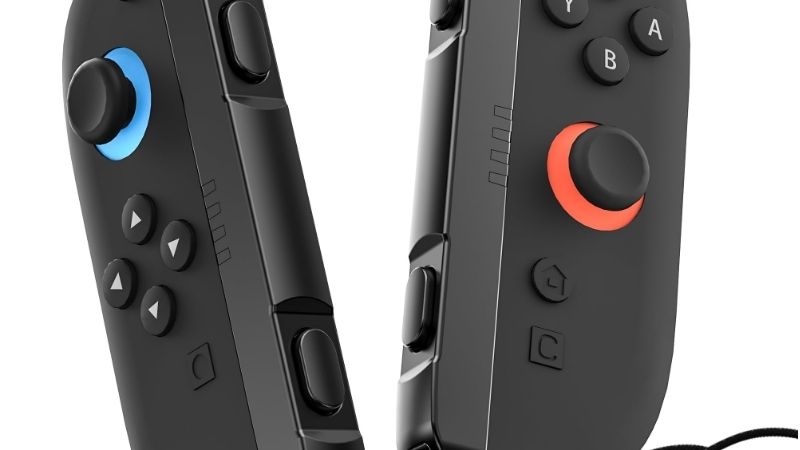
Best alternate retailer: Best Buy listed the same Nintendo accessory as model BEEAJS2AA, $14.99, with an Add to cart path. Pickup timing depends on ZIP code; the location shown in the page is not evidence of nationwide same-day availability. [R02]
Another retailer to check: GameStop listed the genuine two-pack at $14.99, but availability was store-dependent and its page displayed limited-stock messaging. Confirm shipping or pickup for your address before treating it as available. [R03]
Not a buy-now pick: iFixit offered left and right Joy-Con 2 wrist-strap replacements individually at $9.99 each, but both pages showed Out of Stock when reviewed. This is an alternative to monitor, not a currently purchasable recommendation. [R05] [R06]
There is no need to invent a six-product roundup for this query: the clearly supported US choice is one genuine Nintendo replacement SKU available through several merchants. The useful comparison is seller fulfillment, condition, and total cost—not a fictitious ranking of six different straps.
Verified US retailer comparison
The table below reflects product-page information observed on October 28, 2026 (US market). “In stock” means the page displayed that status without completing checkout, not guaranteed delivery to every ZIP code. Prices exclude tax, shipping, and potential membership conditions.
| Listing and exact item | Observed price | Stock status (Oct 28) | What the page actually supports | Buyer caveat |
|---|---|---|---|---|
| Target — Nintendo Joy-Con 2 Straps, pair, TCIN 94704610 | $14.99 | In stock | Seller page explicitly showed “In Stock” and “Add to cart” | Shipping and nearby pickup vary by address. [R01] |
| Best Buy — Nintendo Joy-Con 2 Strap, model BEEAJS2AA, SKU 6625991 | $14.99 | Add to cart; location-dependent | Cart and pickup/shipping controls on page | Check the cart quantity and included two-strap packaging. [R02] |
| GameStop — Nintendo Joy-Con 2 Straps, set of 2 | $14.99 | Limited/local stock unclear | Product page listed new condition and fulfillment selectors | ZIP-specific inventory not confirmed. [R03] |
| Walmart — Nintendo Joy-Con 2 Straps, set of 2 | Price unstable; verify in cart | Add to cart; localized delivery | Page showed Walmart as seller, but different page sections/search captures exposed inconsistent price displays | Do not rely on a quoted Walmart discount without checking live checkout. [R04] |
| Nintendo US — Joy-Con 2 Straps, SKU 123689 | $14.99 regular reference | Order stock unclear | Official catalog displayed regular price; product page showed “Find retailers” | Official product identity, not confirmed direct checkout inventory. [N01] [N02] |
| iFixit — left strap IF378-143-2 / right strap IF378-161-2 | $9.99 per side | Out of stock (both) | Used/replacement parts listed individually | Not a current substitute for an available two-pack. [R05] [R06] |
The best buy-now choice here is not necessarily the seller advertising the lowest pre-tax number. If Target delivers to your address for less than Best Buy or GameStop after delivery charges, pick Target; if a nearby Best Buy offers convenient pickup, the same official accessory may be the more practical purchase. A lower marketplace listing is meaningful only when its exact item, seller identity, condition, and final total check out.
Confirm the exact Joy-Con 2 strap before buying
Joy-Con 2 is not the original Joy-Con
Nintendo’s support material names the Joy-Con 2 strap accessory BEE-018. It is designed to attach to either Joy-Con 2 (L) or Joy-Con 2 (R) on Switch 2, and Nintendo explicitly says the accessory does not work with Joy-Con controllers from the first Switch generation. For comparison, Nintendo’s older Joy-Con strap guide identifies the original accessory as HAC-014. Do not interpret a merchant title saying merely “for Switch” or “Joy-Con strap 2 pack” as proof that it fits Switch 2. [N03] [N05]
The official standalone US retail two-pack uses SKU 123689 and UPC 00045496886011. GameStop and Best Buy additionally display BEEAJS2AA as a retailer-facing model identifier; this is not a different attachment mechanism. Match the Nintendo Switch 2 platform, the Joy-Con 2 naming, and the image of the snap-on accessory before paying. [N01] [R02] [R03]
Check what is already in your box
A standard Nintendo Switch 2 system includes a left and right Joy-Con 2 controller and two Joy-Con 2 straps. If you have just opened the console, check the packing materials before purchasing duplicates. Replacement sets make sense when you have lost the original pair, the wrist loop is damaged, the attachment no longer stays secure, or you want a spare pair for an additional play area. [N04]
If you bought an additional pair of Joy-Con 2 controllers, check that package contents as well; Nintendo identifies two Joy-Con 2 straps in the official controller-pair box. Single-controller, refurbished, marketplace, or open-box offers may differ, so verify the actual seller’s included-accessories statement. [N04]
One missing strap or a complete pair?
The official Nintendo product is sold as a set of two, which is convenient even when only one side has gone missing. Nintendo states that the physical BEE-018 strap can attach to either left or right controller; match the + and − alignment markings during attachment. It is not necessary to hunt for a different retail model for each side. [N03]
By contrast, iFixit’s separate left and right listings are identified as replacement parts for their respective controller models and were out of stock at the time of review. These listings may be relevant if you specifically prefer a single salvaged/replacement part later, but a ready-to-ship Nintendo two-pack is the simpler immediate solution. [R05] [R06]
Seller-by-seller purchase advice
Target: explicit stock status and uncomplicated product identity
Target’s listing specifies “Nintendo Switch 2 Joy-Con 2 Straps Light Blue/Light Red (set of 2)” and identifies Nintendo as the brand. Its page showed $14.99 and In Stock in the October 28 research snapshot. This is the clearest purchasing evidence in the comparison. The product page is also useful for checking whether same-day delivery, shipping, or store pickup is offered for your selected location. Those options can change independently of the general in-stock badge. [R01]
Buy if: You want a new official pair and your actual ZIP-code checkout offers a reasonable shipping or pickup option. Skip if: The final delivery surcharge makes another authorized retailer materially cheaper.
Best Buy: a practical local-pickup alternative
Best Buy’s page identifies BEEAJS2AA, its own SKU 6625991, a listed $14.99 price, and an Add to cart action. Its availability panel is location-sensitive; one captured result showed a specific store with limited units, which should not be generalized to all US stores. Confirm the pickup store and estimated fulfillment in your own cart. [R02]
Buy if: Local pickup is faster or more convenient than shipping. Skip if: Your nearest store is out of stock and shipping costs more than the item itself.
GameStop: same product, less certain local availability
GameStop also has a product page for the official Nintendo set at $14.99. The page supports the identity of the product and offers delivery/pickup selectors, but it includes limited stock messaging and requests an address to establish service availability. It is a backup check, not proof of a guaranteed pickup slot. [R03]
Buy if: Your selected branch or shipping address confirms stock and a favorable final total. Skip if: The product cannot be fulfilled to your location, regardless of the price shown in the search snippet.
Walmart: compare the final cart, not a fluctuating snippet
Walmart has a listing for Nintendo’s Light Blue / Light Red set of two, sold and shipped by Walmart.com on the reviewed product page. However, different captures and segments of that dynamically localized page exposed inconsistent figures (including $10.00 in a search snapshot and $14.88 elsewhere on the page). The mismatch means that the exact price is not verified for an order placed today. Do not present either figure as an assured current deal. [R04]
Buy if: Your real cart shows the exact Nintendo pair, a trustworthy seller, and the lowest delivered total. Skip if: The product variant, pack quantity, or seller changes as you proceed to checkout.
iFixit: valid parts, but not ready to purchase
The iFixit listing for the left strap names part IF378-143-2, and the right names IF378-161-2. Both pages showed a $9.99 per-side price and Out of Stock. Their left/right positioning is specific to those listings, not proof that Nintendo’s BEE-018 universal retail strap needs side-specific shopping. [R05] [R06]
Wait only if: You want a single replacement part and do not need one now. Otherwise the available Nintendo two-pack is a more straightforward way to get back to motion-control play.
How to attach a replacement safely
Nintendo recommends attaching Joy-Con 2 straps when the controllers are used separately as wireless controllers. You do not attach Joy-Con 2 straps by sliding them down the exposed rail used by original Switch Joy-Con straps. Follow the Switch 2-specific snap-on procedure instead. [N03]
- Check the accessory. Confirm you have the Nintendo Switch 2 Joy-Con 2 strap, not the older original-Switch strap. Inspect the loop, clasp, and attachment surfaces; do not use a visibly cracked or broken part.
- Line up the marks. Align the − mark on the Joy-Con 2 left controller with the − mark on a strap. Align + with + for the right controller. Either BEE-018 strap can be used on either side when oriented correctly.
- Engage the lower end first. Position the lower end of the Joy-Con 2 controller into the lower end of the strap attachment.
- Snap in the upper end. Bring the top into place and press until you hear a click. Do not pull at the wrist cord to force the connection.
- Wear it correctly. Put your hand through the loop. Hold the controller firmly, then press the strap-lock button and move the adjuster toward your wrist until secure but comfortable. Do not overtighten.
- Verify before play. With the controller over a safe surface, check that the attachment does not separate easily and that the wrist loop and adjuster stay in position. If it does not click or feels loose, stop and recheck the alignment rather than attempting a motion-control swing. [N03]
To remove it, first loosen the wrist-loop adjuster and take the loop off your wrist; then press the release button on the Joy-Con 2 controller and pull the strap attachment away. These are Nintendo’s Switch 2-specific directions. Older Joy-Con strap instructions describe a different sliding-lock process; mixing the two methods risks damage or a stuck accessory. [N03] [N05]
What if the replacement does not fit or lock?
The connector will not line up: Stop and check that the controller is a Joy-Con 2 and the accessory is BEE-018. A strap designed for original Switch Joy-Con is not an interchangeable substitute. Confirm the +/− markings instead of pushing against resistance. [N03]
You cannot hear or feel the click: Separate the parts using Nintendo’s release-button method, inspect for dirt or physical damage, and try again while correctly aligned. Do not use tools to pry the connector into position or apply adhesive to a safety accessory. If the fit remains loose, do not play motion-control games with it; contact Nintendo Support or request an exchange from the seller.
The wrist loop tightener slides too easily or the cord is frayed: Replace the accessory rather than relying on a knot or a repair to a damaged retention point. A replacement should secure comfortably around the wrist and stay attached while you hold the controller. Nintendo’s instructions specifically stress securing the loop during detached use. [N03]
Your search result says “Joy-Con straps, 2 pack” but omits Switch 2: Do not order until the listing explicitly states Joy-Con 2 / Nintendo Switch 2 and the photographs match Nintendo’s current snap-on accessory. Search results often surface original-Switch straps when both generations share similar keywords.
A short checklist before checkout
- Platform: The listing explicitly says Nintendo Switch 2 / Joy-Con 2, not only Nintendo Switch, Switch OLED, or Lite.
- Identity: Prefer the genuine Nintendo Joy-Con 2 Straps set of 2, SKU 123689, UPC 00045496886011, or verified merchant equivalent.
- Quantity: Confirm you are paying for the complete official pair rather than one used strap or a controller without its accessories.
- Condition: Prefer new for a safety-related wrist attachment; inspect any used component carefully.
- Stock: Look for an actual Add to cart/in-stock indicator tied to the store or ZIP code you will use.
- Price: Compare delivered total, including shipping, sales tax, and relevant return conditions. Do not mistake a cart-level offer for an automatically available discount everywhere.
- Delivery: If needed soon for a party or motion-based game, choose confirmed pickup or delivery rather than waiting on a backorder.
No additional purchase is needed if both original straps are present and fit securely. Nintendo ships two with a standard Switch 2 system; only replace lost, damaged, or nonlocking accessories. [N04]
Frequently asked questions
Can I use the original Nintendo Switch Joy-Con wrist straps with Joy-Con 2?
No. Nintendo identifies the original Joy-Con strap as HAC-014 and the Switch 2 attachment as BEE-018. Nintendo explicitly states the Joy-Con 2 strap is not compatible with original-Switch Joy-Con controllers. Treat the two systems’ attachments as distinct, even when third-party search listings use similar wording. [N03] [N05]
Do I need a separate left and right Joy-Con 2 wrist strap?
Nintendo says a BEE-018 accessory can attach to either Joy-Con 2 controller. Align + or − correctly during installation. The Nintendo US product is a pair, so the normal replacement purchase covers both sides. [N03] [N01]
Does the Switch 2 already include straps?
Yes. Nintendo states that a Switch 2 system set includes two Joy-Con 2 straps. Check your original packaging if you cannot find them, especially before paying for an additional pair. [N04]
Is the Nintendo $14.99 two-pack different from Best Buy’s “Joy-Con 2 Strap” listing?
The reviewed Best Buy listing shows manufacturer model BEEAJS2AA, while Nintendo lists the set as SKU 123689. They refer to Nintendo’s Switch 2 strap accessory in the same Light Blue / Light Red retail configuration; confirm the package quantity in the Best Buy cart and product photographs before paying because its headline uses the singular word “Strap.” [N01] [R02]
Can I buy just one strap rather than a set?
The official US retail listing reviewed here is a set of two. iFixit has separate left/right replacement-part pages priced at $9.99 each, but both were out of stock when checked. If you need a working part immediately, the official two-pack is the better-supported option. [N01] [R05] [R06]
Will a Joy-Con 2 strap help when using mouse controls?
Nintendo says the strap may improve stability when you use Joy-Con 2 mouse controls in compatible games. It is still a safety and handling accessory, not a charging cable, grip with batteries, or new controller. [N04]
Final thoughts
For a lost or damaged Joy-Con 2 wrist strap, buy the genuine Nintendo two-pack rather than taking a chance on an original-Switch strap. The clearest verified option in this US snapshot is Target at $14.99, with Best Buy at $14.99 as a practical second choice where local fulfillment works. Before ordering, confirm Switch 2 compatibility, the two-strap quantity, and the final delivered price. Then use Nintendo’s +/− alignment and click-in installation procedure, and verify that the attachment is secure before motion-control play. [R01] [R02] [N03]
