Key takeaways
- Clamping force — too tight and your head aches within an hour; too loose and the headset slips.
- Ear cushions — memory foam with breathable fabric stays cooler than sealed leatherette during marathons.
- Weight — lighter headsets reduce neck strain; anything under 300g is comfortable for most.
- Glasses friendly — softer cushions relieve pressure on temple arms if you wear glasses.
A gaming headset is the piece of gear that pulls you into the game and lets your team hear you clearly, yet it is easy to overpay for features you will never use or underbuy and end up with a scratchy mic and sore ears. Between wired and wireless, stereo and surround, and a dozen “gaming” buzzwords, the choice gets confusing fast.
This guide walks through the factors that genuinely affect your experience: sound quality, microphone clarity, comfort for long sessions, connection type, and platform compatibility. Learn what to prioritize and you can confidently pick a headset that sounds great, stays comfortable, and fits your budget.
Our top picks
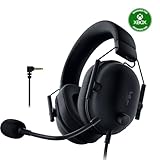
 Razer BlackShark V2 X Xbox Gaming Headset
- Our cutting-edge proprietary design divides the driver into…
- An improved pickup pattern ensures more voice and…
- Sturdy closed earcups fully cover the ears to…
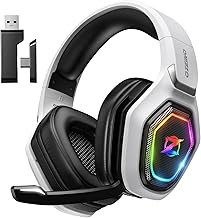
 Ozeino Gaming Headset for PC
- Immersive 7.1 Surround Sound: This gaming headset delivering…
- Great Humanized Design: Comfortable and breathable permeability protein…
- Sensitivity Noise-Cancelling Microphone: 360° omnidirectionally rotatable sensitive microphone,…
 JBL Quantum 100M2 Wired Gaming Headset
- From the faintest footsteps to the loudest explosion,…
- Rally your squad without repeating yourself
- Marathon sessions hit different in these over-ear headphones—lightweight…
| Product | Key specs | |
|---|---|---|
| Razer BlackShark V2 X Xbox Gaming Headset | Our cutting-edge proprietary design divides the driver into… An improved pickup pattern ensures more voice and… Sturdy closed earcups fully cover the ears to… | Check price |
| Ozeino Gaming Headset for PC | Immersive 7.1 Surround Sound: This gaming headset delivering… Great Humanized Design: Comfortable and breathable permeability protein… Sensitivity Noise-Cancelling Microphone: 360° omnidirectionally rotatable sensitive microphone,… | Check price |
| JBL Quantum 100M2 Wired Gaming Headset | From the faintest footsteps to the loudest explosion,… Rally your squad without repeating yourself Marathon sessions hit different in these over-ear headphones—lightweight… | Check price |
 Turtle Beach Stealth 600 Wireless Gaming Headset Turtle Beach Stealth 600 Wireless Gaming Headset | Check price | |
 Logitech G522 Lightspeed Wireless Gaming Headset Logitech G522 Lightspeed Wireless Gaming Headset | Own Your Look: Experience the bold, sleek design… Command Your Voice: Best in class voice clarity… Immerse Yourself: State-of-the art PRO-G audio drivers deliver… | Check price |
 BENGOO G9000 Stereo Gaming Headset for PS4 BENGOO G9000 Stereo Gaming Headset for PS4 | 【Multi-Platform Compatible】Support PlayStation 4, PlayStation 5, Xbox, Xbox… 【7.1 Surround Sound】Clear sound operating strong brass, splendid… 【Noise Isolating Microphone】Headset integrated onmi-directional microphone can transmits… | Check price |
 Logitech G432 Wired Gaming Headset Logitech G432 Wired Gaming Headset | Enjoy expansive cinematic sound Hear Enemies From All Sides Be Heard Loud and Clear | Check price |
 AOC 2.4GHz Wireless Gaming Headset for PS5 AOC 2.4GHz Wireless Gaming Headset for PS5 | Check price |
As an Amazon Associate we earn from qualifying purchases at no extra cost to you.
⚡ Save on Your Next PC — Amazon Prime
Prime members get fast free shipping on the systems above, plus early access to Prime Day & Black Friday PC deals. New members get a 30-day free trial.
Watch: How to Choose a Gaming Headset (2026 Guide) — Video Review
Sound Quality: Stereo vs Surround
Good stereo sound with accurate positional cues is more useful to most players than gimmicky surround processing. What you really want is clean, well-separated audio so footsteps and gunfire come through distinctly. Virtual 7.1 surround, found on headsets like the Ozeino Gaming Headset, can help in some titles but often muddies the mix. Judge a headset by clarity and imaging first; treat surround as a bonus, not a deciding feature.
The Microphone Matters More Than You Think
Your teammates hear your mic, not your headphones, so a clear microphone is half the value of a gaming headset. Look for a detachable or flip-to-mute boom mic with noise reduction so background fan noise and keyboard clatter do not drown out your voice. The JBL Quantum 100M2 and Razer BlackShark V2 X both offer detachable mics that keep chat crisp. If you stream or use voice comms constantly, prioritize mic quality over almost everything else.
Comfort for Long Sessions
- Clamping force — too tight and your head aches within an hour; too loose and the headset slips.
- Ear cushions — memory foam with breathable fabric stays cooler than sealed leatherette during marathons.
- Weight — lighter headsets reduce neck strain; anything under 300g is comfortable for most.
- Glasses friendly — softer cushions relieve pressure on temple arms if you wear glasses.
Wired or Wireless
Wired headsets like the Logitech G432 give you plug-and-play simplicity, zero battery worries, and often better value per dollar. Wireless models such as the Turtle Beach Stealth 600 or Logitech G522 free you from cable clutter and let you step away from the desk, at the cost of charging and a slightly higher price. If you sit at a fixed battlestation and hate charging things, wired is fine. If you value freedom of movement, wireless has matured enough that latency is no longer a real concern.
Platform Compatibility
Not every headset works fully on every system. A 3.5mm wired headset plugs into almost anything with a headphone jack, including controllers, making it the most universal option. Wireless headsets often use a USB dongle tuned for a specific platform, so an Xbox-focused model may not carry chat audio on PlayStation. Before buying, confirm the headset explicitly supports every device you game on, and check whether it needs a separate adapter for consoles.
Tips
- Test the mic with a friend or a recording before deciding; spec sheets rarely tell you how a mic really sounds.
- Prioritize comfort if you game for hours — the best-sounding headset is useless if it hurts.
- Skip virtual surround as a must-have; strong stereo imaging serves competitive play better.
- If you own multiple platforms, a 3.5mm wired headset is the safest all-round compatibility choice.
Frequently Asked Questions
Is surround sound worth it for gaming?
For most players, no. Clear stereo with good positional imaging usually beats virtual surround, which can smear directional cues. Surround helps in some single-player and cinematic games but rarely gives a competitive edge.
Do I need an expensive headset to sound good on voice chat?
No. Mic quality depends on the microphone design and noise reduction, not the price tag. Several mid-range headsets have clearer mics than pricier ones, so read reviews focused specifically on microphone performance.
Are wireless gaming headsets laggy?
Modern 2.4GHz wireless headsets have negligible latency for gaming. Avoid Bluetooth-only models for competitive play, since Bluetooth adds noticeable audio delay. A dedicated USB dongle keeps latency low enough that you will not notice it.
How long should a wireless headset battery last?
Aim for at least 15 to 20 hours per charge so a full week of evening sessions does not leave you tethered. Many current models exceed 40 hours, and quick-charge features can add hours from just a short top-up.
Conclusion
The right gaming headset balances clear sound, a reliable microphone, and all-day comfort against your budget and platforms. Decide whether wired simplicity or wireless freedom suits your setup, insist on a mic your teammates can actually understand, and try the headset on for comfort if you can. Nail those and you will have a headset that disappears in the best way, letting the game take over.