
Key takeaways
- Your Mouse Pad Surface: Are you gliding on a soft cloth pad, a textured cordura pad, or a hard glass pad? Soft cloth pads pair well with almost all skate materials, whereas glass pads will quickly destroy glass skates and require specialized, wear-resistant polymer or PTFE skates to avoid loud, scratching noises.
- Shape Style (Model-Specific vs. Universal Dots): You must choose between model-specific skates (which are precision-cut to fit the exact recessed pockets on the bottom of your specific mouse) and universal dot skates. Universal dots, typically measuring between 6mm and 7mm in diameter, can be placed on any mouse regardless of the brand or model.
- Your Performance Goal (Speed vs. Control): Decide whether you want effortless, low-friction glide for fast-paced tracking (common in battle royale games) or high-friction stopping power for precise, micro-adjustment movements (common in tactical shooters and high-resolution design work).
If you have ever felt like your high-end gaming or productivity mouse is suddenly dragging, snagging, or resisting your hand movements, you are likely dealing with worn-out mouse skates. Also known as mouse feet, these small pieces of low-friction material on the bottom of your mouse dictate how smoothly your device glides across your desk or mouse pad. When learning how to choose mouse skates, many buyers make critical mistakes that ruin their experience.
The most common mistake is assuming that faster is always better. Buyers often purchase ultra-slick glass or speed-focused skates for a fast hard pad, creating an uncontrollable “ice rink” effect where they cannot stop their cursor accurately. Others make the mistake of ignoring skate thickness, buying replacement feet that are too thick or too thin, which disrupts the mouse sensor’s lift-off distance (LOD) and causes the cursor to spin out or stop tracking altogether. Finally, many shoppers simply buy cheap, flat-edged sheets and cut them by hand, resulting in sharp, jagged edges that scrape and ruin expensive cloth mouse pads. Understanding how to navigate these variables is key to optimizing your setup.
Our top picks
 X-Raypad Obsidian Pro Air Speed Mouse Skates
- These universal dot mouse skates, crafted from high-quality…
- Added Noise and Vibration reduction tech, make absorbing…
- X-Raypad Obsidian PRO Air U-PE Universal Dot Mouse…
 Attkryy 80-Pcs DIY Universal PTFE Mouse Skates
- This set includes 80 individual 6mm glide dots…
- Crafted from premium PTFE material, these mouse skates…
- Each skate is backed with strong adhesive that…
 Wallhack PTFE Dot Mouse Skates
- Fine-tune your mouse feel with modular dot skates—adjust…
- Less contact = more speed
- Same material as Teflon, one of the slickest…
| Product | Key specs | |
|---|---|---|
| X-Raypad Obsidian Pro Air Speed Mouse Skates | These universal dot mouse skates, crafted from high-quality… Added Noise and Vibration reduction tech, make absorbing… X-Raypad Obsidian PRO Air U-PE Universal Dot Mouse… | Check price |
| Attkryy 80-Pcs DIY Universal PTFE Mouse Skates | This set includes 80 individual 6mm glide dots… Crafted from premium PTFE material, these mouse skates… Each skate is backed with strong adhesive that… | Check price |
| Wallhack PTFE Dot Mouse Skates | Fine-tune your mouse feel with modular dot skates—adjust… Less contact = more speed Same material as Teflon, one of the slickest… | Check price |
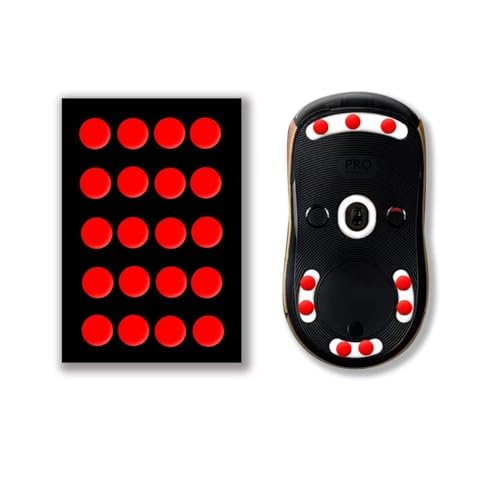 X-Raypad Jade Speed Mouse Skates X-Raypad Jade Speed Mouse Skates | 40 dots skates, Two cleanning Pads, Two adhesive… The skates surface is hard and finely frosted… Need to peel off the protective filmone by… | Check price |
As an Amazon Associate we earn from qualifying purchases at no extra cost to you.
Decide These 3 Things First
Before diving into materials and price points, you must narrow down your preferences by deciding on these three foundational factors:
- Your Mouse Pad Surface: Are you gliding on a soft cloth pad, a textured cordura pad, or a hard glass pad? Soft cloth pads pair well with almost all skate materials, whereas glass pads will quickly destroy glass skates and require specialized, wear-resistant polymer or PTFE skates to avoid loud, scratching noises.
- Shape Style (Model-Specific vs. Universal Dots): You must choose between model-specific skates (which are precision-cut to fit the exact recessed pockets on the bottom of your specific mouse) and universal dot skates. Universal dots, typically measuring between 6mm and 7mm in diameter, can be placed on any mouse regardless of the brand or model.
- Your Performance Goal (Speed vs. Control): Decide whether you want effortless, low-friction glide for fast-paced tracking (common in battle royale games) or high-friction stopping power for precise, micro-adjustment movements (common in tactical shooters and high-resolution design work).
1. Skate Size, Shape, and Thickness Dimensions
The physical dimensions of your mouse skates directly impact both sensor performance and physical friction. Most replacement skates range in thickness from 0.5mm to 1.2mm. The sweet spot for most modern optical sensors is 0.8mm. If you choose skates that are too thin (under 0.6mm), the bottom plastic shell of your mouse may scrape against your pad. If you choose skates that are too thick (over 1.0mm), the sensor may sit too far above the tracking surface, causing tracking loss unless your mouse software allows you to manually adjust the lift-off distance.
Shape also plays a major role in glide feel. Large, full-wrap skates offer a highly stable, consistent glide because they distribute the weight of your hand over a wider surface area. However, larger surface areas naturally generate more static friction. Universal dots, such as the 6mm Attkryy DIY PTFE dots or the 7mm Wallhack PTFE dots, minimize surface contact. By placing just four to six small dots on the corners of your mouse, you drastically reduce physical drag, resulting in a much faster, lighter glide even if the mouse itself is relatively heavy.
2. Material Composition: PTFE, Glass, and U-PE
In 2026, the mouse skate market is defined by three primary materials, each offering distinct tactile feedback, durability profiles, and friction coefficients:
- 100% Virgin Grade PTFE: Polytetrafluoroethylene (PTFE) remains the gold standard. Virgin PTFE is dyed white and contains no recycled fillers. It is highly flexible, self-lubricating, and provides a buttery-smooth glide on cloth pads. It is relatively soft, meaning it will wear down over 3 to 9 months of heavy use.
- Ultra-High-Molecular-Weight Polyethylene (UHMWPE / U-PE): This polymer is incredibly tough and abrasion-resistant. Skates like the X-Raypad Obsidian Pro Air Speed Mouse Skates utilize hardened U-PE to deliver a controlled, consistent glide. U-PE is highly resistant to wearing down, making it the premier choice for gamers who use highly abrasive glass mouse pads that would quickly shave down standard PTFE.
- Aluminosilicate Glass: Glass skates offer almost zero static friction, meaning the mouse starts moving with the absolute minimum amount of force. However, they are fragile, expensive, and cannot be used on glass mouse pads (glass-on-glass contact will scratch and damage both surfaces).
3. Edge Construction and Beveling
The profile of the skate’s outer edge is just as important as the material itself. Cheaply made skates have flat, 90-degree vertical edges. When you push your mouse sideways, these sharp corners dig directly into the weave of cloth mouse pads, causing a scratchy feel, inconsistent speed, and physical damage to the pad over time.
High-quality skates feature curved, rounded, or beveled edges (often marketed as 2.5D or CNC-machined edges). Skates like the X-Raypad Jade Speed Mouse Skates are specifically designed with rounded edges to ensure that even when you apply downward pressure with your palm, the feet roll smoothly over the fabric fibers without snagging. Look for product specifications that explicitly state “curved edges” or “beveled profile” to guarantee a seamless glide.
4. Performance Dynamics: Static vs. Dynamic Friction
When selecting mouse skates, you must balance static friction (the force required to start moving the mouse from a dead stop) and dynamic friction (the force required to keep the mouse in motion).
If you play tactical shooting games or do precision vector editing, you want moderate static friction and high dynamic control. This allows you to lock your cursor in place without accidental drifting. For this style, control-oriented PTFE or U-PE skates (like the X-Raypad Obsidian series) are ideal. If you play tracking-heavy games or use ultra-wide monitors where you constantly sweep your hand across the desk, you want low static and low dynamic friction. Fast PTFE dots or glass skates are best suited for this, allowing effortless, continuous hand sweeps with zero muscular fatigue.
5. Price Tiers and Packaging Value
Mouse skates are an affordable upgrade, but price tiers dictate the material purity, cutting precision, and quantity included in the package:
- Budget ($4 to $8): Typically consists of bulk DIY kits, such as the Attkryy 80-Piece DIY Universal PTFE set priced at around $4.80. These budget kits offer incredible value for multi-mouse households or custom modding projects, giving you dozens of standard 6mm PTFE dots that perform significantly better than stock factory feet.
- Mid-Range ($10 to $16): Includes premium, model-specific pre-cut PTFE skates or specialized speed dots like the X-Raypad Jade ($15.99). These packages usually include one or two full sets of skates custom-molded to fit specific popular mouse models, complete with alcohol prep pads for installation.
- Premium ($18 to $25): This tier features cutting-edge materials and specialized engineering, such as the Wallhack PTFE Dot Skates ($19.99) or the X-Raypad Obsidian Pro Air ($19.99). These products use ultra-dense, hardened polymers or premium virgin PTFE designed to survive extreme friction on glass pads while maintaining whisper-quiet operation.
6. Adhesive Quality, Installation, and Lifespan
A factor that is frequently overlooked is the adhesive backing. Premium mouse skates utilize thin, industrial-grade 3M or Nitto double-sided tape. The adhesive layer must be incredibly thin (ideally under 0.1mm) so it does not add unpredictable height to the skate. It must also be strong enough to prevent the edges of the skates from peeling up during fast swipes, yet leave zero sticky residue behind when you eventually peel them off to replace them.
The lifespan of your skates depends on your usage and your mouse pad. On a standard cloth pad, a set of high-quality virgin PTFE skates will last 6 to 12 months. On a hard, textured glass pad, standard PTFE skates can wear down in as little as 4 to 8 weeks, which is why hardened U-PE skates or specialized control dots are recommended for glass pad users who want their skates to last 6 months or longer.
Spec Checklist
Use this quick-reference table to match your performance needs and budget with the appropriate mouse skate specifications:
| Specification | Budget Tier ($4 – $8) | Mid-Range Tier ($10 – $16) | Premium Tier ($18 – $25) |
|---|---|---|---|
| Material | Standard/Recycled PTFE | 100% Virgin Grade PTFE | Hardened U-PE / Ultra-Pure PTFE |
| Edge Design | Flat or slightly pressed edges | Rounded/Beveled 2.5D edges | CNC-machined curved edges |
| Thickness Range | 0.5mm – 0.7mm | 0.7mm – 0.85mm | 0.8mm – 1.0mm |
| Adhesive Type | Generic double-sided acrylic | Standard 3M adhesive backing | Premium residue-free 3M/Nitto tape |
| Average Lifespan | 2 to 4 months | 6 to 9 months | 9 to 12+ months (wear-resistant) |
Red Flags
Avoid these warning signs when shopping for replacement mouse skates:
- Non-Beveled, Sharp Edges: If the product photos or descriptions do not explicitly mention rounded, curved, or beveled edges, avoid them. Sharp 90-degree edges will slice into your cloth pad and ruin its surface texture.
- Unspecified “Teflon” or PTFE Purity: If a brand simply lists the material as “Teflon” without specifying “100% Virgin Grade” or “UHMWPE,” they are likely using cheap, grey, recycled plastic fillers that offer high friction and poor durability.
- Excessive Thickness (Over 1.2mm) without Adjustable LOD: Skates that are too thick will push your mouse sensor out of its tracking range. Unless you own a gaming mouse with software that lets you manually raise the sensor’s lift-off distance, stick to skates between 0.7mm and 0.9mm.
- No Alcohol Prep Pads Included: Installing new skates requires removing 100% of the old adhesive residue. Brands that do not include cleaning wipes or alcohol pads force you to scrape the plastic, potentially damaging the delicate screw holes and plastic channels underneath.
FAQ
How often should I replace my mouse skates?
For average daily office work, mouse skates can last up to two years. However, for competitive gaming or design work on a cloth pad, you should replace PTFE skates every 6 to 9 months. If you use a glass mouse pad, standard PTFE skates may need to be replaced every 1 to 3 months, whereas hardened U-PE skates can last 6 months or longer on hard surfaces.
Can I use glass mouse skates on a glass mouse pad?
No, you should never pair glass skates with a glass mouse pad. Operating glass against glass creates extreme friction, generates a highly unpleasant scraping sound, and will permanently scratch and ruin both the skates and your expensive mouse pad. For glass pads, stick to hardened polymer skates like U-PE or virgin PTFE.
What is the difference between speed skates and control skates?
Speed skates (often made of pure, hard PTFE or glass) minimize both static and dynamic friction, allowing the mouse to glide with almost zero effort. Control skates (often made of textured, dense U-PE or softer PTFE blends) provide slightly more resistance, giving your hand more physical feedback and stopping power to help you aim or position your cursor precisely.
How do I safely remove my old mouse skates?
To safely remove old skates, gently heat them with a hair dryer on low heat for 10 to 15 seconds to soften the underlying adhesive. Use a plastic pry tool or a pair of tweezers to lift the skate from its edge, making sure to peel up both the glide layer and the black foam adhesive layer underneath. Clean the empty pocket thoroughly with an isopropyl alcohol wipe before applying your new skates.








