Key takeaways
- DLSS 4 Multi Frame Generation dramatically boosts playable frame rates across the stack.
- Strong efficiency from Blackwell, meaning cooler, quieter operation than the previous generation.
- Copilot+ AI features on the newer Ryzen AI and Intel models add real productivity value.
- 16:10 high-refresh panels are now common even at mid-range prices.
NVIDIA’s RTX 50 series has finally trickled down into laptops at every price point, and that changes the calculus for anyone shopping for a portable gaming rig in 2026. Whether you want an affordable RTX 5050 machine or a near-desktop RTX 5070 Ti powerhouse, the Blackwell architecture brings DLSS 4 frame generation and a serious efficiency boost that makes even the mid-tier cards feel punchy.
I’ve spent time across the current crop of RTX 50 laptops, from Acer’s Nitro line to Alienware and GIGABYTE’s slim AERO, to figure out which configurations actually deliver and which ones are marketing more than muscle. Here’s what matters when you buy one this year.
Our top picks
 Acer Nitro V 16S AI Gaming Laptop
180Hz WUXGA display covers 100% sRGB color
RTX 5060 GPU supports DLSS 4 frame generation
32GB of DDR5 memory handles heavy multitasking
4.63-pound chassis adds bulk for travel
Only one M.2 slot remains free for storage upgrades
 Acer Nitro V 15.6” FHD IPS 165Hz
165Hz IPS display suits fast-paced competitive games
USB-C port supports Thunderbolt 4 and charging
Includes a mouse pad in the box
16GB of DDR4 memory trails newer DDR5-equipped laptops
4.66-pound weight adds bulk for daily carrying
 Acer Nitro V 16S AI Copilot+ PC
- Unlock Transformational AI PC Experiences: Dive into a…
- AI-Powered Performance: With an AMD Ryzen AI 7…
- Game Changer: Powered by NVIDIA Blackwell architecture, GeForce…
| Product | Key specs | |
|---|---|---|
| Acer Nitro V 16S AI Gaming Laptop | Check price | |
| Acer Nitro V 15.6” FHD IPS 165Hz | Check price | |
| Acer Nitro V 16S AI Copilot+ PC | Unlock Transformational AI PC Experiences: Dive into a… AI-Powered Performance: With an AMD Ryzen AI 7… Game Changer: Powered by NVIDIA Blackwell architecture, GeForce… | Check price |
 Alienware 16 Aurora Gaming Laptop Alienware 16 Aurora Gaming Laptop | Brilliant display: Go deeper into games with a… Game changing graphics: Step into the future of… Innovative cooling: A newly designed Cryo-Chamber structure focuses… | Check price |
 Acer Nitro 16S AI Copilot+ PC Gaming Acer Nitro 16S AI Copilot+ PC Gaming | Unlock Transformational AI PC Experiences: Dive into a… Unleash Next-Gen Performance: Driven by the advanced 10-core… Game Changer: Powered by NVIDIA Blackwell architecture, GeForce… | Check price |
 GIGABYTE AERO X16 GIGABYTE AERO X16 | Check price | |
 msi Cyborg 15.6" AI Gaming Laptop msi Cyborg 15.6" AI Gaming Laptop | [Feature]: AI ready MSI Cyborg 15.6" 144Hz Gaming… [Processor]: high-end mobile CPU of Intel Core 7-240H… [5070 Laptop]: 8GB GDDR7 VARM | Check price |
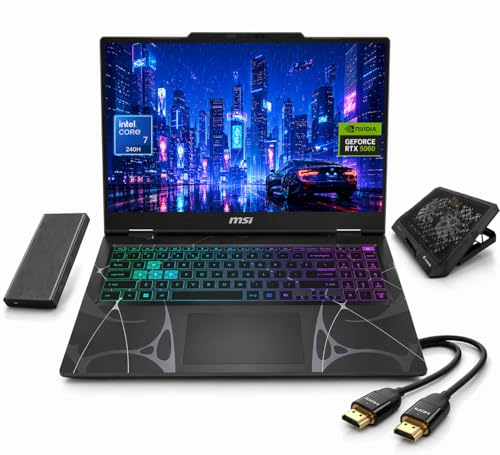 msi Cyborg 15 Gaming Laptop msi Cyborg 15 Gaming Laptop | 【Game Without Limits with RTX 5060】 Unleash pure… 【10-Core Hybrid Power: Intel Core 7 240H】With 10… 【144Hz Smoothness Victory in Every Frame】 The 15.6"… | Check price |
As an Amazon Associate we earn from qualifying purchases at no extra cost to you.
🎮 Get More From Your Setup — Free
Prime Gaming gives you free PC games every month, in-game loot, and a free Twitch channel sub — plus fast free shipping on all the gear above. New members get a 30-day free trial.
Watch: Nvidia Geforce Rtx 50 Series Laptop — Video Review
Design & Build
The RTX 50 laptop lineup spans two distinct philosophies. Machines like the Acer Nitro V 16S and Nitro 16S lean into value: chunky-but-solid chassis, generous cooling, and fast 180Hz WUXGA panels that keep the price accessible. On the other end, the GIGABYTE AERO X16 shows what Blackwell enables in a thin-and-light form factor, wrapping an RTX 5070 into a 165Hz 2560×1600 display with a premium Space Gray finish. Alienware’s 16 Aurora sits in between, offering a bold design and a bright WQXGA screen with an RTX 5050. Across the board, 16-inch 16:10 panels have become the new standard, and that extra vertical space genuinely helps for both gaming and productivity.
Performance
The single biggest reason to buy into RTX 50 is DLSS 4 with Multi Frame Generation, which lets even the RTX 5060-class GPUs push high frame rates in demanding titles. The Acer Nitro V 16S with its RTX 5060 and 572 AI TOPS handles 1600p gaming with the AI features enabled remarkably well, and its Copilot+ variant with the Ryzen AI 7 350 adds serious on-device AI throughput. The RTX 5070 Ti in the top-tier Nitro 16S is the real sweet spot for high-refresh 1440p, while the AERO X16’s RTX 5070 balances portability with strong performance. The entry RTX 5050 machines, like the Nitro V 15 and Alienware 16 Aurora, are best treated as 1080p/1600p performers where DLSS carries the heavier games. Pay attention to total graphics power (TGP), because a higher-wattage RTX 5060 can outrun a throttled RTX 5070 in a thinner chassis.
Pros & Cons
- DLSS 4 Multi Frame Generation dramatically boosts playable frame rates across the stack.
- Strong efficiency from Blackwell, meaning cooler, quieter operation than the previous generation.
- Copilot+ AI features on the newer Ryzen AI and Intel models add real productivity value.
- 16:10 high-refresh panels are now common even at mid-range prices.
- TGP varies wildly between models, so the GPU name alone doesn’t tell the whole story.
- 8GB VRAM on lower cards can constrain future titles at high texture settings.
- Battery life under load remains modest, as always with gaming laptops.
Alternatives to Consider
If portability is your priority, the GIGABYTE AERO X16 is the standout thin option. For maximum value, the Acer Nitro V 16S with the RTX 5060 hits the best price-to-performance ratio, while the RTX 5070 Ti Nitro 16S is the one to buy if you want years of headroom. Budget-conscious buyers eyeing the RTX 5050 machines should compare them against last-gen RTX 40 laptops on clearance, since the older cards can occasionally undercut on price for similar real-world performance.
Frequently Asked Questions
Is 8GB of VRAM enough for RTX 50 laptops?
For 1080p and 1600p gaming today, 8GB is workable, especially with DLSS reducing the rendering load. If you plan to keep the laptop for four or more years and play at high textures, prioritize a model with more VRAM or a higher-tier GPU.
What does DLSS 4 actually do?
DLSS 4 uses AI to upscale and generate additional frames, multiplying your frame rate with minimal visual compromise. It’s the reason mid-range RTX 50 cards feel far faster than their raw specs suggest.
Does the CPU matter as much as the GPU?
The GPU drives gaming performance most, but the newer Ryzen AI and Intel Ultra chips add Copilot+ NPU capabilities and better efficiency. Pair a strong GPU with at least a current-gen CPU to avoid bottlenecks.
Which screen resolution should I pick?
WUXGA (1920×1200) is ideal for RTX 5050/5060 laptops, while WQXGA (2560×1600) suits the RTX 5070 and above. Matching resolution to GPU tier keeps frame rates smooth.
Verdict
The RTX 50 laptop generation is the easiest recommendation NVIDIA has offered in years thanks to DLSS 4. For most buyers, the Acer Nitro V 16S with the RTX 5060 is the value pick, the RTX 5070 Ti Nitro 16S is the performance choice, and the GIGABYTE AERO X16 wins on portability. Match the GPU tier to your target resolution and check the TGP before you buy.