Our Top Picks
 NETGEAR Nighthawk 6-Stream AX5400 WiFi 6 Router25.4 cm x 76.2 cm x 10.2 cm14.7 x 10 x 4.6 inches2.5 poundsCheck on Amazon
 TP-Link AX3000 WiFi 6 Router10.3 x 5.3 x 1.6 inches10.28 x 5.3 x 1.62 inches1.2 poundsCheck on Amazon
A gaming router earns its place when the 5 GHz band stays steady while a match runs, a voice call stays clear, and another device in the next room streams video at the same time. The real decision is not the headline band number alone. It is how the router handles many devices at once, how far its 5 GHz signal reaches through walls, and whether its wired ports give a console or a gaming PC a direct link when wireless play feels uneven.
This guide suits players who share a home with family or roommates, players who move between a desk and a living room console, and households where phones, laptops, and smart devices crowd the same network. The five routers below were chosen from their names and specs on Amazon pages, with a clear 5 GHz band, dual-band WiFi 6, and features that suit gaming in a busy home.
Quick Picks
As an Amazon Associate we earn from qualifying purchases
| Product | Best for | Key spec from title |
|---|---|---|
| ASUS RT-AX86U Pro (AX5700) Dual Band WiFi 6 Extendable Gaming Router, 2.5G Port, Gaming Port, Mobile Game Mode, Port Forwarding, Subscription-Free Network Security, VPN, AiMesh Compatible | A dedicated gaming setup with a wired console | AX5700 dual-band WiFi 6 with a 2.5G port |
| ASUS RT-AX82U (AX5400) Dual Band WiFi 6 Extendable Gaming Router, Gaming Port, Mobile Game Mode, Aura RGB, Included AiProtection Pro Security, Instant Guard, VPN, AiMesh Compatible | A gaming room that also needs wide coverage | AX5400 dual-band WiFi 6 with a gaming port |
| NETGEAR Nighthawk 6-Stream AX5400 WiFi 6 Router (RAX50) – AX5400 Dual Band Wireless Speed (Up to 5.4 Gbps) | A medium to large home with many devices | AX5400 dual-band wireless speed up to 5.4 Gbps |
| TP-Link AX3000 WiFi 6 Router (Archer AX55 Pro) – Multi Gigabit Wireless Internet, 2 x 2.5 Gbps Ports, Dual Band, VPN Router, OFDMA, MU-MIMO, USB 3.0 Port, WPA3, Compatible with Alexa | A desk setup with two wired gaming devices | AX3000 dual-band WiFi 6 with two 2.5 Gbps ports |
| TP-Link AX1800 WiFi 6 Router (Archer AX21) – Dual Band Wireless Internet, Gigabit, Easy Mesh, Works with Alexa – A Certified for Humans Device, Free Expert Support | A first WiFi 6 upgrade for a smaller home | AX1800 dual-band WiFi 6 with four antennas |
How to Choose
Match the 5 GHz band to your rooms
A 5 GHz band moves data with less crowding than a 2.4 GHz band, yet its signal fades sooner through walls and floors. Think about where you play most often and how many walls sit between that spot and the router. A router with four antennas and beamforming can aim its signal toward a device rather than spreading it evenly in every direction. If your gaming spot sits two rooms away, look for a model with a higher band number and a clear coverage figure on its Amazon page. A wired link remains the most direct option for a fixed console or PC, so check the Ethernet ports too.
Count the devices that share the network
A gaming router must serve more than one player at a time in many homes. Phones, laptops, tablets, smart speakers, and a console can all ask for data in the same evening. WiFi 6 features such as OFDMA and MU-MIMO help the router share airtime among many devices instead of serving each one in turn. Look for a model that names those features in its title or specs, and note how many streams it offers. A six-stream model can handle a crowded evening with more ease than a four-stream model, while a home with only a few devices may not need that much headroom.
Check the wired ports before you buy
Wireless play suits many gamers, yet a wired link can give a console or a gaming PC a steadier path to the router. A 2.5 Gbps port suits an internet plan above one gigabit and a network drive that moves large game files. A dedicated gaming port can give one wired device priority over other wired traffic on the same router. Count the LAN ports on the back of the router and match them to the devices that will stay plugged in all day. If you plan to add a second console, a PC, and a network drive, a router with only a few ports may leave you short.
Look for gaming and security tools that you will use
Gaming routers often add a mobile game mode, a gaming port, and tools that shape traffic for play. Those tools help most when several people use the network at once and a game must stay smooth while video plays elsewhere. Security tools also matter, because a router guards every device in the home. Look for WPA3 security, a VPN option, and network security that does not ask for a recurring plan. A mesh option helps too, because it lets you add a second node later if one router cannot reach a far bedroom or a basement gaming corner.
The 5 Best Options
ASUS RT-AX86U Pro (AX5700) Dual Band WiFi 6 Extendable Gaming Router, 2.5G Port, Gaming Port, Mobile Game Mode, Port Forwarding, Subscription-Free Network Security, VPN, AiMesh Compatible

The ASUS RT-AX86U Pro (AX5700) Dual Band WiFi 6 Extendable Gaming Router, 2.5G Port, Gaming Port, Mobile Game Mode, Port Forwarding, Subscription-Free Network Security, VPN, AiMesh Compatible suits a player who wants a wired console to hold priority while the rest of the home stays online. Its dedicated gaming port gives one wired device a clear path, and its mobile game mode aims to keep phone play smooth. The 2.5G port suits a fast wired link, and AiMesh support lets you add a second ASUS node later for a far room.
Specs
- Dual-band WiFi 6 with AX5700 combined band
- 2.5G port for a wired link
- Dedicated gaming port
- Mobile Game Mode
- Subscription-free network security
- VPN support
- AiMesh compatible
Best for: A wired console setup where one device needs priority during play.
Watch out for: The gaming port serves only one wired device at a time, so plan which device plugs in there.
ASIN: B0BQ417K47
ASUS RT-AX82U (AX5400) Dual Band WiFi 6 Extendable Gaming Router, Gaming Port, Mobile Game Mode, Aura RGB, Included AiProtection Pro Security, Instant Guard, VPN, AiMesh Compatible
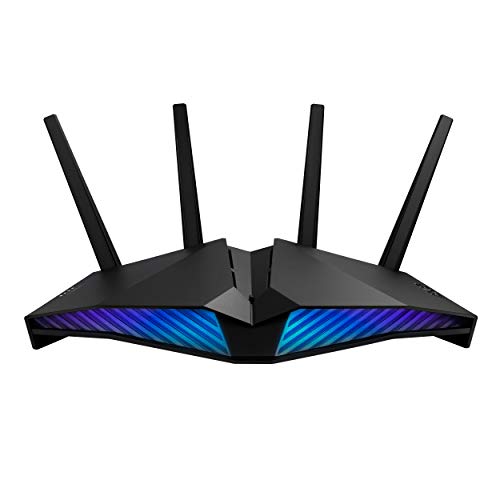
The ASUS RT-AX82U (AX5400) Dual Band WiFi 6 Extendable Gaming Router, Gaming Port, Mobile Game Mode, Aura RGB, Included AiProtection Pro Security, Instant Guard, VPN, AiMesh Compatible brings gaming tools and a bright Aura RGB front to a living room setup. Its gaming port and mobile game mode aim to keep play smooth when other devices use the network, while AiProtection Pro adds security for the whole home. AiMesh support lets you extend coverage later, and the VPN option suits a player who wants a private link for remote access.
Specs
- Dual-band WiFi 6 with AX5400 combined band
- Dedicated gaming port
- Mobile Game Mode
- Aura RGB lighting
- AiProtection Pro security included
- Instant Guard VPN
- AiMesh compatible
Best for: A gaming room where lighting, coverage, and a wired console all matter.
Watch out for: The RGB lighting may feel bright in a dark room, so check the app controls for the front lights.
ASIN: B08BJJ3RGW
NETGEAR Nighthawk 6-Stream AX5400 WiFi 6 Router (RAX50) – AX5400 Dual Band Wireless Speed (Up to 5.4 Gbps)
The NETGEAR Nighthawk 6-Stream AX5400 WiFi 6 Router (RAX50) – AX5400 Dual Band Wireless Speed (Up to 5.4 Gbps) suits a medium to large home where many devices share the same network in the evening. Its six streams help the router serve phones, laptops, and consoles at once, while its dual-band WiFi 6 design keeps the 5 GHz band clear for play. The Nighthawk app gives a simple way to manage the network from a phone, and its coverage figure suits a home with several rooms.
Specs
- Dual-band WiFi 6 with AX5400 combined band
- Six streams for many devices
- Wireless speed up to 5.4 Gbps
- Coverage for up to 2,500 square feet
- Four 1G Ethernet ports and one USB 3.0 port
- Dual band with 2.4 GHz and 5 GHz
- Nighthawk app control
Best for: A busy household where a 5 GHz band must serve many devices at once.
Watch out for: Its angular body takes up desk space, so measure the shelf before you place it.
ASIN: B082X17B8P
TP-Link AX3000 WiFi 6 Router (Archer AX55 Pro) – Multi Gigabit Wireless Internet, 2 x 2.5 Gbps Ports, Dual Band, VPN Router, OFDMA, MU-MIMO, USB 3.0 Port, WPA3, Compatible with Alexa
The TP-Link AX3000 WiFi 6 Router (Archer AX55 Pro) – Multi Gigabit Wireless Internet, 2 x 2.5 Gbps Ports, Dual Band, VPN Router, OFDMA, MU-MIMO, USB 3.0 Port, WPA3, Compatible with Alexa suits a desk where two wired devices need a fast link at once. Its two 2.5 Gbps ports give a gaming PC and a console room to move large files, while OFDMA and MU-MIMO help the 5 GHz band share airtime among wireless devices. The USB 3.0 port adds a way to share a drive, and WPA3 security guards the network.
Specs
- Dual-band WiFi 6 with AX3000 combined band
- Two 2.5 Gbps ports
- OFDMA and MU-MIMO
- USB 3.0 port
- VPN router support
- WPA3 security
- Compatible with Alexa
Best for: A desk setup with a gaming PC and a console both wired to the router.
Watch out for: A plan above one gigabit is needed to use the full wired headroom of the 2.5 Gbps ports.
ASIN: B0BTD7V93F
TP-Link AX1800 WiFi 6 Router (Archer AX21) – Dual Band Wireless Internet, Gigabit, Easy Mesh, Works with Alexa – A Certified for Humans Device, Free Expert Support

The TP-Link AX1800 WiFi 6 Router (Archer AX21) – Dual Band Wireless Internet, Gigabit, Easy Mesh, Works with Alexa – A Certified for Humans Device, Free Expert Support suits a first WiFi 6 upgrade in a smaller home. Its 5 GHz band reaches up to 1,201 Mbps, while its 2.4 GHz band reaches up to 574 Mbps for devices farther from the router. Four high-gain antennas and beamforming help the signal reach a gaming spot in the next room, and EasyMesh support lets you add a node later if coverage falls short.
Specs
- Dual-band WiFi 6 with AX1800 combined band
- 5 GHz band up to 1,201 Mbps
- 2.4 GHz band up to 574 Mbps
- Four high-gain antennas
- Gigabit Ethernet ports
- EasyMesh compatible
- Works with Alexa
Best for: A smaller home moving from an older router to WiFi 6 for gaming.
Watch out for: Its Gigabit ports cap a wired link at one gigabit, so a faster plan will not show its full speed here.
ASIN: B08H8ZLKKK
Which One Fits Your Situation
One wired console that must hold priority
Pick the ASUS RT-AX86U Pro when a single console sits at the center of your play and the rest of the home stays online. Its dedicated gaming port gives that one wired device a clear path, while the 2.5G port suits a fast wired link. Mobile Game Mode helps when you switch to a phone, and AiMesh support lets you add a node later for a far bedroom.
A living room gaming setup with many devices
Pick the ASUS RT-AX82U or the NETGEAR Nighthawk RAX50 when the living room holds a console, a TV, phones, and laptops at once. The ASUS model adds a gaming port and Aura RGB for a gaming corner, while the NETGEAR model adds six streams for a crowded evening. Either one keeps the 5 GHz band clear for play while other devices stream and browse nearby.
A desk with a gaming PC and a console
Pick the TP-Link Archer AX55 Pro when your desk holds a gaming PC and a console side by side. Its two 2.5 Gbps ports give both wired devices a fast link, while OFDMA and MU-MIMO help wireless devices share the 5 GHz band. The USB 3.0 port adds a simple way to share a drive between devices on the same network.
A first upgrade in a smaller home
Pick the TP-Link Archer AX21 when you want a simple WiFi 6 upgrade without a complex setup. Its AX1800 dual-band design gives the 5 GHz band room for gaming, while its four antennas and beamforming help the signal reach the next room. EasyMesh support lets you add a node later if a far corner still needs a stronger signal.
Common Mistakes
- Placing the router behind a TV or inside a closed cabinet, where the 5 GHz signal weakens before it reaches your gaming spot.
- Using only the 2.4 GHz band for gaming when the 5 GHz band sits free and less crowded in the same home.
- Plugging a console into a distant wall jack instead of a direct Ethernet link to the router for a fixed setup.
- Ignoring the number of wired ports, then finding no free LAN port for a second console or a gaming PC.
- Skipping the router app setup, which leaves gaming tools, security options, and band controls at their default settings.
Frequently Asked Questions
Is a 5 GHz band better than a 2.4 GHz band for gaming?
A 5 GHz band often suits gaming better in the same room as the router, because it carries more data with less crowding from nearby networks. A 2.4 GHz band reaches farther through walls, so it suits a device in a far room or a smart device that needs range more than speed. Many players use 5 GHz near the router and 2.4 GHz farther away.
Do I need WiFi 6 for a 5 GHz gaming router?
WiFi 6 helps most in a home with many devices, because OFDMA and MU-MIMO let the router share airtime with more ease. A WiFi 5 router can still play well with only a few devices, yet a WiFi 6 model gives more headroom for phones, laptops, and consoles at once. The five routers in this guide all use WiFi 6.
Can a gaming router help when many people use the network?
Yes, a gaming router can help when its gaming port, mobile game mode, or traffic tools give play priority over other traffic. Those tools work best when the router can see the traffic clearly, so a wired link for the main gaming device helps. A strong 5 GHz band also helps, because it keeps gaming traffic on a less crowded band.
How far should my gaming device sit from the router?
A gaming device plays best in the same room as the router or in the next room with a clear path for the 5 GHz signal. Thick walls, floors, and metal furniture can weaken that signal, so a device two rooms away may do better on a wired link or a mesh node. Place the router high and in the open for the clearest path.
FAQ
Is a 5 GHz band better than a 2.4 GHz band for gaming?
Do I need WiFi 6 for a 5 GHz gaming router?
Can a gaming router help when many people use the network?
How far should my gaming device sit from the router?
More from Amazon
Programs that pair well with the guide above. Offers and eligibility are set by Amazon and may change.
Free shipping on eligible items, Prime Video and more. Eligible new members can start with a free trial.
Start a Prime free trialAd-free music streaming. Eligible new subscribers can start with a free trial.
Try Music Unlimited freeA Prime membership for ages 18-24 with a trial period. Eligibility is set by Amazon.
See Prime for Young AdultsAudiobooks and podcasts to listen to on the go. Eligible new members can start with a free trial.
Try Audible freeAs an Amazon Associate we earn from qualifying purchases.