Key takeaways
- Target 50 to 70 percent load for the best efficiency, noise, and longevity.
- Account for GPU transient spikes, which can briefly far exceed the average draw.
- Leave room for a future GPU or CPU upgrade so you are not buying a new PSU next year.
The power supply is the most overlooked component in a gaming build, and also one of the most important to get right. Pick too little wattage and your system will crash under load, refuse to boot, or damage components over time. Pick a massively oversized unit and you waste money and run less efficiently. The trick is choosing a PSU that comfortably covers your components with sensible headroom for spikes and future upgrades.
This guide explains how to calculate the wattage you actually need, why transient power spikes from modern GPUs matter, what efficiency ratings and connectors to look for, and how to leave room for upgrades. By the end you will be able to pick a PSU with confidence rather than guessing or blindly buying the biggest number on the shelf.
Our top picks
 Computer PC Power Supply Tester
- [8-in-1 ATX Power Supply Tester] -- Support test…
- [Aluminum Alloy Enclosure] -- Light and Easy to…
- [1.8'' LCD Screen] -- Outputted Voltages shows on…
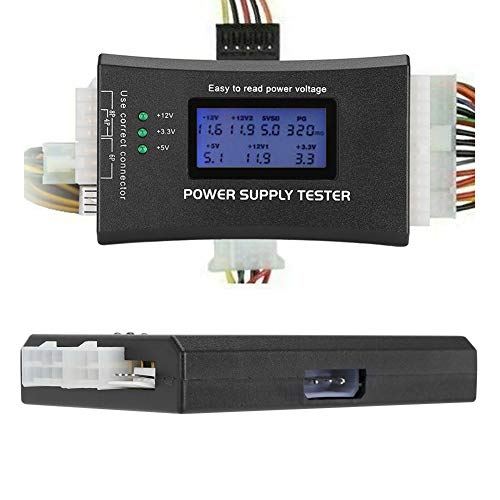 ATX Power Supply Tester
- LCD liquid crystal display, the output voltage is…
- It can also measure the output wire P4/P6/P8/SATA/IDE,…
- MINI and PRACTICAL: Now the number of power…
 Rack Mount Power Strip
- Reliable Power Distribution - Backed by a 3…
- Designed For Your Safety - This rack mount…
- Power Up Your Server - This PDU power…
| Product | Key specs | |
|---|---|---|
| Computer PC Power Supply Tester | [8-in-1 ATX Power Supply Tester] -- Support test… [Aluminum Alloy Enclosure] -- Light and Easy to… [1.8'' LCD Screen] -- Outputted Voltages shows on… | Check price |
| ATX Power Supply Tester | LCD liquid crystal display, the output voltage is… It can also measure the output wire P4/P6/P8/SATA/IDE,… MINI and PRACTICAL: Now the number of power… | Check price |
| Rack Mount Power Strip | Reliable Power Distribution - Backed by a 3… Designed For Your Safety - This rack mount… Power Up Your Server - This PDU power… | Check price |
 inShareplus 12V 33A 400W inShareplus 12V 33A 400W | Check price | |
 Upgraded 942332-001 L04618-800 400W Power Supply L04618-400 Upgraded 942332-001 L04618-800 400W Power Supply L04618-400 | Check price |
As an Amazon Associate we earn from qualifying purchases at no extra cost to you.
⚡ Save on Your Next PC — Amazon Prime
Prime members get fast free shipping on the systems above, plus early access to Prime Day & Black Friday PC deals. New members get a 30-day free trial.
Watch: How to Pick the Right PSU Wattage — Video Review
Start by Adding Up Your Component Draw
Your two biggest power consumers are the GPU and CPU. A modern mid-range GPU might draw 200 to 250 watts, while a high-end card can pull 300 to 450 watts or more under load. Add your CPU, which ranges from around 65 watts for efficient chips to 250 watts for overclocked flagships. Then add a modest 50 to 100 watts for the motherboard, RAM, drives, and fans. Total those figures to get your real-world peak system draw before headroom.
Add Headroom for Spikes and Efficiency
Never buy a PSU that only just meets your calculated peak. Modern GPUs produce brief transient spikes that can momentarily hit double their rated draw for milliseconds, tripping the protection on a marginal PSU. Aim to run your system at roughly 50 to 70 percent of the PSU’s rated capacity under full load. So if your components peak around 500 watts, a quality 750-watt unit is the sweet spot, giving spike headroom and running in its most efficient range.
- Target 50 to 70 percent load for the best efficiency, noise, and longevity.
- Account for GPU transient spikes, which can briefly far exceed the average draw.
- Leave room for a future GPU or CPU upgrade so you are not buying a new PSU next year.
Understand Efficiency Ratings
The 80 Plus rating, from Bronze up through Gold, Platinum, and Titanium, tells you how much wall power actually reaches your components versus being lost as heat. For a gaming rig, 80 Plus Gold is the practical sweet spot, wasting little energy and running cooler and quieter. Higher ratings cost more for diminishing returns unless you run the system heavily around the clock. A more efficient unit also means less heat dumped into your case.
Check Connectors and Form Factor
Wattage is not the only spec. Make sure the PSU has the right PCIe power connectors for your GPU, including the newer 12-pin or 12V-2×6 connector that high-end 2026 cards use. Confirm it is the correct form factor, ATX for most builds or SFX for small cases, and consider a fully modular unit so you only connect the cables you need for cleaner airflow and easier building.
Test and Verify Your Power Setup
If you are troubleshooting a build that will not power on or is unstable under load, a PSU tester can quickly confirm whether the unit is delivering correct voltages on each rail. Inexpensive ATX power supply testers with an LCD readout, or a full 24-pin tester unit, let you rule the PSU in or out before you start swapping other parts. Stable, correct voltages under load are the foundation of a reliable gaming PC.
Tips for Choosing a PSU
- Buy from a reputable brand with a long warranty; the PSU protects everything else in your system.
- Size for your next GPU, not just your current one, if an upgrade is likely.
- Prefer fully modular for cleaner cable management and better airflow.
- Do not cheap out here; a failing PSU can take other components with it.
Frequently Asked Questions
Is a higher wattage PSU always better?
Not necessarily. A hugely oversized PSU runs at a lower, less efficient load and costs more without benefit. Choose a wattage that puts your system at roughly 50 to 70 percent load under full stress for the best balance.
What wattage do I need for a mid-range gaming PC?
A typical mid-range build with a 200 to 250 watt GPU is well served by a quality 650 to 750 watt unit. That covers peak draw, transient spikes, and leaves room for a future upgrade.
Do GPU power spikes really matter?
Yes. Modern GPUs can spike to nearly double their average draw for a fraction of a second. A PSU sized only to the average can trip its protection and shut down, which is why headroom matters more than ever.
What does 80 Plus Gold mean?
It is an efficiency certification indicating the PSU wastes relatively little power as heat across typical loads. Gold is the sweet spot for gaming, offering strong efficiency and cooler, quieter operation without the premium price of Platinum or Titanium.
Conclusion
Picking the right PSU wattage is a matter of adding up your components, applying sensible headroom so you run around 50 to 70 percent load, and accounting for GPU transient spikes and future upgrades. Choose an 80 Plus Gold unit from a trusted brand with the connectors your GPU needs, and verify it delivers stable voltages. Do that and your power supply will quietly and reliably keep your gaming PC running for many years.