
Looking for the best Switch 2 dock cooling fans? Start with one fact that changes the buying decision: Nintendo’s official Switch 2 dock already has its own fan. An add-on cooling base is optional, not a repair for a failed dock fan or a guaranteed way to gain frames per second. If your dock works normally in an open, ventilated space, spending nothing may be the best choice. If you want adjustable airflow, a tidier base, game-card storage, or extra low-power USB ports, six named accessories merit consideration—but some are imports and none has independent, directly comparable temperature testing across this group.
Quick verdict: Which Switch 2 dock cooling fan makes sense?
The JSAUX GP0203 Intelligent Cooling Platform is the most configurable option on paper: a rotary speed control, a numerical fan display, and a manufacturer’s Switch 2 dock-mode compatibility statement. However, its page was marked “Coming Soon” when checked, so it cannot be treated as a reliably in-stock US recommendation. The NEWDERY Dual-Fan Cooling Base is a more practical first price-and-availability check for US buyers: its US-facing product page listed an in-stock unit with six game-card positions and USB expansion. For a modest dual-fan base with RGB lighting, consider the IINE L1101, but confirm that the exact model and cable arrangement are supported by the US seller.
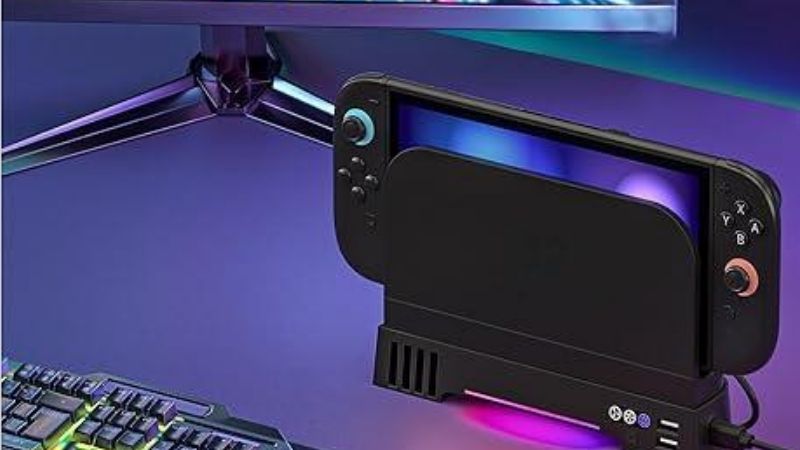
The DOBE TNS-31111 makes more sense when you want eight card slots and simple preset fan speeds, although US fulfillment is unconfirmed. The ELECOM GM-NS225DC01BK is the unusual space-management pick because its stand can accommodate supported upright and angled configurations; it is principally a Japanese-market product. The Oniverse Hubble is the specialist choice for owners interested in legacy GameCube controller ports as well as a dock fan, but that extra complexity and uncertain US availability make it inappropriate as a general-purpose default.
Most importantly, if the console freezes, shuts down because it is too hot, or stops providing TV output or charging, follow Nintendo’s troubleshooting and service instructions first. Do not disguise a hardware fault with an external accessory.
At a glance: Six real dock-fan accessories
| Accessory | What the source confirms | Most useful for | US price and availability status | Biggest reason to hesitate |
|---|---|---|---|---|
| JSAUX Intelligent Cooling Platform GP0203 | Switch 2 dock-mode base; 1,000–6,500 RPM adjustment; digital display; six card slots; USB-C 5V/1A power input | Fine fan-speed control and visible settings | Manufacturer lists $29.99; page also says “Coming Soon” | Listed temperature reductions are manufacturer claims, not our measurements |
| NEWDERY Dual-Fan Cooling Base | Switch 2 dock accessory; dual fans; three adjustable speeds, RGB lighting and six card slots advertised | US buyers wanting a multi-function accessory now | US-facing brand store listed $29.99 and in stock when checked | Product description contains unrelated phone-power-bank copy; confirm specs before checkout |
| IINE RGB Cooling Base L1101 | Official IINE dock-cooling product; external distributor identifies dual fans, RGB and USB expansion | Low-complexity RGB desktop setup | IINE lists $31.99; exact US shipping and stock require checkout | Detailed electrical specs and independent acoustic testing are unavailable |
| DOBE TNS-31111 | Switch 2-specific dock fan model listed by DOBE; retailer describes dual fans, three speed settings, eight card slots, two USB output ports | Physical-game owners who need more desk storage | US retail availability and delivered price not verified | Third-party retailer descriptions are not performance tests |
| ELECOM GM-NS225DC01BK | Official Switch 2 dock cooling-fan stand; upright and four angled positions; variable airflow; USB-powered | Tight entertainment-center layouts when imported | Japanese launch reference ¥4,980; US landed price not verified | Imported product, and angled use must follow ELECOM instructions |
| Oniverse Hubble ventilated dock stand | Official dock sits on the stand; three fan speeds; two USB-A and four GameCube-style controller ports; wall-mount option | Retro-controller and multi-device enthusiasts | US shipping and checkout price unverified | More ports and cabling than a cooling-only buyer needs |
Price note: Prices above are manufacturer or retailer page observations, not guaranteed live checkout quotes. No measured before-and-after temperature, decibel, or frame-rate ranking is available for these six models. An extra fan and a higher advertised RPM are not proof of better gaming performance.
Before you spend money, understand what is being cooled
The Switch 2 console and its dock have different cooling jobs
In TV mode, the console does the gaming computation while the dock handles a different set of tasks, including connections and power-related functions. Nintendo says the Switch 2 dock has a built-in fan; Nintendo support also treats the dock’s fan as serviceable hardware that should operate in the relevant TV-mode conditions. A 2026 independent thermal-camera comparison by Deku Deals discusses the stock dock fan primarily as cooling for the dock’s internals, not a direct cooling solution for the console’s processor. That distinction matters when advertising promises “cooler console equals more FPS.”
A stand that blows room air upward may change the temperatures of some external surfaces. It does not necessarily change internal chip temperature, clock speed, fan curve, or sustained game performance. To establish that kind of benefit, a reviewer would need a controlled test: same game and workload, same dock, same room conditions, same console firmware, comparable sensor or thermal-camera placement, and multiple runs. Neither a single product-page thermal image nor a manufacturer’s unspecified laboratory figure is equivalent to that evidence.
A warm dock is not automatically overheating
Nintendo’s US help center explains that it is normal for a Switch 2 to feel warm during use. A wired LAN connection can also leave some power consumption in sleep mode. A warm plastic shell is therefore not a reliable diagnostic by itself. Look instead for functional symptoms: lost TV video, USB ports stopping charging, a dock fan that fails to run during conditions when it should, repeated system shutdowns, or an overheating warning.
When those symptoms appear, give the stock system unobstructed ventilation, let an overheated dock cool with power disconnected as Nintendo instructs, and use its official service flow if trouble persists. An add-on fan should not be marketed as a substitute for those actions. Some fan bases even create a new obstruction if their outlet sits directly against the stock dock’s vent.
Why a cooling accessory may still be worth buying
There are reasonable, non-miraculous reasons to add a base: you may prefer a stable platform on a clean desk; physical cartridge slots can clear clutter; a fan-speed knob can offer audible control; or an accessory with documented charging ports can organize controller cables. If you keep the official dock inside a tight TV cabinet, the correct first intervention is to move it into a more open area—not to rely on a stronger fan inside the same unventilated enclosure.
In other words, purchase a dock fan because its complete design matches your desk, access needs, power arrangement, and risk tolerance. Treat thermal benefits as conditional until independently measured for your exact setup.
Best Switch 2 dock cooling fans: Detailed reviews
JSAUX GP0203 Intelligent Cooling Platform — Best for fine adjustment
JSAUX’s GP0203 offers the clearest published control specifications in this group. The manufacturer identifies a Switch 2 dock-mode cooling platform powered through USB-C at 5V/1A, with power consumption listed below 2.2W. Its rotary fan control is said to span 1,000–6,500 RPM, and a small digital display reports fan speed. The platform also incorporates six game-card slots. JSAUX lists approximate dimensions of 59.8 × 77.3 × 85.4 mm and weight around 159 g for the assembly it describes. The package includes a short USB-A-to-USB-C lead.
Why choose it: A continuous dial is potentially more useful than switching among three fixed fan speeds. If the fan’s noise becomes distracting during quieter games, the ability to adjust it without navigating a phone app or relying on RGB presets is a practical feature. A displayed number can help you return to the same setting after turning the device off. Six cartridge positions are helpful if those are games you rotate through regularly.
The critical caveat: JSAUX advertises reductions of up to 10–12°C for the console and 2–4°C for the dock. Those figures are manufacturer claims. The product page does not provide enough independently comparable methodology to let us promise those reductions on your setup or infer a frame-rate improvement. They should not be treated as our benchmark. The product also advertised a $29.99 price while simultaneously showing “Coming Soon.” That status makes it a model to watch, rather than one we can confidently tell a US buyer to order immediately.
Pros: Precise speed setting; digital indication; maker-stated Switch 2 dock-mode compatibility; documented low-power input; six storage positions.
Cons: Inconsistent purchase status; thermal marketing requires independent validation; short supplied cable may constrain placement; extra platform footprint compared with the bare official dock.
Who should buy it: The buyer who wants manual control and is willing to verify stock, return policy, case clearance, and airflow direction before paying. Skip it if your goal is a guaranteed 10°C reduction or an FPS boost. Neither outcome has been established by a comparable independent test here.
NEWDERY Dual-Fan Cooling Base — Best first US availability check
NEWDERY lists a cooling fan for the Nintendo Switch 2 dock on a US-dollar storefront. The product title identifies dual fans and three adjustable speeds. Its product imagery promotes six game-card slots, RGB lighting modes, and USB port expansion. At the time of research, the store displayed a $29.99 price and an “In stock, ready to ship” label. Those are meaningful advantages in a small accessory category where other listings are marked “Coming Soon” or are sold chiefly overseas.
Why choose it: It combines several everyday desk functions in one object: support under the original dock, a choice of airflow settings, cartridge organization, lighting for users who want it, and accessory port convenience. If all you need is a small cooling station you can actually price-check in a US storefront, this is a more direct lead than chasing an obscure import. Its fixed speed presets may also be sufficient for a person who does not care about recording exact RPM.
The critical caveat: The same product page contains unrelated description paragraphs for an iPhone magnetic power bank, including a 10,000mAh battery and charging figures. Those paragraphs clearly should not be applied to the Switch 2 fan. Accordingly, we treat the photos and core Switch 2 product identity as a manufacturer listing but do not accept the unrelated battery or power claims as specifications of this cooling base. Request or verify the actual user manual, power connector arrangement, and USB output limits before connecting expensive accessories to its expansion ports.
Pros: US-facing pricing and availability label; dedicated Switch 2 dock product; dual-fan design; multiple desk accessories combined.
Cons: Incorrect copy on the sales page lowers confidence in secondary technical details; fan acoustic measurements not independently established; another layer of USB cabling; RGB may be unwanted in a living room.
Who should buy it: A US buyer who wants a branded, reasonably accessible base and is comfortable verifying the missing power and port details at checkout. Do not rely on generic promises such as “prevent overheating” as proof that the base fixes a defective dock.
IINE L1101 RGB Cooling Base — Best for a simple RGB desktop setup
IINE offers a Switch 2 cooling base through its official store. A retailer identifying the exact L1101 model describes two high-speed fans, RGB lighting, USB expansion and power drawn from the dock’s USB interface. That is a coherent feature set for a gaming desk where decorative lighting matters more than a speed readout. The manufacturer’s US-dollar product page listed the IINE RGB Cooling Base at $31.99 when checked, but the detailed specifications were sparse in the page text.
Why choose it: Compared with a feature-heavy port station, the IINE’s appeal is a narrower combination of active airflow and appearance. You can keep the stock dock responsible for the TV connection while using the accessory chiefly as an under-dock base. The exact L1101 model reference is important: IINE makes other Switch products, and a similarly named fan for an older console should not be assumed to fit the newer dock.
The critical caveat: Publicly accessible specifications do not establish exact fan dimensions, decibel ratings, total pass-through port budget, or real cooling improvement in a US living-room setup. Third-party retailer descriptions can corroborate features but are not laboratory data. Check that the seller is showing L1101 and that the connector attaches where the instructions specify. RGB control and fan-speed switching should be confirmed for that revision, rather than inferred from a stock photo.
Pros: Real IINE brand listing; identifiable Switch 2 model; dual-fan feature described by an independent retailer; useful for a gaming desk with visible accessories.
Cons: Sparse maker specifications; exact US delivery status not confirmed; no comparable heat/noise test; RGB does not add cooling performance by itself.
Who should buy it: Someone who values appearance alongside light accessory functionality and can obtain a clear seller description with a return policy. If you care only about function, a clean, open shelf may be the simpler solution.
DOBE TNS-31111 — Best for physical-game organization
DOBE lists model TNS-31111 as a cooling fan for Switch 2, giving this product a clear identity rather than an anonymous marketplace title. Regional retailer descriptions give the accessory a dual-fan layout, three speed selections, up to eight game-card slots, RGB lighting, and two USB output ports. One Japanese retailer specifies USB outputs rated at 5V/1A each and a fan operating current of approximately 300mA; those are retailer-supplied figures and should be checked against the unit’s included manual. A separate reseller lists the TNS-31111 in its Switch 2 accessory catalog.
Why choose it: Eight slots can make a tangible difference for a household with a large collection of physical Switch 2 games. Unlike a loose cartridge organizer, storage integrated into a dock base keeps the games near the console. The low/medium/high speed concept is easy to understand, and RGB can usually be treated as decoration rather than a performance feature. For someone already looking for desk organization, the cooling function is an extra rather than the only reason to purchase.
The critical caveat: This is not the same as a dock that replaces Nintendo’s video-output hardware. The accessory is described as a support or cooling unit used with the original dock. Verify this distinction in the product pictures and manual: Nintendo’s dock should remain responsible for official TV and power connections. Also, do not assume every USB output provides high-speed charging because the product includes two ports. A 5V/1A accessory port, where confirmed, is suitable for limited loads, not a universal high-power source. At the time of research, an authoritative US delivered price or stock status was not established.
Pros: Exact DOBE model; eight game-card slots; clear preset controls; additional connections described by retailers; documented Switch 2 focus.
Cons: US supply chain uncertain; port ratings depend on the precise seller revision; no independent thermal results; size and lighting may add clutter.
Who should buy it: Physical-media owners who prefer all-in-one desktop organization, especially if they find a seller that verifies the TNS-31111 and accepts returns. Do not select it purely because “dual fan” sounds faster than one fan; fan count alone does not measure useful airflow.
ELECOM GM-NS225DC01BK — Best for unusual shelf layouts
Japanese accessory maker ELECOM announced the GM-NS225DC01BK in February 2026 specifically as a fan stand for the Nintendo Switch 2 dock. Unlike typical flat cooling bases, ELECOM describes support for upright placement and an angled, more horizontal arrangement with four angle settings. It says the angled setup can sit around 10 cm high, potentially helping with a low television shelf. An air-volume adjustment switch controls the fan, the stand has anti-slip contact points, and USB power can be drawn from the dock through an included USB-A-to-USB-C cable.
Why choose it: This model has the clearest differentiating mechanical design of the group. Owners of a television unit with limited vertical clearance often focus on buying stronger fans, but moving the dock to a configuration with more open breathing room can matter more. ELECOM’s adjustable format gives you a way to solve a layout problem while preserving access to the console and original dock. The company specifically notes that angled operation must follow supported positions rather than placing the product completely flat.
The critical caveat: ELECOM’s announcement is Japanese-market documentation, with a launch price reference of ¥4,980, not a verified US checkout price. Importing changes the value equation through shipping, tax, warranty, instructions and return logistics. Buyers must not improvise an unsupported orientation simply because the hardware appears physically capable of lying down. A partly covered vent could defeat the purpose of buying a fan.
Pros: Official manufacturer model and documentation; space-oriented mechanics; variable airflow; included cable; non-slip supports.
Cons: Japan-oriented availability; warranty and US returns may be awkward; the manufacturer does not supply independent gaming FPS results; setup rules are stricter in angled mode.
Who should buy it: A confident importer with a real clearance problem who can read the model’s instructions and verify total landed cost. For most US homes with a normal shelf, a standard ventilated dock position is lower risk and less expensive.
Oniverse Hubble — Best for legacy-controller enthusiasts
Oniverse’s Hubble is a ventilated dock stand with broader connection features than a typical fan. Its manufacturer describes placing the original Switch 2 dock on the stand and connecting it with a USB-A-to-USB-C cable. It also specifies three fan speeds, two USB-A ports, four GameCube-style controller connections, eight LED modes, and a wall-mount option with included mounting hardware. The company positions the stand partly around using older wired controllers alongside modern ones.
Why choose it: The point is not a magic temperature reduction; it is consolidating a complicated controller-focused gaming area. If you regularly switch between titles that use a modern controller and games where you want legacy-style controls, dedicated ports could be more useful than finding a spot for several loose adapters. The wall-mounting option also distinguishes the Hubble from a base that must stay on a horizontal shelf.
The critical caveat: Physical port presence does not prove that every GameCube controller, every game, or every Switch 2 firmware release will handle inputs as expected. Verify the exact controller types, mode support, and any required settings with Oniverse and Nintendo before purchase. Oniverse’s marketing promise to avoid performance drops is not an independent benchmark. We did not verify US stock, final shipping price or US warranty support.
Pros: Four classic controller ports; two USB-A connections; configurable fan speed; lighting options; wall-mount possibility.
Cons: Complex cabling; compatibility must be checked at the controller and game level; US availability unclear; potentially excessive for a user who only wants an extra fan.
Who should buy it: A dedicated retro-controller player who values the additional functions enough to tolerate international purchasing and compatibility checks. Cooling-only shoppers should pick a simpler base—or keep the built-in fan and buy nothing.
How we selected these accessories
Verifiable identities mattered more than impressive marketing
We included only named accessories with a manufacturer page, documented model, or clearly attributable product listing. That is why this roundup does not pad itself with six near-identical, unbranded marketplace titles claiming an unexplained “200% airflow boost.” The JSAUX, IINE, DOBE and ELECOM models each have traceable brand/model evidence; NEWDERY and Oniverse have identifiable manufacturer pages. Where a description is incomplete or internally inconsistent, this article says so.
These are research-based selections, not hands-on tests performed by GeekGamingTricks. Manufacturer features, retail listings and Nintendo support establish what the products are and what vendors claim. They do not establish which one makes a particular game run faster, how long the bearings last, or what temperature a different person’s Switch will reach.
We evaluated airflow path, power, controls and returnability
A useful cooling base should permit the original dock’s vents and the console’s air intakes/exhaust to remain exposed. The direction of forced air matters: blowing against a narrow opening or blocking the stock dock fan can create turbulence or resistance rather than effective cooling. The base should also fit without tipping, tugging on the USB cable, or crowding the entertainment cabinet. Fan controls are a comfort feature; higher RPM is not automatically better if the fan is small, whiny, or badly positioned.
Electrical details are equally important. An accessory described as USB powered is not automatically a suitable substitute for the original Nintendo AC adapter. Auxiliary 5V USB ports should never be assumed to support the console’s TV-mode power needs or full-speed charging of an unrelated device. When power limits are undocumented, treat them as unknown. Lastly, availability matters: a product that exists only on an overseas listing is less convenient for a US reader than one with a verifiable US storefront and reasonable return terms.
No temperature or decibel leaderboard is justified yet
We did not find a common independent protocol measuring all six accessories on the same Switch 2, in the same location, with matched temperatures, microphone distance, game build, dock revision and thermal camera settings. Ranking them by “°C saved” would therefore be misleading. The one model that advertises a large numerical improvement, the JSAUX GP0203, gets credit for being explicit about the claim—not for proving it externally. Likewise, two fans do not necessarily beat one well-positioned fan.
Buying guide: Check these details before checkout
Does the product sit under the Nintendo dock or replace it?
A cooling base for the original dock is different from a third-party TV dock. The former should generally leave Nintendo’s official dock performing video and power functions. The latter introduces separate video, charging and firmware compatibility questions, making it a different purchase category. Switch 2 docking behavior has historically been sensitive to firmware and accessory implementation. If your goal is only supplementary airflow, the easiest way to reduce risk is to keep the official TV dock and its original supported power arrangement.
Read the product manual, not just the marketplace title. Look for the words “for Nintendo Switch 2 Dock,” model numbers and photographs showing the actual stock dock seated correctly. Reject listings that show only an original Switch or OLED dock without explicit Switch 2 compatibility. A generic fan cannot become a verified Switch 2 accessory merely because the seller adds “2026 model” to the headline.
Can the original vents still breathe?
Inspect where the fan blows and where the built-in dock exhausts warm air. The console also has its own ventilation path. Do not attach decorations, stickers, wraparound covers or fan shrouds across these openings. Consider where the hot air goes after it leaves the enclosure: if it immediately hits a closed cabinet wall, the air around the dock can continue warming even when a fan runs at maximum speed. The correct solution may be an open shelf with more clearance.
Keep the setup away from radiators, direct sunlight, heavy dust, thick carpet and other heat-trapping surfaces. If the dock is already comfortable in an open space, an extra fan may give you another audible component without solving a real problem.
What powers the fan, and what can its extra USB ports actually do?
A simple USB-powered fan base draws power from an available compatible port. Check the product-specific connector and rating. JSAUX specifies 5V/1A input and consumption under 2.2W for GP0203; do not copy those values to another brand. If the base offers USB-A outputs, the listed port count does not tell you whether they supply 5W, higher charging power, or data connections. Do not connect a high-load device until the manual confirms support.
Most importantly, do not replace the Nintendo dock’s supplied power arrangement with an unverified supply because the cooling stand includes a USB port. If the vendor diagram is unclear, ask for the manual before ordering. A low-cost fan should not introduce avoidable power-delivery risks to a costly console.
How much noise and lighting can you tolerate?
Three speed presets are easy to operate; a continuous speed dial gives finer control. Neither design guarantees quiet operation. RPM is a rotational measurement, not a sound-pressure measurement. Fan-blade geometry, mounting vibration and room distance all affect the sound you hear. Look for independent noise recordings with stated microphone position and measured sound level, or buy through a returnable channel. If you play narrative games late at night, LED disablement and a low-noise setting may matter more than maximum advertised airflow.
RGB is an aesthetic preference, not a thermal score. If your TV sits in a bedroom or shared family space, a permanently bright accessory may be less appealing than a plain base. Confirm whether the lights can be turned off independently of the fan.
How much does US shipping change the decision?
A $30 manufacturer listing is not automatically a $30 delivered item. Add shipping, taxes, import fees and expected return costs. A Japanese product with a clever hinge can still be poor value if exchange shipping is expensive, the instructions are region-specific, or a defective fan requires returning it overseas. Confirm the correct model revision and the actual seller; third-party platforms sometimes mix customer reviews between unrelated variants.
If a fan base costs enough that returning a defective unit would erase the savings, reconsider why you need it. You may be better off keeping the stock dock unobstructed and spending on a more useful Switch 2 accessory with clearer compatibility documentation.
Safe installation and checks after setup
Step-by-step setup with the official dock
- Power down and disconnect the appropriate cables before rearranging the dock. Allow any unusually hot equipment to cool first. Keep the console, original dock and Nintendo-supplied power components together.
- Read the cooling base’s model-specific instructions. Identify the actual fan intake, outlet, power input, USB expansion ports and support surfaces. Do not improvise a vertical or angled position that the manufacturer has not approved.
- Place the base on a flat, stable, well-ventilated surface. Avoid carpets, fabrics and enclosed cabinets. Maintain space around the Switch 2 dock’s vent and the console’s top and bottom ventilation openings.
- Seat the stock dock without force. Confirm that its connectors and panels are not under mechanical pressure. Make sure a fitted protective shell, if any, does not change the position or block vents.
- Connect the fan only as instructed. Use the model’s documented compatible port and cable. Keep the original dock power supply and HDMI arrangement unchanged unless official instructions say otherwise.
- Power on and check normal TV mode. Confirm that video, audio, controller input and charging behave as they did before adding the stand. Begin with a lower fan setting, checking for unusual vibration and airflow blockage.
- Compare the experience, not an imagined FPS number. Use the same room and similar game session for a basic observation. If the accessory introduces rattling, intermittent USB operation or a new hot spot, turn it off and return to the stock setup.
What to check if the dock still feels hot
| Symptom | Sensible first action | When to stop using accessories |
|---|---|---|
| Console feels warm but TV mode remains normal | Confirm open placement and clear vents; monitor | No need to install a fan purely because plastic is warm |
| New external fan rattles, stalls or obstructs airflow | Power off the accessory and check its seating and cable | Stop if the fan binds, smells unusual or repeatedly stalls |
| Nintendo dock fan remains silent when Nintendo says it should run | Follow official Nintendo dock-fan troubleshooting | Seek service rather than using an external fan as a substitute |
| Dock becomes hot and TV output or USB charging stops | Disconnect dock power, allow cooling, restore clear vents | Obtain Nintendo service if the problem persists |
| Console shows an overheating warning, freezes or repeatedly shuts down | Stop play, allow cooling and follow Nintendo support | Do not continue a stress test or force extra airflow to conceal a fault |
| A USB port on the accessory will not charge another device | Verify its manual and load rating | Never assume it supplies PD or high-wattage charging |
How to evaluate a temperature claim responsibly
Thermal-camera images often look persuasive, but color scales change between pictures. A meaningful comparison must specify ambient temperature, sensor placement, equal warm-up time, game scene, console and dock model, firmware, fan setting, and whether the measurement is an external surface or internal diagnostic reading. If any of those change, a reported difference may not come from the cooler alone. A single hotspot reading near the exhaust is not a measurement of the processor’s junction temperature.
If a manufacturer says “up to 12°C cooler,” read “up to” literally: it is a claim under some conditions, not a minimum guarantee. Likewise, a product claiming “keeps FPS stable” must establish a measured frame-time improvement during controlled workloads to justify that wording. This roundup does not claim that evidence exists for these products.
FAQ about Switch 2 dock cooling fans
Does the Nintendo Switch 2 dock already have a cooling fan?
Yes. Nintendo documents a built-in dock fan and provides troubleshooting for situations in which it does not run correctly, becomes too loud, or the dock gets hot enough to affect TV output or charging. The console has its own cooling system as well. An external dock fan is an optional accessory, not a missing essential component.
Do add-on cooling fans improve Switch 2 FPS?
A manufacturer may market more stable performance, but a specific frame-rate benefit has not been independently demonstrated across the products in this roundup. Some games have fixed performance targets, and many factors govern frame rate. Do not buy a base assuming it will unlock a higher graphical mode or undo a game-engine limit.
Should I buy a fan if my Switch 2 dock gets warm?
Not solely for warmth. Nintendo says warmth during operation can be normal. First check that the original vents are clear and the system has good ambient airflow. A persistent overheating warning, unexpected shutdown, a nonworking internal dock fan, or failed output needs the official troubleshooting path.
Can a dock fan fix a broken internal Switch 2 fan?
No. A separate fan underneath the dock is not a supported replacement for a faulty built-in console or dock fan. Nintendo advises service when the dock fan fails to operate in conditions where it should or when overheating problems persist. Installing an external cooler should never delay an appropriate repair.
Is a USB-powered Switch 2 dock fan safe?
It depends on the exact electrical design, cable and load. Use a model with a traceable manufacturer and documented connection instructions, and keep the original dock power arrangement intact. Do not assume accessory ports provide the same power-delivery capabilities as Nintendo’s supplied adapter or the console’s TV-mode dock connection.
Is a dual-fan base better than a single-fan one?
Not inherently. Fan size, position, airflow direction, vent obstruction and noise are at least as important as fan count. Without standardized airflow and temperature tests on identical hardware, a two-fan listing cannot be declared the better cooler simply by counting motors.
Should I import an ELECOM or Oniverse cooling stand to the US?
Only if a distinctive feature matters enough to justify import risk. ELECOM’s supported angled configurations may help a specific shelf; Oniverse’s retro controller connections may help a specialist setup. Factor in shipping, customs, warranty, instructions and compatibility, and compare that total against simpler US storefront choices.
How should I clean my dock and the add-on fan?
Disconnect power and follow Nintendo’s maintenance advice for the stock dock. Keep vents free of visible dust and use only safe cleaning methods recommended by the respective manufacturers. Do not insert tools into spinning fan blades, spray cleaner through the vent openings, or open a dock to “upgrade” its fan without appropriate service expertise. If a fan bearing fails, use the product’s warranty or service route.
Final thoughts: The right purchase may be no purchase
The best Switch 2 dock cooling fans are accessories for an already functional system, not guaranteed gaming upgrades. For US buyers who want availability and useful desk organization, NEWDERY is the first listing to verify, though its confusing product-page copy makes checking the manual essential. JSAUX GP0203 has the most explicit fan-control information, but its displayed “Coming Soon” status limits immediate purchase advice. IINE L1101 and DOBE TNS-31111 offer plausible straightforward alternatives, while ELECOM and Oniverse serve distinct import-only or specialist needs.
If your Nintendo Switch 2 runs normally in a well-ventilated location, the official dock’s built-in fan is the sensible baseline. If the hardware actually overheats or loses TV output, follow Nintendo support and seek service. Judge any extra cooling platform by fit, electrical documentation, noise, returnability and genuinely useful features—not unverified temperature charts or performance promises.
