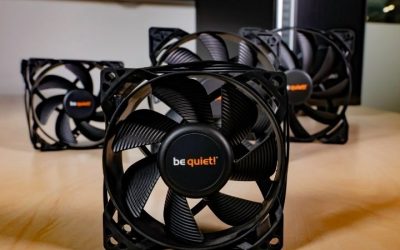
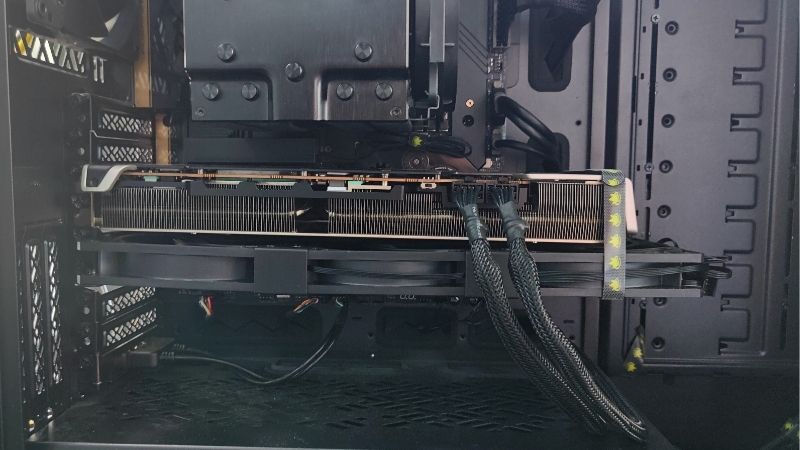
The best GPU deshroud replacement fans are ordinary 12V PWM fans chosen for an extraordinary job: cooling a graphics card’s existing heatsink after its factory plastic shroud and fans have been removed. For most roomy builds, Noctua NF-A12x25 PWM and ARCTIC P12 PWM PST are sensible starting points; a 92mm fan can fit tighter cards, and a 15mm-thick fan can solve side-panel clearance problems. The fan is only half the project, however. A safe conversion also needs a secure mount, electrical compatibility, enough airflow across memory and power components, and a fan curve that responds reliably to GPU heat.
Quick picks and size comparison
These are editorial fit-based recommendations, not a temperature ranking from an in-house GPU test bench. Even two GPUs with the same advertised board power can have different heatsink gaps, fin pitch, VRM locations, connector designs, and side-panel clearance. Choose a fan by the physical coverage and control plan first, then optimize its speed after a stable installation.
| Fan | Dimensions | Best role in a deshroud | Trade-off to check |
|---|---|---|---|
| Noctua NF-A12x25 PWM | 120 × 120 × 25mm | Premium two-fan replacement on broad GPU heatsinks | Premium price; must clear side panel and neighboring slots |
| ARCTIC P12 PWM PST | 120 × 120 × 25mm | Value-oriented two- or three-fan arrays | PST daisy-chain requires current-budget planning |
| Phanteks T30-120 | 120 × 120 × 30mm | Extra depth and performance modes when space allows | Five millimeters thicker than standard 25mm fans |
| Noctua NF-A12x15 PWM | 120 × 120 × 15mm | Thin replacement for close side-panel clearance | Less depth; different pressure/noise behavior under restriction |
| Noctua NF-A9 PWM | 92 × 92 × 25mm | Narrow heatsinks and 92mm spacing | Less swept area than 120mm fans at comparable speed |
| Noctua NF-A9x14 HS-PWM chromax.black.swap | 92 × 92 × 14mm | Very tight 92mm clearance | Small diameter may leave an uncovered heatsink zone |
The best GPU deshroud replacement fans reviewed
1. Noctua NF-A12x25 PWM — best premium 120mm starting point
Noctua’s NF-A12x25 PWM is a 120 × 120 × 25mm, 4-pin, 12V fan. Its published maximum speed is 2,000 rpm and its rated maximum airflow is 60.09 CFM. Those numbers make it attractive for a wide GPU heatsink that can be covered by one or two standard 120mm frames. Noctua emphasizes a tight impeller tip clearance and a pressure-efficient design, but no published case-fan specification can predict the exact GPU hotspot change after deshrouding a particular card.
The premium appeal is control and refinement rather than a promise of silence. A pair of NF-A12x25 fans can be run well below maximum speed while the GPU is idle or lightly loaded, provided the control circuit supports that operating point. The fan has a conventional standard-size housing that makes bracket design straightforward. Its bundled PWM extension and splitter are useful for ordinary motherboard connections; they do not automatically adapt a proprietary mini GPU header. Keep the product’s 12V electrical requirement separate from the connector’s physical pin shape.
There are several reasons to choose something else. Two fans are an expensive fix for a low-value GPU, and their 25mm bodies may collide with the case side panel, adjacent PCIe card, or an ITX riser assembly. The factory shroud may also direct air toward VRM sections that a flat replacement fan array misses. This is our premium fit-based recommendation only when two 120mm footprints cover the whole heatsink, wiring is planned, and the builder can validate memory and hotspot temperatures after installation.
2. ARCTIC P12 PWM PST — best affordable multi-fan array
The original ARCTIC P12 PWM PST is also a 120 × 120 × 25mm 12V fan. The manufacturer lists a 200–1,800 rpm PWM range, up to 56.3 CFM airflow, and 2.20 mm H2O static pressure. Its PST socket makes multiple fans convenient to connect to a common PWM signal. This is practical for a deshrouded graphics card whose heatsink is long enough for a two- or three-fan array without leaving large sections exposed.
Cost is the obvious strength, but the more important technical benefit is availability of a consistent family for a matched fan curve. When you use the same fan type along the GPU, each motor responds similarly to a shared PWM command, making the result easier to tune. With a motherboard header, control may need to come from software mapped to GPU temperature; with a graphics-card header, compatibility and current capacity must be confirmed before connecting. ARCTIC’s PST feature is not a license to attach unlimited motors to a single delicate GPU fan header.
The compromise is tuning effort. The fans can run quietly at modest speeds, but a GPU load may call for much faster airflow, and cable management becomes more involved with multiple frames. Verify that the current model listing really is the standard P12 PWM PST, rather than a CO, Pro, RGB, or 0dB variant with different specifications. If you are not comfortable calculating combined fan current and stress-testing the result, an externally powered controller or motherboard header may be a safer path than direct GPU-header chaining.
3. Phanteks T30-120 — best when extra depth is available
The Phanteks T30-120 stands out for its 30mm frame depth, five millimeters thicker than common 120mm PC fans. The manufacturer offers three PWM operating profiles: Hybrid, Performance, and Advanced. Its top-end published figures are associated with the Advanced mode and reach 3,000 rpm; that setting is not a quiet operating recommendation for an open GPU mod. The more relevant question is whether the card, case, and bracket can make use of the fan’s extra thickness at sane speeds.
A T30 can make sense behind a restrictive heatsink, especially if you want the flexibility to select a less aggressive hardware mode before setting a software fan curve. The thicker frame may help pressure-oriented applications, but GPU fin geometry differs from a radiator or conventional case mount. Two 30mm fans also add weight and project farther below the graphics card. Make sure the mounting method supports the assembly rather than letting the weight pull on the cooler’s fins or PCB.
Its chief drawback is fit, not merely price. A triple-slot card combined with additional 30mm frames can push the assembly into the side panel or overlap adjacent motherboard slots. The T30’s high-speed profile also carries a different current and noise demand than a typical case fan. Use it only when measurements show actual clearance and when control hardware can handle the motor. This is a specialist choice, not an automatic upgrade from a quieter, thinner fan used at an appropriate RPM.
4. Noctua NF-A12x15 PWM — best slim 120mm replacement
Noctua’s NF-A12x15 PWM reduces thickness to 15mm while retaining the 120mm footprint. The published maximum speed is 1,850 rpm, with 55.44 CFM rated maximum airflow and 1.53 mm H2O static pressure. In deshroud work, that 10mm savings versus a standard 25mm fan can be decisive. It may keep the modification inside a two-slot-adjacent envelope or stop the fan frame from touching a close mesh side panel.
The product is most attractive when the stock cooler’s fin area is broad enough for a 120mm array but the total GPU thickness is the limiting dimension. Its 4-pin PWM control gives a familiar pathway for curve tuning. In addition, the smaller depth helps reduce the lever arm on a mount made from a purpose-built bracket. That does not remove the need for mechanical restraint: cables, zip ties, and brackets must stay away from fan blades, solder joints, and the PCIe latch.
Accept the thermal trade-off consciously. A slim fan may need a different RPM to deliver equivalent cooling through a dense heatsink, and its maximum static-pressure rating is below that of the full-thickness NF-A12x25 PWM. That comparison does not establish a specific GPU temperature gap, since installed restriction and fin position dominate real results. Pick this fan because of verified clearance, then test. Do not choose it solely from an advertised low noise number recorded in a different test condition.
5. Noctua NF-A9 PWM — best standard-depth 92mm option
When a GPU heatsink is narrow, two 120mm frames may overhang the card so far that the fan array is difficult to secure or blocks nearby connectors. Noctua’s 92 × 92 × 25mm NF-A9 PWM offers an alternative with a published 2,000 rpm maximum and 46.44 CFM maximum airflow. The smaller footprint can align better with short or slim coolers and can allow two or three fans to cover different sections of the heatsink without extending beyond the PCB.
That ability to position airflow where it matters is often more valuable than comparing free-air CFM against a larger model. Some graphics-card coolers need direct airflow over separated fin stacks; others have a central fin block and exposed VRM region. Before buying, lay out paper rectangles at the proposed fan dimensions and compare them to the actual heatsink. If a 92mm fan covers the necessary zone more closely, it may be the practical choice despite having lower nominal volume flow.
There are limits. Smaller fans can have a more noticeable pitch at higher speeds, and 92mm mounting points will not align with a DIY bracket drilled for 120mm fans. This is a standard 12V 4-pin PC fan, not a direct OEM fan module. Check both the electrical control plan and the physical mount. If total thickness remains tight, the next pick cuts depth without increasing diameter.
6. Noctua NF-A9x14 HS-PWM — best ultra-slim 92mm alternative
The NF-A9x14 HS-PWM chromax.black.swap measures 92 × 92 × 14mm and reaches a listed 2,500 rpm maximum. That makes it one of the few carefully documented options for a very narrow, shallow deshroud. A compact ITX enclosure can require exactly that combination: smaller width to fit the GPU cooler and a thin body to clear the case panel. The black version is also visually less prominent beneath a dark graphics card.
Choose it when the extra millimeters are required, not because a larger RPM number suggests superior cooling. The published airflow figure for this black high-speed model is 33.84 CFM; the smaller swept area means you must examine how many fans and what placement will cover the GPU’s critical surfaces. Run a sustained workload and watch not only core temperature but hotspot and memory readings where the card exposes them. A GPU can show a healthy core average while one local zone receives too little air.
The short primary cable can simplify compact routing, but an extension may be necessary, and the final connection still needs verified PWM behavior. A small fan can be mounted in a way that creates a buzzing vibration or exposes spinning blades to cables. Use a stable bracket and leave clearance for the rotor. The 14mm model is a geometry solution for tight builds; it is not a low-effort replacement for a correctly functioning factory shroud.
Buying guide: measure and wire before removing the stock cooler
Confirm the factory cooling assembly can be safely deshrouded
Not all graphics cards are suitable candidates. Some shrouds are separate plastic pieces held by screws, while others are tightly integrated with structural brackets, RGB wiring, or fan assemblies. Identify whether the heatsink remains firmly attached without the shroud and whether removing a component exposes power delivery parts or makes the PCB vulnerable to flex. If the cooler must be removed from the GPU package, you may need to replace thermal paste or pads according to the exact card design, which increases the risk and potential warranty consequences.
Measure the available 120mm and 92mm footprints
Measure heatsink length, width, and the position of heatpipes, VRM plates, power connectors, and exposed fins. Draw the footprint of the proposed fans without assuming that their full square area delivers air through the metal. Overhang might be acceptable if a frame clears the case, but a fan suspended past the fins contributes little to the target cooling zone. Also calculate total thickness from the backplate to the proposed fan frame; this can determine whether 25mm, 15mm, or 14mm motors are appropriate.
Separate power delivery from fan speed control
A replacement 4-pin fan expects ground, 12V power, a tachometer signal, and PWM control in a standard pinout. Graphics-card headers may use mini connectors, proprietary ordering, or different current capacities. The GELID CA-PWM-02 is an example of an adapter intended to bridge some GPU PWM connections to standard fans, but neither its shape nor its marketing claim proves compatibility with every graphics card. Check your board and adapter pinouts using trusted documentation, and never force a connector or assume wire colors are universal.
Calculate combined fan load before using a splitter
When two or three fans share a header, the power source must tolerate their combined rated maximum current, including startup transients where relevant. Noctua and ARCTIC publish model-specific electrical requirements; the total is not determined from average RPM. A fan header designed for one small OEM blower may have less capacity than a standard motherboard system-fan header. If the GPU header rating is unknown, use a properly powered hub or compatible motherboard header and establish GPU-temperature-based control through an appropriate method. Treat unverified electrical capacity as a stop condition.
Make the fan curve respond to GPU temperature
A deshrouded card cannot be protected by a fan curve that ignores its workload. If using the card’s compatible PWM output, verify that the replacement fans ramp under load and spin at the required minimum duty cycle. If using the motherboard, confirm whether the firmware or supported monitoring software can actually use GPU temperature as the source. Some BIOS fan-control screens expose only CPU and motherboard sensors. Avoid relying on an app’s assumed feature set without checking your current operating system and hardware integration.
Support fans without loading heatpipes or the PCB
Zip ties are popular in hobby projects but should not be the only safety consideration. The tie path must not touch a rotor, bend fins into a heatpipe, snag a neighboring cable, or pull unevenly on a fragile soldered component. A properly sized bracket or a case-mounted fan support may distribute load better. Add strain relief for fan wires, confirm clearance at the PCIe slot and side panel, and rotate each fan by hand with the machine unplugged to ensure nothing rubs. Do not install conductive hardware where it can contact electrical pads.
Do not forget memory and VRM airflow
The stock plastic shroud may be doing more than shielding the blades: it can guide air over memory modules, voltage regulators, and a dedicated baseplate. Large replacement fans can cool the GPU core effectively but miss smaller components near the ends of the board. Look at the cooler from all sides to identify local fins and plates. After conversion, monitor GPU hotspot and memory junction readings if supported, and be alert to unusual throttling, instability, or local heat buildup. If necessary sensors are unavailable, be more conservative with tuning rather than declaring the modification safe based on the core reading alone.
Test in phases and preserve an easy rollback
Photograph the original assembly and label all screws and connectors before starting. After installation, confirm fans start reliably from a cold boot, then test an idle desktop, a short gaming load, and a longer realistic workload in the intended case. Compare temperatures, clocks, fan speeds, acoustic character, and stability against the original setup under similar ambient conditions. If the replacement performs worse, vibrates, or produces unsafe temperatures, return the stock shroud and fans rather than pushing the card harder. A successful deshroud is a measured cooling modification, not a cosmetic swap.
When a replacement fan is the wrong fix
If only one OEM fan has failed and an exact compatible fan module is obtainable, replacing that module may retain the factory airflow path and temperature curve with less risk. A very compact GPU with an integral blower is particularly poor territory for a two-fan DIY conversion. Likewise, a new card still under warranty may not justify the added assembly and electrical uncertainty. Finally, a deshroud cannot repair a clogged heatsink, failed thermal interface, defective pump on a hybrid card, or inadequate case airflow; diagnose those problems independently before shopping for fans.
Practical tools and preparation
Use a measuring tape or calipers to determine actual clearance before ordering; even a paper fan template helps. Consult the graphics card maker’s service guidance for disassembly and any warranty implications. Keep a nonconductive fan bracket or appropriately located mounts and a reliable temperature-monitoring utility available for post-installation checks. A flashlight is useful for inspecting rotor clearance and cable routing. These low-cost or existing tools are more important than buying the highest-airflow fan without a fit plan.
Frequently asked questions
Does deshrouding always make a GPU quieter?
No. It can reduce high-pitched OEM fan noise when larger fans move adequate air at lower speed, but it can also introduce turbulent noise, bracket vibration, or inadequate cooling that forces a steeper fan curve. Sound depends on the whole GPU heatsink, case geometry, fan mount, and control signal. Test the result at a comparable workload instead of comparing free-air manufacturer dBA ratings.
Can I use two 120mm fans on any triple-fan GPU?
Not automatically. Three small factory fans may span a long, narrow heatsink, while two large squares may miss fins at the ends or project past the PCB. Measure actual airflow coverage and physical clearance before buying. Some long graphics cards benefit from three smaller fans instead, but only the specific heatsink layout can settle that choice.
Can a GPU’s original fan header power multiple case fans?
Only when the connector, pinout, controller mode, and combined current are confirmed compatible. The physical presence of four wires does not establish the electrical rating. If you cannot document the safe load, do not daisy-chain several fans onto the card’s tiny header. Use a correctly powered alternative and verify that the chosen fan curve responds to GPU load.
Should I buy 15mm or 25mm replacement fans?
Choose the thicker standard fan when it fits cleanly and its airflow characteristics suit the heatsink. Choose a 15mm version when total GPU thickness or side-panel clearance demands it. The thinner model may have different pressure capability and acoustic behavior. Measure the full assembled stack rather than assuming the published card slot count includes room for additional fans.
Will deshrouding void the warranty?
Warranty rules vary by brand, region, and type of damage. Disassembly is not automatically equivalent to a loss of all consumer rights, but modifications can complicate service or create damage outside warranty coverage. Review the graphics card’s current terms and preserve the original parts. Never rely on a generic online answer as a substitute for the relevant manufacturer’s policy.
Should replacement fans be intake or exhaust against the GPU?
Many open-air GPU heatsinks are designed to receive air blown toward the fins, so a case-style fan is often oriented to push air through the cooler. However, examine your original fan direction and fin path rather than assuming a universal orientation. Verify the airflow arrows on the replacement frame and test the resulting temperatures. Reversed airflow can bypass intended VRM or memory regions.
What temperatures should I monitor after the mod?
At minimum, monitor reported GPU temperature, fan operation, sustained clocks, and throttling behavior. Where the GPU exposes them, hotspot and memory junction readings provide additional context. Manufacturer limits vary by architecture and model, so there is no trustworthy single target temperature for every graphics card. Compare under a consistent load and investigate any worsening stability.
Is a 30mm Phanteks T30 overkill?
It may be. The extra thickness can be useful when there is abundant clearance and a specific reason to need greater pressure capability, but the added size and weight can make mounting difficult. A standard 25mm fan is often simpler, especially in a case with limited expansion-slot space. The T30 is a specialist option rather than a mandatory upgrade.
Final verdict
Start with the Noctua NF-A12x25 PWM when a premium 120mm pair fits; choose the ARCTIC P12 PWM PST for a more economical matched array. Use the Phanteks T30-120 only with measured extra clearance, and switch to the NF-A12x15 PWM or 92mm Noctua models when geometry demands it. The most important purchase decision is whether the whole conversion is electrically and mechanically safe. Verify the board’s fan header, plan coverage of VRM and memory zones, and commit to a temperature-controlled load test before removing the stock cooling system.