Key takeaways
- Interface and advertised maximum read: USB 3.2 Gen 2, up to 1,050 MB/s
- Best fit: Balanced stationary recording and PC transfer
- US seller listing observed Oct. 29, 2026: B&H, $230.01
- Stock signal on checked listing: In Stock; Add to Cart
- Main limitation for Xbox: Confirm USB-A-capable data cable; optional security features are not an Xbox setup tool
The best external SSDs for Xbox captures are reliable USB drives that the console can recognize as an NTFS-formatted capture destination, with a working USB-A data connection and enough capacity for your video workflow. For most players recording clips on an Xbox Series X or Series S, the Samsung T7 1TB is the balanced starting point, while the Samsung T7 Shield 1TB earns its premium if the drive travels between setups. The Kingston XS1000 1TB is particularly convenient because its package includes a USB-A host cable. This guide is about recording and preserving game clips, not installing Xbox Series X|S-optimized games onto USB storage.
Quick verdict: the best SSD for each kind of Xbox creator
Best overall for Xbox capture workflows — Samsung T7 1TB (MU-PC1T0T/AM). The drive combines a mature 10Gbps USB interface, manufacturer-rated reads up to 1,050 MB/s, a compact metal design, and a currently orderable US retailer listing. The key advantage is not that your Xbox captures at a thousand megabytes per second; it is that you get a practical portable SSD without paying extra for a 20Gbps label the console cannot exploit. Buy an appropriate USB-C-to-USB-A data cable if your package lacks one.
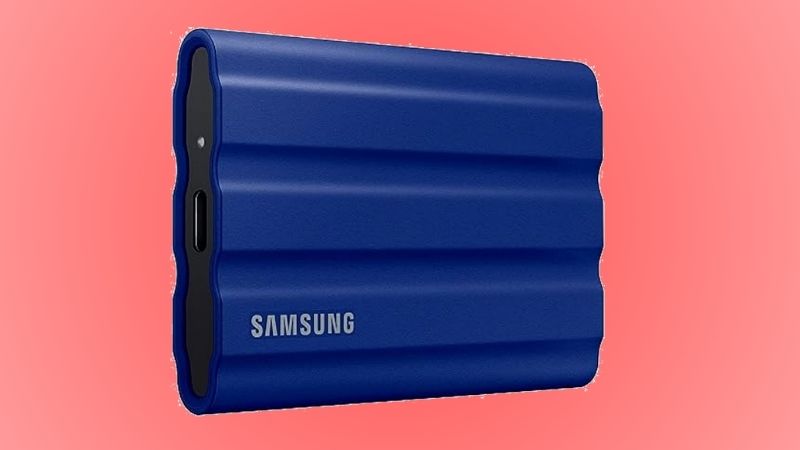
Best rugged option for LAN parties and travel — Samsung T7 Shield 1TB (MU-PE1T0S/AM). Its IP65-rated case and claimed drop protection make it the more forgiving choice when a capture drive shares desk space with controllers, drinks, and travel bags. Those ratings are limited protections, not permission to leave a connected drive wet, and its observed price was higher than the ordinary T7.
Best cable-in-the-box convenience — Kingston XS1000 1TB (SXS1000/1000G). Kingston lists a USB-C-to-USB-A host cable and USB-A-to-USB-C adapter, reducing an easy-to-miss Xbox setup purchase. Its tiny body is useful behind a console, but the lightweight plastic-and-metal enclosure has no published IP water-resistance rating.
Best for a mixed Xbox and fast-PC workflow — Samsung T9 1TB (MU-PG1T0B/AM). Its USB 3.2 Gen 2×2 specification makes more sense if you will frequently transfer source footage to a compatible 20Gbps Windows PC. On Xbox it falls back to the connection the console offers, so it should not be bought solely to make Xbox recording longer or sharper.
Best slim SSD for carrying footage to other devices — Lexar SL500 1TB (LSL500X001T-RNBNU). Its thin body and USB 3.2 Gen 2×2 interface suit creators who also work on a supported PC or mobile device. The included cable is USB-C to USB-C, so a properly rated USB-A data cable is an additional Xbox requirement.
Best lower-listed-price candidate if you can supply the cable — CORSAIR EX300U 1TB (CSSD-EX300U1TB). A US retailer listed it below the other five during research. However, the manufacturer supplies only USB-C-to-USB-C cables, and its phone-oriented magnetic mounting is not a benefit for an Xbox sitting under a TV. Price the needed USB-A cable before calling it the cheapest complete solution.
All six are genuine 1TB consumer SSD models with published manufacturer specifications and a US product listing showing an order option during this research. We did not physically test these drives on an Xbox, measure capture duration, run transfer benchmarks, or complete a checkout. A purchase should be contingent on your console detecting the drive as an eligible capture location after safe preparation.
Side-by-side comparison: exact models, prices, and stock signals
These are observed product-page listings accessed October 29, 2026, not promises of checkout pricing, shipping to your ZIP code, or a permanent discount. Manufacturer speed claims describe the SSD under a suitable test host; they are not measured Xbox recording speeds. “In stock” below means that the seller page exposed an In Stock/Add to Cart signal at the time of research. All prices are in US dollars before tax and shipping.
Samsung T7, MU-PC1T0T/AM
- Interface and advertised maximum read: USB 3.2 Gen 2, up to 1,050 MB/s
- Best fit: Balanced stationary recording and PC transfer
- US seller listing observed Oct. 29, 2026: B&H, $230.01
- Stock signal on checked listing: In Stock; Add to Cart
- Main limitation for Xbox: Confirm USB-A-capable data cable; optional security features are not an Xbox setup tool
Samsung T7 Shield, MU-PE1T0S/AM
- Interface and advertised maximum read: USB 3.2 Gen 2, up to 1,050 MB/s
- Best fit: Rougher travel and shared gaming spaces
- US seller listing observed Oct. 29, 2026: B&H, $287.99
- Stock signal on checked listing: In Stock; Add to Cart
- Main limitation for Xbox: Cost and bulk; protection ratings have limits
Kingston XS1000, SXS1000/1000G
- Interface and advertised maximum read: USB 3.2 Gen 2, up to 1,050 MB/s
- Best fit: Simple USB-A cabling and tiny footprint
- US seller listing observed Oct. 29, 2026: Tech-America, $215.00
- Stock signal on checked listing: In Stock & Ready to Ship; Add to Cart
- Main limitation for Xbox: No specified IP rating; verify seller fulfillment
Samsung T9, MU-PG1T0B/AM
- Interface and advertised maximum read: USB 3.2 Gen 2×2, up to 2,000 MB/s
- Best fit: Moving edits to a 20Gbps-compatible PC
- US seller listing observed Oct. 29, 2026: B&H, $254.99
- Stock signal on checked listing: In Stock; Add to Cart
- Main limitation for Xbox: Extra interface bandwidth not realized by Xbox
Lexar SL500, LSL500X001T-RNBNU
- Interface and advertised maximum read: USB 3.2 Gen 2×2, up to 2,000 MB/s
- Best fit: Thin portable workflow across devices
- US seller listing observed Oct. 29, 2026: B&H, $219.99
- Stock signal on checked listing: In Stock; Add to Cart
- Main limitation for Xbox: USB-C-to-USB-A data cable required for Xbox
CORSAIR EX300U, CSSD-EX300U1TB
- Interface and advertised maximum read: USB 3.2 Gen 2, up to 1,100 MB/s
- Best fit: Lowest observed drive-only listing
- US seller listing observed Oct. 29, 2026: B&H, $174.99
- Stock signal on checked listing: In Stock; Add to Cart
- Main limitation for Xbox: Box includes USB-C-to-USB-C cables only; add Xbox-compatible cable
Price context matters. The EX300U has the lowest drive-only observed price in this particular set, but a separate cable can narrow the difference. The T9 and SL500 have faster USB specifications only when the host supports them. The Kingston’s bundled USB-A host cable simplifies the Xbox connection. Current availability, exact item variant, promotions, seller, taxes, and shipping must be rechecked before ordering. A listing’s Add to Cart button does not prove final checkout success.
What makes an SSD suitable for Xbox game captures?
Capture storage is different from installed-game storage
An external SSD can play several different roles on Xbox, and choosing the wrong format is the easiest way to waste a purchase. For game captures, an external drive is used as a media/capture destination, generally prepared as NTFS and then selected in the console’s capture settings. For Xbox game installations, the console may offer to format a USB drive as a game storage device. That creates a different storage role. The same formatted volume should not be assumed to serve both tasks interchangeably. A drive that you previously initialized for Xbox game installs may need to be connected to a computer, backed up, and reformatted before the console can use it for captures.
This distinction is especially important on Xbox Series X|S. Ordinary external USB SSDs can store supported game data and run certain older games, but they do not replace the internal SSD or a supported expansion card for playing most titles optimized for Xbox Series X|S. If the goal is to play those optimized games directly, stop shopping this capture-drive roundup and research storage expansion compatibility instead. For a dedicated capture archive, a standard portable USB SSD is the appropriate category.
An NTFS capture drive also does not automatically perform the same sharing functions as captures stored internally or in the Xbox network. Treat the drive as a local physical archive: copy valuable clips to a PC or another backup destination, and verify playback there before deleting the originals. Microsoft has previously documented external backup and 90-day retention of captures on the Xbox network, but network retention policies can change. Do not rely on the online copy as the only copy of important footage.
Prefer a dependable USB-A connection to headline speed
Xbox Series X and Series S use USB-A ports for these external drive connections. A portable SSD with a USB-C receptacle is not therefore incompatible: it simply needs an actual data cable from the SSD’s USB-C connector to the console’s USB-A port. A cable that merely charges a device, or a loose chain of adapters, may fail to expose the drive reliably. For the first test, connect directly to the console rather than through an unpowered hub.
There is no practical reason to require a 20Gbps USB 3.2 Gen 2×2 external SSD solely for Xbox clips. USB negotiation is limited by the host’s capabilities, and the 2,000 MB/s values advertised for the T9 and SL500 come from compatible test systems. The Xbox does not magically become a 20Gbps host because a faster drive is plugged in. A correctly recognized 10Gbps-class SSD is already beyond what most compressed game-capture workflows require. Capacity, cabling, drive health, and the correct capture destination are more consequential.
Capacity is a workflow decision, not a guarantee of recording time
All six drives in this roundup are 1TB versions to keep price comparisons meaningful. Actual usable capacity is lower after formatting and other overhead. How many hours fit will depend on your console’s capture output format, resolution, bitrate, and the clips you create. As a rough example—not an Xbox benchmark—if a recording averages 20 Mb/s, an hour takes about 9 GB before container overhead; at 50 Mb/s, that becomes roughly 22.5 GB. Those illustrative inputs must not be mistaken for fixed Xbox bitrates.
An external capture destination has historically enabled recordings of up to about one hour per clip in supported modes, versus shorter internal-recording limits. That does not mean any 1TB SSD can guarantee uninterrupted hour-long clips in every game and resolution. Available options and limits depend on console software, output settings, and recording behavior. Make a five-minute trial, then a longer nonessential trial, before recording a tournament or a once-only gameplay session.
Treat passwords, encryption, and firmware as PC-side features
Several portable SSDs promote AES encryption, companion software, or password protection. Those functions can be valuable when managing files on Windows or macOS, but an Xbox is not a substitute for the manufacturer’s desktop unlocking application. If a drive is protected by a software-managed password, the console may not be able to mount the volume for direct recording. Confirm that the drive works as ordinary accessible USB storage with no active lock before selecting it as a capture location.
Similarly, keep firmware maintenance on a compatible computer using manufacturer tools and instructions. It is not necessary to install a computer utility on Xbox to take clips. For clips you care about, avoid reformats and firmware work until two verified copies exist elsewhere.
Six external SSDs compared in detail
Samsung T7 1TB — best overall for straightforward capture storage
The ordinary Samsung T7 is the least complicated starting recommendation for someone who has an Xbox and a Windows laptop or desktop. Samsung identifies the 1TB Titan Gray US model as MU-PC1T0T/AM, with USB 3.2 Gen 2 connectivity and manufacturer-rated sequential reads of up to 1,050 MB/s. Its compact aluminum enclosure is easy to place beside a console without a separate power adapter. It is also useful after a session: unplug it safely and review the clips on a compatible PC.
The practical reason to favor it is not an assumed advantage in image quality. Video encoding determines what Xbox records; the SSD receives the resulting files. A reliable, adequately fast SSD removes storage as an obvious bottleneck and makes bulk file transfer more comfortable when you move recordings to a workstation. You do not gain a new video resolution merely because the enclosure advertises NVMe technology.
The US B&H listing we accessed displayed $230.01, an In Stock status, and an Add to Cart control. That is an observed listing, not a checked-out order. The model’s three-year limited warranty should be verified on the relevant US warranty terms if that coverage matters to you. Check whether your retail box contains a suitable USB-C-to-USB-A cable; product bundles and reseller packaging can change. Do not count on the Samsung password feature being usable from Xbox: prepare the drive as normal unlocked NTFS media storage first.
Buy it if you record at a fixed setup, want a familiar portable SSD, and also transfer videos to a computer. Skip it if you frequently carry loose drives in a bag where the T7 Shield’s protective shell would be worth the extra spend, or if a reliable older SSD already handles your captures. Your first validation is straightforward: select it as the capture destination, record a short clip, and confirm that the clip opens on your computer.
Samsung T7 Shield 1TB — best for the travel and LAN-party setup
The Samsung T7 Shield 1TB Black, model MU-PE1T0S/AM, uses a USB 3.2 Gen 2 interface and is specified for up to 1,050 MB/s reads and 1,000 MB/s writes under compatible conditions. Samsung publishes an IP65 dust- and water-resistance rating and drop-protection claims under controlled conditions. The rubberized enclosure offers a practical difference if you’re packing a capture drive into a backpack, moving a console among homes, or operating at a crowded gaming table.
Do not overread that rating. IP65 does not mean waterproof under immersion, and a drive should be clean and dry before reconnecting it. The USB connector and an actively recording file remain vulnerable to a yanked cable, interrupted power, or a device falling while writing. Protect the USB cable from being stepped on, leave slack behind the console, and avoid resting the drive where the console’s hot exhaust could warm it unnecessarily.
The B&H page for the exact US model displayed $287.99 and In Stock/Add to Cart during our research. That makes the T7 Shield a premium for physical protection rather than faster Xbox clips. It is also thicker and heavier than some other picks, so a small adhesive-free shelf or clear space behind the TV can be preferable to letting the drive hang from its cable.
Buy it if the drive will repeatedly travel, get packed beside accessories, or sit on a busy shared desk. Skip it if you leave the drive untouched behind the console and a well-priced T7 is available. The most important trade-off is the premium for enclosure durability: it should solve a real handling risk, not substitute for having a second copy of irreplaceable footage.
Kingston XS1000 1TB — best simple USB-A hookup
Kingston’s SXS1000/1000G is a compelling Xbox-specific choice for a reason that is easy to miss in generic SSD reviews: Kingston specifies an included USB-C-to-USB-A host cable and a USB-A-to-USB-C adapter. Because Xbox uses USB-A for a direct external-storage hookup, a box that arrives with the appropriate host-side connector eliminates a separate compatibility guess. The drive itself is very small—Kingston lists dimensions of 69.54 × 32.58 × 13.5 mm and a weight of 28.7 g.
The manufacturer specifies USB 3.2 Gen 2 and up to 1,050 MB/s read / 1,000 MB/s write, along with a five-year limited warranty. These are PC/compatible-host performance figures. Kingston markets the XS1000 for file backup and travel, and the same traits make sense when the drive is used only as a console media destination. The absence of a published IP rating means you should not treat it as a rugged weatherproof product, even though it has no spinning disk inside.
A Tech-America product page for this exact part displayed $215.00, In Stock & Ready to Ship, and Add To Cart. Seller fulfillment, delivery region, and returns still need confirmation. Another retailer may display a very different amount, especially if its listing is fulfilled by a marketplace partner, so do not infer that this model is universally cheaper than Samsung’s T7.
Buy it if a short, tidy USB-A connection is a priority and you want a tiny capture SSD to leave beside the console. Skip it if you require higher enclosure impact protection or use a setup where the short included cable creates tension on the connector. A cable that barely reaches is a worse choice than a longer good-quality data cable, even when that longer cable costs a few dollars extra.
Samsung T9 1TB — best when transfers on a fast PC matter too
The Samsung T9 1TB Black (MU-PG1T0B/AM) is a useful crossover pick for players who capture on Xbox but regularly move source files to a suitably equipped desktop for editing. It uses USB 3.2 Gen 2×2 (20Gbps) and Samsung’s 1TB specification lists reads of up to 2,000 MB/s and writes of up to 1,950 MB/s. The package includes USB-C cables and, according to the checked B&H product listing, a USB-C-to-USB-A cable as well.
The crucial limitation is that Xbox does not offer the same 20Gbps connection as the PC used to measure the headline rate. That means buying the T9 solely to record Xbox clips is poor value if a normal 10Gbps SSD already satisfies the recording task. Its extra capability earns a place only when a faster host will actually be used—for example, frequent large clip-library transfers to a computer with an appropriate USB 20Gbps port and compatible cable.
B&H displayed $254.99, In Stock, and Add to Cart for this exact 1TB model at research time. Samsung’s own direct store displayed an out-of-stock message for the same model in another page view, which is why the seller channel matters. The roundup’s price and stock reflect B&H, not Samsung’s direct inventory. This drive also has a comparatively bulky enclosure and the extra speed is not guaranteed after sustained writes or on a slower host.
Buy it if your Xbox storage doubles as a portable editing shuttle and you will use a verified 20Gbps-capable PC port. Skip it if capture storage is its only job, your computer connects at 5Gbps or 10Gbps, or the T7/XS1000 is cheaper enough to free money for a second backup drive. The test is not an Xbox speed benchmark; it is whether your separate PC workflow actually benefits from the interface.
Lexar SL500 1TB — best thin cross-device transfer choice
The Lexar SL500 1TB Black (LSL500X001T-RNBNU) is designed for highly portable transfer use. Lexar specifies an extremely thin 7.8 mm body, 43 g weight, and USB 3.2 Gen 2×2 speeds rated up to 2,000 MB/s reads and 1,800 MB/s writes with a compatible host. It also publishes IP54 and two-meter drop claims under controlled conditions, with explicit limitations on those ratings. Those features help justify considering the SL500 even though its 20Gbps interface is unnecessary for an Xbox alone.
The Xbox-specific catch is the cable: Lexar lists a USB-C-to-USB-C cable in the box, which does not plug directly into the console’s USB-A ports. Budget for a legitimate USB-C-to-USB-A cable capable of data transfer at USB 3 speeds. Do not assume a random USB-C dongle delivers the same reliability, and do not leave the drive dangling from an adapter while recording.
B&H listed the exact US 1TB SKU at $219.99, with In Stock/Add to Cart. The retailer and manufacturer both identify the same part number. Because some store variants and special editions have distinct suffixes, double-check the suffix rather than relying only on a product photo. The SL500’s thin case fits well into a laptop sleeve, but it is a less obvious permanent-console choice than the Kingston when you factor in additional cabling.
Buy it if you already use USB-C devices and want a slim portable SSD for carrying footage between them after your Xbox session. Skip it if direct Xbox connection without extra purchases is the main goal. The extra theoretical bandwidth is a feature of the drive and a compatible computer, not a measured improvement in Xbox capture duration or visual quality.
CORSAIR EX300U 1TB — best low drive-only price with a cable caveat
The CORSAIR EX300U 1TB (CSSD-EX300U1TB) is a current portable SSD whose official specification advertises up to 1,100 MB/s sequential reads and writes over USB 3.2 Gen 2. Its 1TB capacity is ample for a starting capture archive, and the manufacturer’s three-year warranty provides a conventional support route. The design is primarily marketed around phones, including a MagSafe-compatible magnetic ring. None of that mounting feature is required on an Xbox; it is simply part of the package design.
Corsair’s official package list is especially important here: it contains a 30 cm USB-C-to-USB-C cable and a short right-angle USB-C-to-USB-C cable, but no USB-C-to-USB-A data cable. Since the console’s USB ports are Type-A, purchasing the drive alone does not complete an Xbox hookup. A 10Gbps-rated cable from USB-C on the drive to USB-A on the Xbox is the simple solution. Avoid a charging-only cable or a chain of questionable adapters, and test it before depending on it.
The checked B&H listing displayed $174.99, In Stock, and Add to Cart. Corsair’s own storefront independently marked the drive out of stock, so availability is explicitly seller-dependent here too. Even after paying for the correct cable, this could remain an economical option, but the margin depends on the cable’s actual purchase price. We did not price a specific cable bundle or test its compatibility.
Buy it if you are comfortable obtaining a proper USB-A cable and prefer the lowest observed SSD-only cost in this six-model sample. Skip it if you want a fully specified Xbox cable arrangement in one retail box or expect an Xbox-specific software utility. The first real value check is total delivered cost, not the SSD’s sticker price in isolation.
How to prepare an external SSD for Xbox captures safely
Prepare the SSD on a Windows PC before connecting it
Formatting erases data. If this is a drive you already own, copy its contents somewhere else, open a sample of the backed-up files, and confirm that backup before continuing. Do not format your Xbox game-install drive merely because it has free space: that can wipe installed games. For a new drive, check that it contains no recovery or utility files you need first.
- Connect the portable SSD to a Windows computer using an appropriate USB data cable. Open File Explorer > This PC and identify the external drive by its capacity and model. Be especially cautious if multiple external drives are attached.
- Right-click the correct external volume and select Format. Choose NTFS under File system, choose a clear label such as XBOX_CAPTURES, and review the selected volume again. Starting the format will erase the data on that volume.
- Complete the format and use File Explorer to verify that the drive appears with the NTFS file system. If Windows does not show the drive or a format option is unavailable, stop and inspect Disk Management rather than guessing which disk to initialize. Do not delete partitions on a disk you have not positively identified.
- Eject the drive using Windows’ safe-removal feature when no transfer is running. Do not unplug during formatting or while writing important clips.
These are Windows file-preparation steps, not a recommendation to install Samsung, Kingston, Lexar, or Corsair software on Xbox. If you use macOS rather than Windows, obtain a safe, supported way to format an NTFS volume on a Windows machine; macOS ordinarily does not provide the same built-in NTFS formatting workflow.
Select the external drive as the console’s capture destination
- Connect the newly formatted SSD directly to a USB-A port on the Xbox Series X or Series S using a data-capable cable. Allow the console time to detect it.
- On the Xbox, press the Xbox button to open the guide. Navigate to Profile & system > Settings > Preferences > Capture & share. Look for Capture location and select the connected external drive. Exact menu placement may change with Xbox system updates.
- If your dashboard displays the drive under Settings > System > Storage devices instead, inspect the external device’s available actions for the capture-location setting. Do not choose Format for games in order to record video; that selects a different storage role.
- Open a game, start a short recording using Xbox button > Capture & share > Start recording, then stop it. Use the Captures app to find the file, and confirm the external location where your dashboard allows it.
- Eject or disconnect only after the console has finished recording and saving, and after checking that no write is in progress. Connect the SSD to a computer, copy the clip to a second location, and play the copied file. A playable file on the PC is stronger evidence of a working archive than merely seeing the drive name on Xbox.
If a setting is named differently after a console update, use the console’s capture and storage settings rather than inventing a hidden menu. Microsoft’s Captures app path, My games & apps > See all > Apps > Captures, is documented as a route for managing clips and copying them to an external drive. If the console does not offer direct recording to the SSD but does let you copy captures to it, that still provides a practical backup workflow; do not represent it as successful direct recording.
Verify before an important session
Use a two-stage test. First, record 30–60 seconds of ordinary gameplay and confirm that the resulting file can be opened from the external drive on a PC. Second, make a longer, noncritical recording in the resolution and mode you actually intend to use. Note the observed duration and file size on your hardware, because recording limits are software-dependent and the manufacturer’s SSD speed is not a substitute for verification.
For an important tournament, keep a second destination or computer backup plan ready. USB plug seating, cable strain, drive space, capture settings, and power interruptions are much more likely to spoil a recording than choosing between two reputable SSDs with different theoretical throughput numbers.
Buying checklist: six mistakes to avoid
Buying a game-storage drive and formatting it for the wrong job
An external enclosure advertised as “for Xbox” is not automatically configured for capture recording. A drive preformatted or repurposed for installed games has a different job than an NTFS media/capture drive. Decide which role you need, confirm it in the console, and keep separate volumes or separate drives if you need both. A Series X|S expansion card is not necessary just to hold video files.
Assuming the included USB-C cable fits the console
Many SSDs in 2026 ship with USB-C-to-USB-C cables because phones and laptops use USB-C. The Xbox Series X|S capture connection uses USB-A. The Kingston XS1000 package specifically covers that need, and the Samsung T9 retailer listing includes a USB-A host cable. For the Lexar SL500 and CORSAIR EX300U, purchase a known-good data-capable USB-A cable before the first setup attempt. For other bundles, inspect the exact “What’s in the box” section rather than relying on a generic manufacturer family photo.
Paying for 20Gbps throughput without a 20Gbps computer
A faster maximum sequential read specification can be relevant when transporting video projects between compatible PCs. It is not proof of a higher Xbox recording resolution, longer maximum clip, or reduced skipped frames in every situation. Spend on a larger capacity, better cable, or backup redundancy first if Xbox capture is the only task. Upgrade to a Gen 2×2 SSD when you can name the second system that will use the added speed.
Treating one SSD as the entire backup strategy
A single portable SSD can be lost, reformatted, disconnected, or fail. Xbox network captures have had retention restrictions, and a cloud service can change its policies. A conservative approach is to keep the original capture on the SSD, copy it to a separate PC or NAS location, and maintain another independent copy for irreplaceable recordings. Periodically play a random saved clip and ensure its audio and video are complete. “The folder exists” does not prove every recording is readable.
Turning on security software before proving console compatibility
Encryption and passwords can be good protections for laptop data, but software-unlocked storage may be unusable to a console that cannot run the unlocking application. Before making a capture drive password-protected, test whether Xbox recognizes the volume after a full power cycle. If it does not, use the drive as unlocked capture media or choose a separate encrypted archive workflow managed by the PC after copying the files. Do not weaken the security of unrelated personal data volumes to make the Xbox recognize them.
Comparing prices without checking capacity, model, and seller
Retailers may show separate pages for 500GB, 1TB, 2TB, old variants, special editions, and marketplace offers. Compare exact part numbers, not only the name on a search card. The observed six prices in the table are for six specific 1TB US SKUs, each tied to a named direct seller listing. The final price can change by ZIP code, discounts, sales tax, shipping, and return channel. If a product is out of stock at one seller, that does not automatically mean the entire model is unavailable nationwide.
Troubleshooting: Xbox is not recognizing the capture SSD
SSD does not appear in capture location
- First low-risk test: Reconnect directly to another Xbox USB-A port with a known data-capable cable
- Next safe action: Check detection on a PC; replace cable before suspecting the SSD
Xbox offers to format for games
- First low-risk test: Do not proceed if the SSD holds footage or is intended for clips
- Next safe action: Back up first; verify NTFS media formatting on Windows, then return to capture settings
SSD works on PC but not Xbox
- First low-risk test: Confirm it is unlocked and the volume uses NTFS
- Next safe action: Try the console’s alternate USB port; check for a supported console system update
A clip recorded but does not play on a PC
- First low-risk test: Try a short new test clip and review the file-copy process
- Next safe action: Preserve originals; do not reformat until another verified copy exists
Transfer from SSD to PC seems slow
- First low-risk test: Check the PC’s port and cable specifications
- Next safe action: Test a second supported cable/port before purchasing a higher-speed SSD
Long recording stops earlier than expected
- First low-risk test: Check capture resolution, available storage, and selected destination
- Next safe action: Test supported recording modes; do not assume the one-hour upper bound always applies
If the SSD repeatedly disconnects, inspect the port for damage without inserting metal tools, replace an obviously loose cable, and stop critical recording until the problem is resolved. For persistent errors, consult official Xbox storage/capture guidance and the drive maker’s support page with the exact model number. Reformatting should be a last resort after protecting existing recordings, never the first diagnostic step.
Frequently asked questions
Can an external SSD record Xbox Series X or Series S gameplay?
Yes, supported external USB storage can be used as a capture destination when the console recognizes the volume with the correct media/capture formatting and settings. You need a compatible USB-A connection, a usable NTFS volume, and the proper capture location selected. This is different from formatting the same external volume for installing Xbox games. Test a short clip first, then verify the file on a computer.
Is a 1TB portable SSD enough for Xbox game captures?
For many players, yes. The precise number of recorded hours depends on bitrate, resolution, capture mode, and filesystem overhead. Rather than using generic advertised video-hour figures, make a representative test clip, inspect its file size, and estimate your own storage needs. If your workflow builds a large library of long recordings, a 2TB version of a supported model may be more convenient, but buy it only after verifying the current price and exact model variant.
Does a 2,000 MB/s SSD improve Xbox video quality?
Not by itself. Image quality is primarily determined by the console’s game-capture encoding options, not the SSD’s advertised PC sequential-read speed. Drives such as the Samsung T9 and Lexar SL500 can transfer files faster on a suitable 20Gbps computer, but an Xbox capture connection will not use that entire specification. A more expensive drive is not a substitute for choosing the right recording settings.
Can I capture videos and install Xbox games on the same drive?
Do not count on a single Xbox-formatted volume serving both tasks. Xbox game-install storage and NTFS media/capture storage are configured differently. A console may ask to erase and reformat a drive when you change roles. Use separate drives when you want both workflows available without disruption, and always back up your captures before altering a storage device’s format.
Can I upload clips saved externally straight to the Xbox network?
Directly recorded external clips are best treated as local files that you transfer and manage with a computer or supported Xbox copying tools. Network upload capabilities and policies vary by system version and capture origin. Verify your current console’s options rather than assuming every external file can be uploaded from the console the same way as a capture made to internal storage. Keep an independent local copy even when cloud sharing works.
Do I need a specialized Xbox-branded SSD?
No special brand or RGB gaming enclosure is necessary to store captures. The more important criteria are a recognized USB storage device, correct NTFS formatting, a compatible USB-A data connection, adequate free capacity, and successful trial recordings. An Xbox-branded drive can still be a good purchase if its cabling and price make sense; branding alone does not establish capture compatibility.
Should I buy an SSD or a hard drive for long archives?
An SSD is convenient for frequent travel, smaller setups, and fast copying to a computer. A hard drive can provide more archive capacity per dollar when the main goal is keeping many old clips and the device will stay in a secure location. Regardless of medium, neither should be the only place you store important footage. For regular active capture, portable SSDs are a tidy choice, but the investment should match your actual recording volume.
Final thoughts
For a simple Xbox recording setup, choose the Samsung T7 1TB if its verified delivered cost remains competitive; the Kingston XS1000 1TB is an easier first hookup when you want a confirmed USB-A host cable, while the T7 Shield is worth considering for frequent travel. Only pay for the T9 or SL500’s extra interface capability if you also move clips to a compatible fast PC. Before committing to an event, format the dedicated drive as NTFS, select it for captures, record a test clip, and confirm playback from a second computer copy. That verification matters more than any SSD’s advertised peak transfer rate.