Our Top Picks
 Thermaltake Massive 20 RGB Steel Mesh Panel Single10"-19"18.5 x 14 x 1.5 inches3.38 poundsCheck on Amazon
A 17-inch gaming laptop is wider than most cooling pads, and that mismatch decides everything. A pad built for a 15-inch machine leaves the edges of a big laptop hanging in the air, the fans sitting under solid chassis instead of intake vents, and the whole setup wobbling during a long session. The right pick starts with the deck: it must be wide and deep enough to hold the machine, with fans placed where the laptop actually breathes.
This guide is for owners of 17-inch and larger gaming laptops, desktop-replacement users, and creators who render or edit on big machines that run hot. The five pads below were chosen from names and specifications on Amazon pages, weighing deck size, fan placement, airflow, noise, and build against what a large laptop actually needs.
Quick Picks
As an Amazon Associate we earn from qualifying purchases
| Product | Best for | Key spec from title |
|---|---|---|
| Thermaltake Massive 20 RGB | Widest deck for 18- and 19-inch laptops | 200mm fan, 10-19 inch fit |
| IETS GT500 | Strongest cooling for a throttling laptop | Turbo fan, sealed foam |
| Havit HV-F2056 | Slim, quiet pad for travel and work | 3 fans, 15.6-17 inch fit |
| Cooler Master NotePal X3 | One big quiet fan for a gaming desk | 200mm fan, up to 17 inches |
| KLIM Wind | Simple four-fan pad that fits almost anything | 4 fans, 11-19 inch fit |
How to Choose
Deck Size Comes First
Measure your laptop before you shop, because the screen size on the box is not the footprint on your desk. A 17-inch gaming laptop is usually close to 16 inches wide and 11 inches deep, while many popular pads are barely 15 inches wide. A pad that is narrower than the laptop leaves the corners unsupported, and the machine can rock when you type or press the keys hard. Look for a deck that matches or beats your laptop in both directions, or a listing that names 17-inch, 18-inch, or 19-inch support outright. Front stoppers and rear legs matter too, since they keep a wide machine from sliding off a tilted pad.
Fan Layout Beats Fan Count
More fans do not always mean more cooling, because air only helps where your laptop pulls it in. Most gaming laptops draw air through vents on the bottom panel, so a fan sitting under a solid part of the chassis does little. A single large fan centered under the intake can beat four small fans scattered across the deck, and a sealed pad that forces air into the vents works harder still. Check the fan positions against your laptop’s vent layout in the listing photos, and favor airflow figures over fan counts when you compare models.
Noise and Power Trade-Offs
Cooling power and quiet rarely arrive together, so decide where you will use the pad before you pick one. A turbo blower at full speed can reach the volume of a loud conversation, which suits a closed room during a game but not a shared office or a voice call. A dial or a variable-speed control lets you turn the fan down for light work and up for heavy sessions, which is more useful than a simple on-off switch. Most pads draw power from the laptop through USB, while the strongest turbo models need a wall adapter for full speed. A built-in USB hub keeps your port count intact.
Tilt, Build, and Desk Fit
A cooling pad is also a stand, so its tilt and build decide whether long sessions stay comfortable. Two or three height settings let you raise the keyboard to a typing angle that suits your wrists, and a mesh surface lets air reach the whole underside instead of trapping heat. Heavy desktop-replacement laptops need a stiff deck, so a steel mesh or metal frame holds up better than thin plastic under a four-pound machine. Check the pad’s own footprint too: a 19-inch deck takes real desk space, and its cable should reach your laptop without pulling across the desk.
The 5 Best Options
Thermaltake Massive 20 RGB
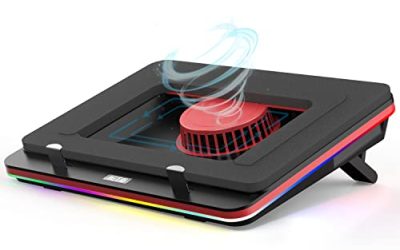
The Massive 20 RGB is the only pad here that fully supports a 19-inch laptop, and it shows in the deck. A single 200mm fan spins slowly to move air across the whole underside without the whine of small fast fans, while the steel mesh surface lets that air reach the laptop base. Three height settings tilt the machine to a comfortable typing angle, and the RGB strip around the edge adds color to a gaming desk. It is heavy and wide, so it belongs on a desk rather than in a bag.
Specs
- 1 x 200mm fan, 600-800 RPM, 64 CFM, 30 dBA
- Fits laptops from 10 to 19 inches
- Steel mesh surface, mesh and plastic build
- 256-color RGB lighting, 5 modes: Wave, RGB Spectrum, Pulse, Blink, Full Lighted
- 3 height settings: 3, 9, and 13 degrees
- Front USB passthrough port
- 47.1 x 35.5 x 4.6 cm, 3.38 pounds
- Model CL-N014-PL20SW-A
Best for: the widest deck in this group, built for 18- and 19-inch laptops.
Watch out for: the wide deck takes real desk space, and it is the heaviest pad here, so it suits a fixed desk, not travel.
IETS GT500

The GT500 is not a normal cooling pad; it is a sealed chamber that forces air into your laptop instead of blowing at it from below. A thick foam gasket seals the deck against the laptop base, and the industrial turbo fan pushes air through the intake vents with real pressure. That design cools harder than any open-fan pad here, which is why it suits laptops that throttle under heavy games or renders. The trade is noise: at full speed it sounds like a small desk fan, so it belongs in a closed room, not on a call.
Specs
- Industrial turbo fan with infinitely variable speed
- Sealing foam gasket creates a pressure chamber against the laptop base
- Fits laptops from 13 to 17.3 inches
- 3-port USB hub
- Detachable, pull-out dust filter on the air inlet
- Metal enclosure, 1.59 kg
- Power adapter included, 100-240V
- Noise up to 65 dB at full speed
Best for: the strongest cooling in this group for a laptop that throttles.
Watch out for: loud at full speed, and the listing shows more than one fan-speed figure across its variants, so confirm the exact variant before ordering.
Havit HV-F2056

The HV-F2056 is the slim, quiet workhorse of this group, built for owners who want cooling without noise or bulk. Three 110mm fans spin at just over 1,000 RPM to move air across the underside of a 15.6-inch or 17-inch laptop, and the metal mesh deck keeps the machine stable while it works. Two height settings give a comfortable typing angle, and two USB ports mean the pad does not cost you a connection. At barely over an inch thick and about a pound and a half, it slips into a bag beside the laptop.
Specs
- 3 fans at 110mm, 1100 ± 200 RPM, 65 CFM
- Fits 15.6- to 17-inch laptops
- 2 adjustable height settings
- 2 USB ports, USB-A to USB-A cable
- Metal mesh surface, HIPS build
- 14.96 x 11.02 x 1.18 inches, 1.54 pounds
- LED indicator and power switch
- 5V DC power, 10,000-hour fan life
Best for: a slim, quiet pad for travel and everyday work.
Watch out for: no fan speed control, and the listing points to a newer version, so check the exact model before ordering.
Cooler Master NotePal X3

The NotePal X3 takes the opposite approach from multi-fan pads: one very large fan instead of several small ones. A single 200mm fan with a blue LED moves a strong stream of air at low speed, which keeps the sound gentle during long sessions. A dial on the pad controls the fan speed, so you can turn it down for light work and up for a demanding game. The metal mesh base holds a 17-inch machine steady, and a front vent sends a light breeze toward your hands. An integrated USB hub adds connections for peripherals.
Specs
- 1 x 200mm fan with blue LED, 65-76.5 CFM, 16-23 dBA
- Fits laptops up to 17 inches
- Metal mesh base
- Dial wheel fan speed controller
- Front vent directs air toward your hands
- Integrated USB hub
- 2 pounds
- 2-year manufacturer warranty
Best for: one big quiet fan for a gaming desk.
Watch out for: a single fan covers the middle of the deck best, so check that it lines up with your laptop’s intake vents.
KLIM Wind

The KLIM Wind is the simple pick: four fans, two USB ports, and a deck that fits almost any laptop you own. It covers laptops from 11 to 16 inches outright and stays compatible with 17.3-inch, 18-inch, and 19-inch machines, where the laptop extends past the edges but remains stable on the front pegs and rear legs. The fans run at one steady speed, so there is nothing to adjust, and the pad is light enough to carry in a bag. A five-year warranty backs the build.
Specs
- 4 fans at 1200 RPM, up to 1400 RPM
- Covers laptops from 11 to 16 inches; compatible with 17.3, 18, and 19 inches
- 2 USB ports
- Noise level 26 dB
- 2 rear legs for incline adjustment, frontal pegs to hold the laptop
- 408 x 287 x 29 mm, 0.85 kg
- Plastic build
- 5-year warranty
Best for: a simple, light pad that fits almost any laptop size.
Watch out for: on 17-inch and larger laptops the machine extends past the pad edges, and the fans run at one fixed speed with no dial.
Which One Fits Your Situation
If You Own an 18- or 19-Inch Laptop
The Thermaltake Massive 20 RGB is the pick. It is the only pad here with a deck that fully supports a 19-inch machine, with a 200mm fan that covers the whole underside and three height settings for typing comfort. The KLIM Wind can hold a 19-inch laptop too, but the machine overhangs the edges, so the Thermaltake is the safer choice for a desktop replacement.
If Your Laptop Throttles Under Load
The IETS GT500 is the pick. Its foam seal and turbo fan force air into the intake vents instead of blowing at the chassis from below, which is the only approach here that cools a throttling laptop by a wide margin. Keep it in a closed room and dial the fan down when the game ends, since it is loud at full speed.
If You Want Quiet and Portable Cooling
Pick the Havit HV-F2056 or the KLIM Wind. The Havit is the slimmer of the two, with three quiet fans and a deck that slips into a bag beside a 17-inch laptop. The KLIM Wind is the simpler pick, with four fans at one steady speed and a five-year warranty. Either one suits a shared room, a library, or a voice call far better than the turbo pad.
If You Want One Big Quiet Fan
The Cooler Master NotePal X3 is the pick. Its single 200mm fan moves a strong stream of air at low speed, so it stays gentle during long sessions, and the dial lets you turn it up only when a game demands it. The front vent sends a light breeze toward your hands, which suits marathon sessions at a gaming desk.
Common Mistakes
- Buying a pad sized for a 15-inch laptop and letting a 17-inch machine hang off the edges.
- Placing the fans under a solid part of the chassis instead of the intake vents.
- Running a turbo pad at full speed during a voice call or in a shared room.
- Setting the pad on a soft surface that blocks its own underside intake.
- Forgetting that most pads draw power from the laptop, so a dead battery drains faster with the fans running.
Frequently Asked Questions
Do these pads fit 18-inch laptops?
Yes, two of them do. The Thermaltake Massive 20 RGB fully supports laptops up to 19 inches, and the KLIM Wind stays compatible with 17.3-inch, 18-inch, and 19-inch machines, though the laptop extends past its edges. The IETS GT500, Havit HV-F2056, and Cooler Master NotePal X3 top out at 17 or 17.3 inches, so they suit 17-inch laptops only.
Does a cooling pad actually lower laptop temperatures?
It depends on the design and on where your laptop pulls air in. Open-fan pads usually drop temperatures by a few degrees by lifting the machine and moving air across the base. Sealed turbo pads like the GT500 push air directly into the intake vents and cool harder, but only when the foam seal lines up with the vents. A pad whose fans sit under solid chassis does little.
Are turbo cooling pads too loud for calls?
At full speed, yes. The GT500 reaches 65 dB at its highest setting, which is louder than a normal conversation and will show up on any microphone. The fix is the speed dial: turn it down for calls and light work, and save full speed for heavy gaming in a closed room. If you take calls often, the Havit or the KLIM Wind is the safer pick.
Do cooling pads need their own power supply?
Most of these pads draw power from the laptop through a USB cable, which is simple but uses one port. The Thermaltake, Havit, NotePal X3, and KLIM Wind all run on USB power, and several include a built-in hub so you get a port back. The GT500 needs its included wall adapter for full power, since a USB port alone cannot drive its turbo fan at top speed.
FAQ
Do these pads fit 18-inch laptops?
Does a cooling pad actually lower laptop temperatures?
Are turbo cooling pads too loud for calls?
Do cooling pads need their own power supply?
More from Amazon
Programs that pair well with the guide above. Offers and eligibility are set by Amazon and may change.
Free shipping on eligible items, Prime Video and more. Eligible new members can start with a free trial.
Start a Prime free trialAd-free music streaming. Eligible new subscribers can start with a free trial.
Try Music Unlimited freeA Prime membership for ages 18-24 with a trial period. Eligibility is set by Amazon.
See Prime for Young AdultsAudiobooks and podcasts to listen to on the go. Eligible new members can start with a free trial.
Try Audible freeAs an Amazon Associate we earn from qualifying purchases.