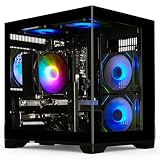
Key takeaways
- Pros: RTX 5060 Ti with Ryzen 7 8700F
- Pros: DDR5 memory and a USB Type-C port
- Pros: VR-Ready listed
- Cons: PSU and cooling details not listed
- Cons: 16GB RAM only
The best gaming pcs under $1400 are prebuilt desktops with an RTX 5060 or RTX 5060 Ti, 16GB of RAM and a 1TB SSD. The MSI Codex Z2 is the top pick here, since its listing pairs an RTX 5060 Ti with a Ryzen 7 8700F and DDR5 memory.
These six desktops are compared from listing specifications, so every figure below comes from the product text. When a detail is missing, such as case size, motherboard model or PSU brand, we mark it “not listed” and suggest checking the maker page. Each system is listed at or under the $1400 ceiling, and all of them sit in the middle-to-upper part of the tier, where current RTX 50-series graphics cards become available in complete systems.
Quick Comparison
| Model | CPU and GPU (per listing) | Memory / Storage | Other listed details | Best for |
|---|---|---|---|---|
| MSI Codex Z2 | Ryzen 7 8700F, RTX 5060 Ti | 16GB DDR5, 1TB SSD | USB Type-C, VR-Ready | Strongest GPU named here, from a known brand |
| CyberPowerPC Gamer Master | Ryzen 5 8400F, RTX 5060 8GB | 16GB DDR5, 1TB PCIe 4.0 SSD | WiFi ready, Windows 11 Home | Balanced DDR5 build |
| Skytech Archangel 5 | Core i5 14400F, RTX 5060 | 16GB RAM, 1TB SSD, DDR5 6000 | 750W Gold PSU, Wi-Fi 5 | Higher memory speed and a larger PSU |
| Skytech Gaming PC Storm | Ryzen 5, RTX 5060 Ti 8GB | 16GB RAM, 1TB SSD, DDR4 3200 | 650W Gold PSU, Wi-Fi 5 | RTX 5060 Ti on a tighter outlay |
| YAWYORE Gaming PC | Ryzen 7 5700X, RTX 5060 | 32GB DDR4, 1TB M.2 NVMe | ARGB fans, WiFi + Bluetooth | Memory-heavy multitasking |
| MXZ Gaming PC | Core i7 12700F, RTX 4060 | 16GB, 1TB M.2 SSD | B660 board, 6 RGB fans, Windows 11 Pro | Older platform with a Pro licence |
1. MSI Codex Z2
Specs (per listing): AMD Ryzen 7 8700F, NVIDIA GeForce RTX 5060 Ti, 16GB DDR5, 1TB SSD, USB Type-C, VR-Ready, Windows 11 Home, model A8NVM-671US.
The Codex Z2 is the only system in this group sold under a major PC brand’s own name, and its listing pairs a Ryzen 7 8700F with an RTX 5060 Ti. That combination points to the strongest graphics performance of the six at this ceiling. DDR5 memory is listed, which gives it a newer platform than the DDR4 systems below. The trade-offs are that 16GB of RAM is the floor for modern games, and the listing does not name the PSU wattage, cooler type or case dimensions. Check the maker page for upgrade room and for the number of storage slots if you plan to add a second drive.
- Pros: RTX 5060 Ti with Ryzen 7 8700F
- Pros: DDR5 memory and a USB Type-C port
- Pros: VR-Ready listed
- Cons: PSU and cooling details not listed
- Cons: 16GB RAM only
2. CyberPowerPC Gamer Master
Specs (per listing): AMD Ryzen 5 8400F 4.2GHz, GeForce RTX 5060 8GB, 16GB DDR5, 1TB PCIe 4.0 SSD, WiFi ready, Windows 11 Home.
This is a straightforward 1080p-to-1440p-class build with a current Ryzen 5 and the RTX 5060. The 1TB drive is PCIe 4.0, and DDR5 gives it a platform with room to move up. CyberPowerPC lists the system as WiFi ready, which usually means a wireless adapter or antenna provision, so confirm the exact wireless hardware on the maker page. The Ryzen 5 8400F sits a tier below the Ryzen 7 in the MSI, but it is a sensible partner for an RTX 5060 in most games; core counts are not listed, so check the maker page. If you want a clean, mainstream layout from a long-running prebuilt maker, this is an easy pick.
- Pros: DDR5 and a PCIe 4.0 SSD
- Pros: RTX 5060 with a current Ryzen 5
- Pros: Windows 11 Home included
- Cons: No RTX 5060 Ti
- Cons: PSU wattage not listed
3. Skytech Gaming Archangel 5
Specs (per listing): Intel Core i5 14400F, RTX 5060, 16GB RAM, 1TB SSD, Windows 11, NVMe SSD, DDR5 6000, 750W Gold PSU, Wi-Fi 5.
The Archangel 5 lists the clearest power and memory details of the group. DDR5 6000 is a fast memory speed, and the 750W 80+ Gold-class PSU leaves headroom for a later GPU upgrade. The Core i5 14400F is a solid mid-range processor for an RTX 5060. The trade-off is Wi-Fi 5, which is older than the Wi-Fi 6E listed on some rivals, so a wired connection or a new adapter may be better. Case, cooler and motherboard are not listed. For a buyer who plans to upgrade the GPU in a couple of years, the larger PSU is the key reason to look at this one.
- Pros: DDR5 6000 memory
- Pros: 750W Gold PSU listed
- Pros: Core i5 14400F with RTX 5060
- Cons: Wi-Fi 5 only
- Cons: Case and cooler not named
4. Skytech Gaming PC Storm
Specs (per listing): AMD Ryzen 5 5500, NVIDIA RTX 5060 Ti 8GB, 16GB RAM, 1TB SSD, DDR4 3200, 650W Gold PSU, Wi-Fi 5, Windows 11.
The Storm puts an RTX 5060 Ti into a lower-cost shell by pairing it with an older AMD Ryzen 5 5500 and DDR4 3200 memory. For GPU-bound games at 1080p and 1440p that can be an efficient use of money, but the CPU and memory are a generation behind the DDR5 systems above, and a Ryzen 5 5500 may limit frame rates in processor-heavy titles. DDR4 memory also suggests an older platform, so upgrade paths may be narrower. The 650W Gold PSU is adequate for the listed parts. Wi-Fi 5 is again the wireless spec. Choose it when the GPU tier matters most to you.
- Pros: RTX 5060 Ti 8GB listed
- Pros: 650W Gold PSU
- Pros: NVMe 1TB SSD
- Cons: Ryzen 5 5500 and DDR4 are older
- Cons: Wi-Fi 5 only
5. YAWYORE Gaming PC
Specs (per listing): AMD Ryzen 7 5700X, GeForce RTX 5060, 32GB DDR4 RAM, 1TB M.2 NVMe SSD, ARGB fans, WiFi and Bluetooth.
The YAWYORE is the memory-heavy option: 32GB of DDR4 and a Ryzen 7 5700X. That suits players who keep a browser, a voice chat and a streaming tool open alongside a game. The RTX 5060 is the same GPU tier as the CyberPowerPC and Skytech Archangel, so gaming performance should be in the same class, while the extra memory and cores help non-gaming work. The brand is less established than MSI or CyberPowerPC, and the PSU, case and warranty terms are not listed, so read the maker page before buying. WiFi and Bluetooth are listed, which saves buying a separate adapter.
- Pros: 32GB RAM and a Ryzen 7 5700X
- Pros: WiFi and Bluetooth listed
- Pros: ARGB fans
- Cons: DDR4 platform
- Cons: PSU and warranty details not listed
6. MXZ Gaming PC
Specs (per listing): Intel Core i7 12700F 5.2GHz, GeForce RTX 4060, 16GB RAM, 1TB M.2 SSD, B660 motherboard, 6 RGB fans, Windows 11 Pro.
The MXZ is the lowest-tier GPU here, an RTX 4060, but it brings a 12th Gen Core i7 12700F and Windows 11 Pro, which some home-office users prefer for features such as remote desktop hosting. The B660 board is a previous-generation Intel platform. This is a fair fit if you want a strong CPU for productivity and 1080p gaming, and less so if you want the newest graphics features. Memory type, PSU rating and case details are not listed on the page we compared, so verify those on the maker page. Compare it against the CyberPowerPC and Skytech Archangel, which list newer GPUs at similar levels.
- Pros: Core i7 12700F and Windows 11 Pro
- Pros: 6 RGB fans and a B660 board named
- Pros: 1TB M.2 SSD
- Cons: RTX 4060 is the oldest GPU in the group
- Cons: Memory type and PSU not listed
How to Choose Under $1400
Pick the GPU first
The graphics card sets your frame rates. In this tier the listings run from RTX 4060 up through RTX 5060 and RTX 5060 Ti. If you play at 1440p, lean toward the RTX 5060 Ti listings; for 1080p, an RTX 5060 is a sensible floor. VRAM beyond what the title says is not listed, so check the maker page.
Look for a PSU of 650W or more
Only the Skytech listings name a PSU, at 650W and 750W Gold. If a prebuilt does not name its PSU, ask the seller, because a weak supply limits upgrades and can affect stability.
Choose DDR5 if you plan to upgrade
DDR5 systems like the MSI, CyberPowerPC and Archangel 5 sit on newer platforms. DDR4 builds can be a good value but have narrower upgrade paths, so match your pick to how long you plan to keep the PC.
Check the warranty and support terms
Prebuilt desktops are sold with different warranty terms, and none of the listings state them. Before you buy, read the maker or seller page for the length of coverage, who handles repairs, and whether the GPU and PSU are covered separately. A longer, clearer policy is worth weighing against a small difference in specifications, especially for lesser-known brands. Also note the operating system: Windows 11 Home is listed on the MSI and CyberPowerPC systems, while the MXZ lists Pro, which adds business features most players never use.
Check storage and wireless
Every listing includes a 1TB SSD, which is the practical minimum. Wi-Fi 5 appears on the Skytech systems, so a wired connection is better for online play.
Gaming PCs for streaming
Streaming adds load, so look for more cores and memory. The YAWYORE lists 32GB of RAM and a Ryzen 7 5700X, and the MSI lists a Ryzen 7 8700F.
Gaming PCs for 1440p
The MSI Codex Z2 and the Skytech Storm list the RTX 5060 Ti, the strongest GPU tier here for 1440p. The RTX 5060 systems can handle 1440p at adjusted settings in many titles.
Gaming PCs for students
A desktop needs a monitor, keyboard and mouse, none of which are listed. Students with limited space should check case dimensions on the maker page. The MXZ ships with Windows 11 Pro, which helps for coursework tools.
FAQ
Is an RTX 5060 Ti worth it over an RTX 5060?
It is a higher tier and helps at 1440p. Whether it justifies the extra spend depends on your monitor and the games you play.
Is 16GB of RAM enough for a gaming PC?
Yes for most games. Choose 32GB, as on the YAWYORE, if you stream or multitask heavily.
Do these PCs include a monitor?
The listings do not mention a monitor, keyboard or mouse. Plan to buy those separately and confirm on the maker page.
Is DDR4 a problem in a new PC?
Not for gaming today, but DDR5 platforms offer more upgrade headroom. DDR4 builds work well when the GPU is your priority.
Can I upgrade these prebuilt PCs later?
Often yes, especially the GPU and storage. Motherboard, case and PSU details are mostly not listed, so check the maker page first.
Last updated: November 2026
FAQ
Is an RTX 5060 Ti worth it over an RTX 5060?
Is 16GB of RAM enough for a gaming PC?
Do these PCs include a monitor?
Is DDR4 a problem in a new PC?
Can I upgrade these prebuilt PCs later?
More from Amazon
Programs that pair well with the guide above. Offers and eligibility are set by Amazon and may change.
Free shipping on eligible items, Prime Video and more. Eligible new members can start with a free trial.
Start a Prime free trialAd-free music streaming. Eligible new subscribers can start with a free trial.
Try Music Unlimited freeA Prime membership for ages 18-24 with a trial period. Eligibility is set by Amazon.
See Prime for Young AdultsAudiobooks and podcasts to listen to on the go. Eligible new members can start with a free trial.
Try Audible freeAs an Amazon Associate we earn from qualifying purchases.