Our Top Picks
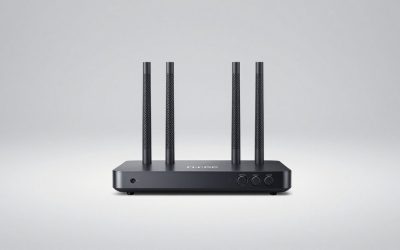
 TP-Link AXE5400 Tri-Band WiFi 6E RouterWiFi 6E, Tri-Band AXE540012.91 x 10.43 x 4.72 inches1.5 poundsCheck on Amazon
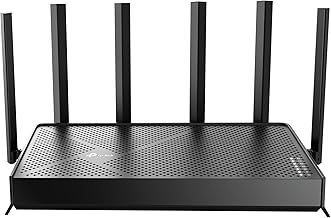
 TP-Link Tri-Band BE19000 WiFi 7 Router11.87 x 10.32 x 3.78 Inch11.87 x 10.32 x 3.78 inches4.78 poundsCheck on Amazon
As an Amazon Associate I earn from qualifying purchases.
The Short Answer
The best internet routers for streaming keep a steady, uncongested connection to every screen in the house at the same time. One 4K stream alone is not demanding, but two or three 4K streams running while phones, laptops, and consoles share the same network is a different job. That is where tri-band Wi-Fi, a fast wired port for the main TV, and enough capacity for many devices start to matter.
Our top pick for most households is the TP-Link Archer AXE75, a Wi-Fi 6E router with a 6 GHz band and a 2.5 Gbps WAN port. The ASUS RT-AX86U Pro is the strongest all-rounder. For the newest standard and the most headroom, the TP-Link Archer BE800 and the NETGEAR Nighthawk RS700S are the two Wi-Fi 7 flagships here, and the NETGEAR Nighthawk RAXE300 is the Wi-Fi 6E step up. Every router here is a standalone router, not a mesh kit, a modem, or a streaming stick, and each one needs a modem or an internet connection from your provider.
Our Top Picks
- Best for most households: TP-Link Archer AXE75 — Wi-Fi 6E, tri-band AXE5400, 6 GHz band, 2.5 Gbps WAN port.
- Best all-rounder: ASUS RT-AX86U Pro — Wi-Fi 6, dual-band AX5700, 2.0 GHz quad-core processor, 2.5 Gbps port, AiMesh support.
- Best Wi-Fi 7 flagship: TP-Link Archer BE800 — Wi-Fi 7, tri-band BE19000, two 10 Gbps ports, four 2.5 Gbps ports, LED screen.
- Best Wi-Fi 7 for large homes: NETGEAR Nighthawk RS700S — Wi-Fi 7, tri-band BE19000, 10 Gig internet port, coverage up to 3,500 sq. ft.
- Best Wi-Fi 6E step up: NETGEAR Nighthawk RAXE300 — Wi-Fi 6E, tri-band AXE7800, eight streams, coverage up to 2,500 sq. ft.
Quick Comparison
| Router | Wi-Fi | Top wireless speed | Bands | Wired ports | Best for |
|---|---|---|---|---|---|
| TP-Link Archer AXE75 | Wi-Fi 6E | Up to 5,400 Mbps | Tri-band | 2.5 Gbps WAN, gigabit LAN | Most households |
| ASUS RT-AX86U Pro | Wi-Fi 6 | Up to 5,700 Mbps | Dual-band | 2.5 Gbps port, 6 ports total | All-round use |
| TP-Link Archer BE800 | Wi-Fi 7 | Up to 19 Gbps | Tri-band | 2 x 10 Gbps, 4 x 2.5 Gbps | Flagship Wi-Fi 7 |
| NETGEAR Nighthawk RS700S | Wi-Fi 7 | Up to 19 Gbps | Tri-band | 10 Gig internet port | Large homes |
| NETGEAR Nighthawk RAXE300 | Wi-Fi 6E | Up to 7.8 Gbps | Tri-band | Confirm on the listing | Wi-Fi 6E step up |
How to Choose
Start with your internet plan: no router can stream faster than the connection coming into your home. On a gigabit plan, a Wi-Fi 6 or Wi-Fi 6E router with a gigabit or faster WAN port is enough for several 4K streams at once. If your plan is a multi-gig plan, look for a 2.5 Gbps or 10 Gbps WAN port so the router itself does not become the bottleneck. The WAN port connects to your modem, so its speed sets the ceiling for everything behind it.
Next, count the screens and the people. A household with one TV and a handful of phones has very different needs from a household with three TVs, laptops on video calls, and a console downloading a game while a movie plays. Tri-band routers help here because they add a third band, usually 6 GHz, that can carry high-demand traffic with less interference from neighbors. The extra band does not make a single stream faster, but it gives the router more room to spread devices around.
Wi-Fi generation is the third decision. Wi-Fi 6 is mature and handles 4K streaming well. Wi-Fi 6E adds the 6 GHz band, the biggest practical gain for streaming in crowded apartment buildings, where the 2.4 GHz and 5 GHz bands are packed with neighboring networks. Wi-Fi 7 adds wider channels, multi-link operation, and higher top speeds, and it is the right choice if you are buying for the next several years and your devices already support it. If none of your devices support Wi-Fi 7 yet, a Wi-Fi 6E router will serve you just as well today.
Wired connections and coverage are the last pieces. A TV or console connected by Ethernet gets a stable link that never competes with wireless traffic, and that alone can end buffering on the main screen. A router placed centrally, out in the open and away from thick walls, covers far more of a home than the same router hidden in a cabinet. Coverage figures here come from the manufacturers and describe open layouts, so if your main TV sits two floors from the router, a mesh system or a wired access point may serve you better. Finally, a router is not a modem: every pick here needs a modem or a direct Ethernet handoff from your provider.
The Picks in Detail
1. TP-Link Archer AXE75 — Best for most households
The Archer AXE75 is a tri-band Wi-Fi 6E router with combined wireless speeds up to 5,400 Mbps: 2,402 Mbps on the 6 GHz band, 2,402 Mbps on the 5 GHz band, and 574 Mbps on the 2.4 GHz band. A 1.7 GHz quad-core processor and 512 MB of memory run the router, and six fixed antennas with beamforming push the signal around the home. The listing describes coverage for two to three bedroom houses and support for 200 or more devices. The 6 GHz band is the headline for streaming: a cleaner band with less interference. The router also has a 2.5 Gbps WAN port, gigabit LAN ports for wiring the main TV, a USB 3.0 port, VPN support, and EasyMesh support for adding coverage later.
Pros:
– 6 GHz band gives streaming traffic a cleaner, less crowded lane
– 2.5 Gbps WAN port suits gigabit and faster internet plans
– Six antennas with beamforming for steady coverage
– VPN server and client support included
Cons:
– No 10 Gbps port for multi-gig wired setups
– Advanced HomeShield features need a separate subscription, so confirm on the listing
– A separate modem is required for most internet providers
View the TP-Link Archer AXE75 on Amazon
2. ASUS RT-AX86U Pro — Best all-rounder

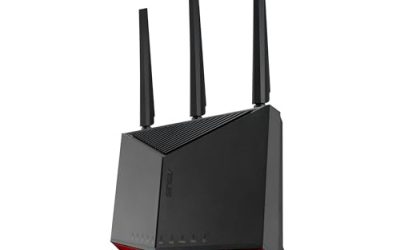
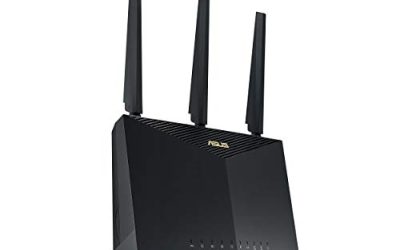
The ASUS RT-AX86U Pro is a dual-band Wi-Fi 6 router with combined wireless speeds up to 5,700 Mbps: 4,804 Mbps on the 5 GHz band and 861 Mbps on the 2.4 GHz band. It runs on a 2.0 GHz quad-core processor with 1 GB of RAM, and the listing states it supports internet connections up to 2 Gbps. A dedicated 2.5 Gbps port handles fast wired links, and the router has six ports in total. Adaptive QoS can prioritize streaming and gaming traffic, and the dedicated gaming port can be used for a wired console or a streaming box that should never wait for bandwidth. AiProtection Pro is included with automatic updates, and the router supports VPN connections, including multiple tunnels at once. It works as a router or an access point, and AiMesh support extends coverage with other ASUS routers.
Pros:
– Strong 5 GHz throughput for wireless 4K streaming
– 2.5 Gbps port and support for internet connections up to 2 Gbps
– Adaptive QoS to prioritize streaming traffic
– AiProtection Pro security included with no added subscription named on the listing
Cons:
– Dual-band only, so there is no 6 GHz band for crowded wireless environments
– Tall, upright design takes more shelf space than a flat router
– Parental controls are more limited than on some rival routers
View the ASUS RT-AX86U Pro on Amazon
3. TP-Link Archer BE800 — Best Wi-Fi 7 flagship
The Archer BE800 is a tri-band Wi-Fi 7 router with combined wireless speeds up to 19 Gbps. It uses 320 MHz channels and 4K-QAM, two Wi-Fi 7 features that raise throughput and efficiency on compatible devices, and it has eight high-performance antennas. The wired side is the most complete in this guide: one 10 Gbps SFP+ fiber WAN and LAN combo port, one 10 Gbps WAN and LAN port, four 2.5 Gbps ports, and one USB 3.0 port. It has 2 GB of RAM and a two year manufacturer warranty according to the listing. Multi-link operation can combine bands for a steadier connection on supported devices, and a front LED screen shows network statistics. HomeShield provides network analytics and security, and EasyMesh support grows coverage with compatible hardware.
Pros:
– Wi-Fi 7 with 320 MHz channels and 4K-QAM for high throughput
– Two 10 Gbps ports plus four 2.5 Gbps ports for multi-gig wired setups
– Eight antennas and a large-home coverage rating on the listing
– LED screen for at-a-glance network statistics
Cons:
– Large footprint and heavier build than the other picks here
– Wi-Fi 7 benefits depend on having Wi-Fi 7 devices
– Some HomeShield features need a separate subscription, so confirm on the listing
View the TP-Link Archer BE800 on Amazon
4. NETGEAR Nighthawk RS700S — Best Wi-Fi 7 for large homes

The NETGEAR Nighthawk RS700S is a tri-band Wi-Fi 7 router with wireless speeds up to 19 Gbps. It has a 10 Gig internet port for multi-gig plans, and the listing describes coverage up to 3,500 sq. ft. with capacity for up to 200 connected devices. The router uses the 2.4 GHz, 5 GHz, and 6 GHz bands, and NETGEAR Armor is included; confirm the trial length on the listing. The 6 GHz band gives newer streaming devices a clear lane, the 10 Gig port keeps the wired side ahead of fast internet plans, and the high device capacity keeps many devices connected without crowding each other out. The Nighthawk app handles setup and management, and the router can be extended with compatible mesh hardware. Confirm the exact wired port mix on the listing before you buy, as different sources describe the LAN port count differently.
Pros:
– Wi-Fi 7 tri-band speeds up to 19 Gbps
– 10 Gig internet port for multi-gig plans
– Coverage up to 3,500 sq. ft. and capacity for up to 200 devices
– 6 GHz band for a clear lane for newer streaming devices
Cons:
– Flagship size and presence, so it needs real shelf space
– Exact LAN port count should be confirmed on the listing
– Wi-Fi 7 benefits depend on having Wi-Fi 7 devices
View the NETGEAR Nighthawk RS700S on Amazon
5. NETGEAR Nighthawk RAXE300 — Best Wi-Fi 6E step up

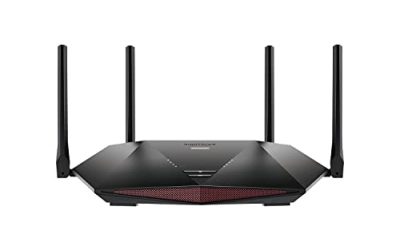
The Nighthawk RAXE300 is a tri-band Wi-Fi 6E router with wireless speeds up to 7.8 Gbps across eight streams. The 6 GHz band is the new lane here, joining 5 GHz and 2.4 GHz to spread devices across three bands. Six antennas hide inside the folding wings of the Nighthawk design, and the router runs on a 1.7 GHz quad-core processor. The listing describes coverage up to 2,500 sq. ft. for up to 40 devices, and a USB 3.0 port is included. Its extra wireless capacity over the AXE75 helps when several people stream at once, and the 6 GHz band keeps high-demand traffic away from the crowded 5 GHz band. NETGEAR Armor and Smart Parental Controls are included. One caution: a Renewed version circulates under a separate ASIN, so match the listing by ASIN B0B1LZMH78 and model RAXE300-100NAS and check the condition field before ordering.
Pros:
– 6 GHz band plus eight streams for busy streaming households
– Coverage up to 2,500 sq. ft. according to the listing
– Folding-wing design hides the antennas
– NETGEAR Armor and parental controls included
Cons:
– No 10 Gbps port for multi-gig wired setups
– A Renewed listing circulates under a separate code, so check the condition field
– Exact wired port mix should be confirmed on the listing
View the NETGEAR Nighthawk RAXE300 on Amazon
Who Should Choose What
Pick the TP-Link Archer AXE75 for a typical household: Wi-Fi 6E, a 6 GHz band, and a 2.5 Gbps WAN port without flagship size or complexity. It fits one or two 4K TVs and a gigabit plan. Pick the ASUS RT-AX86U Pro for a proven all-rounder with strong 5 GHz wireless, a 2.5 Gbps port, and a deep feature list covering streaming, gaming, and home security. Pick the TP-Link Archer BE800 if you have a multi-gig plan, several 4K streams at once, and Wi-Fi 7 devices already in the house. Pick the NETGEAR Nighthawk RS700S instead if your home is large and coverage matters more than wired ports. Pick the NETGEAR Nighthawk RAXE300 if you want Wi-Fi 6E with more wireless capacity than the AXE75 and you do not need Wi-Fi 7 yet.
Common Mistakes
The most common mistake is buying a router faster than the internet plan behind it, then wondering why streams still buffer. A router cannot create speed that is not coming into the house, so match the router to your plan first and check the modem as well. An old modem that tops out below your plan speed will hold back any router.
The second mistake is hiding the router. A router shut inside a cabinet, behind a TV, or on the floor will cover far less of the home than the same router placed centrally, out in the open, and at about chest height. Walls, floors, mirrors, and metal objects all weaken a wireless signal, and no antenna design can undo a bad position.
The third mistake is ignoring the 6 GHz band. On Wi-Fi 6E and Wi-Fi 7 routers, the 6 GHz band is the cleanest lane in the house, but only devices that support Wi-Fi 6E or Wi-Fi 7 can use it. If your TV or streaming box is older, it will stay on 5 GHz, and the 6 GHz band will sit idle. Check what your devices support before you pay for a band they cannot use.
The fourth mistake is leaving the main TV on Wi-Fi when an Ethernet cable is an option, and forgetting the streaming app settings. A wired connection is steadier than any wireless link, and the main screen is the one place where a steady link matters most. Many streaming apps also default to automatic quality, which drops resolution when the connection wavers, so check the app settings before blaming the router. Restarting the modem and router can clear temporary congestion.
FAQ
Do I need Wi-Fi 7 to stream in 4K?
No. A single 4K stream needs only a modest, steady connection, and Wi-Fi 6 handles that with room to spare. Wi-Fi 7 becomes useful when several 4K streams run at once, when your plan is faster than gigabit, or when you are buying a router to keep for several years and your devices already support Wi-Fi 7.
Is a tri-band router better for streaming than a dual-band router?
In a busy household, yes. A tri-band router adds a third band, usually 6 GHz, that gives the router more room to spread devices around. That reduces congestion when several people stream, call, and browse at the same time. In a quiet household with one TV, the difference is smaller.
Should I wire my TV or streaming box with Ethernet?
If you can, yes. A wired connection is steadier than Wi-Fi and never competes with wireless traffic from other devices. It is the simplest way to end buffering on the main screen. If a cable run is not practical, place the router close to the TV and use the 5 GHz or 6 GHz band.
Why does my stream buffer even with a fast internet plan?
Buffering with a fast plan usually points to Wi-Fi congestion, router placement, or a modem that cannot keep up. Check that the router sits centrally and out in the open, that the streaming device is on the clearest band available, and that the modem matches the plan speed. Restarting the modem and router can clear temporary congestion.
Can one router cover a large home for streaming?
It depends on the layout. The routers in this guide list coverage up to 2,500 or 3,500 sq. ft., but those figures describe open layouts. Thick walls, multiple floors, and long distances reduce real coverage. If the far TV still struggles, add a mesh node or an access point from the same family.
Do I still need a modem with these routers?
Yes, for most connections. Every router here needs a modem or a direct Ethernet handoff from your provider. A separate modem is required for most cable and DSL connections, so confirm with your provider that your modem matches your plan.
Conclusion
The best internet routers for streaming match your plan, your home, and the number of screens sharing the connection. For most households, the TP-Link Archer AXE75 covers the job with Wi-Fi 6E, a 6 GHz band, and a 2.5 Gbps WAN port. The ASUS RT-AX86U Pro is the strongest all-rounder, while the TP-Link Archer BE800 and the NETGEAR Nighthawk RS700S are the Wi-Fi 7 flagships for multi-gig plans and large homes, and the NETGEAR Nighthawk RAXE300 is the Wi-Fi 6E step up between them. Place the router centrally, wire the main TV if you can, and use the clearest band available.
FAQ
Do I need Wi-Fi 7 to stream in 4K?
Is a tri-band router better for streaming than a dual-band router?
Should I wire my TV or streaming box with Ethernet?
Why does my stream buffer even with a fast internet plan?
Can one router cover a large home for streaming?
Do I still need a modem with these routers?
More from Amazon
Programs that pair well with the guide above. Offers and eligibility are set by Amazon and may change.
Free shipping on eligible items, Prime Video and more. Eligible new members can start with a free trial.
Start a Prime free trialAd-free music streaming. Eligible new subscribers can start with a free trial.
Try Music Unlimited freeA Prime membership for ages 18-24 with a trial period. Eligibility is set by Amazon.
See Prime for Young AdultsAudiobooks and podcasts to listen to on the go. Eligible new members can start with a free trial.
Try Audible freeAs an Amazon Associate we earn from qualifying purchases.