Our Top Picks
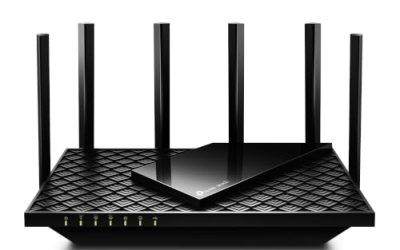
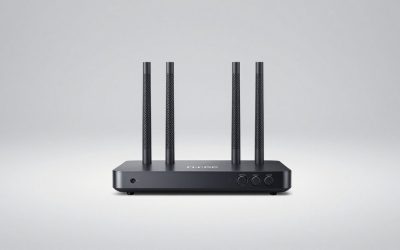
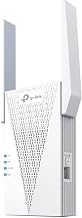
 TP-Link AX6600 WiFi 6 Gaming Router8.85 cubic inches8.35 x 8.35 x 2.04 inches2.43 poundsCheck on Amazon

World of Warcraft itself asks very little of a connection. The game sips bandwidth compared with a video stream, so the router decision for a raider is not about headline speed. It is about what happens ninety minutes into a progression night when someone else in the house starts a cloud backup or a 4K stream and your timed interrupt turns into a rubber-band death. The right router keeps a tiny game stream steady while the rest of the household does whatever it wants.
This guide is for three kinds of WoW players: desk players who can run an Ethernet cable and want the most reliable setup possible; players stuck on Wi-Fi in a bedroom or office who need the cleanest wireless link they can get; and players in larger homes where the gaming room sits far from where the internet enters the house. Every pick was chosen from the names and specifications on its Amazon product page, prioritising QoS controls, wired ports and band layout over box-art speed claims.
Quick Picks
As an Amazon Associate we earn from qualifying purchases.
| Product | Best for | Key spec from title |
|---|---|---|
| ASUS RT-BE86U | Wired raid PCs on multi-gig plans | 10G WAN/LAN plus four 2.5G LAN ports |
| TP-Link Archer GX90 | Households that game and stream at once | AX6600 tri-band with a dedicated game band |
| ASUS RT-BE92U | Wireless raiders who want the 6 GHz band | BE9700 WiFi 7 with 320MHz channels |
| NETGEAR Nighthawk RS300 | A simple, modern WiFi 7 upgrade | BE9300 tri-band, covers up to 2,500 sq. ft. |
| TP-Link Deco BE63 (2-Pack) | Large homes and far-away gaming rooms | BE10000 mesh, covers up to 5,800 sq. ft. |
How to Choose
Start With a Cable, Not a Stronger Signal
The single most effective raid upgrade is still an Ethernet cable. A wired link removes the two things that actually kill pulls: interference from neighbouring networks and signal drops through walls. When you shop, count the LAN ports and check their speeds, because a router with one free gigabit port is a poor match for a desk that also holds a console and a work laptop. A dedicated gaming port, like the one on the RT-BE86U below, prioritises that socket automatically. If a full cable run is impossible, a flat cable along skirting boards or a short run to a mesh satellite is still better than heroic Wi-Fi.
QoS Is the Feature That Protects a Raid Night
WoW traffic is tiny, so it loses every fight for bandwidth unless the router is told to protect it. Spikes usually arrive when the upload side of the connection saturates: a phone backing up photos, a housemate streaming, a launcher downloading a patch. Quality of Service settings let the router hold a small, guaranteed lane for your game while everything else queues behind it. Look for per-device or per-application prioritisation you can actually configure, and be honest when you enter your plan speeds, because shaping set far above the real line rate does nothing. A “gaming” badge on the box is not a substitute for this setting.
Pick the Band Your Room Can Actually Use
If wiring is off the table, band choice decides how your raid feels. The 2.4 GHz band travels far but is crowded and slow to react; it is the wrong place for a raid character. Five gigahertz is the practical default for a PC in the next room. The 6 GHz band on Wi-Fi 6E and Wi-Fi 7 routers is cleaner still, but it fades faster through walls and your PC needs a compatible adapter to use it. Tri-band routers help even older PCs, because the extra band gives the rest of the household somewhere to go that is not your channel.
One Router or Mesh: Let the Floor Plan Decide
A single well-placed router covers most flats and small houses, and it is the simplest setup to keep stable. Mesh earns its place when the gaming room is a floor away from the router or separated by brick and concrete. The catch is the backhaul: a satellite linked wirelessly adds a second wireless hop to every packet, while a satellite connected by Ethernet behaves almost like being wired to the main router. If you go mesh, plan the satellite position around a possible cable run, and put the node in the gaming room so the PC itself can plug straight into it.
The 5 Best Options
ASUS RT-BE86U

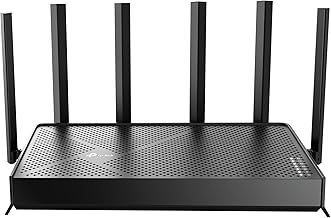
The RT-BE86U is the pick for players who can wire their PC and want that link to stay fast for years. Its port layout is the strongest in this guide: a 10G WAN/LAN port for multi-gig fibre plans and four 2.5G LAN ports, one of them a dedicated gaming port that prioritises the plugged-in device. ASUS’s QoS tools let you put the raid PC first when the connection gets busy, and AiMesh support means it can later become the main unit of a larger system instead of being replaced. It skips the 6 GHz band, so judge it as a wired-first router with strong 5 GHz wireless as backup.
Specs
- WiFi 7 (802.11be) dual-band BE6800, up to 6,800 Mbps (5,764 Mbps on 5 GHz, 1,032 Mbps on 2.4 GHz)
- One 10G WAN/LAN port and four 2.5G LAN ports, including a dedicated gaming port
- 4096-QAM and Multi-Link Operation (MLO)
- AiMesh support for whole-home expansion
- AiProtection Pro and Guest Network Pro, subscription-free per the listing
- USB 3.2 port
Best for: Raiders who can run a cable and want multi-gig wired headroom.
Watch out for: There is no 6 GHz band, so wireless-only players should look at the RT-BE92U instead.
ASIN: B0DGZZJ996
TP-Link Archer GX90
The GX90 takes a different approach to the same problem: instead of asking you to tune queues, it reserves an entire 5 GHz band for gaming. That dedicated game band, rated at 4,804 Mbps in the listing, means the raid PC is not sharing airtime with the TV and every phone in the house, and TP-Link’s Game Accelerator QoS prioritises game traffic within it. A 2.5 Gbps WAN/LAN port keeps it relevant on faster plans, and the eight-antenna design suits busier homes. It is a Wi-Fi 6 design, so it trades the newest standard for a mature, gaming-specific feature set.
Specs
- WiFi 6 tri-band AX6600: 4,804 Mbps dedicated game band (5 GHz), 1,201 Mbps (5 GHz), 574 Mbps (2.4 GHz)
- One 2.5 Gbps WAN/LAN port plus gigabit LAN ports
- Game Accelerator QoS with game statistics and game port forwarding tools
- OFDMA and MU-MIMO with eight external antennas
- USB 3.0 and USB 2.0 ports
- OneMesh support for extending coverage
Best for: Busy households where raid night competes with streaming and downloads.
Watch out for: The game band only pays off if your gaming devices actually connect to it, so set it up deliberately rather than merging all bands under one name.
ASIN: B08TGKX9MT
ASUS RT-BE92U

For players who cannot run a cable, the RT-BE92U offers the cleanest wireless path in this guide. Its 6 GHz band uses 320MHz channels that are still largely empty in most neighbourhoods, which is exactly what a latency-sensitive game wants, and Multi-Link Operation lets compatible clients use more than one band at once. The wired side is not an afterthought either: a 10G port and four 2.5G ports mean a future desk move or a second wired machine is covered. ASUS’s adaptive QoS and subscription-free AiProtection Pro round out a router that suits a mixed gaming household.
Specs
- WiFi 7 tri-band BE9700, up to 9,700 Mbps across 6 GHz, 5 GHz and 2.4 GHz
- 320MHz bandwidth and 4096-QAM on the 6 GHz band, with MLO support
- One 10G port and four 2.5G ports
- AiMesh support for whole-home expansion
- AiProtection Pro network security, subscription-free per the listing
- AI WAN detection for connection monitoring
Best for: Wireless raiders with a Wi-Fi 6E or Wi-Fi 7 adapter in the PC.
Watch out for: The 6 GHz band fades quickly through walls, so this router needs to sit reasonably close to the gaming room to shine.
ASIN: B0DHWCQ3FP
NETGEAR Nighthawk RS300

The RS300 is the straightforward upgrade for a player whose current router is simply old. It brings tri-band Wi-Fi 7 with a 6 GHz band, a 2.5 gig internet port for faster cable and fibre plans, and enough capacity for a hundred devices, which covers the modern mix of PCs, consoles, phones and smart home gear. Setup and management run through the Nighthawk app, which suits players who want to set device priorities once and then forget the router exists. It lacks the deep gaming-specific tooling of the GX90 or the ASUS models, but for a small home it covers the WoW basics well.
Specs
- WiFi 7 tri-band BE9300, up to 9.3 Gbps wireless speed
- 2.5 gig internet port, with additional 2.5G and gigabit LAN ports
- Covers up to 2,500 sq. ft. per the listing
- Supports up to 100 devices per the listing
- NETGEAR Armor security features
- App-based setup and management
Best for: Small homes replacing an ageing router with something modern and simple.
Watch out for: Advanced QoS tuning is more limited than on the ASUS picks, so heavy multi-user households should compare carefully.
ASIN: B0D4JBGPH4
TP-Link Deco BE63 (2-Pack)

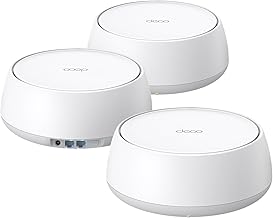
The Deco BE63 solves the problem the other picks cannot: a gaming room that is simply far from the router. Two Wi-Fi 7 units cover up to 5,800 square feet between them, and each unit carries four 2.5G ports, so the satellite in your gaming room doubles as a wired dock for the PC. That wired-backhaul option is the detail that matters for raiding, because a cabled satellite removes the extra wireless hop that makes ordinary mesh feel inconsistent. The Deco app handles setup and device prioritisation, and the system supports more than 200 devices for larger smart homes.
Specs
- WiFi 7 tri-band BE10000: 5,188 Mbps (6 GHz), 4,324 Mbps (5 GHz), 574 Mbps (2.4 GHz)
- Multi-Link Operation and 320MHz channels
- Covers up to 5,800 sq. ft. as a 2-pack, supports over 200 devices
- Four 2.5G WAN/LAN ports per unit plus a USB 3.0 port
- Ethernet backhaul supported between units
- HomeShield security and QoS features per the listing
Best for: Large or two-storey homes where the raid desk sits far from the main connection point.
Watch out for: Management is app-led with fewer manual network controls than a traditional router, which enthusiasts may find restrictive.
ASIN: B0CN8WBXY2
Which One Fits Your Situation
Your PC Sits Near the Router and a Cable Is Easy
Choose the ASUS RT-BE86U. A wired connection removes interference and signal drop-out from the equation entirely, and this router’s four 2.5G LAN ports plus dedicated gaming port mean the raid PC keeps priority even when other wired devices are busy. It is the least exciting setup in this guide and, for raid stability, the most effective one.
Raid Night Collides With Streaming and Downloads
Choose the TP-Link Archer GX90. Its dedicated game band gives your PC airtime that the household’s TVs and phones cannot touch, and the Game Accelerator QoS handles prioritisation when the connection itself gets busy. In a home where three people stream while you raid, separating the traffic matters more than a newer Wi-Fi standard.
You Cannot Wire, but Your Desk Is One Room Away
Choose the ASUS RT-BE92U if your PC has a Wi-Fi 6E or Wi-Fi 7 adapter, since its 6 GHz band is the cleanest short-range link here. If your adapter tops out at Wi-Fi 6, the NETGEAR Nighthawk RS300 is the simpler buy: its 5 GHz band will do the work, and the 6 GHz radio still helps by moving newer household devices off your band.
The Gaming Room Is in a Big or Two-Storey House
Choose the TP-Link Deco BE63 2-pack. Place the second unit in the gaming room and, if at all possible, connect the two units with Ethernet so the satellite uses wired backhaul. Then plug the PC into the satellite’s 2.5G ports. Done this way, a far-away desk gets a connection that behaves almost like sitting next to the main router.
Common Mistakes
- Buying for the biggest Gbps number on the box, when WoW needs stability and low contention rather than raw throughput.
- Raiding on the 2.4 GHz band because it reaches further, even though it is the most crowded and least responsive band in most homes.
- Turning on QoS but leaving the configured speeds at defaults that do not match the actual internet plan, which makes the shaping useless.
- Stacking a new router behind the ISP router without bridge mode, creating double NAT and connection quirks that get blamed on the game.
- Hiding the router inside a cabinet or on the floor behind the TV, then paying for more hardware to fix a placement problem.
Frequently Asked Questions
Does World of Warcraft need a fast internet plan?
No. WoW uses very little bandwidth compared with streaming video, and even modest home plans carry the game itself easily. What matters is how stable the connection stays when other people and devices get busy. A mid-range plan with a router that manages traffic well will raid better than a gigabit plan behind a router that lets one download swamp everyone.
Is Wi-Fi good enough for raiding, or do I need Ethernet?
Ethernet is still the safest choice, because it removes interference and signal variation from the connection. That said, a strong 5 GHz or 6 GHz link from a nearby router is perfectly playable for most raiders. The setups that struggle are distant 2.4 GHz connections and mesh systems where the satellite itself is connected wirelessly through several walls.
Will a gaming router lower my ping to the WoW server?
A router cannot shorten the distance to the server or change how your ISP routes traffic, so it will not turn a high base ping into a low one. What it can fix is the local part of the problem: spikes caused by other traffic in your home, weak wireless links and overloaded hardware. If your ping is stable but high, that is geography and routing, not your router.
Should I replace my ISP router or put my new router behind it?
Replacing it, or putting the ISP unit into bridge or modem mode, is cleaner. Running two routers in series usually creates double NAT, which can complicate voice chat, port forwarding and some game connections. If you must keep the ISP box active, use the new router’s access point mode for Wi-Fi only, or set up the ISP router’s DMZ carefully and expect to spend time checking settings.
FAQ
Does World of Warcraft need a fast internet plan?
Is Wi-Fi good enough for raiding, or do I need Ethernet?
Will a gaming router lower my ping to the WoW server?
Should I replace my ISP router or put my new router behind it?
More from Amazon
Programs that pair well with the guide above. Offers and eligibility are set by Amazon and may change.
Free shipping on eligible items, Prime Video and more. Eligible new members can start with a free trial.
Start a Prime free trialAd-free music streaming. Eligible new subscribers can start with a free trial.
Try Music Unlimited freeA Prime membership for ages 18-24 with a trial period. Eligibility is set by Amazon.
See Prime for Young AdultsAudiobooks and podcasts to listen to on the go. Eligible new members can start with a free trial.
Try Audible freeAs an Amazon Associate we earn from qualifying purchases.