Our Top Picks
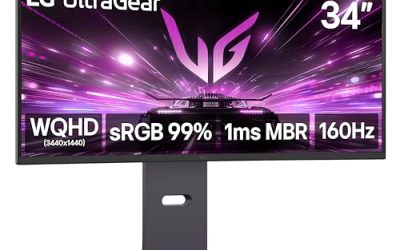
 LG 27GP850-B Ultragear Gaming Monitor 27-Inch QHD14.4"x24.2"x2"11.5 x 24.2 x 22.7 inches13.9 poundsCheck on Amazon
 ASUS TUF Gaming VG27AQ3A 27 Inch 1440p 180Hz14.4" x 24.2" x 2.1"24.2 x 8.4 x 17.9 inches10.1 poundsCheck on Amazon
 AOC 27 Inch Gaming Monitor 2K QHD 180Hz27" 180Hz VA8.18 x 24.17 x 21.32 inches18 poundsCheck on Amazon
The best monitors for Series S are 27-inch 1440p screens that accept 120Hz over HDMI and support FreeSync, because that combination matches exactly what the console can output. The Xbox Series S tops out at 1440p and 120 frames per second for gaming, so a monitor built around that ceiling gives you the full performance of the console without paying for 4K 120Hz bandwidth the Series S cannot use. The five monitors below all clear that bar, and each one suits a different kind of desk: a colour-accurate IPS panel, a fast 180Hz screen with motion-blur reduction, a value pick with a height-adjustable stand, an immersive curved display, and a high-refresh panel for competitive play.
Before the picks, one quirk of the Series S is worth knowing. The console locks HDR behind a 4K output signal, so a native 1440p monitor shows games in standard dynamic range even when the panel supports HDR. That does not make HDR-capable 1440p monitors a waste — the same screen still serves a PC or a future console — but if HDR on the Series S matters to you, only a 4K monitor will unlock it, and 4K at 120Hz needs HDMI 2.1. For everyone else, 1440p at 120Hz is the sweet spot, and that is where this guide stays.
How to Choose
1. 1440p at 120Hz over HDMI
This is the single most important specification. The Series S outputs 1440p at up to 120Hz through its HDMI 2.0 port, so the monitor must accept that exact signal over HDMI, not only over DisplayPort. Many monitors list a high refresh rate that only works over DisplayPort, with HDMI capped lower. Check the monitor’s HDMI specification for 1440p 120Hz before buying, because a screen that only reaches 120Hz on DisplayPort will hold the console at 60Hz.
2. Panel type
IPS panels give the widest viewing angles and the most consistent colours, which suits a desk where you sit close and slightly off-centre. VA panels, including curved ones, give deeper blacks and stronger contrast, which suits dark rooms and cinematic single-player games, though fast motion can smear slightly on cheaper VA screens. Either type works well with the Series S; the choice comes down to whether you value colour accuracy or contrast more.
3. Adaptive sync
The Series S supports AMD FreeSync over HDMI, which matches the monitor’s refresh rate to the console’s frame output and removes tearing without adding input lag. A monitor with FreeSync Premium or G-SYNC compatibility covers the same ground, and both are worth having. Without adaptive sync, frame-rate dips in demanding games show up as visible tearing across the screen.
4. Response time and motion handling
A 1ms grey-to-grey response time keeps fast motion clean, and some monitors add backlight strobing modes that reduce blur further. These features matter most in shooters and racing games. For slower games, panel quality and contrast matter more than the last fraction of a millisecond. Treat very low response-time claims with care and look at the panel type alongside the number.
5. Size and viewing distance
A 27-inch screen is the natural match for 1440p on a desk: the pixel density keeps text and game detail sharp at arm’s length without scaling. A 24-inch 1080p screen costs less and still reaches 120Hz, but it gives up the sharpness that makes the Series S look its best. A 32-inch 1440p screen works in a larger room, though pixels become more visible up close. For a standard desk, 27 inches at 1440p is the size to aim for.
6. Stand, ports, and extras
A height-adjustable stand makes a real difference over long sessions, and pivot and swivel help when the monitor also serves as a work display. Two HDMI ports let you keep a PC or a second console connected without swapping cables. Built-in speakers are a bonus for a compact desk, though a headset or separate speakers will sound better. VESA mounting opens up monitor arms when desk space is tight.
Top Picks
LG UltraGear 27GP850-B — Best Overall Monitor for Series S
View the LG UltraGear 27GP850-B on Amazon
The LG UltraGear 27GP850-B is a 27-inch Nano IPS monitor with a 2560 x 1440 resolution, a 165Hz refresh rate that overclocks to 180Hz, and a 1ms grey-to-grey response time. It carries NVIDIA G-SYNC compatibility and AMD FreeSync Premium, so the Series S gets tear-free frames over HDMI, and its Nano IPS panel covers a wide colour gamut for vivid, accurate game worlds. The stand adjusts for height, tilt, and pivot, which makes it easy to set the screen at a comfortable angle for long sessions.
Who it is for: Players who want one monitor that handles the Series S at its best and doubles as a strong PC gaming screen. The colour quality and the flexible stand suit a desk where the monitor also serves for work and media.
Caveats: The 165Hz and 180Hz modes exceed what the Series S can use, so part of the refresh headroom only matters on a PC. The console’s HDR limitation applies here too: on a native 1440p signal the picture is standard dynamic range. Confirm the exact ASIN on the live listing before buying, as more than one listing carries this model name.
ASUS TUF Gaming VG27AQ3A — Best Monitor for Series S for Smooth Motion
View the ASUS TUF Gaming VG27AQ3A on Amazon
The ASUS TUF Gaming VG27AQ3A is a 27-inch Fast IPS monitor with a 2560 x 1440 resolution, a 180Hz refresh rate, and a 1ms response time. Its ELMB Sync mode combines backlight strobing with adaptive sync, which keeps fast motion clear without giving up tear-free frames. FreeSync Premium and G-SYNC compatibility cover the Series S over HDMI, and the panel’s 130 percent sRGB coverage keeps colours rich. Built-in speakers cover casual play without extra hardware on the desk.
Who it is for: Competitive players and anyone sensitive to motion blur. The 180Hz headroom and ELMB Sync make shooters and racing games look noticeably cleaner than on a standard 144Hz screen.
Caveats: The stand adjusts for tilt and swivel but not height, so a monitor arm or riser may be needed for the ideal viewing angle. ELMB Sync works best at high frame rates and can dim the picture slightly. The 180Hz ceiling is beyond the Series S output, so the extra headroom only shows its value on a PC.
AOC Q27G4XN — Best Value Monitor for Series S
View the AOC Q27G4XN on Amazon
The AOC Q27G4XN is a 27-inch QHD monitor with a 2560 x 1440 resolution, a 180Hz refresh rate over DisplayPort, and a 1ms response time. Over HDMI it reaches 144Hz, which clears the Series S 120Hz target with room to spare. Adaptive-Sync handles tear-free console play, the listing names Xbox readiness directly, and the height-adjustable stand is a feature many screens at this level leave out. Two HDMI 2.0 ports and a DisplayPort cover a console and a PC at the same time.
Who it is for: Players who want the core Series S experience — 1440p at 120Hz with adaptive sync — plus a height-adjustable stand, without spending more than the setup requires. It is the pick for a first dedicated console monitor.
Caveats: The HDMI refresh ceiling is 144Hz rather than 180Hz, which is fine for the Series S but worth knowing if a high-refresh PC is also in the plan. The HDR support is basic, and the Series S will not send an HDR signal to a native 1440p screen in any case. This is the US model of the Q27G4X line, so check the exact model suffix on the listing.
KTC H27S5C — Best Curved Monitor for Series S
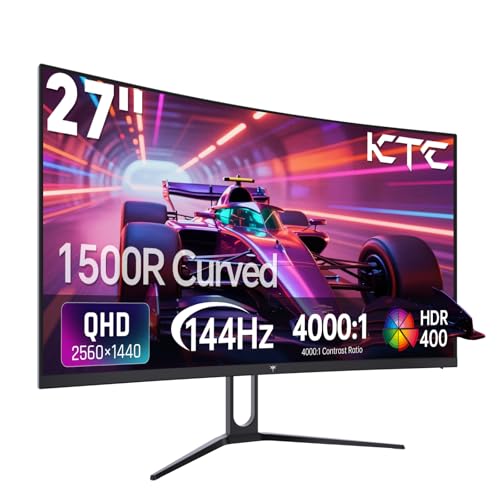
The KTC H27S5C is a 27-inch curved monitor with a 1500R curve, a 2560 x 1440 resolution, and a 144Hz refresh rate. Its HVA panel delivers a 4000:1 contrast ratio, which gives deep blacks in dark game scenes, and HDR400 support adds brightness headroom for PC use. Adaptive Sync keeps console frames tear-free, and two HDMI 2.0 ports plus a DisplayPort 1.4 cover a console and a PC. The three-year manufacturer warranty is longer than most screens in this class carry.
Who it is for: Players who want an immersive, curved screen for single-player and cinematic games, and who value contrast and deep blacks over the last word in colour accuracy. The curve wraps the edges of the image closer to your peripheral vision at a normal desk distance.
Caveats: VA-type panels can show slight smearing in very fast dark-to-light motion, so competitive shooter players may prefer one of the IPS picks. The stand tilts but does not adjust for height, so plan on a VESA arm if height adjustment matters. More than one listing carries this model name, so confirm the exact ASIN on the live listing.
MSI MAG 274QF X24 — Best High-Refresh Monitor for Series S

View the MSI MAG 274QF X24 on Amazon
The MSI MAG 274QF X24 is a 27-inch Rapid IPS monitor with a 2560 x 1440 resolution and a 240Hz refresh rate. Its HDMI 2.0b port carries 1440p at 120Hz with AMD FreeSync from the Series S, while the DisplayPort reaches the full 240Hz for a PC. The 0.5ms response time and Rapid IPS panel keep motion sharp, and the height-adjustable stand, built-in speakers, and tilt adjustment round out a desk-friendly package. It is the fastest screen in this guide by a wide margin.
Who it is for: Players who split time between the Series S and a high-refresh PC, and want one monitor that serves both without compromise. The 240Hz ceiling gives the screen a long useful life as PC hardware improves.
Caveats: The Series S can only use 120Hz of the 240Hz available, so much of the headline refresh rate is PC-only. Availability has been inconsistent in tracker snapshots, so confirm the listing is live and in stock before buying. The 240Hz capability adds cost that a console-only player may not need.
Comparison Table
| Monitor | Size and Panel | Resolution | Max Refresh (HDMI) | Adaptive Sync | Stand |
|---|---|---|---|---|---|
| LG UltraGear 27GP850-B | 27 in, Nano IPS | 2560 x 1440 | 144Hz | FreeSync Premium, G-SYNC Compatible | Height, tilt, pivot |
| ASUS TUF VG27AQ3A | 27 in, Fast IPS | 2560 x 1440 | 144Hz | FreeSync Premium, G-SYNC Compatible | Tilt, swivel |
| AOC Q27G4XN | 27 in, Fast IPS | 2560 x 1440 | 144Hz | Adaptive-Sync | Height, tilt |
| KTC H27S5C | 27 in, curved HVA | 2560 x 1440 | 144Hz | Adaptive Sync | Tilt |
| MSI MAG 274QF X24 | 27 in, Rapid IPS | 2560 x 1440 | 120Hz | Adaptive-Sync, FreeSync Premium | Height, tilt |
Which One Is Right for You?
Choose the LG UltraGear 27GP850-B if you want the strongest all-round screen: colour, stand flexibility, and sync support in one package. Choose the ASUS TUF VG27AQ3A if motion clarity is your priority, because ELMB Sync plus a 180Hz panel keeps fast games cleaner than any other pick here. Choose the AOC Q27G4XN if you want the Series S experience at the lowest outlay that still includes a height-adjustable stand. Choose the KTC H27S5C if you play mostly cinematic single-player games in a dark room and want the immersion of a curved screen with deep blacks. Choose the MSI MAG 274QF X24 if a PC shares the desk and you want a 240Hz screen that will stay relevant as your hardware improves. Whichever you pick, connect the Series S with a good HDMI cable, enable 120Hz in the console display settings, and confirm the monitor’s HDMI mode is set to accept 1440p at 120Hz.
Frequently Asked Questions
Can the Xbox Series S output 4K gaming?
No. The Series S renders games at up to 1440p, and its gaming output tops out at 1440p and 120 frames per second. It can output a 4K signal for media and for upscaled content, but native 4K gaming is beyond the console. A 1440p monitor is the right match, and a 4K monitor only makes sense if you also use it with a PC or a Series X.
Do I need HDMI 2.1 for a Series S monitor?
No. The Series S has an HDMI 2.0 port, and 1440p at 120Hz with FreeSync fits comfortably within HDMI 2.0 bandwidth. HDMI 2.1 matters for 4K at 120Hz, which the Series S cannot produce for gaming. Spend the money on panel quality and a good stand instead.
Why does my Series S not show 120Hz on my new monitor?
First, check that the monitor’s HDMI port accepts 1440p at 120Hz — some screens only reach high refresh rates over DisplayPort. Then check the console: go to display settings and enable 120Hz output, and make sure the game itself supports a 120Hz mode. If the monitor has a specific HDMI mode or console mode in its menu, enable that too.
Will HDR work on a 1440p monitor with the Series S?
No. The Xbox locks HDR behind a 4K output signal, so a native 1440p monitor displays Series S games in standard dynamic range. The monitor’s HDR capability still works with a PC or with other devices. If HDR on the console is a priority, you need a 4K monitor, and 4K at 120Hz needs HDMI 2.1.
Disclosure: As an Amazon Associate, we may earn from qualifying purchases.
FAQ
Which One Is Right for You?
Can the Xbox Series S output 4K gaming?
Do I need HDMI 2.1 for a Series S monitor?
Why does my Series S not show 120Hz on my new monitor?
Will HDR work on a 1440p monitor with the Series S?
More from Amazon
Programs that pair well with the guide above. Offers and eligibility are set by Amazon and may change.
Free shipping on eligible items, Prime Video and more. Eligible new members can start with a free trial.
Start a Prime free trialAd-free music streaming. Eligible new subscribers can start with a free trial.
Try Music Unlimited freeA Prime membership for ages 18-24 with a trial period. Eligibility is set by Amazon.
See Prime for Young AdultsAudiobooks and podcasts to listen to on the go. Eligible new members can start with a free trial.
Try Audible freeAs an Amazon Associate we earn from qualifying purchases.