Our Top Picks
 Sceptre IPS 24-Inch Business Computer Monitor 1080p 75Hz247.03 x 21.25 x 15.53 inches6 poundsCheck on Amazon
A monitor in this budget class can still look sharp and feel smooth, but only if you pick the right trade-offs. Panel type, refresh rate and size matter more than brand badges at this tier, and a well-chosen 24-inch IPS display will beat a larger, washed-out panel every time. The real decision is what you do most: fast games reward refresh rate, while work and media reward colour and viewing angles. A panel that suits your main use will please you daily, while a mismatched one annoys you every time you sit down.
This guide is for gamers who want a smooth display without a big spend, students who need a sharp screen for study and play, and home workers who sit in front of a monitor all day. It explains how to weigh panel, size and refresh rate, and it picks four monitors from names and specifications listed on their Amazon pages.
Quick Picks
As an Amazon Associate we earn from qualifying purchases.
| Product | Best for | Key spec from title |
|---|---|---|
| ASUS VA24EHF | Smooth gaming on a budget | 100Hz IPS panel |
| Acer SB220Q bi | Small desks and tight spaces | 21.5-inch ultra-thin design |
| Sceptre E248W-FPT | Work with built-in sound | Built-in speakers and IPS panel |
| LG 24MP400-B | Long days in front of a screen | IPS panel with Reader Mode |
How to Choose
Start with the panel type
An IPS panel is the safest pick in this class because it holds colour and contrast when you view it from an angle, which matters on a shared desk or a wide seating position. Cheaper TN panels wash out quickly off-axis, while VA panels can smear fast motion. Look for the panel type in the listing before anything else, since it shapes every hour you spend in front of the screen. A good IPS panel at this tier is the single upgrade that improves both games and work. A panel that holds colour from an angle also makes a second monitor far more useful.
Match size to your desk and distance
A 24-inch display suits most desks because it fills your view at arm’s length without forcing you to turn your head, while a 21.5-inch screen fits a small desk or a dorm room better. Larger screens in this class often stretch the same 1080p resolution over more inches, which makes text softer rather than sharper. Measure your desk depth and viewing distance, then pick the size that fills your field of view without crowding the room. A screen that is too large for the desk also pushes the keyboard too close to the edge.
Weigh refresh rate against resolution
Refresh rate decides how smooth motion looks, and a 100Hz panel shows a clear step up from 60Hz or 75Hz in fast games. Resolution decides how sharp text and images look, and 1080p is the standard at this tier. A 100Hz 1080p display is the sweet spot for gaming in this class, while a 75Hz panel is fine for work and slower games. Check the refresh rate in the listing, and remember that your graphics card must also reach that rate for the benefit to show. A cable that cannot carry the rate will cap the display no matter what the listing promises.
Check ports, stand and eye comfort
The ports decide what you can plug in, so confirm HDMI and VGA or DisplayPort against your computer’s outputs before ordering. A tilt-adjustable stand lets you set the screen at eye level, which matters over a long day, and features such as flicker-free backlighting and a low blue light mode reduce eye strain. Read the listing for the port list, stand adjustment and eye-care features, then match them to your desk setup rather than discovering a missing port after delivery. A stand with height adjustment is worth seeking out if you sit at the desk for hours.
The 4 Best Options
ASUS VA24EHF Eye Care Monitor

The ASUS VA24EHF is the smoothest gaming pick in this class. Its 23.8-inch Full HD IPS panel runs at 100Hz, which makes fast games feel noticeably smoother than a standard 60Hz screen, and the 1ms MPRT response keeps motion sharp. Adaptive-Sync matches the refresh rate to your graphics card to cut tearing, while the frameless design suits a dual-monitor setup later. Eye Care features such as flicker-free backlighting help during long sessions, and the slim profile fits most desks. The slim profile also leaves room for a second monitor later without a new stand.
Specs
- 23.8-inch Full HD IPS panel
- 100Hz refresh rate
- 1ms MPRT response time
- Adaptive-Sync support
- Frameless design
- HDMI and VGA ports
- Flicker-free backlighting
Best for: Gamers who want smooth 100Hz motion on a budget.
Watch out for: The stand adjusts tilt only, so height changes need a monitor arm or riser.
ASIN: B0C66CFQRV
Acer SB220Q bi Ultra-Thin Monitor
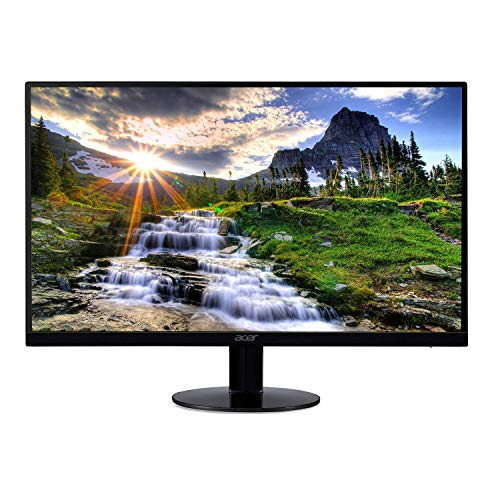
The Acer SB220Q bi is the pick for small desks. Its 21.5-inch Full HD display and ultra-thin ZeroFrame design take up little space, yet the panel still delivers sharp text and clear images for work and play. The 75Hz refresh rate with FreeSync keeps casual games smooth, and the 4ms response time is quick enough for everyday play. HDMI and VGA ports cover most computers, and the slim bezels make the screen feel larger than its size. For a dorm room or a compact corner desk, it fits where bigger screens cannot. The slim bezels also make two sit neatly side by side.
Specs
- 21.5-inch Full HD display
- 75Hz refresh rate
- 4ms response time
- AMD FreeSync support
- Ultra-thin ZeroFrame design
- HDMI and VGA ports
Best for: Small desks where space matters more than screen size.
Watch out for: The 21.5-inch screen feels small if you sit far back or share the display.
ASIN: B07CVL2D2S
Sceptre E248W-FPT IPS Monitor
The Sceptre E248W-FPT is the practical pick for work that needs sound without extra speakers. Its 24-inch Full HD IPS panel shows sharp images with wide viewing angles, and the built-in speakers handle video calls and media without a separate audio setup. The 75Hz refresh rate keeps everyday motion smooth, and the edgeless design looks clean on a desk. Two HDMI ports plus VGA cover a computer and a second device, and the audio in and out ports give you options for headphones or external speakers later. The edgeless design also makes the screen feel larger than its 24 inches.
Specs
- 24-inch Full HD IPS panel
- 75Hz refresh rate
- Built-in speakers
- Two HDMI ports and VGA
- Audio in and audio out
- Edgeless design
Best for: Work setups that need built-in sound and a clean 24-inch display.
Watch out for: The built-in speakers suit calls and media, not loud music or critical listening.
ASIN: B087QRW81Z
LG 24MP400-B Full HD IPS Monitor
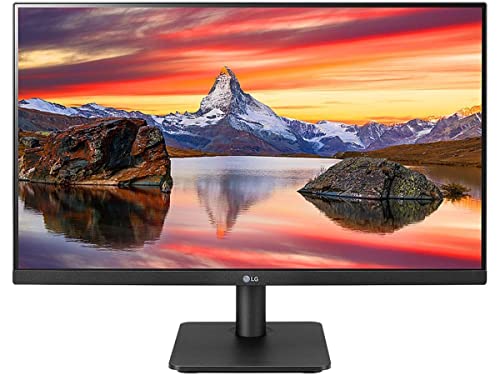
The LG 24MP400-B is the comfortable pick for long days in front of a screen. Its 23.8-inch Full HD IPS panel shows clear, accurate colour from wide angles, and Reader Mode softens the display for long reading sessions. Flicker Safe technology reduces the flicker that tires eyes over hours of use, while AMD FreeSync keeps casual games smooth at 75Hz. The slim bezel and compact stand fit neatly on a desk, and HDMI and D-Sub ports cover older and newer computers alike. The compact stand also leaves desk space free for notebooks and a keyboard.
Specs
- 23.8-inch Full HD IPS panel
- 75Hz refresh rate
- AMD FreeSync support
- Reader Mode
- Flicker Safe technology
- Slim bezel design
- HDMI and D-Sub ports
Best for: Long workdays where eye comfort matters most.
Watch out for: The 75Hz refresh rate is fine for casual play but below the 100Hz ASUS for fast games.
ASIN: B097NWD3TL
Which One Fits Your Situation
You play fast games on a budget
Choose the ASUS VA24EHF when smooth motion is the priority. Its 100Hz refresh rate and 1ms response make fast games feel far smoother than a 75Hz panel, and Adaptive-Sync keeps tearing away when frame rates move around. The 23.8-inch IPS panel stays clear from wide angles, so it suits a gaming corner where you sometimes sit off-centre. The 100Hz panel also makes everyday scrolling feel smoother, not just games.
You study or work at a small desk
Pick the Acer SB220Q bi for a compact desk. Its 21.5-inch screen and ultra-thin frame leave room for books, notes or a laptop beside it, and the sharp Full HD panel handles documents and video well. The 75Hz refresh rate with FreeSync is enough for casual games between study sessions, and the slim bezels keep the setup looking tidy. The small screen also draws less power in a small room.
You need sound without extra speakers
Go with the Sceptre E248W-FPT when you want audio built into the monitor. The built-in speakers cover video calls, lessons and media without a separate speaker set cluttering the desk, and the 24-inch IPS panel gives you room to work. The extra HDMI port also lets you connect a second device, such as a console or a streaming stick, without swapping cables. The second HDMI port also takes a console for after-work play.
You sit at the screen all day
Take the LG 24MP400-B for long hours of work. Reader Mode and Flicker Safe technology are built for exactly this use, softening the display and cutting the flicker that causes eye strain over a full day. The IPS panel keeps text sharp and colours steady from any angle, and the slim design leaves your desk clear for the rest of your setup. The eye-care features also help when you work late.
Common Mistakes
- Choosing the biggest screen in the class and getting softer text from the same 1080p resolution stretched wider.
- Ignoring panel type and ending up with a display that washes out when viewed from an angle.
- Buying a 100Hz monitor without checking that the graphics card and cable can actually reach 100Hz, which wastes the panel’s main advantage.
- Forgetting to check ports and discovering the monitor has no input that matches the computer.
- Judging a monitor by its size alone instead of panel, refresh rate and eye-care features.
Frequently Asked Questions
Is 100Hz worth it over 75Hz on a budget monitor?
Yes, for fast games, because the step from 75Hz to 100Hz makes motion visibly smoother and the mouse feel more responsive. The difference is smaller than the jump from 60Hz, but it shows in shooters and racing games. For work and slow games, 75Hz is fine, so let your games decide whether the extra rate earns its place.
Does an IPS panel matter at this tier?
Yes, because IPS holds colour and contrast when you view the screen from an angle, while cheaper panel types wash out quickly off-axis. That matters on a shared desk, a wide seating position or a dual-monitor setup where the second screen sits at an angle. A good IPS panel is the most reliable upgrade in this class, improving games and everyday work.
Can a monitor in this class work for photo editing?
It can for casual editing, since an IPS panel shows consistent colour from wide angles, but it cannot replace a colour-calibrated display. These panels cover everyday colour work well, yet they lack the calibration and wide gamut of a dedicated photo monitor. For hobby edits and social media, they are fine; for paid client work, a calibrated display is safer.
What cables do I need for a budget monitor?
Most monitors in this class include an HDMI cable in the box, and HDMI is the simplest connection for modern computers. Older machines may need VGA or D-Sub, which these models also carry, so check your computer’s outputs before ordering. A DisplayPort cable is only needed if your monitor and computer both provide it.
FAQ
Is 100Hz worth it over 75Hz on a budget monitor?
Does an IPS panel matter at this tier?
Can a monitor in this class work for photo editing?
What cables do I need for a budget monitor?
More from Amazon
Programs that pair well with the guide above. Offers and eligibility are set by Amazon and may change.
Free shipping on eligible items, Prime Video and more. Eligible new members can start with a free trial.
Start a Prime free trialAd-free music streaming. Eligible new subscribers can start with a free trial.
Try Music Unlimited freeA Prime membership for ages 18-24 with a trial period. Eligibility is set by Amazon.
See Prime for Young AdultsAudiobooks and podcasts to listen to on the go. Eligible new members can start with a free trial.
Try Audible freeAs an Amazon Associate we earn from qualifying purchases.