Our Top Picks
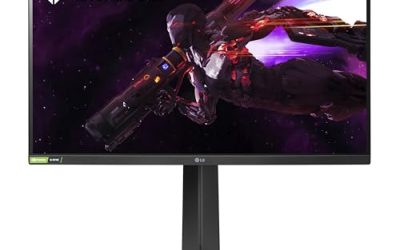
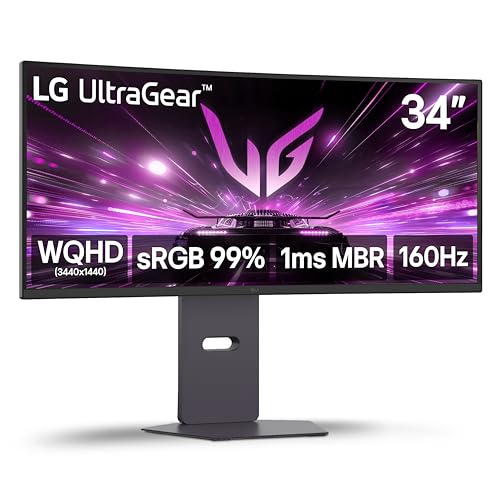 LG Ultragear QHD 34-Inch Curved Gaming Monitor 34GP63A-B34 Inch10.24 x 31.85 x 22.56 inches17.4 poundsCheck on Amazon
 Samsung 34' Odyssey G5 Ultra-Wide Gaming Monitor with34-inch10.73 x 31.75 x 18.71 inches12.3 poundsCheck on Amazon
A single wide monitor can change how a desk feels. Instead of splitting attention across two separate screens, with a bezel running down the middle, the best wide monitors give you one continuous canvas that stretches across your field of view. Games fill your peripheral vision, timelines in video editing stretch out without scrolling, and spreadsheets show far more columns at once.
The term wide monitor usually means an ultrawide display with a 21:9 aspect ratio, most often a 34-inch panel with a 3440 x 1440 resolution. That combination has become the sweet spot: it is wide enough to feel genuinely different from a standard 16:9 screen, yet it fits on a normal desk and works with a single graphics card output. Larger options exist, including 38-inch and 49-inch super-ultrawide panels, but the 34-inch class provides the most choice and the most balanced trade-offs for most buyers.
This guide focuses on 34-inch ultrawide monitors that suit both gaming and everyday work. Every pick below is a 34-inch, 21:9, 3440 x 1440 display, so the comparison stays honest: the differences that matter are panel type, refresh rate, curvature, color coverage, connectivity, and ergonomics.
How to Choose
Screen size and aspect ratio
Most wide monitors in this class measure 34 inches diagonally with a 21:9 aspect ratio. That width is enough for two full application windows side by side, or for a game to fill your peripheral vision without the panel dominating the room. Before buying, measure your desk depth as well as its width: a 34-inch ultrawide is roughly 32 inches wide, and you will want at least 24 inches of depth so the screen sits at a comfortable viewing distance.
Resolution
A resolution of 3440 x 1440, often called UWQHD, is the standard for 34-inch wide monitors. It delivers noticeably sharper text and finer detail than a 2560 x 1080 ultrawide, which can look soft at this size. A 5120 x 1440 super-ultrawide demands considerably more graphics power, so UWQHD remains the practical balance between sharpness and performance for most systems.
Panel type
Almost every monitor in this guide uses a VA panel. VA panels deliver strong contrast, with deep blacks that suit dark game scenes and movie watching, and they keep costs reasonable. Their weakness is viewing angle and, on some models, slower dark-to-light transitions that can smear fast-moving dark objects. IPS ultrawide panels exist and provide wider viewing angles and more consistent color, but they generally cost more at the same size and refresh rate, and their contrast is lower. For a desk where you sit directly in front of the screen, a good VA ultrawide is a sensible choice.
Refresh rate and response time
A refresh rate of 144Hz or higher makes motion look smoother in games and makes scrolling through documents feel more fluid. The picks in this guide range from 144Hz to 180Hz. Response time matters alongside refresh rate: look for a quoted response of 1ms, whether measured as MPRT or GtG, and remember that manufacturers measure these figures differently. Adaptive sync support, such as AMD FreeSync Premium or FreeSync Premium Pro, helps keep frame delivery smooth when your graphics card output varies.
Curvature
Ultrawide monitors are almost always curved, because a flat 34-inch panel would put its far edges at an awkward angle to your eyes. Curvature is expressed as a radius: 1500R is a moderate curve, while 1000R is more aggressive and wraps further around your view. A 1500R or 1800R curve suits mixed gaming and work, keeping straight lines in documents looking natural. A 1000R curve feels more immersive in games but can make straight edges in spreadsheets and editing timelines look slightly bowed.
Color coverage and HDR
Color coverage decides how rich and accurate images look. A panel that covers a wide portion of the sRGB color space will render games and video with pleasing, saturated color, while wider DCI-P3 coverage helps with photo and video work. HDR support appears on many wide monitors, usually as DisplayHDR 400, which adds brighter highlights but does not transform image quality the way a high-end HDR television does.
Connectivity and ergonomics
Check the ports before you buy. Every monitor here includes HDMI and DisplayPort, and DisplayPort is the connection to use for the highest refresh rates. A height-adjustable stand matters more than it seems: ultrawide panels are heavy, and being able to set the screen at eye level prevents neck strain during long sessions. VESA mounting support is worth having if you plan to use a monitor arm later.
Top Picks
LG UltraGear 34GP63A-B
The LG UltraGear 34GP63A-B is a 34-inch curved ultrawide with a 3440 x 1440 VA panel, a 160Hz refresh rate, and AMD FreeSync Premium. Its 1500R curve wraps gently around your view, which suits both gaming and everyday work, and the height-adjustable stand lets you set the screen at a comfortable eye level without reaching for a separate mount.
Key specifications include a 34-inch VA panel, 3440 x 1440 resolution, 160Hz refresh rate, 1ms MBR response time, HDR10 compatibility, and wide sRGB color coverage. The panel also includes built-in speakers, which are handy for casual video watching when you do not want to put headphones on.
This monitor is for someone who wants a straightforward, well-rounded ultrawide for gaming after work and for general productivity during the day. The 160Hz refresh rate is fast enough for most competitive play, while the resolution keeps text crisp. It is a good fit for a first ultrawide, because nothing about it is extreme: the curve is moderate, the stand adjusts, and the feature set covers the essentials without complication. One caveat is that the VA panel trades some viewing-angle consistency for its strong contrast, so color can shift slightly when viewed from a sharp side angle.
Samsung Odyssey G5 LC34G55TWWNXZA
Samsung Odyssey G5 LC34G55TWWNXZA
The Samsung Odyssey G5, model LC34G55TWWNXZA, is a 34-inch ultrawide with a 1000R curve, a 3440 x 1440 VA panel, and a 165Hz refresh rate. Its deep curve is the most aggressive in this guide, and it is the defining feature of the monitor: games feel wrapped around you, and the edges of the screen sit closer to your eyes than on a gentler panel.
Key specifications include a 34-inch VA panel, 3440 x 1440 resolution, 165Hz refresh rate, 1ms response time, AMD FreeSync Premium, and HDR support. Samsung adds its Eye Saver Mode and flicker-free backlighting, which are aimed at reducing eye fatigue during long sessions.
This monitor is for a gamer who wants immersion above all else. The 1000R curve is at its best in racing games, flight simulators, and open-world titles, where the wide field of view and the wrap-around shape make the game world feel larger. It also works well for watching films, since the 21:9 aspect ratio matches the shape of many movies without black bars filling the top and bottom of the frame.
The caveat follows directly from the curve: straight lines in documents and editing software can appear slightly bent near the edges, so people who spend most of their day on spreadsheets or timelines may prefer a gentler panel.
Gigabyte G34WQC A

The Gigabyte G34WQC A is a 34-inch curved ultrawide with a 3440 x 1440 VA panel, a 144Hz refresh rate, and AMD FreeSync Premium. Its 1500R curve strikes a middle ground between immersion and practicality, and its color coverage is a genuine strength: the panel covers a wide portion of the DCI-P3 color space, which gives games and video a rich, vivid look.
Key specifications include a 34-inch VA panel, 3440 x 1440 resolution, 144Hz refresh rate, 1ms MPRT response time, VESA DisplayHDR 400, and wide DCI-P3 color coverage. The monitor carries a height-adjustable stand and includes HDMI and DisplayPort connections.
This monitor is for someone who splits time evenly between gaming and content consumption and wants strong color without moving to a far more expensive panel class. The 144Hz refresh rate is smooth for most games, the HDR400 certification adds brighter highlights in supported content, and the color coverage makes it a pleasant screen for photo browsing and streaming video as well as play.
One caveat is that 144Hz is the lowest refresh rate in this guide, so players chasing the fastest possible motion may prefer one of the 160Hz or 180Hz options below. Another point to confirm before ordering is the exact model suffix: Gigabyte sells several closely related 34-inch monitors, so check that the listing shows G34WQC A and the expected 144Hz specification.
Dell S3422DWG

The Dell S3422DWG is a 34-inch curved ultrawide with a 3440 x 1440 VA panel, a 144Hz refresh rate, and AMD FreeSync Premium Pro. Its 1800R curve is the gentlest in this guide, which makes it the most work-friendly option here: straight lines stay straighter, and the screen feels like a very wide conventional monitor rather than a wraparound display.
Key specifications include a 34-inch VA panel, 3440 x 1440 resolution, 144Hz refresh rate over DisplayPort, 1ms MPRT and 2ms GtG response times, VESA DisplayHDR 400, and wide color coverage. Dell includes a height- and tilt-adjustable stand, and the monitor ships with a DisplayPort cable in the box. The panel has an anti-glare coating and wide viewing angles for a VA display.
This monitor is for someone who wants a wide monitor mainly for work and general use, with gaming as a regular but secondary activity. The gentle curve suits long documents, wide spreadsheets, and editing timelines, while the 144Hz refresh rate and FreeSync Premium Pro keep games smooth.
The caveat is that the gentler curve delivers less of the wraparound immersion that draws some buyers to ultrawide gaming in the first place. If your priority is a cinematic, wrap-around feel in games, one of the more deeply curved picks will suit you better. Also note that the highest refresh rate is available over DisplayPort, so use that connection rather than HDMI to get the full 144Hz.
ASUS TUF Gaming VG34VQL3A

The ASUS TUF Gaming VG34VQL3A is a 34-inch curved ultrawide with a 3440 x 1440 VA panel and a 180Hz refresh rate, the fastest in this guide. Its 1500R curve, FreeSync Premium Pro support, and 1ms GtG response time make it the pick for players who want the widest combination of speed and screen space in this class.
Key specifications include a 34-inch VA panel, 3440 x 1440 resolution, 180Hz refresh rate, 1ms GtG response time, Extreme Low Motion Blur, FreeSync Premium Pro, DisplayHDR 400, and wide sRGB color coverage. The monitor includes a height-adjustable stand and ASUS DisplayWidget Center software, which lets you adjust settings from the desktop instead of reaching for the buttons on the back of the panel.
This monitor is for a competitive-minded gamer who plays fast-paced titles and wants extra refresh headroom over a standard 144Hz panel. It is equally comfortable as a productivity screen, since the 1500R curve is moderate and the resolution keeps text sharp across the full width.
One caveat is that reaching 180Hz depends on your graphics card and connection: use DisplayPort, and check that your system can sustain high frame rates at 3440 x 1440 in the games you play. Confirm the exact model number on the listing, since ASUS sells several TUF monitors with similar names.
Comparison Table
| Monitor | Size and resolution | Panel and curve | Refresh rate | Sync and HDR | Stand |
|---|---|---|---|---|---|
| LG UltraGear 34GP63A-B | 34 in, 3440 x 1440 | VA, 1500R | 160Hz | FreeSync Premium, HDR10 | Height adjustable, built-in speakers |
| Samsung Odyssey G5 LC34G55TWWNXZA | 34 in, 3440 x 1440 | VA, 1000R | 165Hz | FreeSync Premium, HDR | Height and tilt adjustable |
| Gigabyte G34WQC A | 34 in, 3440 x 1440 | VA, 1500R | 144Hz | FreeSync Premium, DisplayHDR 400 | Height adjustable |
| Dell S3422DWG | 34 in, 3440 x 1440 | VA, 1800R | 144Hz | FreeSync Premium Pro, DisplayHDR 400 | Height and tilt adjustable, DisplayPort cable included |
| ASUS TUF Gaming VG34VQL3A | 34 in, 3440 x 1440 | VA, 1500R | 180Hz | FreeSync Premium Pro, DisplayHDR 400 | Height adjustable |
Which One Is Right for You?
Start with how you spend most of your time on the screen. If gaming is the priority and you want the most immersive feel, the Samsung Odyssey G5 with its 1000R curve is the natural choice, while the ASUS TUF Gaming VG34VQL3A is the pick for fast-paced play where refresh rate matters most. If you want a balanced all-rounder for gaming and work, the LG UltraGear 34GP63A-B covers the essentials with a moderate curve and a 160Hz panel.
For work-first use, the Dell S3422DWG is the strongest fit: its gentle 1800R curve keeps straight lines looking straight, and its understated design suits a home office. If color richness matters to you, whether for games, films, or creative work, the Gigabyte G34WQC A stands out for its wide DCI-P3 coverage at this level.
Whatever you choose, measure your desk first, plan to connect over DisplayPort for the highest refresh rate, and leave enough depth between your eyes and the screen for the curve to work as intended. A wide monitor is a long-term desk companion, so the right choice is the one that fits your room, your system, and your daily routine, not simply the one with the largest numbers on the box.
Frequently Asked Questions
Is a 34-inch ultrawide monitor better than two monitors?
For many people, yes. A single 34-inch ultrawide gives you one continuous workspace with no bezel in the middle, which is better for gaming, films, and timelines. Two separate monitors still have advantages: you can dedicate one screen to a full-screen game and keep chat or a guide open on the other, and you can replace one panel if it fails. If you constantly need a full-screen application plus a second full-screen window, dual monitors may suit you better. If you want a clean desk and a seamless view, a wide monitor is the simpler setup.
Do I need a powerful graphics card for a 3440 x 1440 monitor?
A 3440 x 1440 display has roughly a third more pixels than a standard 2560 x 1440 screen, so it asks more of a graphics card. Most mid-range graphics cards from recent years handle it well for everyday work and for games at moderate settings. For demanding games at high settings and high refresh rates, a stronger card helps. If your current card struggles at 1440p, expect similar or slightly lower frame rates on an ultrawide, and consider lowering in-game settings before deciding the monitor is at fault.
Will a curved ultrawide work for office work and spreadsheets?
Yes, and this is one of the main reasons people buy them. A 34-inch ultrawide shows two full documents side by side, or a spreadsheet with many more columns visible at once. A gentler curve, such as 1800R or 1500R, keeps lines looking straighter for productivity work, while a deep 1000R curve can make straight edges appear slightly bowed. If office work dominates your day, favor the gentler curve and a height-adjustable stand.
What cables and ports do I need for a wide monitor?
Use DisplayPort for the highest refresh rates, since it is the connection most ultrawide monitors rely on for their maximum speed. HDMI works as well, but on some models it supports a lower maximum refresh rate than DisplayPort. Check that your graphics card has a DisplayPort output and that the monitor includes a suitable cable; if it does not, add one to your order. Also confirm the monitor has enough HDMI ports for a console or a second device if you plan to connect more than a PC.
Disclosure: As an Amazon Associate, we may earn from qualifying purchases.
FAQ
Which One Is Right for You?
Is a 34-inch ultrawide monitor better than two monitors?
Do I need a powerful graphics card for a 3440 x 1440 monitor?
Will a curved ultrawide work for office work and spreadsheets?
What cables and ports do I need for a wide monitor?
More from Amazon
Programs that pair well with the guide above. Offers and eligibility are set by Amazon and may change.
Free shipping on eligible items, Prime Video and more. Eligible new members can start with a free trial.
Start a Prime free trialAd-free music streaming. Eligible new subscribers can start with a free trial.
Try Music Unlimited freeA Prime membership for ages 18-24 with a trial period. Eligibility is set by Amazon.
See Prime for Young AdultsAudiobooks and podcasts to listen to on the go. Eligible new members can start with a free trial.
Try Audible freeAs an Amazon Associate we earn from qualifying purchases.