The best monitors for vertical shooters must accommodate a portrait playfield as well as a game that supports a tall aspect ratio. That is a different problem from choosing a monitor for competitive first-person shooters in landscape orientation. Vertical arcade shooters often benefit from a rotated display, sometimes called TATE mode, but a pivoting stand does not guarantee that the game supports portrait output. Confirm rotation controls, VESA mounting and how the title handles resolution, scaling and side borders. A portrait setup also changes desk clearance and cable routing. This shortlist considers the physical ability to rotate the panel alongside image quality, refresh rate and input flexibility, so the chosen monitor works in the orientation you intend to use.
Quick verdict: choose for portrait play, not just Hz
Portrait arcade gaming imposes physical requirements that ordinary landscape-monitor roundups often overlook. The display needs a stable way to rotate, enough clearance around its stand and a connection path that supports the chosen game’s vertical output. The recommendations below prioritize workable TATE arrangements before secondary features such as maximum refresh rate or HDR branding.
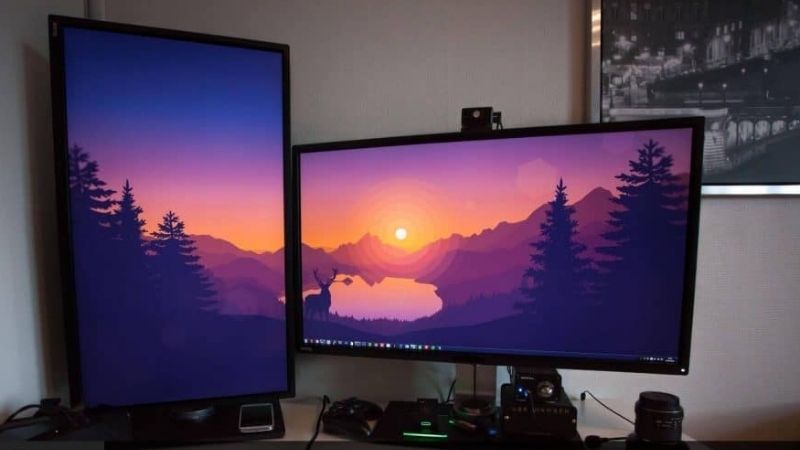
Vertical shooter means portrait/TATE arcade games here—not FPS games played while standing. Buy a monitor with confirmed pivot or VESA rotation support and verify each game truly supports a vertical picture.
For the primary use case: AOC GAMING Q27G4XF. The shortlist describes it as a practical QHD option for shooters and vertical display rotation. Its distinguishing evidence is 27-inch Fast IPS 1440p, up to 180Hz on DisplayPort and 144Hz HDMI; pivot stand. The limiting check is hDR10 signal acceptance does not guarantee high-contrast HDR hardware. These are model-specific factors, not a promise of independent testing or verified U.S. checkout.
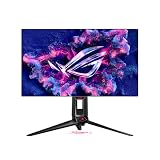
A contrasting option: ASUS ROG Swift OLED PG27AQDP. The shortlist describes it as prioritizes extremely fast response and 1440p competitive play. Its distinguishing evidence is 26.5-inch 2560 × 1440 WOLED 480Hz, anti-glare, pivot-adjustable stand. The limiting check is requires exceptionally high game frame rates for full refresh benefit. These are model-specific factors, not a promise of independent testing or verified U.S. checkout.
Comparison table: displays, specs, and trade-offs
| Product / exact family | Verified feature or evidence boundary | Best fit | Major caveat | US price — exact variant, checked Oct 31, 2026 | Stock status — exact variant, checked Oct 31, 2026 |
|---|---|---|---|---|---|
| AOC GAMING Q27G4XF | 27-inch Fast IPS 1440p, up to 180Hz on DisplayPort and 144Hz HDMI; pivot stand | A practical QHD option for shooters and vertical display rotation | HDR10 signal acceptance does not guarantee high-contrast HDR hardware | No verified US retailer quote for the exact Q27G4XF | AOC global/European product documentation, not a US stocked offer |
| ASUS ROG Swift OLED PG27AQDP | 26.5-inch 2560 × 1440 WOLED 480Hz, anti-glare, pivot-adjustable stand | Prioritizes extremely fast response and 1440p competitive play | Requires exceptionally high game frame rates for full refresh benefit | $799.00 (ASUS US PG27AQDP) | Stock conflicting; do not claim in stock |
| Acer Predator XB273U F5 | 27-inch IPS 2560 × 1440 at up to 360Hz with HDMI/DP support and pivot stand | A high-refresh IPS choice without OLED image-retention concerns | Confirm exact regional availability and HDR behavior rather than equating support with OLED HDR | $579.99 (Acer US XB273U F5BMIIPRZX) | In stock (Acer US exact part UM.HX3AA.501) |
| ViewSonic XG2431 | 24-inch-class IPS FHD 240Hz; maker specifies 90-degree pivot stand; RTINGS-tested motion | High-refresh tate/portrait arcade gaming with supported software | Game and emulator portrait outputs require independent configuration; stock variable | US price not verified | Out of stock at Newegg US (not worldwide) |
US price and inventory observations are tied to the named seller, selected SKU, color or memory configuration where specified. “Buy Now” and “Add to Cart” describe purchase buttons, not a completed checkout or guaranteed warehouse stock. Family-level pricing, obsolete variants, and conflicting source badges are explicitly qualified. Unresolved rows are not assumed purchasable.
Additional comparisons and purchase considerations
| Situation | Recommended evaluation or next action |
|---|---|
| Portrait-native arcade/bullet-hell game | Confirm game resolution and 90-degree stand pivot |
| Second monitor for chat plus occasional gaming | Prioritize ease of rotation and VESA support |
| Competitive FPS built for 16:9 | Stay landscape unless portrait is explicitly supported |
The selected monitors and their key compromises
AOC GAMING Q27G4XF — fit and limitations
AOC GAMING Q27G4XF is on this shortlist for a specific reason: 27-inch Fast IPS 1440p, up to 180Hz on DisplayPort and 144Hz HDMI; pivot stand. That makes it relevant when a practical QHD option for shooters and vertical display rotation. The critical choice is whether the game supports portrait play and the stand can rotate safely. High refresh helps only if the output path and game configuration also deliver frames consistently.
The main qualification is hDR10 signal acceptance does not guarantee high-contrast HDR hardware. Confirm pivot or VESA mounting, portrait orientation in the operating system, and the game’s native aspect-ratio behavior before ordering. This is a specification-led comparison, not a claim that we measured this model in a controlled hands-on test.
ASUS ROG Swift OLED PG27AQDP — fit and limitations
ASUS ROG Swift OLED PG27AQDP is on this shortlist for a specific reason: 26.5-inch 2560 × 1440 WOLED 480Hz, anti-glare, pivot-adjustable stand. That makes it relevant when prioritizes extremely fast response and 1440p competitive play. The critical choice is whether the game supports portrait play and the stand can rotate safely. High refresh helps only if the output path and game configuration also deliver frames consistently.
The main qualification is requires exceptionally high game frame rates for full refresh benefit. Confirm pivot or VESA mounting, portrait orientation in the operating system, and the game’s native aspect-ratio behavior before ordering. This is a specification-led comparison, not a claim that we measured this model in a controlled hands-on test.
Acer Predator XB273U F5 — fit and limitations
Acer Predator XB273U F5 is on this shortlist for a specific reason: 27-inch IPS 2560 × 1440 at up to 360Hz with HDMI/DP support and pivot stand. That makes it relevant when a high-refresh IPS choice without OLED image-retention concerns. The critical choice is whether the game supports portrait play and the stand can rotate safely. High refresh helps only if the output path and game configuration also deliver frames consistently.
The main qualification is confirm exact regional availability and HDR behavior rather than equating support with OLED HDR. Confirm pivot or VESA mounting, portrait orientation in the operating system, and the game’s native aspect-ratio behavior before ordering. This is a specification-led comparison, not a claim that we measured this model in a controlled hands-on test.
Buying guide: check the display in your setup
Model eligibility and buying decisions
Orientation troubleshooting: three separate rotations to validate: ViewSonic’s March 2026 Auto Pivot support bulletin explicitly limits the feature to the monitor’s on-screen display (OSD) menu. The XG2431 manual describes an OSD Pivot Auto setting tied to its orientation sensor. Neither document proves automatic Windows desktop rotation or tate-mode output inside a specific game. A picture of a portrait display with a rotated OSD is therefore not evidence of a compatible vertical shooter.
| Layer | What to verify | Stop condition |
|---|---|---|
| Mechanical | The stand rotates a full 90° with cable clearance and the panel off the desktop | The supplied stand only tilts or has insufficient clearance; include VESA arm cost |
| Operating system | Select portrait orientation and expected 1080×1920 / 1440×2560 timing; confirm refresh in display settings | Portrait mode falls back to an unsuitable frame rate or stretches the HUD |
| Game or emulator | Select native vertical/tate output where supported; ensure cursor, overlays and menus stay usable | The game renders fixed landscape with black bars or rotates HUD incorrectly |
Auto-pivot troubleshooting with limits: on an applicable ViewSonic monitor, try OSD Pivot Auto first, then inspect DDC/CI and the maker’s compatibility notes. Some ViewSonic models need an upstream USB connection and a background utility, but generic support advice must not be transformed into an XG2431-specific hardware requirement. Even when the OSD works, change OS orientation and game mode separately. This is a reproducible user validation procedure, not an in-house game compatibility certification.
Pivot hardware and cable slack: The AOC Q27G4XF and supported ergonomic IPS models can help with portrait setup if the stand really pivots on your regional SKU. Rotate the panel slowly and verify HDMI/DP cables do not bind at the connectors. An arm needs the proper VESA pattern and weight limit.
Keep the orientation reversible: In Windows Display settings change orientation to Portrait only when the screen is physically rotated; retain a reversible configuration for conventional PC titles. Set scaling and mouse cursor movement, then check that the game input remains aligned with the visible playfield.
Fit and design trade-offs
Physical rotation catch: one-way 90-degree pivot is not two-way tate support: ViewSonic’s published XG2431 specification lists the supplied stand as Pivot (Right/Left): 90° / 0° , with 120mm of height adjustment and 100 × 100mm VESA mounting. In other words, the built-in stand has a documented pivot direction; buyers must not assume a 90-degree rotation both clockwise and counterclockwise. For a fixed-position arcade cabinet, the available direction can decide whether power/DisplayPort cables run safely on the desired edge.
| Tate cabinet constraint | Purchase/installation gate | Reject if |
|---|---|---|
| One-sided cable exit or cabinet side wall | Draw the 90° rotation direction before ordering; check panel height clearance, USB upstream and power cable slack | The supplied 90°/0° pivot direction forces sockets against a wall or sharply bends cable |
| Portrait orientation must alternate direction by game | Verify game/emulator display rotation separately and measure VESA arm requirements | The stock stand is assumed to rotate both directions or software auto-pivot is incorrectly treated as physical rotation |
| Need 240Hz with moving arcade sprites | Use the independently researched XG2431 response/strobing evidence, then inspect brightness and flicker comfort | PureXP strobing is incorrectly expected to be flicker-free, or a game’s portrait output is not supported |
Before checkout, place a cardboard 540 × 323mm display outline (the manufacturer’s display-only dimensions, not the actual assembled stand) inside the cabinet and mark the cable edge for the stand’s documented right/left pivot. A VESA arm may permit more rotation, but independently confirm loading, connector clearance and arm cost. This is a fitting method, not proof that any given vertical shooter supports portrait timing; verify its 9:16 picture in the exact game before buying.
OLED needs special considerations for portrait: An OLED can look excellent on pixel-art sprites but static sidebars and arcade HUDs still warrant image-retention precautions. If your content has fixed black bars and menu overlays, confirm pixel shifting and maintenance policies instead of assuming portrait makes them irrelevant.
Physical rotation and portrait gameplay are distinct requirements: Confirm that the stand explicitly supports a 90-degree pivot or that the monitor has an appropriate VESA mount and compatible arm. A listing that says “swivel” may mean horizontal stand rotation, not portrait orientation. Then investigate whether the game supports 9:16 or another vertical aspect ratio without cropping important content. Some shooters letterbox, force 16:9 or move HUD elements in ways that make portrait play impractical. Changing Windows to portrait mode cannot force a game engine to render a good portrait UI. Treat the ability to rotate a generic office display as a mechanical feature, not proof of a vertical-shooter gaming recommendation.
Compatibility, setup and verification
Portrait-shooter gate: a real pivot 240Hz screen, and a fast screen that fails the mount test
A tate-mode shooter needs two independent approvals. First the panel must physically turn 90 degrees without cable strain; second the game, emulator or GPU must correctly render a portrait image, with readable controls and HUD. RTINGS’ October 8, 2026 vertical-monitor update reviews work-friendly portrait models, but a 60–144Hz office pick is not automatically the strongest arcade-shooter option. Its portrait stand requirement is useful, while competitive gaming response time needs separate evidence.
| Exact setup | Why it matters for vertical shooters | Disqualifying issue |
|---|---|---|
| ViewSonic XG2431, included pivot stand | 240Hz IPS, manufacturer-specified 90-degree pivot and RTINGS-tested motion handling | Old stock/replacement parts, limited HDR, or game refuses 9:16 portrait output |
| Dell SE2426HGS on supplied stand | 240Hz IPS and low gaming lag in RTINGS testing | Included stand does not provide portrait pivot; requires a separately checked VESA arm |
| 27-inch pivot high-refresh model | More shooter playfield and 1440p sharpness in supported titles | Taller case hits the desk, or older arcade game scales to letterbox instead of portrait |
The ViewSonic XG2431 maker specifications identify the pivot-capable stand and 240Hz IPS panel; RTINGS’ lab test finds responsive movement and unusually customizable strobing. But the official OSD auto-pivot/G-sensor menu changes the on-screen display’s menu orientation, not automatically every Windows game or emulator. Confirm your specific game’s portrait option before purchasing. ViewSonic marketing material and the service manual describe nominal diagonal size differently, so check the physical dimensions and actual stand clearance rather than rely on a rounded 24-inch label.
Return-window trial: power off, raise the stand to full height, rotate the XG2431 90 degrees without pulling cables, then set OS orientation to portrait. Launch a known compatible tate game and run its display-size configuration: verify top/bottom aren’t cut off, buttons/HUD read normally and the input latency still feels acceptable at 60, 120 and maximum refresh. Reset to landscape before judging another game’s image; a panel being upright does not force game-side resolution support. For non-pivot Dell models, price a compatible VESA arm and check monitor arm clearance before purchase.
The game must support portrait output: A physical display rotated 90 degrees does not automatically make a game portrait-native. Some games use letterboxing or fixed 16:9 scenes, while arcade-emulator or TATE modes can display correctly in 9:16. Verify the specific game/video mode first.
A controlled compatibility test before you buy: If possible, rotate an existing monitor or use an inexpensive pivot stand and set the desktop orientation to portrait. Open the exact game at 1080 × 1920 or another available portrait resolution, check menus, minimap, cursor confinement and field of view. Capture a screenshot and compare weapon visibility and peripheral awareness against landscape mode. Verify that fullscreen and borderless-window modes behave as expected. For titles that were designed for landscape play, a 27-inch monitor turned upright can feel taller than comfortable at a desk; measure eye travel and controller placement rather than judging from promotional photographs.
Where portrait monitors do make sense: A rotating gaming screen can be excellent for bullet-hell games built around vertical scrolling, portrait rhythm games, emulation of vertical arcade formats, coding beside a main display and chat or broadcast monitoring. If competitive shooters remain in landscape, the more important property may be high refresh at native QHD with good response behavior and a stand you can switch rapidly. Look for accessible cable connectors that do not collide with the stand during rotation. An arm with height and reach adjustments may be more valuable than buying a new screen with a premium “gaming” label.
Tate-mode buying test: a rotating stand does not rotate the game: For vertical arcade shooters, three separate questions determine whether a screen is usable: can the hardware rotate 90 degrees without striking the desk, can Windows or the GPU produce a 9:16 desktop resolution, and does the specific game render gameplay and menus correctly in that orientation? Passing only the first two does not establish portrait-game support. The AOC Q27G4XF manufacturer’s ergonomics table confirms physical pivot ±90 degrees, 130mm height adjustment and a 27-inch 1440p panel. Verify output timing over the real connection as well: this is not a promise that every HDMI source produces the same maximum refresh as DisplayPort.
A productivity display is a useful negative control. A Dell 24-inch P2425HE family page supports a 100Hz IPS display with 90-degree pivot, so it can make sense as a rotating second screen for scoreboards, chat or documentation. It should not displace an actual high-refresh gaming pick for demanding arcade motion. Conversely, the 480Hz OLED PG27AQDP boasts exceptional motion response but carries RTINGS-reported firmware and VRR behavior risks; for a long-lived static score strip, acknowledge OLED aging and warranty rather than assuming fastest is always best.
| Situation | Required gate | Purchase implication |
|---|---|---|
| Native tate arcade game | Documented 9:16 rendering plus verified pivot/arm | Favor rotated IPS with physical clearance |
| Landscape game with scrolling level design | Game actually supports portrait output, not just a vertical scene | Keep normal landscape monitor if it does not |
| Dual-use spectator/streaming column | Pivot and readable text; refresh secondary | Do not pay OLED-esports premium without need |
Ten-minute return-window checklist: Record game name, in-game resolution/aspect controls, DP/HDMI mode and whether rotation requires restarting the title. Test menus, HUD, mouse coordinate mapping, refresh and cable slack with the monitor fully upright; check screen clearance against speakers and stand base. A VESA mount still needs an arm rated for the panel’s mass. If the game forces 16:9 black borders or the stand cannot safely rotate, reject this setup even if a promotional image shows a portrait desktop. Regional manufacturer specifications do not independently validate live U.S. inventory or shipping to your ZIP code.
Portrait display mechanical and game-support verification: Confirmed rotation mechanics: the AOC GAMING Q27G4XF manufacturer specification explicitly lists a stand pivot range of approximately −90° to +90°, a 130mm height adjustment and a 27-inch QHD panel. The ASUS TUF VG249Q is a separately documented 23.8-inch 1080p IPS alternative with −90° to +90° pivot, 0–150mm height adjustment, 144Hz maximum refresh and 100 × 100mm VESA support. Their size and refresh profiles are different; neither can be called in stock at a U.S. retailer solely from a global specifications page. AOC Q27G4XF official page ; ASUS US VG249Q specifications .
Use the portrait distinction correctly: pivot means the stand can rotate. It does not mean a shoot-’em-up scales 9:16 content, exposes a portrait menu or retains the HUD when Windows is rotated. Before purchasing, consult a game’s native portrait/TATE support and test its display options on an existing screen. Where the game only supports landscape, a higher-Hz OLED in portrait orientation may offer no actual portrait benefit. Verify game fullscreen versus borderless behavior; do not infer compatibility from the monitor’s physical hardware.
| Game and desk scenario | Qualified next step | Reject or defer when |
|---|---|---|
| QHD portrait arcade shooter | Check game 1440 × 2560 or rotating viewport support, then the Q27G4XF stand and cable clearance | The game letterboxes or cuts off the score/HUD |
| Compact 1080p TATE setup | Compare VG249Q 23.8-inch chassis, 144Hz support and stand pivot | The intended U.S. seller has no new-stock listing |
| Landscape competitive shooter | Prioritize measured response/overshoot at realistic frame rates, not pivot alone | The game lacks native portrait support |
| Monitor arm | Verify VESA dimensions, arm weight capacity, portrait side clearance and cable slack | The display cannot rotate without striking desk or cables |
Evidence boundary: these are confirmed manufacturer pivot features, not independently verified U.S. retail stock, cable tests or hands-on game compatibility results. Check each exact North American part number and the game’s actual portrait mode before claiming that it is a ready-to-buy vertical-shooter solution.
Pivot hardware and game portrait output differ
VG249Q shows the mechanical requirement: ASUS documents VG249Q stand pivot from +90° to −90°, 150mm height adjustment and VESA 100×100 support; this establishes a real physical portrait candidate, not game portrait rendering support.
US buying evidence at this checkpoint: No verified US current listing; feature benchmark only. This is a page observation, not completed checkout, and must not be presented as universal stock or delivery availability.
Test portrait scaling and arcade game HUDs: A monitor that pivots does not force a vertical scrolling shooter to support portrait resolution or render a rotated HUD correctly. GPU display orientation and game aspect-ratio support are separate checks.
Portrait-shooter check: three pivot screens, three different compromises: Do not confuse the genre label ‘vertical shooter’ with the monitor’s ability to rotate. A tate-mode arcade game often wants a tall 9:16 canvas, while a modern vertical-scrolling game may still have a standard 16:9 interface. Buying portrait hardware before checking the title’s output options can leave you with sideways menus, pillarboxes or an unreadable HUD. The ASUS VG249Q spec verifies actual 90-degree left/right pivot, 150mm height travel and 144Hz, a useful older 24-inch class reference rather than a current in-stock promise.
For a newer, larger setup, Dell’s US G2724D listing explicitly lists 90-degree pivot, VESA 100mm mounting, height adjustment and DisplayPort connectors. Its 27-inch 1440p class offers more desktop area, but the long side is more likely to collide with a shelf or desk during rotation. By contrast, the ASUS PA278QV also pivots 90 degrees, but reaches only 75Hz. It can be a deliberate tate-mode choice for slower arcade titles, not an esports-refresh recommendation.
| Use case | Physical gate | Software gate | When to reject |
|---|---|---|---|
| Classic 240p/480p arcade shooter via emulator | 24-inch pivot or VESA arm; bottom-cable clearance | Confirm emulator supports rotated output, correct integer scaling and input remapping | Unfixable bezel, refresh synchronization or display signal mismatch |
| Fast scrolling shooter on PC | 27-inch pivot can help clarity if desk depth permits | Verify native portrait resolution and intended FPS; don’t assume every title supports it | HUD clips or forced landscape view despite OS rotation |
| Work monitor used occasionally in tate | PA278QV’s 90-degree pivot is genuine | 75Hz limit may be acceptable for noncompetitive play | You primarily need 144Hz+ for fast games |
Practical 15-minute acceptance sequence: Rotate with the machine powered off or at low brightness and keep cables slack. After confirming clearance, set 1080 × 1920 or 1440 × 2560 in Windows or Linux and check whether the panel actually reports that orientation. Launch the exact arcade title both windowed and fullscreen; take screenshots showing the player field and menus. Compare frame pacing, joystick/controller directions, scaling filters and whether a bezel or mounting arm obstructs controls. Turn the display back to landscape and repeat once to catch software that stores the wrong orientation.
Do not inflate the shortlist: the three examples are not equally fast, not all newly in stock, and not a verified list of games with tate support. A retailer page showing an adjustable stand must say pivot or specify ±90 degrees; swivel is not equivalent. Product listing links here establish only the stated mechanical facts, not successful checkout.
How we selected these options and checked evidence
We looked for a practical portrait mount and a monitor that suits the game, not simply a marketing claim about vertical rotation. A vertical stand will not make an unsupported game render at 9:16.
The comparison is based on the exact configuration and technical limitations recorded in this draft, with model identities, connection requirements, and purchase conditions treated separately. Published manufacturer specifications are not substitutes for independent long-duration measurements. Prices and stock are seller-, date-, and region-specific; where no current U.S. checkout was verified, that uncertainty remains visible instead of being presented as a live offer. The recommendations are therefore shortlists for further verification, not accounts of our own hands-on lab tests.
Frequently asked questions
Can any 27-inch monitor run a vertical shooter?
Most can rotate the desktop image via the OS, but only a stand/arm with physical pivot and a game supporting portrait output provide a usable setup.
Will my GPU lose refresh rate when the monitor is upright?
Rotation itself does not mandate a lower refresh rate, but the active portrait mode, cable and GPU output must support the desired resolution and timing.
Final thoughts
For arcade vertical shooters, choose a pivoting panel and test the specific title first. Some games expect traditional 16:9 output with a tall playfield inside a landscape frame, while others accept genuine 9:16 portrait.
Rotate the stand without cables under tension; set Windows display to Portrait; launch game windowed and fullscreen; inspect UI clipping, scaling, black bars, input mapping and VESA arm clearance.
Do not count swivel as pivot, do not equate vertical shooter genre with 9:16 support, and do not describe a discontinued model as in-stock.