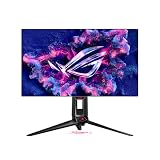
For the best 1440p monitors for CS2, prioritize consistent competitive motion clarity over a single maximum-Hz headline. Counter-Strike 2 often rewards predictable frame delivery and minimal distracting overshoot more than a broad list of image-enhancement features. Choose the panel around the frame rates your system can sustain in competitive settings, not just the largest refresh number on the box. Pixel response, overshoot, backlight-strobing limitations and usable overdrive settings influence motion quality when a match slows down. A 1440p panel can make distant details easier to distinguish, but the higher resolution may lower FPS on some hardware. Compare tests performed under similar conditions, then decide whether the sharper image or maximum refresh is more valuable to your CS2 setup.
Quick verdict: prioritize clarity and frame delivery
For Counter-Strike 2, the sensible monitor depends on the frame rates your CPU can sustain, your preferred screen size and how much you value motion clarity over other display qualities. A premium ultra-high-refresh model can be wasted on an inconsistent system. The options below separate fast OLED and IPS approaches while keeping performance claims tied to the actual test conditions.
For Counter-Strike 2, prioritize stable frame delivery and verified 1440p motion clarity. A 480Hz OLED is compelling only if the CPU and GPU hold sufficiently high frame rates; 180–240Hz IPS can be the practical value tier.
For the primary use case: ASUS ROG Swift OLED PG27AQDP. The shortlist describes it as prioritizes extremely fast response and 1440p competitive play. Its distinguishing evidence is 26.5-inch 2560 × 1440 WOLED 480Hz, anti-glare, pivot-adjustable stand. The limiting check is requires exceptionally high game frame rates for full refresh benefit. These are model-specific factors, not a promise of independent testing or verified U.S. checkout.
A contrasting option: Acer Predator XB273U F5. The shortlist describes it as a high-refresh IPS choice without OLED image-retention concerns. Its distinguishing evidence is 27-inch IPS 2560 × 1440 at up to 360Hz with HDMI/DP support and pivot stand. The limiting check is confirm exact regional availability and HDR behavior rather than equating support with OLED HDR. These are model-specific factors, not a promise of independent testing or verified U.S. checkout.
Comparison table: displays, specs, and trade-offs
| Product / exact family | Verified feature or evidence boundary | Best fit | Major caveat | US price — exact variant, checked Oct 31, 2026 | Stock status — exact variant, checked Oct 31, 2026 |
|---|---|---|---|---|---|
| ASUS ROG Swift OLED PG27AQDP | 26.5-inch 2560 × 1440 WOLED 480Hz, anti-glare, pivot-adjustable stand | Prioritizes extremely fast response and 1440p competitive play | Requires exceptionally high game frame rates for full refresh benefit | $799.00 (ASUS US PG27AQDP) | Stock conflicting; do not claim in stock |
| Acer Predator XB273U F5 | 27-inch IPS 2560 × 1440 at up to 360Hz with HDMI/DP support and pivot stand | A high-refresh IPS choice without OLED image-retention concerns | Confirm exact regional availability and HDR behavior rather than equating support with OLED HDR | $579.99 (Acer US XB273U F5BMIIPRZX) | In stock (Acer US exact part UM.HX3AA.501) |
| LG UltraGear 27GS95QE-B | 26.5-inch QHD OLED 240Hz, DisplayHDR True Black 400, anti-glare treatment | Strong dark-scene contrast for games played under controlled light | Static HUD retention and ambient-light reflections deserve consideration | $699.99 (LG US catalog; was $899.99) | LG catalog Add to Cart; product page Notify Me: conflict |
| AOC GAMING Q27G4XF | 27-inch Fast IPS 1440p, up to 180Hz on DisplayPort and 144Hz HDMI; pivot stand | A practical QHD option for shooters and vertical display rotation | HDR10 signal acceptance does not guarantee high-contrast HDR hardware | No verified US retailer quote for the exact Q27G4XF | AOC global/European product documentation, not a US stocked offer |
| ASUS ROG Swift OLED PG27AQWP-W | 27-inch Tandem WOLED, native 2560×1440 540Hz; optional 1280×720 720Hz dual mode | Top-end CS2 PC sustaining very high FPS at QHD, plus OLED image quality | Glossy reflections and VRR flicker; 720Hz is 720p-only, not QHD | $1,099.00 (ASUS USA) | Unclear |
| LG 27GX790B-B | 27-inch Tandem WOLED; 1440p 540Hz and 720p 720Hz alternate mode; matte coating and USB-C | Bright-room competitive QHD if reflection handling matters more than glossy clarity | Exact USB-C PD/refresh needs manual check; OLED VRR/burn-in and high FPS remain constraints | $799.99 (LG US catalog; was $999.99) | LG catalog Add to Cart; checkout not confirmed |
US price and inventory observations are tied to the named seller, selected SKU, color or memory configuration where specified. “Buy Now” and “Add to Cart” describe purchase buttons, not a completed checkout or guaranteed warehouse stock. Family-level pricing, obsolete variants, and conflicting source badges are explicitly qualified. Unresolved rows are not assumed purchasable.
Additional comparisons and purchase considerations
| Situation | Recommended evaluation or next action |
|---|---|
| Stable high FPS and mixed games | 1440p high-refresh IPS or OLED |
| Inconsistent FPS under 200 | Spend first on PC or settings stability |
| Tournament-style tiny viewing field | Compare a 24-inch 1080p monitor before upgrading |
The selected monitors and their key compromises
ASUS ROG Swift OLED PG27AQDP — fit and limitations
ASUS ROG Swift OLED PG27AQDP is on this shortlist for a specific reason: 26.5-inch 2560 × 1440 WOLED 480Hz, anti-glare, pivot-adjustable stand. That makes it relevant when prioritizes extremely fast response and 1440p competitive play. Treat panel technology, resolution, refresh rate, motion behavior, and ergonomic fit as separate variables. The GPU must actually drive the chosen timing and the screen must look acceptable at lower frame rates.
The main qualification is requires exceptionally high game frame rates for full refresh benefit. Validate refresh over the exact HDMI, DisplayPort, or USB-C path and compare independent response-time measurements before assuming the marketing Hz tells the whole story. This is a specification-led comparison, not a claim that we measured this model in a controlled hands-on test.
Acer Predator XB273U F5 — fit and limitations
Acer Predator XB273U F5 is on this shortlist for a specific reason: 27-inch IPS 2560 × 1440 at up to 360Hz with HDMI/DP support and pivot stand. That makes it relevant when a high-refresh IPS choice without OLED image-retention concerns. Treat panel technology, resolution, refresh rate, motion behavior, and ergonomic fit as separate variables. The GPU must actually drive the chosen timing and the screen must look acceptable at lower frame rates.
The main qualification is confirm exact regional availability and HDR behavior rather than equating support with OLED HDR. Validate refresh over the exact HDMI, DisplayPort, or USB-C path and compare independent response-time measurements before assuming the marketing Hz tells the whole story. This is a specification-led comparison, not a claim that we measured this model in a controlled hands-on test.
LG UltraGear 27GS95QE-B — fit and limitations
LG UltraGear 27GS95QE-B is on this shortlist for a specific reason: 26.5-inch QHD OLED 240Hz, DisplayHDR True Black 400, anti-glare treatment. That makes it relevant when strong dark-scene contrast for games played under controlled light. Treat panel technology, resolution, refresh rate, motion behavior, and ergonomic fit as separate variables. The GPU must actually drive the chosen timing and the screen must look acceptable at lower frame rates.
The main qualification is static HUD retention and ambient-light reflections deserve consideration. Validate refresh over the exact HDMI, DisplayPort, or USB-C path and compare independent response-time measurements before assuming the marketing Hz tells the whole story. This is a specification-led comparison, not a claim that we measured this model in a controlled hands-on test.
AOC GAMING Q27G4XF — fit and limitations
AOC GAMING Q27G4XF is on this shortlist for a specific reason: 27-inch Fast IPS 1440p, up to 180Hz on DisplayPort and 144Hz HDMI; pivot stand. That makes it relevant when a practical QHD option for shooters and vertical display rotation. Treat panel technology, resolution, refresh rate, motion behavior, and ergonomic fit as separate variables. The GPU must actually drive the chosen timing and the screen must look acceptable at lower frame rates.
The main qualification is hDR10 signal acceptance does not guarantee high-contrast HDR hardware. Validate refresh over the exact HDMI, DisplayPort, or USB-C path and compare independent response-time measurements before assuming the marketing Hz tells the whole story. This is a specification-led comparison, not a claim that we measured this model in a controlled hands-on test.
Buying guide: check the display in your setup
Model eligibility and buying decisions
High-Hz correction for CS2: 540Hz QHD is not 720Hz QHD: The newer ASUS ROG Swift OLED PG27AQWP-W independent review validates 2560×1440 at 540Hz natively , with a separate 1280×720 at 720Hz Frame Rate Boost mode. It is incorrect to promote this model as a 1440p/720Hz monitor. In the direct PG27AQWP-W versus PG27AQDP comparison , the newer model has 540Hz QHD rather than 480Hz QHD, higher HDR brightness and a glossy coating that can create more distracting mirror-like reflections than the older matte display. Both still need a powerful PC, acceptable VRR flicker and OLED maintenance.
| CS2 scenario | Real test candidate | Reason not to overpay |
|---|---|---|
| Reliable native QHD with frame delivery mainly 180–240 FPS | Well-tested 240Hz IPS/OLED option | 540Hz only reduces scan interval when the PC delivers fresh frames; check 1% lows, not just peak FPS |
| Sustained extremely high CS2 frame rate and OLED motion priority | PG27AQWP-W 1440p/540Hz | Glossy reflections, VRR flicker and price may outweigh incremental benefit over PG27AQDP 480Hz |
| Maximum 720Hz mode while accepting lower visual detail | PG27AQWP-W at 720p/720Hz | Do not represent it as QHD; check in-game scaler, UI sharpness and GPU output mode |
| Sunlit room, extensive desktop HUD and static software | IPS with validated overdrive, or carefully selected matte OLED | Reflections, fringing and OLED retention may matter more than a refresh-rate headline |
Controlled CS2 decision: record the same native-1440p game route across three runs at your normal competitive settings; log median/1% low FPS, VRR behavior, frame time and whether the monitor exposes 540Hz. Compare 720p/720Hz only as a separate lower-resolution experiment, not on the same sharpness axis. At 480, 540 and 720Hz nominal scan intervals are about 2.08, 1.85 and 1.39ms respectively; these are refresh intervals , not measured end-to-end mouse-to-photon latency. Exact US retail price and stock remain unverified.
QHD 480Hz is real, but the PC has to deliver
Why CS2 frame-time stability matters more than a label: The ASUS US page identifies a 26.5-inch viewable QHD WOLED running natively at 480Hz and a $799 US storefront price with Buy Now. This is a 1440p model, not a 1080p esports monitor.
US buying evidence at this checkpoint: ASUS USA store displayed $799.00 with Buy Now. This is a page observation, not completed checkout, and must not be presented as universal stock or delivery availability.
Validate the PG27AQDP with matched CS2 tests: A nominal 480Hz panel can only show 480 unique frames if game, PC and connection sustain them. Overdrive, input lag, pixel response and VRR behavior must be considered separately from headline hertz.
Fit and design trade-offs
Exact-panel comparison for CS2: 540Hz OLED, glossy reflections versus matte USB-C: RTINGS’ October 6, 2026 side-by-side compares the precise ASUS PG27AQWP-W and LG 27GX790B-B . Both use the same generation Tandem OLED technology and deliver 2560×1440 at 540Hz natively ; the eye-catching 720Hz mode runs at 1280×720 , not QHD. They are therefore alternatives for a CS2 desk, not a 540Hz-vs-720Hz contest at 1440p. An older LG 27GS95QE, older ASUS PG27AQDP or other 27GX79 suffix is not the same tested product.
The actual purchasing distinction is room lighting and work connections: ASUS has a glossy coating that can look clearer in controlled lighting and higher DisplayPort bandwidth; LG’s matte finish better disperses reflections and it includes a USB-C input for a laptop. USB-C presence alone does not establish power delivery or 540Hz via that specific port. RTINGS also notes VRR flicker on the ASUS at variable frame rates. Neither lab test establishes the reader’s CS2 frame rate, anti-aliasing settings, ability to see 540fps, or whether the high-end price has a practical return.
| Specific CS2 workstation | Model preference | Pass / fail test |
|---|---|---|
| Dim, controlled competitive desktop, stable very-high FPS | ASUS PG27AQWP-W | Check glossy reflections at your aim position, native 1440p/540Hz selected and tearing/VRR behavior in actual CS2. |
| Window-lit dual-use station, secondary laptop connection | LG 27GX790B-B | Confirm matte treatment and exact USB-C video/power capabilities from model manual; do not assume charging watts. |
| CS2 often runs 200–300 fps or budget dominates | A proven 240–360Hz 1440p model | Log the 1% lows before paying for 540Hz; avoid buying a 720Hz headline that requires lower 720p resolution. |
Reproducible return-window comparison: capture a consistent CS2 practice route with frame-time overlay over three sessions; note the middle and 1% low fps, not just a peak. Test the monitor at native QHD/540Hz, a deliberately capped stable lower refresh, and (if of interest) 720p/720Hz separately. Examine moving crosshairs under the actual room lighting and the brightness/VRR combination. Burn-in policies and exact U.S. SKU must be checked at checkout; no in-house latency or FPS result is asserted here.
OLED versus IPS for long sessions: The ASUS PG27AQDP provides very fast pixel transitions and 480Hz, while 180–360Hz IPS options avoid OLED image-retention considerations. If you scrim for hours with static radar, scoreboard and menus, evaluate maintenance and brightness behavior alongside speed.
Build a CS2 desk instead of buying a spec sheet: A 27-inch 1440p display gives more workspace than a 24-inch tournament monitor; whether it is comfortable depends on your seating distance and how much eye travel you tolerate. A shallow stand footprint helps if you keep your keyboard turned and aim with a large mousepad. Check VESA mounting, height and tilt, and confirm your GPU’s output can drive the selected refresh rate. Use the in-game display menu or the operating system to inspect the active resolution and refresh after setup. If your actual frame rate is modest, a clean 240Hz IPS monitor can be better value than an expensive 480Hz OLED.
CS2 decision matrix: why 240Hz IPS can beat a 360Hz OLED on your particular PC
A 1440p competitive monitor earns its place by its combination of actual game-frame delivery, pixel response at the FPS you reach, low measured input lag and a viewable image in your room. The RTINGS Gigabyte M27Q X review reports 27-inch 1440p 240Hz IPS, very low input lag and sharp motion at high refresh; at lower refresh rates, blur becomes more visible. RTINGS tested revision 1.0 while also reporting a later rev. 2.0. Do not transfer every measured characteristic to a listing with an unconfirmed revision or promise buyer outcomes from its ‘1ms’ marketing figure.
The MSI MPG 271QRX QD-OLED evaluation supports a quite different 1440p 360Hz choice: near-instantaneous response and deep blacks, but noticeable VRR flicker during changing frame rates, text-fringing concerns and a firmware history affecting input lag. RTINGS’ test-bench review was updated in March 2026. A buyer mixing CS2 with long spreadsheet or editing sessions should price the burn-in and static UI trade-off alongside its motion advantage.
| Actual CS2 session | 1440p 240Hz IPS: M27Q X type | 1440p 360Hz QD-OLED: 271QRX type |
|---|---|---|
| 1% low consistently under 180 FPS | Do not overpay for unused hertz; look at overdrive near 120–180Hz | OLED response still fast, but 360Hz is underutilized; evaluate VRR flicker |
| GPU/CPU can hold over 300 FPS | 240Hz is a measurable scanout cap | 360Hz may improve motion samples, assuming firmware and link mode are correct |
| Mixed daylight work and gaming | IPS text rendering avoids OLED subpixel caveat | Consider static UI longevity and perceived raised blacks in bright light |
| Second PC or console use | Verify exact revision and console HDMI signal separately | MSI KVM and USB-C 90W add useful desk value; not a reason to ignore OLED care |
Repeatable benchmark without imaginary professional-player endorsements: Use an identical CS2 map, resolution, graphics preset, server/workshop condition and player movement route across three short runs. Capture average FPS, 1% lows and frame-time variance, then compare VRR on/off and overdrive settings. A 240Hz screen refreshes every 4.17ms; 360Hz is every 2.78ms, but RTINGS explicitly distinguishes interval limits from instrument-measured input lag . Neither interval is a prediction of click-to-photon latency. Also confirm your GPU can output native 1440p at the selected refresh and whether DSC or firmware updates are needed.
The referenced independent reviews describe specific tested configurations, not hardware tests performed for this article. Neither shows US checkout status for every exact SKU or the performance of the reader’s PC. Choose based on repeatable local frame-time results rather than a claim that every CS2 user needs 360Hz or 480Hz.
Performance limits and real-world implications
Frame-time stability decides what you actually see: At 240Hz a refresh lasts roughly 4.17ms; at 480Hz roughly 2.08ms. These intervals are theoretical display refresh spacing, not total input latency or a promise that every frame arrives on time. Test 1% lows in your actual CS2 maps and smoke-heavy scenarios.
CS2 prefers consistent frames over an isolated refresh claim: A 1440p monitor brings sharper distant detail than 1080p at comparable size, but the higher pixel count can reduce frame rate on the same hardware. For Counter-Strike 2, compare both average and 1% low performance at your chosen competitive settings; sudden long frame times affect aim tracking even with a high-refresh panel. A 240Hz screen requests a new image roughly every 4.17 milliseconds, but game frame scheduling, CPU limitations and display processing all contribute to end-to-end responsiveness. A 360Hz or 480Hz QHD model is meaningful only if your system and settings take advantage of its refresh while keeping motion behavior clean.
Motion clarity testing is a choice of trade-offs: Compare response-time performance at high and intermediate refresh rates. An aggressive overdrive preset may reduce gray-to-gray transition time while introducing inverse ghosting. Motion-blur reduction strobing can improve perceived clarity but often trades away brightness or simultaneous VRR operation. OLED has different response behavior from an LCD and may still be affected by sample-and-hold blur. Test crosshair movement in a reproducible map scene at 1440p and the FPS caps you actually use. Treat manufacturer “0.03ms” and “1ms” figures as different test claims, not a cross-panel ranking.
CS2 monitor decision: measure the FPS you can sustain, not just panel Hz
A 480Hz QHD OLED can be a superb specialist CS2 monitor, but it is not automatically the right purchase for someone whose 1% lows are around 170–220 frames per second. At 480Hz a refresh occupies about 2.08ms; at 240Hz about 4.17ms. These intervals describe refresh cadence, not total click-to-photon input lag or a guarantee of twice the visible clarity. The independent ASUS PG27AQDP test from RTINGS reports very fast pixel response and low lag at most refresh rates, but also problematic 60Hz lag, visible VRR flicker and software bugs. An old test-unit firmware result is not evidence that every current revision is fixed.
The Acer Predator XB273U F5 regional product page identifies a WQHD IPS model with HDMI 2.1, DP 1.4 and an adjustable stand. Its listing also has model/region suffixes, so do not import availability or a tested refresh ceiling from an unrelated XB273U series SKU into a U.S. buying guide. Verify the U.S. part number and actual selectable 2560 × 1440 refresh mode before declaring it a 360Hz or higher bargain.
| Competitive use | More defensible choice | Evidence needed |
|---|---|---|
| 1440p CS2 with unstable frame delivery | Responsive 180–240Hz QHD IPS first | Repeatable map-specific frametime log and 1% lows |
| High and consistent CPU-limited FPS, dark-room play | PG27AQDP 480Hz QHD OLED if VRR behavior acceptable | Current firmware, 60Hz fallback behavior, burn-in warranty |
| Tournament practice on 24.5-inch FHD | Compare a purpose-built FHD esports display instead | Physical screen coverage, eye distance and native tournament settings |
Controlled CS2 trial: Use one replay route and repeat it three times with the same resolution, refresh rate, GPU driver, graphics settings and CPU background load. Compare median and low-percentile frametimes, then use a 240fps camera or a trusted display review for visible ghosting rather than inferring pixel response from ‘0.03ms’ advertising. Use VRR on and off across the same fluctuation range; if the game stutters despite the faster panel, fix CPU/graphics performance before spending more on refresh. If the purchase requires undisclosed regional firmware or an unverified U.S. store listing, treat it as a research lead, not confirmed inventory.
Compatibility, setup and verification
CS2 acceptance threshold: verify the exact signal before valuing 540Hz: The independently researched ASUS PG27AQWP-W offers very sharp motion and low measured input lag across refresh rates, but RTINGS also reports visible VRR flicker with changing frame rates, dark-gray uniformity variation and OLED text fringing. The same source distinguishes 2560×1440 at 540Hz from 1280×720 at 720Hz . Because CS2’s output resolution is often changed in competition, choosing the lower-resolution mode changes the image’s pixel density and scaling behavior, not only the refresh number. A 720Hz label on a listing is not a 1440p/720Hz promise.
| Exact on-desk check | Expected useful result | Stop condition |
|---|---|---|
| Display OSD and OS advanced display settings | 2560×1440 and 540Hz reported at the same time, with compatible cable/GPU | Only 720Hz at 1280×720 available when you need native QHD |
| Same CS2 map, movement path and three short benchmark runs | Record real average, 1% lows and frame-time variability with the actual GPU | 1% lows remain far below target refresh; no claim of 540 distinct rendered frames |
| Unstable frame-time firefight with VRR on and off | Inspect flicker and tearing trade-offs rather than assuming VRR always improves visibility | Persistent distractive VRR flicker at your typical frame pacing |
| Typical desk, static HUD and work text for 30 minutes | Check glossy reflections, text fringing and OLED-care routine | Strong window reflections or static-work risk dominates your use |
Do not calculate an alleged mouse-click-to-pixel result by taking 1/540 second: RTINGS’ input-lag methodology measures a different quantity, and the display review does not supply your system’s CS2 end-to-end delay. This is a reproducible buyer test plan, not an experiment performed by GeekGamingTricks. Compare the LG 27GX790B-B’s matte coating and input list from the exact matched review before selecting a model. A benchmark without identical resolution, motion route and graphics settings should not decide a $1,000-class monitor purchase.
Stop comparing unlike test regimes: A benchmark in a different resolution or workshop map cannot be treated as an FPS prediction for your system. First measure local CPU/GPU behavior at 2560×1440 and the presets you use. Only then decide whether a 360Hz-or-higher display has a plausible benefit.
A return-window clarity test: Try your own crosshair, enemy silhouette contrast and the overdrive mode at realistic 180–240fps and at high refresh. Watch for overshoot, smearing, flicker, stutter and too-small UI scaling. Choose ergonomics and repeatable visibility over a maximum-Hz headline.
How we selected these options and checked evidence
We weighted measured response behavior and overshoot, usability in Counter-Strike 2 and the frame rates a real PC can sustain. A 500Hz headline is not proof of consistently clearer motion.
The comparison is based on the exact configuration and technical limitations recorded in this draft, with model identities, connection requirements, and purchase conditions treated separately. Published manufacturer specifications are not substitutes for independent long-duration measurements. Prices and stock are seller-, date-, and region-specific; where no current U.S. checkout was verified, that uncertainty remains visible instead of being presented as a live offer. The recommendations are therefore shortlists for further verification, not accounts of our own hands-on lab tests.
Frequently asked questions
Does 1440p always make opponents easier to see?
Not always. Higher pixel density can sharpen edges, but motion clarity, player visibility settings and frame stability may matter more for a particular player.
Should I choose the maximum overdrive setting?
Only if tests at your frame rates show acceptable overshoot. The fastest preset can leave bright trails that make motion clarity worse.
Final thoughts
For a CS2 player already sustaining very high 1440p frame rates, PG27AQDP is a coherent fast OLED option. For a budget PC averaging 160fps, a well-tuned 240Hz IPS may free funds for a CPU upgrade.
Use the same CS2 workshop benchmark for 1% lows and frame-time graph at fixed resolution; confirm the monitor menu shows native 480Hz; check dark-room visibility, matte coating, burn-in coverage and pixel-refresh workflow.
Do not claim OLED eliminates all latency or that 480Hz is worthwhile if the game cannot approach it.