Key takeaways
- Sharpness: 4K packs four times the pixels of 1080p and over twice those of 1440p, so text, textures, and fine detail look noticeably crisper, especially on 27-inch and larger panels.
- GPU demand: 4K roughly doubles the rendering load versus 1440p, meaning you need a far stronger graphics card to hit the same frame rate — the single biggest cost consideration.
- Refresh rate: 1440p monitors commonly reach 165–240Hz affordably, while high-refresh 4K panels are pricier, so 1440p is easier to pair with fast, fluid competitive gameplay.
- Price: Both the monitor and the GPU cost more at 4K, so a complete 1440p setup delivers a better overall experience per dollar for the majority of builds.
- Ideal use: 4K rewards immersive, single-player and cinematic titles where detail shines, while 1440p suits fast shooters and mixed libraries where frame rate is king.
- Screen size: The jump to 4K pays off most on 32-inch and larger displays; on a 27-inch panel at normal distance the sharpness gain over 1440p is real but more subtle.
Resolution is the single biggest lever on how a game looks and how hard your GPU has to work, and in 2026 the real fight is between 1440p and 4K. QHD has become the enthusiast sweet spot for high-refresh gaming, while 4K — once a slideshow-inducing luxury — has matured into a viable option now that flagship graphics cards can actually drive it at high frame rates.
The choice matters because it forces a trade between sharpness and speed, and it directly dictates the GPU you’ll need to be happy. Aim too high and you’ll fight low frame rates or shell out for a top-tier card; aim too low and you leave detail on the table on a big, close screen. Here’s how 1440p and 4K really compare where your eyes and your graphics card meet.
Our top picks


As an Amazon Associate we earn from qualifying purchases at no extra cost to you. Ratings are shown as listed on Amazon.
⚡ Save on Your Next PC — Amazon Prime
Prime members get fast free shipping on the systems above, plus early access to Prime Day & Black Friday PC deals. New members get a 30-day free trial.
Watch: 1440p vs 4K Gaming Monitor: 2026 Guide — Video Review
Quick Verdict
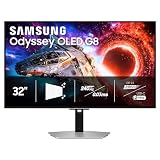
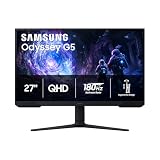
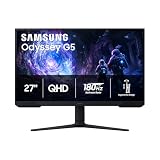
1440p is the smart default for most gamers — a Samsung Odyssey G5 or G55C at 165–180Hz gives you high frame rates on a mid-to-upper GPU without breaking the bank. Choose 4K, like an ASUS TUF VG27UQ1A or LG UltraGear 27G810A, if you own a flagship card, sit close to a large panel, or value crisp detail in slower, cinematic games over maximum frames.
Key Differences
- Sharpness: 4K packs four times the pixels of 1080p and over twice those of 1440p, so text, textures, and fine detail look noticeably crisper, especially on 27-inch and larger panels.
- GPU demand: 4K roughly doubles the rendering load versus 1440p, meaning you need a far stronger graphics card to hit the same frame rate — the single biggest cost consideration.
- Refresh rate: 1440p monitors commonly reach 165–240Hz affordably, while high-refresh 4K panels are pricier, so 1440p is easier to pair with fast, fluid competitive gameplay.
- Price: Both the monitor and the GPU cost more at 4K, so a complete 1440p setup delivers a better overall experience per dollar for the majority of builds.
- Ideal use: 4K rewards immersive, single-player and cinematic titles where detail shines, while 1440p suits fast shooters and mixed libraries where frame rate is king.
- Screen size: The jump to 4K pays off most on 32-inch and larger displays; on a 27-inch panel at normal distance the sharpness gain over 1440p is real but more subtle.
1440p Monitors: The High-Refresh Sweet Spot
QHD earned its reputation as the enthusiast default by balancing everything gamers care about. A panel like the Samsung Odyssey G5 or the 32-inch G55C delivers a sharp, immersive image while staying easy to drive, so a mid-range-to-upper GPU can push 144Hz-plus in demanding titles without compromise. You get the fluidity that makes fast games feel responsive and the clarity that makes everything look modern.
Just as importantly, 1440p keeps the whole build affordable. Because it demands far less GPU horsepower than 4K, you can spend your money on refresh rate, response time, and features instead of raw pixel-pushing power. For competitive shooters, mixed game libraries, and anyone who wants high frame rates without a flagship card, 1440p is the pragmatic, high-value winner — and the resolution most gamers should choose in 2026.
4K Monitors: Maximum Detail and Immersion
4K is the choice for gamers who want the sharpest possible image and have the hardware to back it up. On a large panel like the LG UltraGear 27G810A or an ASUS ROG XG27UCSR, the extra pixel density makes textures, foliage, and distant detail pop in a way 1440p can’t match, and it transforms slower, story-driven games into showcase experiences. Dual-mode panels even let you drop to a lower resolution at a higher refresh when you want speed.
The cost is real, though — you need a flagship graphics card to hit high frame rates, and both the monitor and GPU carry a premium. 4K makes the most sense on 32-inch-plus displays, at a viewing distance where the density is obvious, and for players who prioritize visual fidelity over chasing the highest possible frame counts. If you’ve got the GPU and crave detail, it’s genuinely stunning.
Which Should You Buy?
- For For competitive, fast-paced gaming: pick 1440p because it’s far easier to drive at 165Hz-plus, giving you the frame rates that matter in shooters.
- For For the best value setup: pick 1440p since both the monitor and the GPU needed to run it well cost dramatically less than a 4K equivalent.
- For For cinematic, single-player immersion: pick 4K if you own a flagship card and want maximum detail in visually rich, slower-paced worlds.
- For For a large 32-inch-plus screen: pick 4K because the higher pixel density keeps a big panel looking sharp where 1440p can start to feel soft.
- For For a mid-range graphics card: pick 1440p to match your GPU’s strengths and avoid the frame-rate compromises 4K would force.
Frequently Asked Questions
Can you tell the difference between 1440p and 4K?
On a 27-inch panel at a normal desk distance the difference is noticeable but subtle; on 32-inch and larger screens, or up close, 4K’s added sharpness becomes clearly visible. The gain is most obvious in text, fine textures, and distant detail.
What GPU do I need for 4K gaming?
For high-refresh 4K you’ll want a current flagship graphics card; mid-range cards can manage 4K at 60Hz with settings turned down or with upscaling. 1440p high-refresh is achievable on far more affordable GPUs.
Is 1440p still worth it in 2026?
Very much so — it remains the best balance of sharpness, refresh rate, and affordability for most gamers. Unless you have flagship hardware and a large screen, 1440p delivers the better overall experience per dollar.
Does 4K hurt frame rates a lot?
Yes, 4K roughly doubles the rendering load compared to 1440p, so expect significantly lower frame rates on the same GPU. Upscaling technologies help close the gap, but native 4K remains far more demanding.
Final Verdict
For most gamers in 2026, 1440p at a high refresh rate is the resolution that makes the most sense — it’s sharp, fast, and pairs beautifully with mid-to-upper GPUs without inflating your budget. Step up to 4K only if you own a flagship card, run a large panel, and prize detail over frame rate; in that specific scenario it’s spectacular. Match the resolution to your GPU and your favorite genres, and you’ll get the most enjoyment for your money.