Key takeaways
- Comparing native RTX 4070 Super FPS with generated RTX 5070 FPS: these are different output metrics. Match native or equivalently upscaled settings first.
- Treating GDDR7 as more VRAM: both cards have 12GB, regardless of the memory type.
- Mixing different reviews into one average: different CPUs, game builds, patches, and drivers can change the apparent winner.
- Assuming PCIe 5.0 is required: the RTX 5070 is compatible with suitable PCIe 4.0 systems; check the actual slot and configuration.
- Using launch MSRP as a live deal: check seller, exact SKU, dated price, availability, shipping, and returns.
- Buying by the RTX series number alone: overall capability, capacity, software support, and total price define the purchase.
The RTX 5070 vs RTX 4070 Super comparison is unusually close for graphics cards from different GeForce generations. In Tom’s Hardware’s 2026 native-rendering suite, the newer RTX 5070 leads by about 6% at 1440p Ultra and 10% at 4K Ultra, not by the kind of margin that normally justifies replacing a healthy graphics card. Both offer 12GB of video memory. The RTX 5070 adds faster GDDR7, newer display connectivity, and access to Multi Frame Generation, while the RTX 4070 Super uses less rated board power and remains a capable 1440p GPU. The right purchase depends more on your existing hardware, game settings, and actual U.S. asking price than on the model number alone.
Quick answer: which GPU makes more sense in 2026?
Keep an RTX 4070 Super you already own unless you can point to a specific supported feature that it lacks. The RTX 5070 is not a meaningful general-purpose performance upgrade from that card. It does not increase VRAM capacity, and modest native-game improvements are unlikely to transform a 1440p experience that is already smooth. Spending hundreds of dollars merely to switch generations is hard to justify without a compelling trade-in offer.
Choose the RTX 5070 for a fresh build when a verified U.S. listing is competitively priced, its size and connector fit your system, and you will use features such as higher-bandwidth DisplayPort or supported Multi Frame Generation. It is the slightly faster GPU on average in current same-suite tests. That advantage matters when prices are similar, but it does not make every RTX 5070 listing a good deal.
Consider a less expensive RTX 4070 Super if you can inspect the exact used or refurbished card, the discount is meaningful, and your priorities are 1080p or 1440p gaming, DLSS Super Resolution, conventional Frame Generation, and moderate power consumption. Warranty status, seller protection, fan condition, and proof that the card is working may matter more than the difference between the two chips.
Neither card is a particularly reassuring new purchase when your main worry is running out of VRAM at maximum 4K textures. Both remain 12GB designs. For that use case, evaluate the price of a reputable 16GB alternative before treating the newer model as the automatic answer.
RTX 5070 vs RTX 4070 Super specifications
| Specification | GeForce RTX 5070 | GeForce RTX 4070 Super |
|---|---|---|
| Desktop architecture | Blackwell | Ada Lovelace |
| CUDA cores | 6,144 | 7,168 |
| Memory capacity | 12GB | 12GB |
| Memory technology | GDDR7 | GDDR6X |
| Memory interface | 192-bit | 192-bit |
| Rated memory bandwidth | 672GB/s | 504GB/s |
| Reference total graphics power | 250W | 220W |
| Manufacturer system PSU guidance | 650W | 650W |
| PCI Express GPU interface | PCIe 5.0 x16 | PCIe 4.0 x16 |
| Reference display output family | DisplayPort 2.1b, HDMI 2.1b | DisplayPort 1.4a, HDMI 2.1a |
| NVIDIA Frame Generation | Standard plus supported Multi Frame Generation | Standard Frame Generation in supported games |
| Original U.S. starting price | $549 at launch | $599 at launch |
Those are NVIDIA reference or family-level specifications, not a guarantee that every MSI, ASUS, Gigabyte, or PNY retail card ships with identical clocks, dimensions, coolers, or power plugs. The RTX 4070 Super’s larger CUDA-core count does not imply it must be faster: the architectures, operating characteristics, memory systems, and scheduling behavior are different. Likewise, a newer PCI Express version by itself does not predict a significant frame-rate improvement.
The 672GB/s versus 504GB/s numbers describe theoretical memory bandwidth, a difference of one-third relative to the older card. They do not mean 33% higher average FPS or 33% more VRAM. Cache behavior, game workload, shader throughput, the CPU, and resolution all affect the result. The value of faster memory is visible in certain bandwidth-sensitive titles, but those wins have to be demonstrated with matched tests rather than assumed from the spec sheet.
How we compared the cards
This comparison uses NVIDIA’s published desktop specifications, matched-game independent reviews, a 2026 GPU benchmark hierarchy, and retailer pages checked for the U.S. market on October 28, 2026. The site has not personally benchmarked either card. The key performance figures below belong to the publishers’ stated test suites; they are not original Geek Gaming Tricks measurements or guarantees for a buyer’s PC.
Tom’s Hardware’s 2026 rasterization suite covers 11 games with a geometric mean that weights each title equally. The ray-tracing table uses a separate set of settings and games. TechSpot’s launch review uses 16 rasterized titles and a different date, game mix, and driver situation. We keep those sets separate rather than constructing a synthetic FPS average from unrelated sources.
Pricing is less stable than specifications. Manufacturer launch prices are identified as historical reference points. A current retailer’s visible list price is useful for a purchasing discussion only when the exact SKU and date are named; stock and shipping still require a ZIP-specific checkout check. The comparison does not pretend that a discontinued RTX 4070 Super listing remains buyable.
Native 1440p gaming: a small advantage for RTX 5070
Tom’s Hardware reports a geometric-mean result of 96.4 FPS for the RTX 5070 and 91.2 FPS for the RTX 4070 Super at 1440p Ultra across its 11-game 2026 rasterization suite. Relative to the 4070 Super, that is a 5.7% improvement. Both scores indicate strong mainstream 1440p performance within that particular selection of games, but the difference is not likely to be obvious every time you move the mouse.
A five-to-six-percent average can matter when a title sits just short of a performance target, yet it can also disappear behind CPU bottlenecks, game-specific tuning, or ordinary measurement variability. If an older card already handles your favorite games at a comfortable refresh rate, the newer card rarely fixes the underlying problem of wanting a much larger jump in visual quality or smoothness. A user targeting a locked 60 FPS may see even less practical benefit than someone operating near an uncapped 165Hz display.
There are exceptions. TechSpot’s original RTX 5070 review documented a large lead in Hogwarts Legacy at 1440p, a title sensitive to memory bandwidth in the chosen configuration. The same review found other games with essentially equal performance, and some in which the 4070 Super was ahead. The meaningful lesson is not that one game proves a universal winner; it is that the RTX 5070’s faster memory can help certain workloads while failing to create a compelling overall generational jump.
Competitive games and high refresh rates
In esports-oriented games, the graphics card may cease to be the main limit before either GPU is exhausted. A powerful processor, a low-latency memory configuration, consistent 1% lows, and well-chosen graphics settings can have more influence on the feel of play than a small average GPU difference. A performance chart generated with a fast laboratory CPU will not automatically match a midrange processor in a crowded multiplayer scene.
For 144Hz, 165Hz, or faster monitors, judge each card by the specific title’s worst-case frame pacing as well as average FPS. If the RTX 4070 Super runs your competitive games at the monitor’s useful refresh range, replacing it with a 5070 for five percent more average raster performance is usually a low-priority upgrade. If you are building from scratch at comparable verified prices, the 5070’s extra headroom is a rational tiebreaker.
4K gaming: the lead grows, but both have limits
At 4K Ultra, Tom’s Hardware’s 2026 rasterization suite places the RTX 5070 at 54.3 FPS and the RTX 4070 Super at 49.2 FPS. The RTX 5070 is therefore approximately 10.4% faster in this particular aggregate. A five-frame difference around the 50-FPS mark may be more noticeable than the percentage alone suggests when the game is struggling to stay near 60 FPS. Still, the newer card does not suddenly become a high-end native-4K powerhouse.
These numbers are aggregated results, not a forecast for your next AAA release. Both cards can provide a satisfying 4K experience when settings are tuned intelligently, but native maximum settings, demanding ray tracing, and especially certain texture or mod combinations can undermine the goal of maintaining smooth frame times. DLSS Quality mode, selective reductions in shadow quality, or a more restrained RT preset often yield a better experience than forcing every option to its highest value.
If you own a 4K OLED television or monitor, also check whether the card’s output and your display’s input support the mode you intend to use. Connection standards can determine what resolution, bit depth, chroma mode, and refresh rate combinations are available. DisplayPort 2.1b on the newer NVIDIA reference card is a connectivity advantage, not proof that the GPU can render new AAA games at extremely high native 4K frame rates.
Where the RTX 4070 Super still makes sense at 4K
Not every 4K gaming workload needs the latest GPU. Older games, lighter titles, strategy games, emulation use cases, and graphically restrained presets may perform well enough on the 4070 Super. If your favorite game already runs acceptably with upscaling and your existing display settings, the 5070’s modest native lead may not justify swapping hardware. Conversely, if you are buying a card expressly to play demanding new titles at native 4K with maximum visual effects, it is worth comparing higher-performance options rather than expecting either 12GB model to meet that ambition indefinitely.
Ray tracing results need their own interpretation
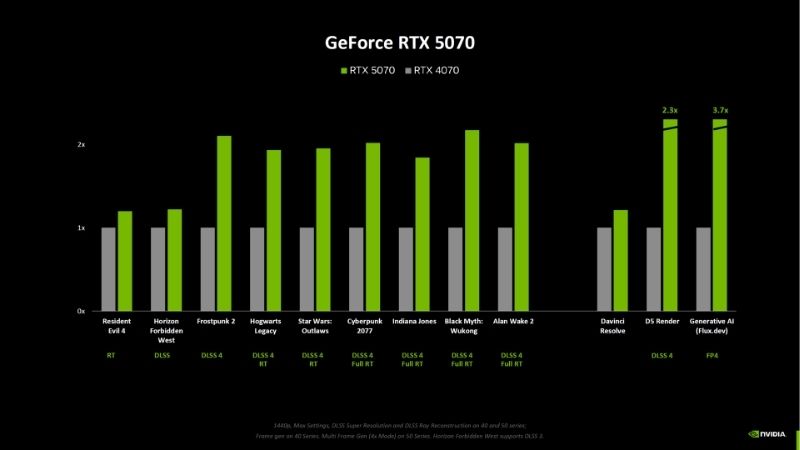
Ray tracing can shift the balance more sharply in certain conditions, but it is not one uniform workload. In Tom’s Hardware’s separate 2026 ray-tracing suite, the RTX 5070 averages 51.5 FPS at 1440p Ultra versus 43.6 FPS for the RTX 4070 Super, an 18.1% lead. The same table reports 22.7 FPS versus 22.1 FPS at 4K Ultra, a much smaller gap and poor native performance for both cards. A buyer should not interpret the encouraging 1440p margin as proof that heavy 4K path tracing will be comfortable.
The effect of VRAM pressure, engine choices, individual RT techniques, and upscaling changes the rankings. TechSpot’s 2025 tests showed the 5070 behind the 4070 Super in some RT examples, including demanding configurations in Alan Wake II and Cyberpunk 2077. That does not contradict a newer aggregate with a different selection and build environment. It demonstrates why comparing the exact game, preset, driver version, and use of DLSS is essential before drawing a definitive conclusion.
For someone who values ray-traced reflections in a handful of supported games, the RTX 5070 is usually the better new purchase at a small price premium. Someone who values full path tracing at 4K, however, should focus first on the native base frame rate and sufficient VRAM, not on the existence of a frame-generation switch. Generated frames cannot recover missing texture memory or make a genuinely unplayable underlying render rate feel like an effortlessly responsive experience.
DLSS and frame generation: what really changed?
Both cards support DLSS Super Resolution in compatible games, and both can benefit from newer transformer-based DLSS upscaling models where supported. The RTX 4070 Super also supports NVIDIA’s single-frame-generation path in compatible games. The architectural distinction is that the RTX 5070, as part of the RTX 50 family, supports DLSS Multi Frame Generation where a game or supported NVIDIA app override enables it. A feature is only useful when the game, driver, and settings expose it.
NVIDIA’s published support instructions distinguish a Multi Frame Generation override for RTX 50-series cards from the ordinary Frame Generation model upgrade that works on both RTX 40 and RTX 50. The company also makes transformer-based Super Resolution and Ray Reconstruction updates available across supported RTX hardware. This is why saying the RTX 4070 Super has no modern DLSS image-quality improvements would be inaccurate.
Newer DLSS versions and NVIDIA’s emerging neural-rendering features bring additional compatibility distinctions, but do not assume that every branded feature is active in every game. Check the actual game-specific list and the installed NVIDIA app rather than treating a marketing screenshot as a universal capability table. Some titles expose DLSS options directly inside their graphics menu; others require updated integration or a supported per-game app override.
Why generated FPS is not the same as responsiveness
Frame generation creates additional displayed images between conventionally rendered frames. It can make motion look smoother, particularly on a high-refresh-rate display, but those frames do not contain a fresh gameplay simulation and input response equivalent to an equally high native frame rate. For example, a game starting with a sluggish base render rate may still feel sluggish after a large displayed-FPS multiplier. Generated frames can also introduce artifacts around interfaces, fast-moving objects, or complex scene transitions.
Start performance evaluation with native frames or a clearly defined upscaled base mode, then consider frame generation as a separate presentation feature. NVIDIA Reflex may help manage parts of the latency pipeline in supported games; it does not turn interpolated or generated frames into additional real input samples. Competitive gamers may prefer stable native frames and controlled latency over the highest possible displayed FPS counter.
12GB VRAM on both cards: the shared limitation
The RTX 5070’s GDDR7 memory is faster, but it remains exactly 12GB. The RTX 4070 Super also has 12GB. Capacity and speed are different properties. Extra bandwidth can improve performance when an application frequently transfers data through the GPU’s memory subsystem, but it cannot store a texture set that exceeds the available memory footprint. Drivers may page memory or reduce residency under pressure, and that can cause abrupt drops or stutter that raw bandwidth alone cannot eliminate.
At 1440p, 12GB is workable in a broad range of games with sensible settings. At 4K, especially with high-resolution texture packs, ray-traced data structures, demanding mod lists, or unusually large render targets, there is less room for error. Actual consumption depends on the game and the settings; an on-screen VRAM allocation number is not automatically the same as strict VRAM requirement. Check independent per-game testing that specifically examines stutter, texture quality, and 1% lows rather than only peak allocation.
For a buyer choosing between these two cards, a useful rule follows: if the RTX 4070 Super already fits your performance and memory needs, the 5070 is a small speed upgrade. If you are currently VRAM-limited, moving to the 5070 probably does not address the root problem. Spend time comparing a credible 16GB model within the same real-world budget rather than paying a premium for an unchanged capacity.
Power draw, thermals, and noise
NVIDIA specifies 250W total graphics power for the RTX 5070 and 220W for the RTX 4070 Super, a 30W difference at the reference specification level. That does not mean the newer card always consumes precisely 30W more while playing. The workload, frame-rate cap, cooling design, BIOS power limits, and factory overclock can change actual board power. TechSpot’s launch testing found broadly similar gaming power in its sample workload, illustrating why published ratings and measured consumption are not interchangeable.
Both NVIDIA reference configurations carry a 650W system PSU recommendation. This does not mean that every 650W power supply is suitable regardless of its age, quality, CPU draw, or cabling. An upgraded graphics card is a reason to inspect the entire power budget, and custom overclocked boards can carry manufacturer-specific recommendations. Use the precise board’s manual when checking connector requirements.
Noise and thermals are especially dependent on the partner card. A large triple-fan RTX 5070 can be quieter than a compact dual-fan RTX 4070 Super in one test, while a high-quality 4070 Super cooler can outperform a less capable 5070 design in another. Look for independent acoustic measurements at comparable noise floors and power settings. Avoid presenting one manufacturer’s advertised fan design as evidence of an independently verified decibel result.
Display outputs and platform compatibility
The RTX 5070’s reference output platform supports DisplayPort 2.1b, including higher-bandwidth modes, whereas the RTX 4070 Super uses DisplayPort 1.4a. Both support modern HDMI 2.1-family connectivity, but board-specific implementations and monitor capabilities still determine the modes available. Display Stream Compression can allow high-resolution, high-refresh-rate operation when the GPU, display, and cable all support the necessary combination.
For an ordinary 1440p 144Hz or 165Hz gaming display, an RTX 4070 Super is not automatically handicapped by its older DisplayPort generation. The newer output is more valuable when the display demands unusually high bandwidth, color depth, refresh rate, or multiple simultaneous high-resolution modes. Check the actual monitor’s input specifications and the cable certification; a label like HDMI 2.1 or DisplayPort 2.1 does not by itself define every supported mode.
PCIe 5.0 support on the RTX 5070 is also backward compatible with older PCIe systems. Running the card in a proper x16 PCIe 4.0 slot does not by itself make the card incompatible, although unusually restricted lane configurations and specific workloads can have performance consequences. For most users upgrading a reasonably modern desktop, motherboard compatibility is easier than case and power-cable clearance.
Video editing, streaming, and AI workflows
Both NVIDIA generations can hardware-encode AV1 and can accelerate applications that use CUDA or supported NVIDIA APIs. The RTX 5070 adds a newer generation of NVIDIA’s NVENC and NVDEC blocks and has architecture-specific advantages in some workloads. These may be attractive to creators who encode, export, stream, or use supported AI effects regularly. However, NVIDIA GPU generation alone does not predict a universal improvement in every version of Premiere Pro, DaVinci Resolve, Blender, or a local inference application.
For video editing, measure the exact task: H.264 or AV1 export, codec decoding, GPU-accelerated effects, timeline scrubbing, or noise reduction. An application may run into CPU, disk, codec, or system-RAM limits instead of GPU shader throughput. Compare the same app version, codec, project, driver, and acceleration settings. A newer media engine can be valuable without changing render-time performance in an unrelated effect.
For local AI workloads, the 12GB capacity is often a more concrete constraint than a headline AI throughput figure. A model that does not fit in VRAM will not automatically become usable because the RTX 5070 has newer Tensor Cores. If your workflow regularly requires substantially more than 12GB, investigate a larger-memory card; otherwise, the 5070 may still offer useful speed in supported precision formats and software builds. The degree of improvement must be measured for that workload.
United States prices and availability as of October 28, 2026
Launch MSRP is not today’s checkout price. NVIDIA positioned the RTX 5070 at $549 when it launched, while the RTX 4070 Super originally entered the U.S. market at $599. Those historical figures explain the intended product positioning, but do not establish that new cards remain purchasable at those amounts. GPU supply and resale conditions in October 2026 make an MSRP-only recommendation misleading.
| Exact listing or market reference | Observed U.S. price, October 28, 2026 | Stock status | What it means |
|---|---|---|---|
| RTX 5070 NVIDIA direct reference listing | $549 listed, launch-reference-level direct price | Out of stock on NVIDIA Marketplace | Not a verified buyable offer |
| MSI RTX 5070 Gaming Trio OC, Best Buy SKU 6619436 | $879.99 visible on direct product page | Add to cart; ZIP-specific fulfillment unclear | Partner-card retail snapshot, not a GPU-wide price |
| PNY RTX 5070 OC Triple Fan, Best Buy SKU 6620352 | $849.99 visible on direct product page | Choose pickup location; shipping unclear | Confirm local availability before purchasing |
| Gigabyte RTX 4070 Super Eagle OC, B&H model GV-N407SEAGLE OC-12GD | Price not verified | No longer available at B&H | Do not treat as purchasable new stock |
| Used RTX 4070 Super, U.S. completed sales tracker | $656 median from 55 qualifying sales through October 27 | Used-market transactions, not stock | A market benchmark, not a specific offer or warranty |
The Best Buy direct product pages display visible prices for the named RTX 5070 partner boards, but the store context and fulfillment location matter. An Add to Cart or pickup selector does not certify delivery to every U.S. ZIP code. The RTX 4070 Super example at B&H explicitly says it is no longer available. Used-price trackers reflect completed transactions, not a guaranteed card you can buy at a given figure; condition and seller protection vary.
Those observations illustrate the importance of discount, but they are not a controlled two-SKU comparison of new graphics cards with identical warranty and fulfillment terms. Do not subtract a used-market median from the price of a new factory-overclocked RTX 5070 and call the difference a clean hardware-generation premium. First make the offerings comparable: same condition category, total delivered price, warranty coverage, return terms, and seller reliability.
How much extra should you pay for the newer card?
At matched condition and warranty, the RTX 5070’s 5.7% advantage in the 2026 native 1440p suite suggests that a very large premium is difficult to recover through rasterized gaming alone. A modest premium can be worthwhile for the newer media features, display connectivity, and Multi Frame Generation support, especially in a new build. A substantial premium needs a clearly defined feature benefit, not a vague expectation that the next generation must be faster.
For a practical screening rule, calculate the actual price gap between two cards you can buy and compare it with the real FPS improvement in your games. If the newer card is more than about 10–15% dearer and you mostly play conventional 1440p titles, investigate whether another GPU tier offers better value instead. This is a consumer decision heuristic, not a benchmark-derived absolute price ceiling; the break-even depends on the games and whether the newer features matter to you.
Should RTX 4070 Super owners upgrade to RTX 5070?
For most existing RTX 4070 Super owners, no. The change keeps you at 12GB and delivers only a relatively small native-performance increase across independent averages. The time and resale risk involved in removing a working card, listing it for sale, purchasing a replacement, and checking PSU and case fit are real costs. It is usually wiser to wait until a future card delivers a larger improvement in both the performance you care about and the memory headroom your games need.
There are limited exceptions. You might own a monitor with a connection mode that the 4070 Super cannot serve as desired, need a specific supported RTX 50-series software path, or receive a trade-in offer that makes the swap unusually inexpensive. In those cases, verify the relevant compatibility or feature support before selling the older GPU. Do not assume buying the newer card unlocks every future DLSS feature in every game; check NVIDIA’s current feature list.
Owners who are unhappy with current 4K frame rates should also ask whether a roughly ten-percent average gain is enough. If a demanding title is far below your target, it may not be. An upgrade with materially more processing power and more VRAM is a different category of decision from this near-sidegrade.
Building a new gaming PC: how to choose intelligently
For a new 1440p build, start with three games you intend to play most and decide on a minimum acceptable base frame rate. Search for same-setting reviews of those games and compare the total platform cost, including an appropriate monitor. If a new RTX 5070 and a used 4070 Super have similar delivered prices after accounting for warranty and risk, the newer card is usually the easier purchase. If the 4070 Super is substantially less expensive from a trustworthy seller, it can make more sense for mainstream 1440p gaming.
A fresh 4K build deserves a more demanding checklist. Determine whether you want native 4K, upscaled 4K, or high-refresh-rate competitive play. Then verify whether 12GB is sufficient for the specific games and texture settings you plan to use. When the answer is uncertain and the rest of the build is expensive, investing in more GPU headroom may be wiser than optimizing a relatively small difference between these two products.
Before checkout, read the exact add-in-board model’s dimensions, power connector position, slot thickness, recommended PSU, display outputs, and return policy. A factory-overclocked model that barely fits a case can be a worse buy than a slightly slower model with safe clearance and quieter cooling. In a compact system, leave practical room for the power cable’s bend radius and do not force a connector against the side panel.
Buying a used RTX 4070 Super safely
A used 4070 Super can be attractive because the older GPU performs surprisingly close to the 5070. The trade-off is uncertainty about how that particular board was handled. Prefer a seller with a clear return window, original model number, readable photos of connectors and the PCIe edge, and evidence that the card runs under load without artifacts or crashes. Ask whether the warranty is transferable; this depends on the board partner and purchase documentation.
If inspecting locally, check for damaged fans, corrosion, missing screws, tampered components, or a warped PCB. A normal gaming test with a current driver and a repeatable benchmark can establish basic operation, although it does not prove long-term reliability. Avoid buying solely from a screenshot of a single synthetic score. An unusually low price with no return rights can erase the savings once shipping, repairs, or failed hardware enter the picture.
Do not assume all older cards are defective or all refurbished cards are protected by the original manufacturer warranty. Document the seller’s actual obligations and the return deadline before you exchange money. That evidence matters more than a generic claim that one generation is inherently more dependable.
Common comparison mistakes to avoid
- Comparing native RTX 4070 Super FPS with generated RTX 5070 FPS: these are different output metrics. Match native or equivalently upscaled settings first.
- Treating GDDR7 as more VRAM: both cards have 12GB, regardless of the memory type.
- Mixing different reviews into one average: different CPUs, game builds, patches, and drivers can change the apparent winner.
- Assuming PCIe 5.0 is required: the RTX 5070 is compatible with suitable PCIe 4.0 systems; check the actual slot and configuration.
- Using launch MSRP as a live deal: check seller, exact SKU, dated price, availability, shipping, and returns.
- Buying by the RTX series number alone: overall capability, capacity, software support, and total price define the purchase.
One additional error is comparing an inexpensive used 4070 Super with a heavily factory-overclocked, premium-cooler 5070 and calling the entire price difference the cost of the newer GPU architecture. That comparison mixes age, condition, warranty, cooling, and vendor margins with the underlying chip performance. You can make the comparison, but you must identify all those differences before making a value recommendation.
Frequently asked questions
Is RTX 5070 much faster than RTX 4070 Super?
No, not in typical native rasterized gaming. Tom’s Hardware’s 2026 suite shows the 5070 ahead by about 5.7% at 1440p Ultra and 10.4% at 4K Ultra. Game-by-game results vary substantially. This is a useful generational improvement only for certain buying circumstances, not a universally dramatic performance jump.
Do both graphics cards have 12GB of VRAM?
Yes. The RTX 5070 uses 12GB GDDR7, whereas the RTX 4070 Super uses 12GB GDDR6X. The newer GPU has greater theoretical memory bandwidth, but their memory capacities are equal. If you need materially more than 12GB for high-resolution textures, complex mods, or creator tasks, neither is a capacity upgrade.
Does the RTX 4070 Super support DLSS 4 improvements?
Supported RTX 40-series GPUs can use applicable DLSS Super Resolution and transformer-model upgrades, and the RTX 4070 Super supports conventional DLSS Frame Generation in compatible games. Multi Frame Generation is an RTX 50-series capability. A specific game still needs support or an applicable NVIDIA app override for the feature to be available.
Is RTX 5070 better for ray tracing?
It has advantages in some matched tests, including an 18.1% lead at 1440p Ultra in Tom’s Hardware’s 2026 RT hierarchy. But the same suite records very low native 4K RT frame rates for both models and only a small gap there. Use results for your own games and settings, particularly when enabling heavy path-traced effects.
Should I buy a used RTX 4070 Super or a new RTX 5070?
It depends on the completed purchase price, warranty, and risk. If the used card is considerably cheaper, can be tested, and has adequate return protection, it may be a good 1440p value. If total costs are close, the new 5070 generally offers the simpler ownership proposition, somewhat higher performance, and newer feature support. Check both offers’ exact model numbers before deciding.
Does RTX 5070 need a bigger power supply?
NVIDIA lists 650W as the reference system recommendation for both cards, while the GPU total graphics power rating rises from 220W on the RTX 4070 Super to 250W on the RTX 5070. Actual requirements depend on the rest of the computer, the PSU’s quality and age, the partner board, and the power connection arrangement. Verify your exact card’s manual.
Final thoughts
The RTX 5070 is the technically newer, slightly faster option, with GDDR7, newer output connectivity, and Multi Frame Generation as its most meaningful differentiators. The RTX 4070 Super is close enough in many native gaming tests that replacing a functioning one is generally poor value. Both share the same 12GB capacity ceiling, making neither a compelling answer to an existing VRAM bottleneck.
If you are buying today, write down the delivered price of one specific RTX 5070 and one verifiable RTX 4070 Super offer, including condition, returns, and warranty. Then compare same-setting performance in your three priority games. Keep the 4070 Super if you already own it; select the 5070 for a new build when its real-world premium is small or its distinctive features matter; and consider a higher-memory alternative if 4K texture headroom is your actual goal.