Our Top Picks
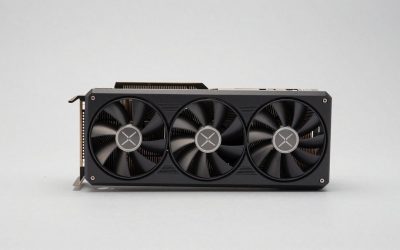
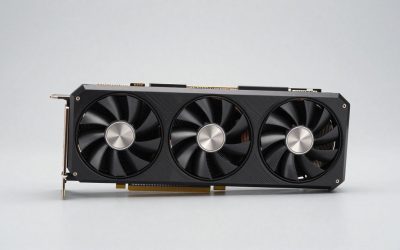
 ASUS Dual Radeon RX 9060 XT 16GB GDDR6RX9060XT|16GB|Black8 x 4.7 x 1.9 Inches1.3 PoundsCheck on Amazon
Pros & cons
- 16GB GDDR6 memory suits modern gaming resolutions
- 0dB mode keeps the card silent during light loads
- Dual BIOS lets you switch quiet or performance profiles
- 2.5-slot design needs adequate case clearance
- Boost clock gains depend on manual OC mode
Buy the RX 9060 XT 16GB unless your budget stops hard at the 8GB model’s price and you play mostly esports and older games at 1080p. The two cards share the same GPU, so when a game fits in 8 GB they perform almost identically. But in a growing list of modern titles, especially at 1440p, at high texture settings or on older PCIe 3.0 and 4.0 motherboards, the 8GB card falls far behind, sometimes into unplayable territory.
AMD launched both versions on 4 June 2025, at $299 for 8 GB and $349 for 16 GB. That $50 is the whole question here, because nothing else about the chip changes.

GIGABYTE Radeon RX 9060 XT Gaming OC 8G Graphics Card, PCIe 5.0, 8GB GDDR6, GV-R9060XTGAMING OC-8GD Video Card
Chosen because it specifies PCIe 5.0 and 8GB GDDR6.
View on Amazon
Sapphire 11350-04-20G Pulse AMD Radeon™ RX 9060 XT Gaming OC Graphics Card with 8GB GDDR6, AMD RDNA 4
Chosen because it specifies AMD RDNA 4.
View on AmazonASUS Dual Radeon RX 9060 XT 16GB GDDR6 Gaming Graphics Card | PCIe 5.0, HDMI 2.1b, DisplayPort 2.1a, 2.5-slot design, Axial-tech Fans, 0dB Technology
Chosen because it specifies PCIe 5.0 and HDMI 2.1b.
View on Amazon
ASUS Dual Radeon RX 9060 XT 16GB GDDR6 White Edition Gaming Graphics Card | PCIe 5.0, HDMI 2.1b, DisplayPort 2.1a, 2.5-slot design, Axial-tech fan design, 0dB Technology
Chosen because it specifies PCIe 5.0 and HDMI 2.1b.
View on AmazonWhat Is Actually Different
| Spec | RX 9060 XT 8GB | RX 9060 XT 16GB |
|---|---|---|
| Architecture | RDNA 4.0 | RDNA 4.0 |
| Launch MSRP | $299 | $349 |
| Shaders | 2048 | 2048 |
| Boost clock | 3130 MHz | 3130 MHz |
| Process | 4 nm | 4 nm |
| TDP | 150 W | 160 W |
| VRAM | 8 GB GDDR6 | 16 GB GDDR6 |
| Bus / bandwidth | 128-bit, 322.3 GB/s | 128-bit, 322.3 GB/s |
| Cache | 4 MB L2 + 32 MB L3 | 4 MB L2 + 32 MB L3 |
| Interface | PCIe 5.0 x16 | PCIe 5.0 x16 |
| Power connector | 1x 8-pin | 1x 8-pin |
| Length / width | 267 mm, 2-slot | 267 mm, 2-slot |
| Outputs | 1x HDMI 2.1b, 2x DP 2.1a | 1x HDMI 2.1b, 2x DP 2.1a |
Same shader count, same clocks, same bandwidth and same cache. The only practical differences are memory capacity and a 10 W TDP bump. That makes this one of the cleanest tests of how much VRAM matters in modern games.
When 8 GB Is Fine
If a game’s working set fits in 8 GB, the cards are effectively equal. TechTeamGB’s comparison showed this clearly in Counter-Strike 2 at 1080p low, where the two models landed within about 2% of each other at over 500 FPS. You can expect the same parity in:
- Esports titles: Valorant, CS2, League of Legends, Overwatch 2, Rocket League, Fortnite on competitive settings.
- Older AAA games, roughly those released before 2022, at 1080p high.
- Current games at 1080p with textures set to medium or high rather than ultra.
- Indie games and lighter titles of almost any age.
If this list covers your library, the 8GB card delivers the same experience for $50 less.
When 8 GB Breaks Down
Hardware Unboxed’s review of the 8GB model, published through TechSpot, was blunt about where it struggles. Their tests at 1440p with upscaling included the following:
- Doom: The Dark Ages: the 16GB model was about 17% faster on average with roughly 27% higher 1% lows. The 8GB card was still usable.
- The Last of Us Part II (Ultra): the 16GB card was about 22% faster on average and around 37% better in 1% lows.
- Indiana Jones and the Great Circle: even with a lower texture pool on the 8GB card, the 16GB model was about 45% faster on average. In a more demanding section at matched very high settings, the 8GB card became barely playable while the 16GB card stayed smooth.
Tom’s Hardware found that at 4K with the most demanding settings, 8GB cards in its test pool collapsed to single-digit frame rates. Nobody should buy either card for native 4K, but the result shows how sharply performance drops once VRAM runs out. It does not taper off; it falls off a cliff.
Why averages hide the problem
When VRAM overflows, the GPU pulls texture data across the PCIe bus from system RAM, which is far slower than on-board memory. The result shows up as stutter, texture pop-in, missing textures and sudden dips, often before the average FPS looks bad. A card can post a respectable average while feeling rough to play. Always look at 1% lows and frame-time graphs in reviews, not just averages.
The PCIe Generation Trap
This is the most underappreciated part of the comparison. When an 8GB card overflows, the speed of the PCIe link decides how bad the stutter gets. The RX 9060 XT has a full x16 PCIe 5.0 interface, but many people install it in older boards.
Hardware Unboxed’s follow-up PCIe scaling article on TechSpot showed:
- F1 25 (very high): dropping the 8GB card from PCIe 5.0 to 4.0 cut performance by about 30%. On PCIe 3.0 the 16GB card was more than twice as fast.
- Spider-Man 2: the 16GB card was about 26% faster even on PCIe 5.0. On PCIe 3.0 its lead grew past 100% for averages and much more for 1% lows.
- Ratchet & Clank: Rift Apart: the 16GB card stayed far ahead even after the 8GB card moved to a faster bus.
The 16GB card barely cares which PCIe generation you use, because it rarely needs the bus for overflow. If your motherboard is PCIe 3.0, such as many B450, Intel 10th gen or older boards, or PCIe 4.0, the 16GB model is much more important than the spec sheet suggests.
VRAM Needs by Resolution: A Practical Estimate
| Resolution and settings | Typical VRAM use in recent AAA games | 8GB verdict |
|---|---|---|
| 1080p, medium textures | ~5 to 7 GB | Comfortable |
| 1080p, high/ultra textures | ~7 to 10 GB | Borderline in newer titles |
| 1440p, high textures with upscaling | ~8 to 11 GB | Often over the limit |
| 1440p, ultra plus ray tracing | ~10 to 13 GB | Over the limit |
| 4K with upscaling | ~10 to 14 GB | Not suitable |
These are broad ranges. VRAM use varies widely by engine, and frame generation and ray tracing each add memory overhead. The pattern is clear, though: 8 GB has no margin above 1080p in current releases, and new games tend to need more memory, not less.
Features, Power and Fit Are Identical
Both versions support FSR 4, AMD’s ML upscaler that is exclusive to RDNA 4, plus FSR frame generation, Anti-Lag and improved RDNA 4 ray tracing. One detail matters here: frame generation and ray tracing both increase VRAM use. On the 8GB card, turning them on can push a game over the limit, so those features help the 16GB card more.
For power, here is a simple PSU estimate: 160 W GPU plus about 125 W for a typical gaming CPU plus about 150 W of headroom, for roughly 435 W. A quality 500 to 550 W unit covers either version, and both use one 8-pin connector. The reference length of 267 mm and 2-slot width are the same, though partner card dimensions vary.
Is the $50 Worth It? A Cost Calculation
The 16GB card costs about 17% more at launch MSRP ($349 vs $299).
- In games that fit in 8 GB, you get 0% more performance for that 17%. The 8GB card wins on value.
- In VRAM-heavy games, Hardware Unboxed’s numbers show roughly 17 to 45% more average performance at 1440p with upscaling, and far more in worst cases. The 16GB card wins clearly.
- Over three years of ownership, $50 works out to about $1.40 a month for protection against future games that will need more memory.
Resale value matters too. As 8GB cards age, they are likely to lose value faster than 16GB versions, which recovers part of the price difference when you upgrade.
Who Should Buy Which
| Buyer profile | Version |
|---|---|
| Esports-focused, 1080p high refresh, tight budget | 8GB |
| Mixed library including new AAA releases | 16GB |
| 1440p monitor, now or planned | 16GB |
| PCIe 3.0 or 4.0 motherboard | 16GB |
| Plans to keep the card 3 years or more | 16GB |
| Secondary or kids’ PC playing lighter games | 8GB |
Frequently Asked Questions
Is the RX 9060 XT 16GB faster than the 8GB version?
Only when a game needs more than 8 GB of video memory. In games that fit, the two perform nearly identically because they use the same GPU, clocks and bandwidth. In VRAM-heavy games, the 16GB model can be 17 to 45% faster on average, and sometimes far more, based on Hardware Unboxed’s results.
Is 8 GB of VRAM enough for 1080p gaming?
For many games at 1080p, yes, especially esports titles and older releases. Several new AAA games now exceed 8 GB at high or ultra textures even at 1080p, which causes stutter or blurry textures. Lowering texture quality usually restores smooth play.
Does my motherboard’s PCIe version matter for the 8GB card?
Yes, quite a lot. When the 8GB card runs out of VRAM, it streams data over PCIe, and slower PCIe 3.0 or 4.0 links make the resulting stutter much worse. The 16GB card is far less affected because it rarely overflows.
Do both versions support FSR 4?
Yes. Both are RDNA 4 cards with full FSR 4 support, along with FSR frame generation and Anti-Lag. Keep in mind that frame generation and ray tracing use extra VRAM, which can push the 8GB card over its limit.
Do the two versions need different power supplies?
No. The 16GB card’s TDP is only 10 W higher, at 160 W against 150 W. A quality 500 to 550 W PSU with one 8-pin connector handles either version with a typical gaming CPU.