Our Top Picks
 C4000BG CenturyLink Bonded Line Wi Fi DSL Router5x5x10 inches4.7 x 5.7 x 8.3 inches2 poundsCheck on Amazon
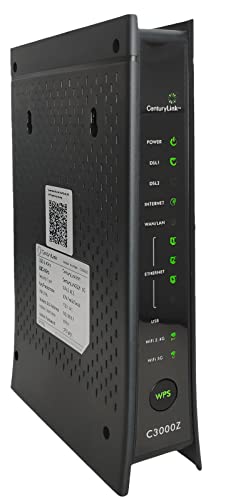 ZyXEL C3000Z Dual-Band 802.11b/g/n Gigabit Modem for CenturyLink9.05 x 3.22 x 11.76 inches0 poundsCheck on Amazon
 MOTOROLA VDSL2/ADSL2+ Modem + WiFi AC1600 Gigabit Router8.5 x 2.38 x 6.75 inches0.85 poundsCheck on Amazon
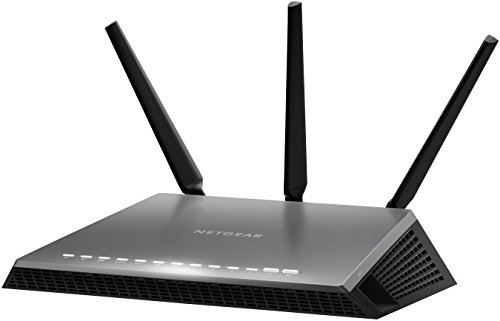 Netgear D7000-100NAS Nighthawk AC1900 VDSL/ADSL Modem Router Certified13.91 x 10.2 x 3.23 inches3.35 poundsCheck on Amazon
Buying a modem router for CenturyLink DSL is two decisions wearing one coat. The first is technical: CenturyLink delivers DSL over single and bonded pairs, with and without vectoring, and a gateway built for one line type can be useless on another. The second is about the market. CenturyLink gateways on Amazon are mostly Renewed units and third-party offers rather than retail stock, so the listing matters as much as the model name. Getting the line type right, then the condition right, is the whole game.
This roundup is for CenturyLink DSL households replacing a rented or failed gateway, and every pick is a modem router whose listing states DSL function and CenturyLink compatibility wording. Read each entry for its limits as much as its features: two of these units cover bonded lines, two are non-bonded only, and several listings are Renewed. All five were chosen from the product names and specifications on their Amazon listings, and each needs a live check on condition and offers before you order.
Quick Picks
As an Amazon Associate we earn from qualifying purchases.
| Product | Best for | Key spec from title |
|---|---|---|
| CenturyLink C4000BG | Bonded lines wanting current Wi-Fi | Bonded Line Wi-Fi DSL Router, Wi-Fi 6 |
| ZyXEL C3000Z (Renewed) | Bonded VDSL2 with vectoring | Dual-Band Gigabit Modem for CenturyLink, Renewed |
| CenturyLink C3000A (Renewed) | A like-for-like gateway replacement | Wireless DSL Modem Router, Renewed |
| Motorola MD1600 | Single-pair lines without vectoring | VDSL2/ADSL2+ Modem + AC1600 Router |
| NETGEAR Nighthawk D7000 | Non-bonded lines, stated certification | AC1900 VDSL/ADSL Modem Router, CenturyLink certified |
How to Choose
Identify Your Line Type Before Anything Else
Nothing else matters until you know what CenturyLink provisioned at your address. A bonded line uses two copper pairs to reach higher speeds; a standard line uses one. Vectoring is a noise-cancelling technique applied on some VDSL2 lines, and a modem that ignores it can sync poorly or not at all. Your current gateway’s status page, your bill, or a call to CenturyLink will tell you which combination you have. Write it down. Every compatibility statement in this roundup is conditional on that answer, and the most common failure in this category is a perfectly good gateway bought for the wrong line type.
Match the Gateway’s DSL Function to That Line
With the line type known, read each listing’s DSL wording literally. A bonded-line gateway covers bonded service; a unit whose title says non-bonded only will not bond, no matter how fast its Wi-Fi is. The Motorola MD1600 and the NETGEAR D7000 in this roundup both state non-bonded limits in their own listing copy, while the C4000BG is sold as a bonded-line unit and the ZyXEL C3000Z is described with bonded VDSL2 and vectoring. Treat phrases like “works with CenturyLink” as the start of the check, never the end of it: the bonded, vectoring and speed wording beside them decides whether the box will sync on your line.
Treat Condition as Part of the Specification
This category runs on refurbished ISP hardware. Most CenturyLink-branded gateways on Amazon are Renewed listings or third-party offers of returned and retired rental units, not factory-fresh retail products. That is not automatically bad — these are the same models the ISP itself deploys — but it changes what to verify. Check whether the listing is Renewed or new, who the seller is, what the return window looks like, and whether offers exist at all on the day you buy. A gateway that arrives wiped and working is a bargain; one locked to a previous account or missing its power supply is a project. Condition is a spec here.
Separate the Modem Job From the Wi-Fi Job
A modem router does two jobs, and they age at different rates. The DSL modem half is dictated by your line and changes rarely; the Wi-Fi half decides how your phones, consoles and laptops actually feel the connection. The C4000BG brings Wi-Fi 6, while the other picks are dual-band ac-class units — perfectly serviceable on DSL speeds, where the line, not the radio, is the bottleneck. Also count wired ports if you game or work at a desk: several picks include Gigabit Ethernet for a console or PC. Buy the modem half for your line first, then let Wi-Fi and ports break the tie.
The 5 Best Options
CenturyLink C4000BG Bonded Line Wi-Fi DSL Router
The C4000BG is the current-generation answer for bonded CenturyLink DSL: a Greenwave-built gateway sold under CenturyLink’s own branding, described as a bonded-line xDSL unit with Wi-Fi 6 dual-band coverage in the AX3000 class. A seller note on the listing is unusually blunt about scope — compatible with CenturyLink and Brightspeed DSL services, and not compatible with fiber internet service — which is the clarity this category needs. That branding makes its compatibility statement the strongest in this group, though it remains the listing’s statement, not a certification we can add to. Expect to buy it from a third-party seller rather than from Amazon, and verify the offer before ordering.
Specs
- DSL function as listed: bonded-line xDSL gateway for CenturyLink DSL service
- Seller note on the listing: not compatible with fiber (Ethernet) internet service
- Wi-Fi 6 (802.11ax) dual-band, AX3000 class (600 + 2400 Mbps link rates as described)
- Compatibility wording: the product’s own CenturyLink branding, as listed
- Availability: captured listing shows third-party sellers; confirm condition and offers live
Best for: bonded-line households that want the newest Wi-Fi standard in the gateway itself.
Watch out for: the captured listing is fulfilled by third-party sellers, and a separate Renewed listing for this model exists under a different ASIN — confirm you are on the intended listing, check the seller and condition on the live page, and confirm a buyable offer exists before relying on this pick.
ASIN: B0977WWVYF
ZyXEL C3000Z Dual-Band Gigabit Modem for CenturyLink (Renewed)
The C3000Z is the technician’s gateway: ZyXEL hardware that CenturyLink deployed widely, described in its listing content as supporting bonded VDSL2 with vectoring, alongside a VDSL2/ADSL2+ modem and a dedicated Gigabit Ethernet WAN port. That combination covers the widest range of CenturyLink line types in this roundup, including vectoring lines that simpler modems struggle with. The honest catch sits in the title: this is a Renewed listing, and no new retail listing for the model could be tied down. One quirk to read carefully — the title’s wireless wording understates the dual-band ac-class radio the listing describes, so judge the Wi-Fi by the described function, not the abbreviated title.
Specs
- Condition as listed: Renewed
- DSL function as described: bonded VDSL2 with vectoring; VDSL2/ADSL2+ gateway
- Dedicated Gigabit Ethernet WAN port as described
- Wi-Fi: dual-band; the title states 802.11b/g/n while the listing describes dual-band ac-class function — quoted separately, as listed
Best for: bonded or vectoring lines, and anyone replacing a rented ZyXEL with the same hardware family.
Watch out for: this ASIN is the Renewed listing — expect a refurbished unit, confirm the live offers, seller and return terms before ordering, and be ready to factory-reset and re-provision the gateway when it arrives. If only new stock will do, this is not your listing.
ASIN: B08666QX62
CenturyLink C3000A Wireless DSL Modem Router (Renewed)

The Actiontec-built C3000A is the like-for-like replacement play: a CenturyLink DSL modem router whose photographed front panel shows separate DSL 1 and DSL 2 indicators — the mark of bonded-pair capable hardware — alongside four Ethernet ports and dual-band Wi-Fi with band-steering “smart Wi-Fi” as described. If your rented unit is a C3000A and the rental fee annoys you, this is the class of box without the line item. As with the ZyXEL above, the listing that could be verified is the Renewed one; the non-Renewed listing’s code could not be tied down, so what you see here is refurbished stock sold through Amazon’s Renewed channel and its sellers.
Specs
- Condition as listed: Renewed
- DSL modem router for CenturyLink DSL, model C3000A
- Front-panel DSL 1 / DSL 2 indicators as photographed — bonded-pair capable hardware
- Dual-band Wi-Fi (2.4 GHz + 5 GHz) with band-steering “smart Wi-Fi” as described
- 4 Gigabit LAN ports as recorded in the listing’s spec tables
Best for: households replacing a rented C3000A-class gateway with the same hardware, minus the rental.
Watch out for: this is the Renewed listing and its code came from a mirror of that listing — confirm the condition, seller and live offers on the Amazon page itself before ordering, and check the unit is not account-locked when it arrives.
ASIN: B093W4YVXP
Motorola MD1600 VDSL2/ADSL2+ Modem + WiFi AC1600 Gigabit Router
The MD1600 is the retail alternative: a Motorola modem router combining a VDSL2/ADSL2+ modem with an AC1600 dual-band gigabit router, described as supporting DSL speeds up to 100 Mbps depending on service. It earns its place for one reason — it is a retail product rather than retired ISP stock. Its limits, though, are written into its title and they are strict: for non-bonded, non-vectoring DSL. On a bonded or vectoring CenturyLink line it is simply the wrong box, whatever the price. The title’s provider wording also varies between captures, so the live listing — not any roundup, including this one — is the authority on what it claims.
Specs
- Built-in VDSL2/ADSL2+ modem combined with an AC1600 dual-band Wi-Fi gigabit router
- Supports DSL speeds up to 100 Mbps as described (service-dependent)
- Limit as listed in the title: for non-bonded, non-vectoring DSL only
- Availability: signals conflict between sources; confirm a buyable offer live
Best for: single-pair, non-vectoring DSL lines where you want a retail modem router instead of ISP hardware.
Watch out for: do not buy this for a bonded or vectoring line — the listing’s own wording excludes both. Confirm the live title’s provider wording and that a buyable offer actually exists, since availability signals for this listing conflict; if the live title does not name your provider situation, treat it as a generic VDSL2/ADSL2+ unit and decide accordingly.
ASIN: B077NNGNJM
NETGEAR Nighthawk AC1900 VDSL/ADSL Modem Router (D7000)
The D7000 carries the most explicit compatibility sentence in this group, printed in its own title: “Certified with CenturyLink – Non-bonded, DSL Internet Only”. That is the listing’s claim, quoted exactly — it covers non-bonded DSL and nothing more, and it should never be stretched into a blanket approval for every CenturyLink line. As hardware, it pairs a VDSL/ADSL modem with AC1900 dual-band Wi-Fi and a 1GHz dual-core processor as described, the strongest router half among the third-party picks. Its weakness is footing: NETGEAR’s own support site lists the D7000 as End of Service, so Amazon offers are third-party sellers and remaining stock rather than a supported retail channel.
Specs
- Title as listed: “NETGEAR Nighthawk AC1900 VDSL/ADSL Modem Router Certified with CenturyLink – Non-bonded, DSL Internet Only (D7000)”
- Built-in VDSL/ADSL modem
- AC1900 dual-band Wi-Fi (600 + 1300 Mbps as described)
- 1GHz dual-core processor as described
- Support status: NETGEAR lists the model as End of Service; Amazon offers are third-party/remaining stock
Best for: non-bonded CenturyLink lines where you want the strongest stated certification wording and router performance.
Watch out for: non-bonded only, exactly as its title says — bonded-line households must look elsewhere in this list. Because the model is End of Service with its maker, confirm a genuinely buyable offer on the live listing before counting on it, and drop this pick if only used or inflated third-party offers remain.
ASIN: B0111MRL4S
Which One Fits Your Situation
Your Line Is Bonded and You Want Current Wi-Fi
Choose the C4000BG. It is the bonded-line gateway in this group with Wi-Fi 6, sold under CenturyLink’s own branding with an explicit DSL-only scope note. Buy it from the listing with the clearest seller and return terms you can find, since offers come from third parties, and keep your line-type confirmation from CenturyLink handy during setup.
A Single-Pair, Non-Bonded Line on a Sensible Budget
The D7000 and the MD1600 both live here, and both state their non-bonded limits openly. The NETGEAR brings the stronger router and the listing that claims CenturyLink certification for non-bonded service; the Motorola is the plainer retail box. Either way, verify your line is genuinely non-bonded and non-vectoring first — that single fact decides whether these work at all.
Replacing a Rented Gateway With the Same Hardware
If your rental is a ZyXEL C3000Z or an Actiontec C3000A, the Renewed listings here are the same hardware families without the monthly fee. The C3000Z covers bonded VDSL2 with vectoring as described; the C3000A matches bonded-pair hardware with four LAN ports. Budget a little setup time: expect to reset the unit and enter your CenturyLink credentials yourself.
You Plan to Add Your Own Router Later
Start with a gateway whose wired side is strong, and the C3000Z’s dedicated Gigabit Ethernet WAN port, as described in its listing, gives the cleanest handoff to separate equipment. The C3000A’s four Gigabit LAN ports serve a desk-bound setup well in the meantime. DSL speeds will not trouble gigabit wiring — the point is flexibility when your network outgrows the gateway’s Wi-Fi.
Common Mistakes
- Buying a cable modem router (DOCSIS) for a DSL line — the two networks share nothing but the shelf, and no brand wording makes a cable modem sync on DSL.
- Ordering the C4000XG for DSL service: it is the fiber sibling in the C4000 family, and fiber hardware will not run a copper DSL line.
- Assuming any VDSL modem covers bonded lines — the MD1600 and the D7000 both state non-bonded limits in their own listings.
- Reading the word CenturyLink in a title as a CenturyLink certification, when most listings state compatibility wording only.
- Skipping the condition line and being surprised that the gateway that arrived is a Renewed unit from a third-party seller.
Frequently Asked Questions
Does CenturyLink certify third-party modems?
Certification language in this category comes from the listings themselves, not from a CenturyLink approval list for retail modems. One pick here, the NETGEAR D7000, carries certification wording for non-bonded DSL in its own title; the CenturyLink-branded gateways state compatibility through their branding and model roles. Treat every claim as what the listing says, scoped to the line types it names, and confirm your line type with CenturyLink directly.
Will a bonded-line gateway work on a single-pair line?
Usually the modem half is not the problem: gateways described with VDSL2 and ADSL2+ functions, like the C3000Z, speak the languages single-pair lines use, and bonded units light one DSL indicator instead of two. The reverse never works — a non-bonded modem cannot bond. Always match the listing’s stated DSL functions to your provisioned line, and expect to enter your account credentials during setup either way.
What does Renewed mean for these gateways?
Renewed units are pre-owned products inspected and sold through Amazon’s Renewed programme and its sellers, which for ISP gateways usually means retired rental or returned hardware that has been reset and checked. It is the normal way this hardware reaches retail at all. Check the specific listing’s condition notes, seller and return window, and plan on a factory reset and fresh setup when the unit arrives.
Can I stop renting without calling CenturyLink?
You still need your DSL account credentials — the PPPoE username and password attached to your service — and those come from CenturyLink, either from your gateway’s settings or from support. The hardware swap itself is simple: connect the replacement, enter the credentials, and confirm sync. Keep the rented unit until the replacement is online and stable, then return it and make sure the rental charge leaves your bill.
FAQ
Does CenturyLink certify third-party modems?
Will a bonded-line gateway work on a single-pair line?
What does Renewed mean for these gateways?
Can I stop renting without calling CenturyLink?
More from Amazon
Programs that pair well with the guide above. Offers and eligibility are set by Amazon and may change.
Free shipping on eligible items, Prime Video and more. Eligible new members can start with a free trial.
Start a Prime free trialAd-free music streaming. Eligible new subscribers can start with a free trial.
Try Music Unlimited freeA Prime membership for ages 18-24 with a trial period. Eligibility is set by Amazon.
See Prime for Young AdultsAudiobooks and podcasts to listen to on the go. Eligible new members can start with a free trial.
Try Audible freeAs an Amazon Associate we earn from qualifying purchases.