Our Top Picks
 Razer DeathAdder V2 Gaming Mouse: 20K DPI OpticalMouse2.87 x 5 x 1.69 inches0.4 poundsCheck on Amazon
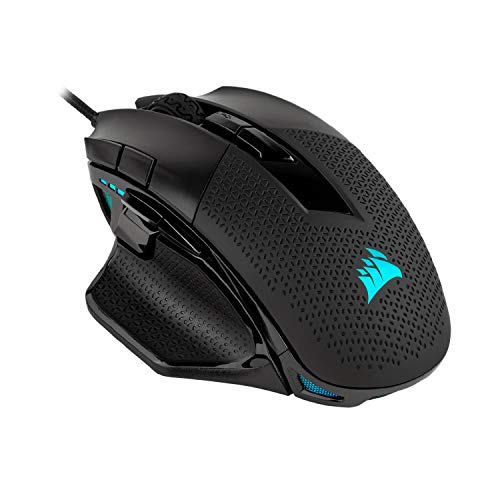 CORSAIR NIGHTSWORD RGB Adjustable Weight FPS MOBA PC5.08 x 3.38 x 1.71 inches0.3 poundsCheck on Amazon
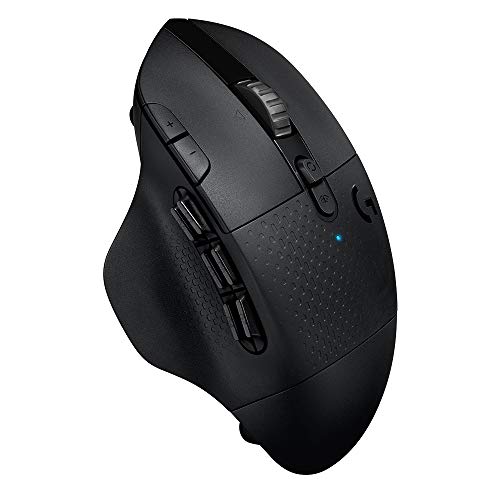 Logitech G604 Lightspeed Wireless Gaming Mouse with 155.1" x 3.1" x 1.8"1.77 x 3.14 x 5.11 inchesCheck on Amazon
 Razer Basilisk V3 Customizable RGB Wired Ergonomic GamingMouse2.96 x 5.12 x 1.67 inches0.2 poundsCheck on Amazon
The best comfortable gaming mouse is the one you forget you are holding. In a long session, comfort is not a luxury: it is the difference between staying sharp in the final round and losing focus because your hand aches or your wrist feels stiff. A mouse that fits your hand lets you play longer, aim more steadily, and finish a session feeling fine instead of feeling worn out.
Comfort comes from the shape of the shell, not from the sensor or the button count. A tall, sculpted shell that fills the palm suits a relaxed palm grip. A narrower, flatter shell suits a fingertip grip. A thumb rest takes weight off the thumb, and a textured grip keeps the mouse steady when your palm gets warm. Weight matters too: a lighter mouse is easier to move quickly, while a heavier mouse can feel more planted. There is no single right answer, because hands differ in size and grip style differs from player to player.
This guide compares five ergonomic gaming mice that are built around comfort first. Every pick has a shaped, right-handed shell with a proper thumb area, a sensor that tracks cleanly, and buttons placed where your fingers naturally rest. They cover wired and wireless options, light and mid-weight designs, and a range of hand sizes.
How to Choose
1. Shape and Hand Size
Shape is the first thing to get right, and it matters more than any other feature. A mouse that is too small forces your fingers to curl tightly, which tires the hand quickly. A mouse that is too large forces you to stretch to reach the buttons. Measure your hand from the base of the palm to the tip of the middle finger: hands under 17cm usually suit a medium mouse, hands between 17cm and 19cm suit a large mouse, and hands over 19cm need the largest shells. A tall hump near the middle of the shell supports the palm, while a lower hump suits fingertip players.
2. Grip Style
How you hold the mouse decides which shape works. In a palm grip, the whole hand rests on the mouse, so you want a tall shell with a broad back that fills the palm. In a claw grip, the palm rests lightly while the fingers arch, so you want a shorter shell with a pronounced hump. In a fingertip grip, only the fingertips touch the mouse, so you want a light, low shell. Try to match the mouse to your grip rather than forcing your grip to match the mouse, because a mismatch is what causes aches over a long session.
3. Weight and Balance
Weight changes how a mouse feels in motion. A mouse around 80 to 90 grams feels quick and easy to flick across the pad, which suits fast games. A mouse around 100 to 135 grams feels more planted, which some players prefer for steady aiming. Balance matters as much as total weight: a mouse that is heavy at the back feels different from one that is heavy at the front. A few mice in this guide include a tunable weight system, so you can shift the balance until it feels right.
4. Thumb Rest and Side Buttons
The thumb does a lot of work during a long session, and a good thumb rest takes the strain off it. Look for a sculpted thumb area that lets the thumb sit naturally instead of dragging on the pad. Side buttons should sit where the thumb naturally falls, without forcing you to stretch or bend to reach them. Two well-placed side buttons beat six awkward ones, because buttons you cannot reach comfortably are buttons you will never use.
5. Sensor and Polling Rate
The sensor decides how accurately the mouse tracks your hand. All five picks use modern optical sensors with high maximum sensitivity and clean tracking at fast speeds, so the sensor will not hold you back. A polling rate of 1000Hz is the standard for gaming mice, and it keeps the cursor responsive. Beyond that, the differences between sensors are small: shape and comfort matter far more than a few thousand extra dots per inch.
6. Cable or Wireless
A wired mouse never needs charging and is always ready, but the cable can drag on the desk and change how the mouse feels. Look for a light, flexible cable that stays out of the way, or use a cable holder to keep it off the desk. A wireless mouse removes the cable entirely, which many players find more comfortable, but it needs charging or fresh batteries. Modern wireless mice last for days or weeks on a charge. Two of the picks in this guide are wireless, and three are wired.
7. Buttons, Wheel, and Build Quality
The main buttons should click cleanly without feeling stiff, because stiff buttons tire the fingers over hours of play. The scroll wheel should turn smoothly with clear steps, and a free-spinning wheel is a bonus for browsing. Look for a shell with a matte or lightly textured finish rather than a glossy one, because a glossy shell gets slippery when your palm warms up. Rubberized side grips help too.
Top Picks
Razer DeathAdder V2
The Razer DeathAdder V2 is the classic comfortable gaming mouse. Its right-handed ergonomic shell is one of the most copied shapes in gaming, because it fits a wide range of hand sizes and suits both palm and claw grips. The tall, sculpted back fills the palm without forcing the fingers into an awkward angle, and the rubberized side grips keep the mouse steady when your hand gets warm. At 82 grams, it is light enough to move quickly but heavy enough to feel planted.
The sensor is Razer’s Focus+ optical sensor, with a maximum sensitivity of 20,000 DPI and clean tracking at high speeds. The optical switches click quickly, and the eight programmable buttons include two well-placed side buttons that fall naturally under the thumb. The Speedflex cable is light and flexible, so it drags far less than a stiff rubber cable, and the Chroma RGB lighting can be set to a single color or turned off entirely.
Who it is for: Gamers with medium to large hands who use a palm or claw grip and want a proven, comfortable shape that works for long sessions without fuss.
Caveats: The DeathAdder V2 is wired only, so players who hate cables should look at the wireless picks below. The shell is wide, so players with small hands may find it a stretch.
Corsair Nightsword RGB
The Corsair Nightsword RGB is built for players who like a substantial mouse with a proper thumb rest and a tunable weight. Its contoured shell has a deep thumb rest on the left side and a flared base that supports the little finger, so the whole hand sits on the mouse rather than dragging on the pad. The textured rubber grips keep it steady, and the sculpted shape suits a palm grip better than any other mouse in this guide.
The standout feature is the tunable weight system: the Nightsword ships with a set of weights that slot into the base, so you can adjust the total weight and shift the balance toward the front or the back until it feels right. The optical sensor tracks up to 18,000 DPI, and the ten programmable buttons include a sniper button under the thumb that temporarily lowers sensitivity for careful aiming. The iCUE software lets you remap every button and tune the sensor to your pad.
Who it is for: Palm-grip players with medium to large hands who like a heavier, planted mouse and want to tune the weight and balance to their own hand.
Caveats: The Nightsword is one of the heavier mice in this guide, even with the weights removed, so players who like a very light mouse should look elsewhere. It is wired only.
SteelSeries Rival 5

The SteelSeries Rival 5 is the most versatile mouse in this guide, and a good choice if you play many different kinds of games. Its ergonomic right-handed shell is a medium size that suits a wide range of hands, with a gentle hump that supports the palm without forcing a single grip style. At 85 grams, it is light enough for fast movement and steady enough for careful aiming, and the matte finish stays grippy when your palm warms up.
The Rival 5 has nine programmable buttons, built around a five-button side panel with a two-way thumb paddle that is easy to find without looking. That side panel is the reason this mouse works so well across genres: the extra buttons suit ability-heavy games, while the shape stays comfortable for long sessions. The TrueMove Air optical sensor tracks up to 18,000 CPI, and the Golden Micro switches are sealed against dust and splashes. The PrismSync RGB lighting runs along the side strips and the rear logo.
Who it is for: Multi-genre players who want extra side buttons for abilities and shortcuts, in a medium, comfortable shell that suits palm and claw grips alike.
Caveats: The side panel takes a little time to learn, and the thumb paddle can be pressed by accident until your thumb learns its position. The cable is a standard braided type rather than the lighter flexible cable on the DeathAdder V2.
Logitech G604 LIGHTSPEED
The Logitech G604 LIGHTSPEED is the wireless pick for players who want a big, comfortable mouse with plenty of buttons and a battery that lasts for weeks. Its sculpted right-handed shell is one of the largest in this guide, with a broad thumb area carrying six thumb buttons and a deep palm rest that fills a large hand. At 135 grams with a single AA battery fitted, it is the heaviest mouse here, and that weight gives it a planted feel that many players prefer for steady aiming.
The G604 connects over Logitech’s LIGHTSPEED wireless link or over Bluetooth, so it works with a gaming PC, a laptop, and a second machine without swapping receivers. The HERO 16K sensor tracks up to 16,000 DPI, and the fifteen programmable controls include a hyper-fast scroll wheel that spins freely for long documents and locks into stepped mode for games. Battery life runs up to 240 hours on the LIGHTSPEED connection.
Who it is for: Players with large hands who want a wireless mouse with a big, comfortable shell, many thumb buttons, and a battery that lasts for weeks.
Caveats: At 135 grams, the G604 is heavy for fast flick aiming, so players who like a very light mouse should choose the DeathAdder V2 or the Rival 5 instead. The thumb button cluster takes time to learn, and the battery adds weight that cannot be removed.
Razer Basilisk V3
The Razer Basilisk V3 rounds out this guide as the comfort pick with the most refined thumb area. Its right-handed shell has a sculpted thumb rest with a removable clutch paddle, and the shape fills the palm in a way that suits long sessions. The eleven programmable buttons include a HyperScroll tilt wheel that spins freely or clicks in steps, and the thumb rest keeps the thumb relaxed instead of dragging on the pad. At 101 grams, it sits in the middle of this guide on weight.
The Focus+ optical sensor tracks up to 26,000 DPI, the highest in this guide, and the optical switches click with a light, crisp feel. The Chroma RGB lighting runs through eleven zones, and the Synapse software lets you remap buttons and set profiles for different games. The cable is a flexible Speedflex type, similar to the one on the DeathAdder V2, so it stays out of the way during play.
Who it is for: Gamers who want a refined, comfortable shell with a proper thumb rest and a versatile scroll wheel, and who play a mix of fast and slow games.
Caveats: The Basilisk V3 is wired only. The thumb clutch paddle is useful once you learn it, but it can get in the way until your thumb adapts.
Comparison Table
| Mouse | Weight | Sensor | Max Sensitivity | Buttons | Thumb Rest | Connection | Grip Styles |
|---|---|---|---|---|---|---|---|
| Razer DeathAdder V2 | 82g | Focus+ optical | 20,000 DPI | 8 programmable | Contoured, rubberized | Wired | Palm, claw |
| Corsair Nightsword RGB | Tunable, 119g base | PMW3391 optical | 18,000 DPI | 10 programmable | Deep sculpted rest | Wired | Palm |
| SteelSeries Rival 5 | 85g | TrueMove Air optical | 18,000 CPI | 9 programmable | Side panel with paddle | Wired | Palm, claw |
| Logitech G604 LIGHTSPEED | 135g | HERO 16K optical | 16,000 DPI | 15 programmable | Broad, 6 thumb buttons | Wireless, Bluetooth | Palm |
| Razer Basilisk V3 | 101g | Focus+ optical | 26,000 DPI | 11 programmable | Sculpted rest, clutch paddle | Wired | Palm, claw |
Which One Is Right for You?
If you want the safest, most proven comfortable shape, choose the Razer DeathAdder V2. Its shell suits most hand sizes, and at 82 grams it is light enough for fast games and comfortable enough for long ones. It is the easiest recommendation in this guide.
If you have large hands and like a heavier, planted mouse, choose the Corsair Nightsword RGB or the Logitech G604 LIGHTSPEED. The Nightsword is the better pick if you play wired and want to tune the weight and balance. The G604 is the better pick if you want wireless freedom and the most thumb buttons in this guide.
If you play many different kinds of games and want extra buttons without giving up comfort, choose the SteelSeries Rival 5. Its side panel suits ability-heavy games, its medium shell fits most hands, and its 85-gram weight keeps it quick.
If you want the most refined thumb rest and the most versatile scroll wheel, choose the Razer Basilisk V3. Its HyperScroll wheel switches between free spinning and stepped scrolling, and its sculpted shell is built for long sessions.
One more piece of advice: give a new mouse a full week before you judge it. Your hand needs time to learn a new shape, and a mouse that feels odd on day one often feels natural by day seven. If it still aches after a week of regular use, the shape is wrong for your hand. Comfort is personal, and the right mouse is the one your hand forgets.
Frequently Asked Questions
What grip style should I use for a comfortable gaming mouse?
The grip that feels natural is the right one. In a palm grip, your whole hand rests on the mouse, which suits long sessions. In a claw grip, your palm rests lightly while your fingers arch, which gives quick, precise clicks. In a fingertip grip, only your fingertips touch the mouse, which gives fast movement. Match the mouse to your grip: tall shells suit palm grips, medium shells suit claw grips, and low, light shells suit fingertip grips.
Is a lighter mouse always more comfortable?
Not always. A lighter mouse is easier to move quickly and tires the wrist less during fast games, but a heavier mouse can feel more stable for steady aiming. Many players find a weight between 80 and 100 grams comfortable for mixed play, while players with large hands often prefer a heavier mouse because it fills the hand better. The best weight is the one that lets you aim steadily without your wrist tiring.
Does a wireless mouse add delay compared with a wired mouse?
Modern wireless gaming mice use a dedicated wireless link that keeps delay very low, and most players cannot feel any difference from a wired mouse. The G604 in this guide uses Logitech’s LIGHTSPEED link, which is designed for gaming. A wireless mouse also removes the cable, which many players find more comfortable. The trade-off is that a wireless mouse needs charging or fresh batteries, while a wired mouse is always ready.
How do I stop my hand from aching during long gaming sessions?
Fit is the main answer: a mouse that matches your hand size and grip style causes far less strain than one that does not. Beyond that, take a short break every hour to stretch your fingers and wrist, keep your wrist straight rather than bent, and use a mousepad with enough room that you move your arm rather than twisting your wrist. If aches persist after a week with a well-fitting mouse, try a different shape.
Disclosure: As an Amazon Associate, we may earn from qualifying purchases.
FAQ
Which One Is Right for You?
What grip style should I use for a comfortable gaming mouse?
Is a lighter mouse always more comfortable?
Does a wireless mouse add delay compared with a wired mouse?
How do I stop my hand from aching during long gaming sessions?
More from Amazon
Programs that pair well with the guide above. Offers and eligibility are set by Amazon and may change.
Free shipping on eligible items, Prime Video and more. Eligible new members can start with a free trial.
Start a Prime free trialAd-free music streaming. Eligible new subscribers can start with a free trial.
Try Music Unlimited freeA Prime membership for ages 18-24 with a trial period. Eligibility is set by Amazon.
See Prime for Young AdultsAudiobooks and podcasts to listen to on the go. Eligible new members can start with a free trial.
Try Audible freeAs an Amazon Associate we earn from qualifying purchases.