Our Top Picks
 Razer DeathAdder V2 Gaming Mouse: 20K DPI OpticalMouse2.87 x 5 x 1.69 inches0.4 poundsCheck on Amazon

Clicks per second is a strange skill to shop for, because a test score says as much about your technique as about your mouse. Drag, butterfly and jitter clicking all reward the same traits: a light, crisp switch that resets quickly, a shell that lets your fingers slide without catching, and a sensor that tracks smoothly while your hand moves fast. A heavy mouse with stiff buttons will hold you back no matter how much you practise, while a light mouse with a responsive switch makes every technique easier. The four mice below were chosen from the names and specifications on their Amazon pages for exactly those traits.
This guide is for Minecraft players who bridge and PvP with click techniques, for competitive gamers who want faster double clicks, and for anyone curious about drag and butterfly clicking. It explains what makes a switch good for high click rates, how weight and shape change your technique, and which of the four mice fits each style of clicking.
Quick Picks
As an Amazon Associate we earn from qualifying purchases.
| Product | Best for | Key spec from title |
|---|---|---|
| Glorious Model O Matte Black | Drag clicking | 67g superlight honeycomb design |
| ROCCAT Kone Pro | Butterfly clicking | 66g lightweight, Titan Switch Optical |
| Logitech G502 HERO | Versatile clicking styles | HERO 25K sensor, 25,600 DPI |
| Razer DeathAdder V2 | Fast double clicks | Focus+ 20K optical sensor, 20,000 DPI |
How to Choose
Pick a switch that resets fast
The switch is the heart of a CPS mouse, because every technique depends on how quickly the button comes back up. Mechanical switches with light actuation and short travel let you register repeated clicks with less effort, which is what drag clicking and butterfly clicking both need. Optical switches go further by removing the metal contact that can bounce and cause missed or double registrations, so they feel more consistent during rapid clicking. Check the switch type in the listing and look for a click lifecycle rating that shows the switch is built for heavy use. A mushy switch that needs a hard press will tire your hand long before your technique improves.
Keep the weight low
Weight matters more for CPS than for almost any other kind of gaming, because your fingers make hundreds of small, fast movements. A mouse under 70 grams lets you lift and reposition with almost no effort, and it reduces the strain that builds up during long clicking sessions. Honeycomb shells are popular for this reason: they cut weight without shrinking the mouse, and the holes give your fingers extra grip while you drag. Heavier mice are not useless for clicking, since some players prefer the stability, but they demand more from your hand and make drag clicking harder. If you are choosing between two similar mice, pick the lighter one.
Match the shape to your grip
Clicking techniques put unusual demands on your hand, so the shape decides whether a technique feels natural or awkward. Drag clicking works best on a flat, rough top surface that your finger can slide across, while butterfly clicking needs enough width for two fingers to alternate on the same button. A narrow mouse can cramp a two-finger technique, and a tall mouse can force your wrist into an uncomfortable angle. Think about how you hold the mouse now: palm grippers want a longer body, claw grippers want a shorter one, and fingertip grippers want something light and compact. The right shape feels comfortable within minutes, while the wrong one feels strange after a week.
Check the sensor and the cable
A fast sensor keeps your aim steady while you click, and a bad cable can ruin an otherwise good mouse. Look for an optical sensor with a high DPI range and polling rate, because that keeps tracking smooth when your hand moves fast. The sensor model in the listing is a useful clue: well-known sensors from Pixart and the major brands beat an unnamed one. The cable matters too, especially for drag clicking, since a stiff cable drags the mouse and breaks your rhythm. A light, flexible cable is worth seeking out, and wireless models remove the problem despite the battery weight. Test the glide on your mousepad before you commit to a technique.
The 4 Best Options
Glorious Model O Matte Black

The Model O is the mouse most clickers start with, and it earned that reputation by getting the basics right. Its honeycomb shell keeps the weight down to 67 grams, which makes it easy to lift and slide, and the textured surface gives your finger just enough grip to drag across the button without slipping off. The Pixart 3360 sensor tracks cleanly at high speeds, and the Omron switches have a light, crisp click that resets quickly between presses. It is a wired mouse with an ambidextrous shape, so it suits left-handed players too, and the RGB lighting can be turned off entirely if you find it distracting during practice.
Specs
- 67g superlight honeycomb design
- Pixart 3360 sensor, 12,000 DPI
- Omron switches
- Ambidextrous shape
- RGB lighting
Best for: Drag clicking on a light, grippy shell.
Watch out for: The honeycomb holes collect dust and need regular cleaning.
ASIN: B07LDH3TWM
ROCCAT Kone Pro

The Kone Pro takes a different approach to fast clicking by using optical switches instead of mechanical ones. Its Titan Switch Optical design registers clicks with a beam of light rather than a metal contact, which removes the bounce that can cause missed or unwanted double clicks during rapid clicking. At 66 grams it is one of the lightest ergonomic mice available, and the Owl-Eye 19K sensor keeps tracking stable while your hand moves fast. The shape is a classic right-handed ergonomic curve with textured side grips, so it stays comfortable during long sessions, and the PhantomFlex cable is light enough that it rarely pulls against the mouse.
Specs
- 66g lightweight ergonomic design
- Titan Switch Optical
- Owl-Eye 19K sensor, 19,000 DPI
- AIMO RGB lighting
- PhantomFlex cable
Best for: Butterfly clicking with consistent optical switches.
Watch out for: The right-handed shape does not suit left-handed players.
ASIN: B091BLFTT2
Logitech G502 HERO

The G502 HERO is the heaviest mouse in this guide, but it earns its place because it adapts to more clicking styles than any other mouse here. Its 11 programmable buttons let you map extra clicks wherever your fingers rest, and the adjustable weight system lets you tune the balance until drag clicking feels right. The HERO 25K sensor is one of the most accurate optical sensors, tracking cleanly at 25,600 DPI, and the on-board memory keeps your settings when you move between computers. It is a wired mouse with a sculpted right-handed shape and a thumb rest, suiting players who want one mouse for clicking, aiming and everyday use.
Specs
- HERO 25K sensor, 25,600 DPI
- 11 programmable buttons
- Adjustable weights
- RGB lighting
- On-board memory
Best for: Players who want one mouse for many clicking styles.
Watch out for: It is heavier than the other mice here, which makes drag clicking harder.
ASIN: B07GBZ4Q68
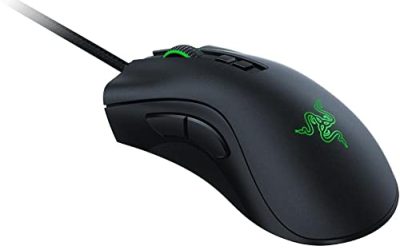
Razer DeathAdder V2
The DeathAdder V2 is built around speed, and its optical switches are why it clicks so fast. Razer’s optical mouse switches actuate with light, so there is no metal contact to bounce, and the 0.2ms response time keeps each press registering the moment your finger lands. The Focus+ 20K optical sensor tracks at 20,000 DPI with 650 IPS, which keeps your aim steady while you click rapidly, and the 82-gram body is light enough for long sessions without feeling flimsy. Eight programmable buttons and Chroma RGB lighting round out a mouse that has become a standard choice for competitive play, and its ergonomic shape has been refined over many generations.
Specs
- Focus+ 20K optical sensor, 20,000 DPI, 650 IPS
- Optical mouse switches, 0.2ms response time
- 82g lightweight design
- 8 programmable buttons
- Chroma RGB lighting
Best for: Fast double clicks in competitive play.
Watch out for: The smooth top surface is less grippy for drag clicking than a honeycomb shell.
ASIN: B082G5SPR5
Which One Fits Your Situation
If you mainly drag click
If drag clicking is your main technique, start with the Glorious Model O. Its honeycomb shell gives your finger grip to slide across, and its 67-gram weight lets you drag without tiring your hand. Use a light touch and let the texture do the work. Your click rate climbs as your finger learns the surface, and the switch resets fast enough to keep up. If the holes feel uncomfortable, try another grip first.
If you mainly butterfly click
If butterfly clicking is your technique, the ROCCAT Kone Pro fits best. Its optical switches register each press cleanly, so alternating two fingers on one button gives a steady rhythm. The ergonomic shape gives both fingers room, and the light 66-gram body keeps your hand relaxed. Butterfly clicking is tiring at first, so take breaks and build up gradually. The Kone Pro’s consistent feel helps you find a rhythm you can repeat.
If you want one mouse for everything
If you use several styles, the Logitech G502 HERO is the most flexible choice. Its adjustable weights tune the feel, and its 11 buttons map extra actions where your fingers rest. The HERO sensor tracks accurately, so you can switch games without changing mice. It is heavier than the dedicated clickers here, so drag clicking takes more effort. Tune the weights to the lightest setting, then add weight back if it feels unstable.
If you play competitively
If you play ranked matches, the Razer DeathAdder V2 is the pick competitive players reach for most. Its optical switches register presses faster than mechanical ones, and the Focus+ sensor keeps aim locked. The 82-gram body is light enough for fast flicks yet solid under pressure. Set your polling rate to the highest setting, and practise in short sessions to stay fresh. A mouse cannot replace practice, but the DeathAdder V2 makes practice pay off faster.
Common Mistakes
- Buying a heavy mouse for drag clicking, then blaming your technique when the weight is the real problem.
- Pressing too hard during drag clicking, which slows the switch reset and tires your hand.
- Ignoring the mousepad, when a rough or sticky surface can ruin an otherwise good clicking mouse.
- Chasing the highest DPI number instead of checking the switch type, weight and shape.
- Practising for hours without breaks, which builds bad habits and risks strain in your hand and wrist.
Frequently Asked Questions
What is CPS and why does the mouse matter?
CPS means clicks per second. The switch sets how fast a press registers and resets, the weight sets how fast your fingers move, and the shell sets whether your finger slides or grips. Technique matters too: drag, butterfly and jitter clicking each use the mouse differently. A fast-clicking mouse removes hardware limits, so your practice shows in your results.
Can any gaming mouse drag click?
Most gaming mice can drag click, but results vary with the switch and the shell. Light switches and a textured top surface produce more registrations per drag, while stiff switches or a smooth shell produce fewer. Optical switches are more consistent because they have no metal contact to bounce. If your mouse drag clicks poorly, the switch is usually the cause.
Is drag clicking allowed in Minecraft servers?
It depends on the server: the rules are not the same everywhere. Some allow it freely, some limit it, and some ban accounts that exceed their limits. Read your server’s rules before you use a clicking technique, and check for a maximum click rate. A fast-clicking mouse is legal hardware, but breaking a server’s rules can still get your account banned.
How do I practise clicking without hurting my hand?
Start with short sessions of five to ten minutes and stop when your hand feels tired. Warm up with normal clicking first, and keep your wrist straight. Use a smooth mousepad so your fingers do not fight friction, and take a day off if you feel any pain. Speed improves gradually over weeks, so steady practice beats long, painful sessions.
FAQ
What is CPS and why does the mouse matter?
Can any gaming mouse drag click?
Is drag clicking allowed in Minecraft servers?
How do I practise clicking without hurting my hand?
More from Amazon
Programs that pair well with the guide above. Offers and eligibility are set by Amazon and may change.
Free shipping on eligible items, Prime Video and more. Eligible new members can start with a free trial.
Start a Prime free trialAd-free music streaming. Eligible new subscribers can start with a free trial.
Try Music Unlimited freeA Prime membership for ages 18-24 with a trial period. Eligibility is set by Amazon.
See Prime for Young AdultsAudiobooks and podcasts to listen to on the go. Eligible new members can start with a free trial.
Try Audible freeAs an Amazon Associate we earn from qualifying purchases.