Our Top Picks
 MOGINSOK 2.5GbE Firewall Appliance Mini PCBarebone (No RAM/No SSD)5.74 x 5.73 x 2.11 inchesCheck on Amazon
As an Amazon Associate we earn from qualifying purchases.
Disclosure: This guide contains affiliate links to Amazon. If you buy through those links, this site may earn a commission at no extra cost to you.
What “DIY router” means in this guide
A DIY router is not a normal packaged home router that you unbox, join to an app, and leave alone. In this guide, the term means one consistent type of hardware: a fanless mini PC with several wired LAN ports, bought as the base for a router and firewall system that you install and configure yourself. You choose the operating system, usually pfSense Community Edition or OPNsense, you assign the ports as WAN and LAN, and you add your own wireless access point and network switch if you need them. The mini PC itself handles routing, firewall rules, DHCP, DNS, VLANs, VPN connections, and traffic shaping.
That definition matters for gamers and home-lab users. A self-built router lets you separate routing from Wi-Fi, put a gaming PC on its own VLAN, apply bufferbloat controls, and replace an access point later without replacing the router. It also puts more responsibility on you: no vendor app fixes everything, and a bad configuration can take the house offline. If you want built-in Wi-Fi and guided setup, a conventional router is the better tool, and none are included here on purpose.
All four picks share the same basic shape: an x86 Intel processor with AES-NI hardware encryption support, four Ethernet ports running at 2.5 gigabit speed with Intel network controllers, a fanless metal chassis, and documented support for pfSense or OPNsense. They differ in age, memory type, whether memory and storage are included, and how much assembly you have to do before the first install.
Quick picks
- Best ready-to-install choice: Protectli Vault Pro VP2420 — A quad-core Celeron J6412 appliance with four 2.5GbE ports, memory and storage already fitted, and a clear path to pfSense or OPNsense without opening the case first.
- Best modern barebone platform: MOGINSOK MGSRN100 — An Intel N100 system with four Intel I226-V ports and a DDR5 memory slot, sold with no RAM and no SSD so you supply both and build exactly the machine you want.
- Best compact alternative barebone: ZHIANN Firewall Micro Appliance, Intel N100 — Another N100 barebone with four Intel I226-V 2.5GbE ports, AES-NI, and room for NVMe storage, suited to builders who prefer newer hardware and multiple display outputs for setup.
- Best older, simpler configuration: Protectli Vault FW4C — A J3710 appliance with four 2.5GbE ports and a small fitted memory and storage configuration, best understood as a straightforward gigabit-plus firewall for lighter rule sets and VPN loads.
1. Protectli Vault Pro VP2420 — ready to install, four 2.5GbE ports

The Protectli Vault Pro VP2420 is the least DIY of these four in the physical sense, and that is its appeal. The listing configuration includes 8GB of DDR4 RAM and a 120GB M.2 SATA SSD already installed, so your building work starts with the firewall software rather than with a screwdriver and a parts list. Under the heatsink is an Intel Celeron J6412, a quad-core processor with burst speeds up to 2.6 GHz and AES-NI support for hardware-accelerated encryption. That combination is well matched to a home or small-office connection where you want firewall rules, VLANs, and a WireGuard or OpenVPN connection running on the same box.
Four 2.5 gigabit Ethernet ports give you a practical port plan: one for WAN, one for your main LAN and switch, one for a separate gaming or work network, and one spare for a second WAN, a dedicated access point network, or a lab segment. Because the ports use Intel controllers, they avoid many of the driver headaches that can appear when a firewall operating system based on FreeBSD meets an unfamiliar network chip. The chassis is fanless, so it can sit in a living space or a small network cabinet without fan noise, and it is designed to run continuously.
For a gaming household, the VP2420 makes sense as the stable centre of a wired network. Connect a switch to the LAN port for consoles and PCs, an access point for phones, and keep latency-sensitive traffic wired. Traffic shaping and DNS filtering are handled in the software you install, not locked behind a vendor account.
Key specifications
- Processor: Intel Celeron J6412, quad-core, up to 2.6 GHz, AES-NI
- Network: 4 x 2.5GbE Ethernet ports, Intel controllers
- Memory: 8GB DDR4 RAM in this listing configuration
- Storage: 120GB M.2 SATA SSD in this listing configuration
- Cooling: Fanless, passive metal chassis
- Software: Compatible with pfSense, OPNsense, Untangle and other open-source firewall systems, per the listing
Pros
- Memory and storage included, so installation can start right away
- Four 2.5GbE ports allow WAN, LAN, and separate segments without a workaround
- Fanless design suits always-on use in quiet rooms
- AES-NI support helps with encrypted VPN traffic
Cons
- DDR4 and SATA storage are older technologies than the DDR5 and NVMe parts in the N100 barebones below
- No built-in Wi-Fi, so an access point is a separate purchase and setup step
- The fitted 120GB drive is fine for a firewall, but heavy logging plans should be thought through in advance
View the Protectli Vault Pro VP2420 on Amazon
2. MOGINSOK MGSRN100 — N100 barebone you finish yourself
The MOGINSOK MGSRN100 is the most literal DIY router in this guide. It is sold as a barebone: no RAM and no SSD are included. You choose a DDR5 memory module, choose an M.2 NVMe drive, fit both, and only then install your firewall system. For builders, that is a feature rather than a flaw. You are not paying for a tiny drive you would replace, and you can size memory for the services you actually intend to run, from a plain firewall to a system with intrusion detection, detailed logging, and several VPN tunnels.
The processor is a 12th-generation Intel N100, quad-core and running up to 3.4 GHz, with AES-NI support. The N100 is a low-power chip, which suits a machine that never switches off, and its single-channel DDR5 slot accepts up to 32GB according to the listing. Storage is handled by an M.2 slot supporting NVMe drives over PCIe 3.0. Networking is four Intel I226-V 2.5GbE ports, a controller family that current pfSense and OPNsense releases support well, provided you install a current version rather than an old image you have kept on a USB stick for years.
The aluminium chassis uses passive cooling, and the listing notes watchdog support, auto power on after an outage, Wake-on-LAN, and PXE boot — details that decide whether a router recovers on its own when you are away. Plan setup with a monitor attached, confirm each port mapping, label the cables, and only then move the box to its permanent shelf.
Key specifications
- Processor: Intel N100, quad-core, up to 3.4 GHz, AES-NI
- Network: 4 x Intel I226-V 2.5GbE LAN ports
- Memory: 1 x DDR5 SO-DIMM slot, up to 32GB, no RAM included
- Storage: 1 x M.2 NVMe PCIe 3.0 slot, no SSD included
- Cooling: Fanless, aluminium passive-cooling chassis
- Software: Listing states pfSense support and compatibility with OPNsense, Ubuntu, Windows and virtualisation platforms
Pros
- Newer N100 processor and DDR5 memory platform
- You choose RAM and SSD sizes instead of accepting a fixed configuration
- Four Intel I226-V ports are a strong match for current firewall releases
- Auto power on and watchdog features suit an unattended, always-on router
Cons
- Barebone means extra parts, extra assembly, and no working router until both are fitted
- A single memory slot limits you to single-channel memory
- First-time builders need to check current firewall versions for the newest driver support before installing
View the MOGINSOK MGSRN100 on Amazon
3. ZHIANN Firewall Micro Appliance, Intel N100 — another modern barebone route

The ZHIANN firewall micro appliance takes the same basic formula as the MOGINSOK — an Intel N100 processor, four Intel 2.5GbE ports, AES-NI, and a fanless case — and presents it as a barebone router PC for pfSense and OPNsense. It is included as a genuine alternative within the same hardware type, not as a different kind of product. If you are comparing the two N100 boxes, focus on the exact port controller, the memory and storage slots described on the listing you open, and which seller configuration you are actually selecting, because barebone listings often group several variants together.
Per the listing, this model uses the Intel N100 quad-core processor with a maximum speed of 3.4 GHz, four Intel I226-V 2.5GbE LAN ports, DDR5 memory support, and M.2 NVMe storage support alongside additional SATA connections. Display outputs including HDMI and DisplayPort make the initial console setup easier, since you can attach a monitor directly instead of troubleshooting a headless install. The listing also notes support for AES-NI, TPM 2.0 related features, watchdog, auto power on, and Wake-on-LAN.
In practice, this suits someone who enjoys the build and wants a small, silent box at the edge of the network. Fit memory and storage, install from a USB installer, assign WAN and LAN carefully, then manage everything from the web interface. Keep a written record of which physical port is which interface — that note saves real time months later when you add a VLAN.
Key specifications
- Processor: Intel N100, quad-core, up to 3.4 GHz, AES-NI
- Network: 4 x Intel I226-V 2.5GbE LAN ports
- Memory: DDR5 support, barebone configuration — confirm the exact fitted or required module on the listing
- Storage: M.2 NVMe support and SATA connections, barebone configuration
- Cooling: Fanless, aluminium alloy passive heatsink chassis
- Software: Listing lists Windows, pfSense and OPNsense among supported operating systems
Pros
- Modern N100 platform in a silent, fanless enclosure
- Four Intel 2.5GbE ports give flexible WAN, LAN and segment options
- Multiple display outputs make first-time console setup simpler
- Barebone format lets you reuse a suitable SSD or memory module you already own
Cons
- Barebone configuration means the router is incomplete until you add parts
- Variant listings can be confusing, so the exact configuration needs a careful check before ordering
- No wireless hardware for your LAN, so an access point remains a separate step
View the ZHIANN Firewall Micro Appliance on Amazon
4. Protectli Vault FW4C — older platform, straightforward job
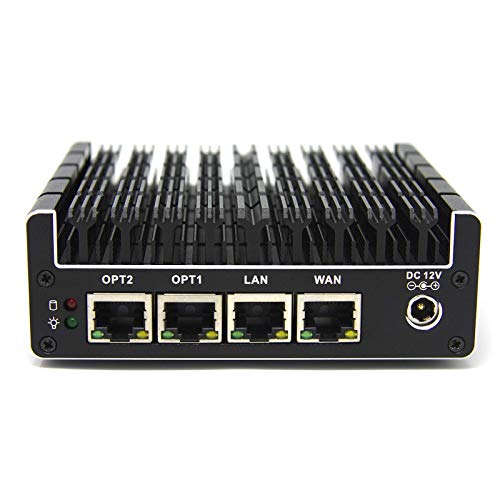
The Protectli Vault FW4C is built around an Intel J3710 processor, an older quad-core chip than the J6412 and N100 options above, still with AES-NI support. The listing configuration considered here includes 4GB of DDR3 RAM and a 32GB SSD, with four 2.5 gigabit Ethernet ports. That is a modest specification, and it should be matched to a modest job: routing and firewalling for a home connection, a small set of VLANs, DNS filtering, and light VPN use, rather than a stack of demanding extra services all running at once.
Where the FW4C earns its place is simplicity. Like the VP2420, it arrives with memory and storage fitted, so the project is a software project. The fanless design keeps it silent, and the four ports allow WAN, main LAN, a guest segment, and a spare.
Be honest about headroom. RAM fills quickly once you enable intrusion detection, long log retention, and several packages, and a 32GB drive leaves little room for careless logging. For a lean firewall those limits are manageable; for a growing home lab, an N100 barebone or the VP2420 is the safer foundation.
Key specifications
- Processor: Intel J3710, quad-core, AES-NI
- Network: 4 x 2.5GbE Ethernet ports
- Memory: 4GB DDR3 RAM in this listing configuration
- Storage: 32GB SSD in this listing configuration
- Cooling: Fanless, passive chassis
- Software: Built for open-source firewall systems including pfSense and OPNsense, per the listing
Pros
- Fitted memory and storage keep the build simple
- Four 2.5GbE ports still allow proper network segmentation
- Fanless and compact for a shelf, closet or small rack area
- AES-NI support for VPN workloads within its lighter performance class
Cons
- Older J3710 processor offers less headroom than the J6412 and N100 picks
- 4GB of RAM and a 32GB drive restrict add-on packages and logging
- DDR3 platform is a dead end for future memory upgrades
View the Protectli Vault FW4C on Amazon
How to choose your DIY router hardware
Start with the ports. Four ports is the practical sweet spot for most homes. One port becomes WAN, one becomes your trusted LAN, and the remaining ports can carry a guest network, a work network, a lab, or a second internet connection. Confirm the controller behind the ports, not just the speed printed in the title. Intel controllers such as the I226-V have the driver support that FreeBSD-based firewall systems need, and that support matters more than a headline number.
Match the processor to the connection and the services. Basic routing is light work. Gigabit traffic shaping, intrusion detection, and fast VPN tunnels are not. AES-NI is the feature to insist on for encrypted traffic, and a newer processor such as the N100 or the J6412 gives you more room as you add services. If your internet connection is fast and you plan to shape traffic at full speed, buy headroom now rather than replacing the box within a year.
Decide between fitted and barebone honestly. A fitted appliance such as the VP2420 or FW4C shortens the path to a working router. A barebone such as the MGSRN100 or the ZHIANN appliance gives you control over memory and storage, and can make better use of parts you already own, but it also adds compatibility checks: memory type and speed, drive keying and length, and whether the module you have is actually supported. Write those details down before ordering anything.
Plan the rest of the network. None of these appliances is a complete network on its own. You need a modem or optical terminal in front of it, usually a switch beside it, and an access point for Wi-Fi. That separation is the point of a DIY router, but it should be part of the plan from the start.
Think about recovery. Choose hardware with auto power on, keep a backup of your configuration somewhere other than the router itself, and keep the installer USB. A five-minute restore beats rebuilding rules from memory during an outage.
Frequently asked questions
Do these mini PCs include Wi-Fi?
No. These are wired router and firewall appliances. You connect a separate wireless access point to a LAN port or to your switch, and that access point provides Wi-Fi while the mini PC handles routing and firewall duties.
Which is easier to install, pfSense or OPNsense?
Both install from a USB image and are configured first at a console and then through a web interface. OPNsense is often described as having a more approachable interface for newcomers, while pfSense has a long history and a large body of guides. Either works on the hardware in this guide; choose based on the documentation and community you prefer to follow.
How much RAM does a DIY router need?
A plain firewall setup runs comfortably on the fitted configurations here. Add intrusion detection, VPN tunnels, detailed logging, or virtualisation, and more memory becomes worthwhile — where a barebone with a larger DDR5 ceiling earns its keep.
Can I run other software on the same box?
Yes, either directly on the hardware — the simplest layout for a main router — or in a virtual machine under a hypervisor alongside other services. The second route adds flexibility and complexity in equal measure, and makes careful port assignment and backups even more important.
Will a DIY router lower my gaming ping?
A DIY router does not change the route your traffic takes across the internet, so it cannot promise a lower ping on its own. What it can do is manage your local network properly: wired connections for gaming machines, sensible traffic shaping to reduce bufferbloat when the connection is busy, and separate segments so background devices do not interfere with a gaming session.
Conclusion
These four fanless multi-LAN mini PCs cover the sensible range of a DIY router project. Choose the Protectli Vault Pro VP2420 for a ready-to-install appliance with four 2.5GbE ports and fitted memory and storage. Choose the MOGINSOK MGSRN100 or the ZHIANN N100 appliance if you want the newer N100 and DDR5 platform and are happy to supply RAM and an SSD yourself. Choose the Protectli Vault FW4C only for a lean, straightforward firewall where its older processor and smaller fitted configuration match the job. Whichever base you pick, pair it with a good switch and a separate access point, label your ports, back up your configuration, and you will have a router that you understand, control, and can grow with your network.
More from Amazon
Programs that pair well with the guide above. Offers and eligibility are set by Amazon and may change.
Free shipping on eligible items, Prime Video and more. Eligible new members can start with a free trial.
Start a Prime free trialAd-free music streaming. Eligible new subscribers can start with a free trial.
Try Music Unlimited freeA Prime membership for ages 18-24 with a trial period. Eligibility is set by Amazon.
See Prime for Young AdultsAudiobooks and podcasts to listen to on the go. Eligible new members can start with a free trial.
Try Audible freeAs an Amazon Associate we earn from qualifying purchases.