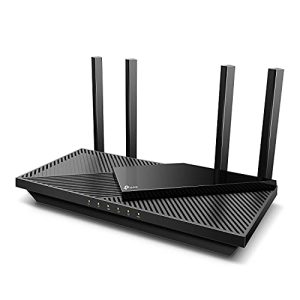
Our Top Picks
 MikroTik RB4011 Ethernet 10-Port Gigabit Router22.8 x 12 x 3 cm4.7 x 9 x 1.2 inches1.4 poundsCheck on Amazon
As an Amazon Associate we earn from qualifying purchases.
The best office WiFi routers 10 plus ports are built for a workplace where the wireless network is only half the story. An office with desktops, printers, network storage, conference room screens, and a dozen wired devices needs Ethernet ports as much as it needs Wi-Fi, and a home router with four LAN ports runs out of connections before the first row of desks is wired. A router with ten or more ports keeps the wired network in one box, with room for the devices that should never depend on wireless.
Ten-port routers are a specialist class. Most home routers carry four or five Ethernet ports, and the step up to ten usually means a Wi-Fi 7 flagship such as the ASUS RT-BE88U, which lists ten network ports including two 10G ports and an SFP+ cage, or a business router such as the TP-Link ER8411, which pairs multi-gigabit ports with VPN and VLAN features for small offices. These routers cost more than a home model, but they replace a separate switch for a small office and give the wired network the same attention as the wireless one.
This guide explains how to choose a ten-port office router, how to count the ports an office actually needs, and when a standard router paired with a managed switch is the smarter buy. It is a guide rather than a linked shortlist: no single set of ten-port routers could be verified to the standard this series requires before publication, so the models below are named without links and the user should confirm the listing before ordering.
The port count is only the start of the decision. An office should also count the devices that will stay wireless, since phones, laptops, and meeting room gear all share the airwaves while the wired devices share the ports. A ten-port router with weak wireless will frustrate the meeting rooms even while the desks run perfectly, so the wireless capacity deserves the same attention as the port list. Sketching the office layout, with the router position, the desk clusters, and the meeting rooms marked, makes the choice much clearer than any specification sheet alone.
How to Choose
Count the wired devices first
Walk the office and count every device that deserves a cable: desktops, printers, network storage, conference screens, access points, and cameras. Add two spare ports for growth, then compare the total with the router. A router with ten ports serves an office with eight wired devices comfortably; an office with twelve wired devices needs a switch as well, no matter how many ports the router carries.
Port speed, not just port count
Ten slow ports are less useful than six fast ones. A modern office router mixes port speeds: a 10G port for the network storage or the internet connection, 2.5G ports for desktops and access points, and gigabit ports for printers and low-bandwidth devices. Check the speed of each port in the specifications, since a router can list ten ports while only two of them run above gigabit speed.
WAN capacity and internet plan
The WAN port decides how much internet speed the office can actually use. A 10G WAN port suits a multi-gigabit fibre plan, while a 2.5G WAN port suits a gigabit plan with room to grow. A router with a gigabit WAN port will cap a faster plan no matter how good the wireless radios are, so match the WAN port to the plan before anything else.
VLANs and network segmentation
An office network usually needs separation: staff devices on one network, guests on another, and cameras or printers on their own segment. VLAN support lets the router divide the wired and wireless networks into isolated groups, and a guest network keeps visitors off the staff systems. Business routers include these features as standard; home routers often hide them behind a simplified interface.
VPN and remote access
Staff who work from home or from client sites need a secure way back into the office network. A router with built-in VPN support, including modern protocols, lets the office run its own VPN server without extra hardware. Check which VPN protocols the router supports and whether the office devices can connect to them without extra software.
Wireless capacity for the office
The wired ports matter most, but the wireless side still has to serve phones, laptops, and meeting room devices. A Wi-Fi 6 or Wi-Fi 7 radio with enough streams for the headcount keeps video calls stable when the room fills up. For an office spread over several rooms, plan for additional access points rather than expecting one router to cover the whole floor.
Management and reliability
An office router should keep running without daily attention. Look for automatic firmware updates, a clear management interface, and the ability to reboot or diagnose the network remotely. A router that needs a manual restart every week will cost more in lost work than the difference between it and a more reliable model.
Ten-Port Routers Worth Knowing
The ASUS RT-BE88U is the reference ten-port Wi-Fi router: a dual-band Wi-Fi 7 model with one 10G SFP+ port, one 10G WAN/LAN port, four 2.5G ports, and four gigabit ports, giving ten network ports in total. It suits a small office that wants fast wired capacity and modern wireless in one box, and its AiMesh support lets it extend coverage with additional ASUS units. The TP-Link ER8411 is a business alternative with ten multi-gigabit ports, VPN support, and VLAN features, suited to an office that needs network segmentation more than the latest Wi-Fi standard. The ASUS RT-AX88U Pro is a step down in port count, with eight LAN ports plus a 2.5G WAN port, and it suits an office that can live with nine network ports and wants a proven Wi-Fi 6 platform. None of these models is linked here, because the verification standard for this series requires a confirmed listing before a link is published, and the listing details for this class were not confirmed in time.
Router Plus Switch: The Practical Alternative
For many offices, the smarter buy is a good standard router paired with a managed switch. A five-port router plus a sixteen-port managed switch gives more wired capacity than any ten-port router, costs less, and puts the switch where the desks are rather than where the internet enters the building. The switch handles the wired devices, the router handles the internet and the wireless network, and the two connect over a single cable. This setup also scales: adding a second switch is simpler than replacing a router when the office grows. The trade-off is two devices to manage instead of one, and the switch needs its own power outlet and a place on the rack or desk.
How to Plan the Port Layout
Place the router where the internet enters the building and run one cable to a switch near the desks. Connect desktops, printers, and network storage to the switch, and reserve the router ports for the internet connection, the switch uplink, and any access points. Leave two ports free on the switch for growth, and label every cable so a fault can be traced without unplugging the whole rack. For a conference room, run a dedicated cable to the room screen and the video bar rather than depending on wireless, since a wired connection keeps video calls stable when the room is full.
Routers and Switches Worth Shortlisting for Port-Heavy Offices
If you need ten or more wired connections, you can either choose a router with many built-in ports or pair a capable wired router with a switch. These options cover both routes.
MikroTik RB4011iGS+RM
A 10-port gigabit router with a powerful feature set and rack-mount design. It rewards admins who are comfortable with RouterOS configuration.
MikroTik RB4011 Ethernet 10-Port Gigabit Router (RB4011iGS+RM)
One of the home product options compared in this guide.
View on AmazonUbiquiti EdgeRouter 10X
A compact 10-port gigabit router with PoE flexibility. It suits a small office that wants many wired ports in a single box and does not mind an advanced setup.

Ubiquiti Networks EdgeRouter 10X, 10-Port High-Performance Gigabit Router with PoE Flexibility (ER-10X)
One of the home product options compared in this guide.
View on AmazonTP-Link ER605 Wired Gigabit VPN Router
A wired VPN router that supports multiple WAN connections and Omada management. It works well as the front end of a router-plus-switch design.

TP-Link ER605, Wired Gigabit VPN Router | Up to 3 WAN Ethernet Ports + 1 USB WAN, SPI Firewall SMB Router, Omada SDN Integrated, Load Balance, Lightning Protection
One of the home product options compared in this guide.
View on AmazonTP-Link TL-SG116 16-Port Gigabit Switch
An unmanaged 16-port gigabit switch with a metal case. Pair it with the router above to add the wired capacity a busy workplace needs.
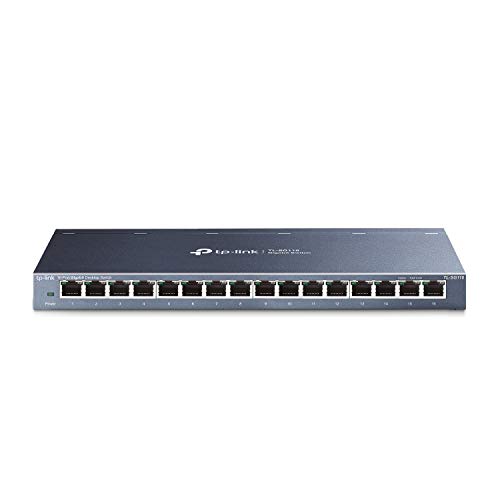
TP-Link TL-SG116, 16 Port Gigabit Unmanaged Ethernet Switch | Desktop/Wall Mount, Fanless, Sturdy Metal w/Shielded Ports, Traffic Optimization
One of the home product options compared in this guide.
View on AmazonComparison Table
| Approach | Wired capacity | Wireless | Management | Best for |
|---|---|---|---|---|
| Ten-port Wi-Fi router | 10 network ports | Wi-Fi 7, built in | One device | Small office, one box |
| Business router | 10 multi-gigabit ports | Varies, often needs access points | Business features | Offices needing VLANs and VPN |
| Router plus managed switch | 16 or more ports | Depends on router | Two devices | Growing offices, desk clusters |
| Standard router only | 4 to 5 ports | Wi-Fi 6 or 7 | One device | Very small offices, few wired devices |
Before You Buy
Count the wired devices one more time before ordering, and add two spares for growth: the count decides whether a ten-port router is enough or a switch is needed as well. Check the speed of each port in the specifications, since a router can list ten ports while only two of them run above gigabit speed. Confirm the WAN port matches the internet plan, and check whether the router supports the VLAN and VPN features the office needs. If the office is choosing the router-plus-switch route, buy the switch at the same time and plan the cable runs from the router to the switch and from the switch to the desks. Label every cable during installation, so a fault can be traced without unplugging the whole rack.
Which One Is Right for You?
An office with eight or fewer wired devices and a taste for simplicity should look at a ten-port router such as the RT-BE88U, which keeps the whole network in one box. An office that needs VLANs, VPN, and segmentation should look at a business router such as the ER8411. An office with more than ten wired devices, or one that expects to grow, should buy a good standard router and a managed switch instead: it costs less, scales better, and puts the ports where the desks are. Whichever route fits, count the wired devices first, match the WAN port to the internet plan, and leave spare ports for the next device that arrives.
Frequently Asked Questions
How many ports does a small office really need?
Count the wired devices, add two spares, and that is the number. Most small offices land between eight and sixteen wired devices once desktops, printers, storage, screens, and access points are counted, which is why a ten-port router suits some offices and a router-plus-switch setup suits others.
Is a 10G port necessary for an office router?
It depends on the internet plan and the internal traffic. A 10G port matters when the office has a multi-gigabit plan or moves large files to network storage regularly. For a gigabit plan and ordinary office work, 2.5G ports cover the need with room to spare.
Can a home router work in a small office?
It can, for a very small office with few wired devices and no need for VLANs or VPN. The limits appear quickly: four LAN ports, no network segmentation, and a wireless radio tuned for a home rather than a busy room. An office with more than a handful of staff usually outgrows a home router within a year.
What is the difference between a managed and an unmanaged switch?
A managed switch lets the office divide the network into VLANs, prioritise traffic, and monitor port status, while an unmanaged switch simply connects devices together. An office that needs guest separation or traffic priority should choose a managed switch; an office that only needs more ports can use an unmanaged one.
FAQ
Which One Is Right for You?
How many ports does a small office really need?
Is a 10G port necessary for an office router?
Can a home router work in a small office?
What is the difference between a managed and an unmanaged switch?
More from Amazon
Programs that pair well with the guide above. Offers and eligibility are set by Amazon and may change.
Free shipping on eligible items, Prime Video and more. Eligible new members can start with a free trial.
Start a Prime free trialAd-free music streaming. Eligible new subscribers can start with a free trial.
Try Music Unlimited freeA Prime membership for ages 18-24 with a trial period. Eligibility is set by Amazon.
See Prime for Young AdultsAudiobooks and podcasts to listen to on the go. Eligible new members can start with a free trial.
Try Audible freeAs an Amazon Associate we earn from qualifying purchases.