Our Top Picks
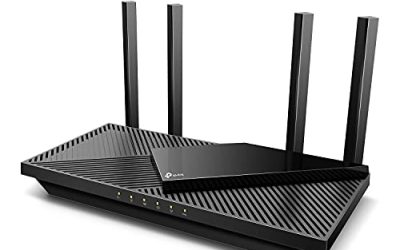
 TP-Link Archer AC1750 WiFi Routerdual band router9.59 x 6.32 x 1.29 inches0.93 poundsCheck on Amazon
The best routers for broadband are the ones that match the connection coming into the home, whether that is a cable line, a DSL line, or a fibre line. A router does not create broadband speed on its own; it takes the connection from a modem and shares it across the home, so the right choice depends on the type of line, the speed of the plan, and the size of the household. This guide compares five standalone routers that pair well with common broadband setups, explains how each type of connection works with a third-party router, and shows how to match a router to the plan rather than buying more hardware than the line can use.
Broadband comes in three main forms. Cable broadband arrives through a coaxial cable and a cable modem, DSL broadband arrives through a phone line and a DSL modem, and fibre broadband arrives through an optical line and a fibre modem, often called an ONT. In all three cases the router itself is the same kind of device: it plugs into the modem with an Ethernet cable and distributes the connection by wire and by Wi-Fi. That means a good broadband router is judged by the same qualities as any home router, with a few extra checks. The WAN port must be fast enough for the plan, the router must support the login method the provider uses, and the wireless coverage must reach every room that needs it.
A common mistake is to buy a flagship router for a modest broadband plan. A router rated for multi-gigabit wireless speeds cannot make a 100 Mbps line any faster, and the extra hardware goes unused. The five picks below cover a sensible span: two affordable Wi-Fi 6 models for standard plans, a proven Wi-Fi 5 model for slower lines, and two faster Wi-Fi 6 models for gigabit fibre and cable plans. Each one is a standalone router that connects to a separate modem, and each one suits a different combination of line type and household size.
How to Choose a Router for Broadband
1. Match the router to the broadband plan
The speed of the broadband plan sets the ceiling for everything the router does. A household on a plan below 200 Mbps gains nothing from a router with a 2.5 gigabit WAN port or a tri-band radio, while a household on a gigabit fibre plan needs a router whose WAN port can pass a full gigabit through. Check the plan speed first, then choose a router whose WAN port and wireless rating clear that figure with room to spare. A router rated AX1800 suits most standard plans, while a router rated AX5400 or higher suits gigabit plans and homes with many simultaneous streams.
2. Confirm the modem and connection type
Every router in this guide needs a separate modem. For cable broadband, the modem is a cable modem that connects to the coaxial socket. For DSL broadband, the modem is a DSL modem or a provider gateway switched to bridge mode. For fibre broadband, the modem is usually an ONT supplied by the provider, and the router plugs into it directly. Before buying, confirm with the provider whether a third-party router is allowed and whether the provider gateway can be set to modem-only mode, sometimes called bridge mode. Some providers also need the router to support a login method such as PPPoE, which most modern routers include in their setup screens.
3. Check the WAN port speed
The WAN port is the socket that carries the broadband connection into the router, and its speed caps the internet speed for the whole home. A gigabit WAN port suits plans up to one gigabit, which covers the large majority of households. A 2.5 gigabit WAN port suits plans faster than one gigabit and future-proofs the setup if the provider later raises the plan speed. Households on slower cable or DSL plans will not notice the difference between the two, so the WAN port only matters at the top end of the speed range.
4. Coverage for the floor plan
Stated coverage figures describe ideal conditions, so treat them as a rough guide. A router with four external antennas and beamforming holds a stronger link through walls than a compact router with internal antennas, and a central, elevated position helps more than any single specification. For a single-floor home, one well-placed router usually covers the whole floor. For a two-storey home, place the router high up near the centre of the house. If the far rooms still lose signal, favour a router that supports a mesh system from the same maker, so an extra node can be added later without replacing the router.
5. Wired ports for consoles and televisions
Wireless speed gets the attention, but wired ports decide how well gaming consoles, desktop PCs, and televisions perform. Four gigabit LAN ports cover the usual wired devices in a living room or office, and a wired connection also removes the variability of Wi-Fi from online gaming and video calls. A USB port adds shared storage or a printer to the network. Households with a console and a PC in the same room should favour a router with a dedicated gaming port or strong traffic prioritisation, which gives gaming traffic first claim on the connection.
6. Device capacity and processor
A router is a small computer, and its processor decides how smoothly it juggles dozens of connections. A household with phones, laptops, consoles, smart televisions, and smart home gadgets can easily pass twenty connected devices, and a weak processor slows down when security features and parental controls are switched on. Favour a router with a faster processor and a higher stated device capacity when the household is large or when several people stream video at the same time.
7. Security, app, and updates
Built-in security software that blocks malicious sites protects every device on the network, including smart home gadgets that cannot run their own security software. Parental controls that set time limits and filter content by device are useful in a family home. Check what is included free, since some makers put the deeper controls behind a subscription. A clear setup app that walks through installation in a few minutes saves a frustrating evening, and a maker with a record of regular firmware updates keeps the router protected for longer.
Top Picks
TP-Link Archer AX21

The Archer AX21 is a dual-band Wi-Fi 6 router rated AX1800, with up to 1200 Mbps on the 5 GHz band and 574 Mbps on the 2.4 GHz band. It carries one gigabit WAN port, four gigabit LAN ports, and a USB 2.0 port, with four high-gain antennas and beamforming for coverage. OFDMA and MU-MIMO let it handle several devices at once, and it supports EasyMesh, so it can join a mesh network with compatible TP-Link hardware later. Setup runs through the TP-Link Tether app, and the router includes parental controls and VPN server support for remote access to the home network.
Who it is for: households on a standard cable, DSL, or fibre plan that want a simple Wi-Fi 6 upgrade from a provider-supplied router, with enough wired ports for a console and a PC.
Caveats: its AX1800 rating and gigabit WAN port suit plans up to one gigabit but leave little headroom for faster fibre plans. The USB port is USB 2.0 rather than USB 3.0, so shared storage transfers run slower than on the faster picks below.
Linksys MR7350

The Linksys MR7350 is a dual-band Wi-Fi 6 router rated AX1800, with combined wireless throughput of up to 1.8 Gbps. Linksys states coverage of up to 1,700 square feet and support for more than 25 devices, which suits a small to medium home. It has one gigabit WAN port, four gigabit LAN ports, and two external antennas, and its main strength is mesh: the MR7350 uses Intelligent Mesh technology, so extra Linksys mesh nodes can extend coverage through a larger home without a new router. Setup runs through the Linksys app, and the router includes parental controls and guest network support.
Who it is for: households on a standard broadband plan that want a router able to grow into a mesh system later, especially in homes where the far rooms sit beyond the reach of a single router.
Caveats: with two antennas and an AX1800 rating, it is a modest performer for heavy simultaneous streaming, and its gigabit WAN port caps it at plans up to one gigabit. Match the listing by ASIN B0897ZCBPF and model MR7350-AMZ, as a separate renewed listing for the same model carries a different ASIN.
TP-Link Archer A7
The Archer A7 is a dual-band Wi-Fi 5 router rated AC1750, with up to 1300 Mbps on the 5 GHz band and 450 Mbps on the 2.4 GHz band. It carries one gigabit WAN port, four gigabit LAN ports, and a USB port for shared storage or a printer. Three external antennas handle coverage, and the router supports OneMesh, so it can join a mesh network with compatible TP-Link extenders. It includes a VPN server, parental controls, and quality of service controls that prioritise chosen traffic, and it works with Alexa for voice control of the network.
Who it is for: households on a slower cable or DSL plan that need a reliable, inexpensive router for everyday browsing, streaming, and video calls, and homes where Wi-Fi 6 devices are not yet in use.
Caveats: Wi-Fi 5 is an older standard, so it handles many simultaneous devices less efficiently than the Wi-Fi 6 picks in this guide, and it will not suit a gigabit fibre plan as well as the faster models below. Confirm current availability on the live listing before buying, as this is the oldest model in the roundup and its listing has been running for several years.
NETGEAR Nighthawk RAX54S

NETGEAR Nighthawk RAX54S on Amazon
The Nighthawk RAX54S is a dual-band Wi-Fi 6 router rated AX5400, with combined wireless throughput of up to 5.4 Gbps. NETGEAR states coverage of up to 2,500 square feet and support for 25 devices, which suits a medium to large home on a fast broadband plan. It carries one gigabit WAN port, four gigabit LAN ports, and a USB port, with four external antennas, MU-MIMO, OFDMA, and beamforming. A one-year NETGEAR Armor subscription is included for network security, and the router works with the Nighthawk app for setup and management.
Who it is for: households on a fast cable or gigabit fibre plan that want strong coverage from a single router, with enough wireless capacity for several simultaneous streams and a house full of connected devices.
Caveats: the WAN port is gigabit, so a broadband plan faster than one gigabit will be capped at the router. Some Armor security features need a subscription after the included year, so check what stays free before relying on them.
ASUS RT-AX86U

The RT-AX86U is a dual-band Wi-Fi 6 gaming router rated AX5700, with up to 4804 Mbps on the 5 GHz band and 861 Mbps on the 2.4 GHz band. Its wired layout is the strongest in this roundup: a 2.5 gigabit WAN/LAN port that suits fibre plans faster than one gigabit, a dedicated gaming port that prioritises a wired console or PC, three further gigabit LAN ports, and a USB 3.2 port. Adaptive QoS prioritises gaming traffic, a mobile game mode lowers latency for phones, and AiProtection security is included without a subscription. AiMesh support lets it join a mesh network with compatible ASUS routers.
Who it is for: gaming households on a fast cable or fibre plan that want the lowest latency and the most capable wired layout, and homes where the broadband line runs faster than one gigabit.
Caveats: its gaming features add settings that casual users may never touch, and its vertical stand design needs a stable shelf. It is the most gaming-focused pick here, so a household with no gamers may get better value from a simpler router above.
Comparison Table
| Router | Wi-Fi | Speed class | WAN port | LAN ports | USB | Stated coverage | Mesh support |
|---|---|---|---|---|---|---|---|
| TP-Link Archer AX21 | Wi-Fi 6, dual-band | AX1800 | 1 gigabit | 4 gigabit | USB 2.0 | Not stated | EasyMesh |
| Linksys MR7350 | Wi-Fi 6, dual-band | AX1800 | 1 gigabit | 4 gigabit | Not stated | Up to 1,700 sq. ft. | Intelligent Mesh |
| TP-Link Archer A7 | Wi-Fi 5, dual-band | AC1750 | 1 gigabit | 4 gigabit | USB port | Not stated | OneMesh |
| NETGEAR Nighthawk RAX54S | Wi-Fi 6, dual-band | AX5400 | 1 gigabit | 4 gigabit | USB port | Up to 2,500 sq. ft. | Not stated |
| ASUS RT-AX86U | Wi-Fi 6, dual-band | AX5700 | 2.5 gigabit | 4 gigabit | USB 3.2 | Not stated | AiMesh |
Which One Is Right for You?
Start with the broadband plan. Households on a standard cable or DSL plan below gigabit speed can choose the Archer AX21 or the Linksys MR7350, which cover everyday browsing, streaming, and video calls without unused hardware. Households on a slower line that want the lowest outlay can choose the Archer A7, which handles modest plans well despite its older Wi-Fi 5 radio. Households on a gigabit fibre or fast cable plan should narrow the list to the Nighthawk RAX54S and the ASUS RT-AX86U, which carry the wireless capacity and wired layout for a fast line, with the RT-AX86U as the only pick here with a 2.5 gigabit WAN port for plans faster than one gigabit. Next, consider the floor plan: a small to medium home suits any pick, while a larger home suits the RAX54S with its stated 2,500 square feet of coverage, and a home with dead zones suits the MR7350, which can grow into a mesh system with extra nodes. Gamers should look at the RT-AX86U first for its dedicated gaming port and adaptive QoS. Finally, confirm the modem setup with the provider before buying, since every router here needs a modem or a provider gateway in bridge mode, and a few providers need PPPoE login details entered during setup.
Frequently Asked Questions
Do I need a separate modem with these routers?
Yes. Every router in this guide is a standalone router that needs a modem to connect to the broadband line. Cable homes need a cable modem, DSL homes need a DSL modem or a provider gateway switched to bridge mode, and fibre homes usually plug the router into the provider-supplied ONT. The router connects to the modem with an Ethernet cable, and the modem handles the connection to the provider.
Can I use my own router with my broadband provider?
In most cases, yes, but confirm two things with the provider first. One is whether a third-party router is allowed on the plan, and the other is whether the provider gateway can be set to modem-only mode. Some providers also need login details such as a PPPoE username and password entered during router setup, so have those details ready before starting the installation.
What speed router do I need for gigabit broadband?
A router with a gigabit WAN port and a Wi-Fi 6 rating of AX3000 or higher suits a gigabit plan. The Nighthawk RAX54S and the ASUS RT-AX86U in this guide both clear that bar, and the RT-AX86U goes further with a 2.5 gigabit WAN port for plans faster than one gigabit. The main limit for a gigabit household is usually the placement of the router and the capability of the devices, not the router itself.
Is Wi-Fi 5 still fine for broadband?
Wi-Fi 5 is still fine for slower broadband plans and light use, which is why the Archer A7 earns a place in this guide. It handles browsing, streaming, and video calls on a modest line without trouble. It is less suited to a gigabit plan or a home with many simultaneous devices, where a Wi-Fi 6 router such as the Archer AX21 or the Nighthawk RAX54S manages the load more efficiently.
Disclosure: As an Amazon Associate, we may earn from qualifying purchases.
FAQ
Which One Is Right for You?
Do I need a separate modem with these routers?
Can I use my own router with my broadband provider?
What speed router do I need for gigabit broadband?
Is Wi-Fi 5 still fine for broadband?
More from Amazon
Programs that pair well with the guide above. Offers and eligibility are set by Amazon and may change.
Free shipping on eligible items, Prime Video and more. Eligible new members can start with a free trial.
Start a Prime free trialAd-free music streaming. Eligible new subscribers can start with a free trial.
Try Music Unlimited freeA Prime membership for ages 18-24 with a trial period. Eligibility is set by Amazon.
See Prime for Young AdultsAudiobooks and podcasts to listen to on the go. Eligible new members can start with a free trial.
Try Audible freeAs an Amazon Associate we earn from qualifying purchases.