We research everything we recommend. When you buy through our links, we may earn a commission. As an Amazon Associate we earn from qualifying purchases.
5 Best Case Fans: 120mm and 140mm Picks (November 2026)
Compare the best 120mm and 140mm case fans for gaming PCs, from quiet Noctua and be quiet! picks to pressure-focused ARCTIC fans for radiators and mesh cases.
Choosing a case fan is really a decision about where air has to fight its way through, not about chasing the biggest airflow number on a box. A fan blowing into an open case works in easy conditions, while the same fan behind a dust filter, a dense front panel, or a radiator needs pressure to keep moving air at all. Size matters for the same reason: a 140mm fan can often move useful air more slowly, while a 120mm fan fits more mounts and coolers.
This guide is for three kinds of builders. Quiet-PC fans want intake and exhaust they barely notice during gaming. Upgraders with hot graphics cards want stronger, better-directed airflow. Radiator and small-case builders need pressure-focused models that still behave at low speed. Every pick below was chosen from the specifications listed on its Amazon product page or the maker’s official product information, including size, speed range, connector, and airflow or pressure figures where the listing states them.
Quick Picks
As an Amazon Associate we earn from qualifying purchases.
Product
Best for
Key spec from title
Noctua NF-A12x25 PWM
Quiet 120mm intake, exhaust, or cooler duty
120mm, 4-pin PWM, premium quiet fan, brown
ARCTIC P12 PWM PST
Filling several 120mm mounts and daisy-chaining fans
120mm, PWM Sharing Technology, pressure-optimised
be quiet! Silent Wings 4 120mm PWM High Speed
A 120mm mount that needs extra speed headroom
120mm, 4-pin, 2500 RPM, model BL094
ARCTIC P14 PWM PST
140mm radiator, heatsink, or filtered intake work
140mm, PWM Sharing Technology, 200 to 1700 RPM
Noctua NF-A14 PWM
Quiet 140mm case or radiator airflow
140mm, 4-pin PWM, premium quiet fan, brown
How to Choose
Match the size first, then airflow versus static pressure
Start with the mount, because a brilliant 140mm fan is useless in a case that only accepts 120mm fans at the front. Check every position separately, since many cases mix sizes between the front, top, and rear. After size, look at the job. Open exhaust positions reward airflow, measured in CFM. Filtered intakes, radiators, and tower cooler fins reward static pressure, measured in mmH2O, because the fan must push against resistance. The ARCTIC P12 and P14 below are explicitly pressure-optimised, while a high-CFM model such as the Silent Wings 4 High Speed suits a mount where raw speed headroom matters more.
Treat noise as a speed problem, not just a rating
A noise figure only describes one operating point, usually maximum speed, and fans rarely need to run there in a well-planned case. What matters in daily use is how much air a fan moves at the moderate speeds you will actually tolerate beside your desk. Larger 140mm fans help here, because they can shift a given volume of air while turning slower than a comparable 120mm fan. Bearings and motor design also shape the sound character. A low, smooth hum disappears into game audio far more easily than a whine at the same measured level, so prioritise fans designed for quiet operation and plan a fan curve that keeps them restrained.
Check connectors and how you will control several fans
Most modern case fans use a 4-pin PWM connector, which lets the motherboard vary speed precisely instead of running the fan at full speed whenever the PC is on. Count your headers before ordering a full set. If you have more fans than headers, look for a sharing system such as ARCTIC’s PWM Sharing Technology, where the listing includes both a 4-pin connector and a 4-pin socket so fans can be linked and controlled together. Avoid mixing very different fans on one shared signal if you can, because the same percentage setting produces different speeds, noise, and airflow from each model.
Decide whether lighting and looks are worth the trade-offs
None of the five fans in this guide uses RGB lighting, and that is a deliberate pattern worth understanding. Lighting adds a second cable, often a controller or hub, and another software ecosystem to manage, while contributing nothing to cooling. Builders with a glass side panel may accept that happily, and matching lit fans can look excellent. Everyone else gains simplicity from plain fans: one cable per fan, no controller, and no lighting software. Colour still matters, though. Noctua’s brown fans are a visible statement in a windowed case, while black models from ARCTIC and be quiet! disappear into most builds.
The 5 Best Options
Noctua NF-A12x25 PWM
Top Pick
Noctua NF-A12x25 PWM
Best for: A quiet gaming PC that needs one dependable 120mm fan for intake, exhaust, or a cooler.
This is the 120mm fan to shortlist when quiet operation and versatility matter equally. Its Amazon title describes it as a premium quiet fan with a 4-pin connector, and that positioning fits how most builders use it: front intake behind a filter, rear exhaust, or mounted on a cooler where pressure and manners both count. Because it is a single, standard-size fan with no lighting system to wire up, it also suits gradual upgrades, where you replace the loudest fan in an existing case first and add matching units later only if temperatures still demand it.
Watch out for: The brown colour scheme is unmistakable through a glass panel, so check that you are happy with the look before filling a whole case with them.
ARCTIC P12 PWM PST
Runner-Up
ARCTIC P12 PWM PST
Best for: Builders filling multiple 120mm mounts who want linked control and pressure for filters or radiators.
The P12 PWM PST is built around a practical idea: pressure-optimised airflow plus a sharing connector, so several fans can run together without a separate hub for every mount. ARCTIC lists a wide speed range and a focused airstream, which makes this fan a sensible default for filtered front intakes and radiators as well as ordinary exhaust duty. It is especially appealing when a case has three empty front mounts, because buying and wiring identical fans keeps the fan curve predictable. Each position then responds the same way, instead of three different models spinning up at three different speeds.
Watch out for: Confirm whether the listing you open is for a single fan or a multi-pack before ordering, because this family is sold in several pack counts.
be quiet! Silent Wings 4 120mm PWM High Speed
be quiet! Silent Wings 4 120mm PWM High Speed
Best for: A restrictive 120mm mount, radiator, or compact build that needs speed headroom a standard quiet fan cannot offer.
Where the standard quiet fan brief ends, this high-speed version begins. Its Amazon page lists a maximum of 2500 RPM and 76.7 CFM of airflow, figures that give it far more headroom than a fan intended to idle along in a silent desktop. That headroom suits a restrictive front panel, a hard-working radiator, or a compact case where one 120mm position has to do serious work. The trade is obvious in the same listing: at full speed the stated noise level reaches 31.2 decibels, so the sensible way to run it is with a curve that reserves the top end for genuine heat.
Watch out for: That headroom gets loud at maximum speed, so plan a fan curve rather than letting it run unrestricted on a temperature spike.
ARCTIC P14 PWM PST
Stepping up to 140mm changes the balance of airflow and noise, and this ARCTIC model leans into it with a pressure-optimised design aimed at heatsinks and radiators. Amazon lists 72.8 CFM of airflow and 2.40 mmH2O of static pressure across a 200 to 1700 RPM range, so it can feed a filtered front intake without needing to spin frantically. The sharing connector carries over from its smaller sibling, which helps in cases with two or three 140mm front mounts. Note the frame is 27mm thick rather than the usual 25mm, a small detail that matters in tight radiator stacks.
Specs
Size: 140mm, 140 x 140 x 27 mm
Speed range: 200 to 1700 RPM, controlled by PWM PST
Airflow: 72.8 CFM
Static pressure: 2.40 mmH2O
Noise level: 0.3 Sone
Connector: 4-pin connector plus 4-pin socket
Bearing: Fluid dynamic bearing
Voltage: 12 volts
Best for: 140mm front intakes behind filters, radiators, and heatsinks where pressure and linked control both help.
Watch out for: The 27mm thickness can foul a radiator, shroud, or front panel in a compact case, so measure clearance instead of assuming a standard fit.
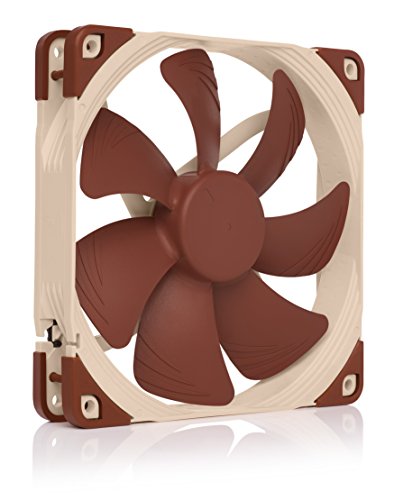
Noctua NF-A14 PWM
Noctua NF-A14 PWM
Best for: A quiet build with 140mm mounts that wants strong airflow at restrained speeds, on a case panel or radiator.
Size: 140mm, 140 x 140 x 25 mm
Connector: 4-pin PWM
Speed range: 300 to 1500 RPM
Maximum speed with supplied Low-Noise Adaptor: 1200 RPM
For a case that accepts 140mm fans, this Noctua is the quiet-first option that still posts serious specifications. The listing describes a premium quiet fan running from 300 to 1500 RPM, and it includes a Low-Noise Adaptor that caps the maximum at 1200 RPM for builders who would rather fix a calm ceiling than tune a detailed curve. Its square frame suits radiators as well as case mounts, so a pair can serve as front intake today and move to a 280mm radiator later. As with its smaller sibling, the brown finish is the main aesthetic consideration.
Watch out for: Cases with mixed mounts may only fit it in some positions, so verify each 140mm location rather than assuming the whole case matches.
Which One Fits Your Situation
Your gaming PC sits on the desk beside you
Choose the Noctua NF-A12x25 PWM for 120mm mounts or the NF-A14 PWM for 140mm mounts, then set a gentle curve that keeps them at moderate speed during play. Both are built around quiet operation rather than maximum speed, and the 140mm model’s adaptor-capped setting shows the philosophy clearly: enough airflow for a gaming system, without a fan note cutting through dialogue, voice chat, or quiet scenes between matches.
Your case has empty front mounts and a warm graphics card
Fill the front with ARCTIC P12 PWM PST fans if the mounts are 120mm, or the P14 PWM PST if they are 140mm. Their pressure-optimised designs suit the dust filter your intake air must cross, and the sharing connectors simplify wiring several fans to one signal. A consistent wall of intake air aimed along the graphics card usually helps more than one faster fan in a single position.
One mount has to work unusually hard
Pick the be quiet! Silent Wings 4 120mm PWM High Speed when a restrictive panel, a radiator, or a compact chassis leaves a single 120mm fan with a difficult job. Its listed 2500 RPM ceiling and 76.7 CFM airflow give it reserve capacity the quieter fans here do not claim. Keep that reserve in hand with a careful curve, because the same listing shows the noise cost of using all of it.
You are planning a radiator build now or later
Start with the fans that state pressure figures: the ARCTIC P12 PWM PST for 120mm radiators or the ARCTIC P14 PWM PST for 140mm models. Pressure is what keeps air moving through dense fins instead of spilling around them. The Noctua pair also uses square frames suited to radiator mounting, so choose between them by whether linked sharing connectors or a quiet-first design matters more in your build.
Common Mistakes
Buying 140mm fans before checking every mount, then discovering the rear or top position only accepts 120mm.
Comparing fans on airflow alone and fitting a low-pressure model behind a filter or radiator, where static pressure decides the result.
Running every fan at full speed permanently instead of setting a curve, which creates noise without meaningfully better temperatures.
Mixing several different fan models on one shared connector and expecting them to behave identically at the same signal.
Ignoring frame thickness, especially with a 27mm fan near a radiator or shroud, until the build physically will not close.
Frequently Asked Questions
Should I choose 120mm or 140mm case fans?
Choose whichever size your mounts accept, and prefer 140mm where the case offers it, because a larger fan can move useful air while turning more slowly. Many cases mix sizes, with 140mm options at the front and a 120mm rear exhaust, so check each position individually. Never force the issue with adapters until you have confirmed screw spacing and clearance.
How many case fans does a gaming PC actually need?
Most mid-tower gaming PCs cool well with two or three intakes and one exhaust, provided the intake path is not badly blocked. Adding a fourth or fifth fan usually brings smaller gains than fixing a restrictive front panel or a poor fan curve. Start with balanced intake and exhaust, check temperatures under a real game load, and add fans only where a specific hot spot remains.
Is static pressure or airflow more important?
It depends on what sits in front of the fan. For an open exhaust grille, airflow is the useful figure. For a dust filter, a dense front panel, a heatsink, or a radiator, static pressure matters more, because the fan must push against resistance to deliver its rated air. That is why pressure-optimised models such as the ARCTIC P12 and P14 appear here alongside higher-airflow designs.
Can I mix different fan brands in one case?
Yes, and it often makes sense, for example quiet Noctua fans on visible mounts and pressure-focused ARCTIC fans behind a front filter. Keep each shared header or linked chain to one model where possible, so a single curve produces predictable speeds. Then tune each header group separately in your motherboard software, because identical percentage settings will not produce identical speeds across different fans.
N
Noah Parker
We compare specs, materials and verified owner reviews before a product earns a spot. Rankings are never paid.
FAQ
Should I choose 120mm or 140mm case fans?
Choose whichever size your mounts accept, and prefer 140mm where the case offers it, because a larger fan can move useful air while turning more slowly. Many cases mix sizes, with 140mm options at the front and a 120mm rear exhaust, so check each position individually. Never force the issue with adapters until you have confirmed screw spacing and clearance.
How many case fans does a gaming PC actually need?
Most mid-tower gaming PCs cool well with two or three intakes and one exhaust, provided the intake path is not badly blocked. Adding a fourth or fifth fan usually brings smaller gains than fixing a restrictive front panel or a poor fan curve. Start with balanced intake and exhaust, check temperatures under a real game load, and add fans only where a specific hot spot remains.
Is static pressure or airflow more important?
It depends on what sits in front of the fan. For an open exhaust grille, airflow is the useful figure. For a dust filter, a dense front panel, a heatsink, or a radiator, static pressure matters more, because the fan must push against resistance to deliver its rated air. That is why pressure-optimised models such as the ARCTIC P12 and P14 appear here alongside higher-airflow designs.
Can I mix different fan brands in one case?
Yes, and it often makes sense, for example quiet Noctua fans on visible mounts and pressure-focused ARCTIC fans behind a front filter. Keep each shared header or linked chain to one model where possible, so a single curve produces predictable speeds. Then tune each header group separately in your motherboard software, because identical percentage settings will not produce identical speeds across different fans.
Affiliate disclosure. As an Amazon Associate we earn from qualifying purchases at no extra cost to you. Prices accurate as of the date shown.
Compare the best budget GPUs for 1080p gaming, new versus used, with verified VRAM, outputs and fit checks for prebuilts, small cases and older PCs today.
Compare gaming power supplies by wattage, from a 650W Bronze unit for single-GPU builds to a 1000W Gold unit for high-end cards, with modular and ATX 3 picks.
Compare AM5, AM4 and LGA 1851 gaming motherboards from MSI, ASUS and Gigabyte, with socket, chipset, DDR4 or DDR5, WiFi and M.2 checks before you buy a board.
Ranked strictly by VRAM, these five GPUs run larger local LLMs on a single card, from a 32GB flagship down to 16GB cards for quantised mid-size models at home.
Ranked by VRAM and performance class for their segment, these value GPUs cover 1080p and 1440p gaming, from the RX 9060 XT 16GB to the Arc B580 12GB card.
Ranked by performance class against official board power, these efficient GPUs cover quiet small builds, 1440p gaming and new low-heat desktops for 2026.


 Noctua NF-A14 PWM