We research everything we recommend. When you buy through our links, we may earn a commission. As an Amazon Associate we earn from qualifying purchases.
4 Best GPUs Under $200 (November 2026)
Compare the best budget GPUs for 1080p gaming, new versus used, with verified VRAM, outputs and fit checks for prebuilts, small cases and older PCs today.
At this budget, the real decision is not which card tops a chart. It is whether you spend the whole amount on a new card with a warranty and a clean return window, or gamble part of it on a used card from a faster class that may arrive tired, loud, or impossible to send back. That trade-off shapes everything else: how much VRAM you accept, which power connector you can feed, and how much risk your build can absorb.
This guide is for three kinds of buyers: first-time builders finishing a 1080p machine, owners of older desktops and prebuilts who need a drop-in upgrade, and bargain hunters weighing second-hand listings against new stock. Every new card below was chosen from its Amazon product page and title, using only the specifications printed there, and the used option is covered honestly as a route, not dressed up as a verified listing.
Quick Picks
As an Amazon Associate we earn from qualifying purchases.
Product
Best for
Key spec from title
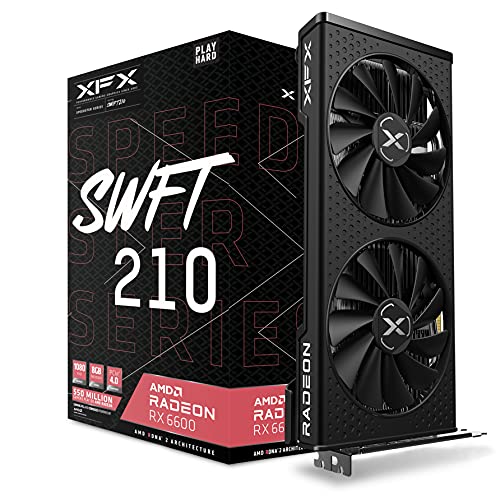
XFX Speedster SWFT 210 Radeon RX 6600 CORE
A first 1080p build where you want the full 8GB new, with warranty
8GB GDDR6, HDMI, 3x DisplayPort, AMD RDNA 2
ASRock Intel Arc A580 Challenger 8GB OC
Tinkerers who want 8GB and modern DisplayPort on an Intel card
8GB GDDR6, PCIe 4.0, dual fans, DisplayPort 2.0
ASUS Dual GeForce RTX 3050 6GB OC Edition
A compact two-slot upgrade for a small case that still needs HDMI 2.1
A very small prebuilt or mini case with almost no spare length
6GB GDDR6, 96-bit, 14 Gbps, PCIe 4.0, super compact
Read the table as a map of compromises rather than a ranking carved in stone. The two 8GB cards give texture settings more breathing room, while the two 6GB cards answer a different problem: physical fit and easy installation in machines that were never designed around a gaming card. If your case and power supply can take any of them, start with the 8GB pair. If your machine is a compact prebuilt with a short graphics bay, the shorter cards may be the only ones that actually close the side panel, and a card that fits beats a stronger card that stays in its box.
How to Choose
Decide new versus used before you compare models
A new card in this class buys you certainty: a sealed box, a manufacturer warranty, a return window, and fans that have only ever cooled your own games. A used card can put a faster GPU generation within reach, but its history is unknown, and mining use, worn fans, and dried thermal paste are all possibilities you cannot inspect from a listing photo. If you go used, insist on a platform with buyer protection, ask for a video of the card running a game or benchmark, and agree the return terms before paying. Never pay by a method you cannot reverse.
Treat VRAM as your settings ceiling
Video memory decides how high your texture settings can go before a game starts swapping data and stuttering. The 8GB cards in this guide are the safer pick for newer releases at 1080p, where high textures can fill smaller buffers quickly. A 6GB card still runs esports titles and older games comfortably, and upscaling can stretch it further, but you will lower textures sooner in demanding titles. Think about the games you actually own: a library of competitive shooters asks far less of VRAM than a shelf of recent open-world releases with large texture packs.
Match the card to your monitor and resolution
Every card here is aimed at 1080p, which is where this budget makes sense. At that resolution the differences between these GPUs show up as settings headroom rather than the ability to play at all. Check the outputs against your monitor before anything else: a screen that only has HDMI needs an HDMI port, a high-refresh display usually wants DisplayPort, and a second monitor needs a second output of the right type. The XFX card lists three DisplayPort outputs plus HDMI, while the ASUS lists HDMI 2.1 for newer displays. Buying for a 1440p monitor on this budget means accepting lower settings almost everywhere.
Check power connectors and physical fit twice
Budget cards fail purchases in boring ways: a power supply with no spare PCIe connector, a case that is an inch too short, or a thick card blocking the slot below. Measure the length available from the bracket to the first obstruction, count your free PCIe power leads, and read the exact connector requirement on the listing of the specific model you are ordering, because board partners differ. The ZOTAC Solo exists for exactly this problem, with listed dimensions far shorter than a typical dual-fan card, while the dual-fan models need you to confirm both length and slot width first.
The 4 Best Options
The four cards below split into two pairs. The 8GB pair suits a fresh build or a meaningful upgrade where the card will stay in the machine for years. The 6GB pair suits constrained machines where the upgrade has to fit first and impress second. None of them asks you to believe anything beyond what its own product page states, and each entry ends with the check that matters most before you order that specific card.
XFX Speedster SWFT 210 Radeon RX 6600 CORE
Top Pick
XFX Speedster SWFT 210 Radeon RX 6600 CORE
Best for: A first 1080p gaming build that needs 8GB, several display outputs, and a new-card warranty.
GPU: AMD Radeon RX 6600, AMD RDNA 2
Memory: 8GB GDDR6
Outputs: HDMI, 3x DisplayPort, from the product title
A first 1080p gaming build that needs 8GB, several display outputs, and a new-card warranty.
Watch out for
Measure your case before ordering, because the listed length is 9.49 inches, and confirm the power connector requirement on the listing for this exact model.
This is the straightforward new-card answer for a first 1080p build. Its listing pairs 8GB of GDDR6 with three DisplayPort outputs and HDMI, so a main gaming monitor and a spare screen are both covered without adapters. The dual-fan cooler and standard desktop format suit a normal mid-tower far better than a cramped prebuilt, and the RDNA 2 design is a known quantity with mature drivers. Choose it when you want the most complete new package in this guide and your case has room for a full-length card.
ASRock Intel Arc A580 Challenger 8GB OC
Runner-Up
ASRock Intel Arc A580 Challenger 8GB OC
Best for: A tinkerer who wants 8GB, quiet idle behaviour, and modern display outputs from an Intel card.
A tinkerer who wants 8GB, quiet idle behaviour, and modern display outputs from an Intel card.
Watch out for
Check that your motherboard BIOS offers Resizable BAR and update it if needed, because Intel Arc cards depend on that setting being enabled to perform as intended.
Intel’s entry is the interesting alternative for buyers who like the idea of a newer platform and are comfortable keeping drivers current. The Challenger listing offers 8GB of GDDR6 on a PCIe 4.0 card with dual fans, a 0dB silent cooling mode that stops the fans at light load, and DisplayPort 2.0 among its outputs. That combination suits a living-room or desk PC that idles quietly and still games at 1080p. Pick it if the AMD and NVIDIA cards feel predictable and you enjoy being the person who updates drivers on day one.
ASUS Dual GeForce RTX 3050 6GB OC Edition
ASUS built this card around compatibility. The listing describes a 2-slot design about 20 centimetres long, with two Axial-tech fans, 0dB technology for silent light use, and a steel bracket. Its HDMI 2.1 and DisplayPort 1.4a outputs cover both newer televisions and typical gaming monitors, and the factory overclock is printed plainly in the product details. It gives up VRAM compared with the 8GB cards, so it fits best in a smaller case playing esports and older titles, where 6GB is rarely the limit and a card that fits neatly matters more than texture headroom.
Specs
GPU: NVIDIA GeForce RTX 3050
Memory: 6GB GDDR6
Interface: PCIe 4.0
Outputs: HDMI 2.1, DisplayPort 1.4a
Design: 2-slot, dimensions listed as 7.9 x 4.7 x 1.5 inches
Cooling: Two Axial-tech fans, 0dB technology, steel bracket
Boost clock listed: 1537 MHz in OC mode
Best for: A compact build or small-case upgrade that needs HDMI 2.1 and a true two-slot card.
Watch out for: Confirm you are ordering the 6GB model, because the product details name the exact model as DUAL-RTX3050-O6G and other RTX 3050 variants with different memory exist.
ASIN: B0CVCG2VPK
ZOTAC Gaming GeForce RTX 3050 6GB Solo
ZOTAC Gaming GeForce RTX 3050 6GB Solo
Best for: A slim prebuilt or mini PC where card length is the single deciding factor.
GPU: NVIDIA GeForce RTX 3050
Memory: 6GB GDDR6, 96-bit, 14 Gbps, from the product title
A slim prebuilt or mini PC where card length is the single deciding factor.
Watch out for
A cooler this small has little thermal headroom, so make sure the case has some airflow, and check the exact output layout on the listing before pairing it with older monitors.
The Solo is the problem-solver of this guide. Its listed dimensions are just 5.9 by 4.5 inches, which makes it a realistic fit for the short graphics bays in slim prebuilts and small-form-factor cases where the dual-fan cards above simply cannot go. You still get 6GB of GDDR6 on a PCIe 4.0 interface, so the upgrade over integrated graphics is dramatic for esports and older games. Choose it when the alternative is no dedicated card at all, and accept that its small cooler and narrower memory bus make it the modest performer here by design.
Which One Fits Your Situation
You are building your first 1080p gaming PC
Start with the XFX RX 6600. In a fresh build you control the case and power supply, so its length and connector needs are easy to plan around, and the 8GB of memory gives your settings the most room to grow as your library expands. A new card also means the warranty clock starts with you, which matters on a machine you expect to keep for years.
You are upgrading a prebuilt with a small case
Measure first, then shortlist the ZOTAC Solo and the ASUS Dual. The Solo’s listed 5.9-inch length fits bays that reject ordinary cards, while the ASUS offers a two-slot design with better display outputs if your case has a little more room. Confirm the power connector situation on the exact listing before ordering either, because prebuilt power supplies vary enormously and the wrong assumption is the most common reason these upgrades get returned.
You are tempted by a faster used card
That instinct is understandable, because the used market is where the exciting performance in this budget lives. Protect yourself: buy only where returns are possible, ask for video proof of the card under load, and inspect the fans and connectors on arrival. If a seller refuses any of that, walk away and take the new XFX or ASRock instead. A slower card that works daily beats a faster one that fails within a month.
Your PC doubles as a quiet living-room machine
Look at the ASRock Arc A580 Challenger. Its listing highlights a 0dB silent cooling mode, so the fans can stay still during films and desktop work, and its 8GB of memory still covers 1080p gaming from the sofa. The ASUS Dual makes the same quiet-idle promise in its listing and adds HDMI 2.1, so pick between them by which outputs your television and receiver actually need.
Common Mistakes
Comparing a new card’s specification sheet against a used card’s asking description as if both carried the same warranty and return protection.
Ordering the wrong memory variant, because RTX 3050 cards exist in more than one configuration and the exact model name on the listing is what decides it.
Forgetting to measure card length and slot width, then discovering the new GPU touches the drive cage or covers the only other expansion slot.
Assuming the power supply is fine without checking which PCIe power connectors are actually free and what the specific card requires.
Chasing a 1440p monitor upgrade on this budget, then blaming the card when demanding games need settings lowered across the board.
Frequently Asked Questions
Should I buy new or used at this budget?
Buy new if the PC is your main machine and downtime would hurt, because the warranty and return window are worth real money here. Buy used only when the saving buys a clearly faster class of card, the seller accepts returns, and you can test the card under load during the return window. If any condition is missing, the new cards here are the safer spend.
Is 6GB of VRAM enough for 1080p gaming?
For esports titles, older games, and medium texture settings, yes, 6GB still works at 1080p today. The limit appears in newer, texture-heavy releases, where you may need to drop textures from high to medium to keep frame times smooth. If your library leans toward recent big releases and you plan to keep the card for several years, the 8GB cards above give you more headroom for the same resolution.
Will these PCIe 4.0 cards work in an older PCIe 3.0 motherboard?
Yes. PCIe generations are backward compatible, so a PCIe 4.0 card installs and runs in a PCIe 3.0 slot, which covers most older desktops and prebuilts still in service. The practical checks are physical and electrical instead: whether the card fits the case, whether the power supply has the connector the specific model needs, and whether the motherboard BIOS is recent enough to recognise a modern card without an update.
How do I check a used GPU before the return window closes?
Install it, update the drivers, and run a demanding game or a free GPU stress tool for half an hour while watching temperatures and listening for fan rattle. Look for flickering, coloured artefacts, driver crashes, and fans that fail to spin or never slow down. Photograph any damage on arrival, test every display output you plan to use, and start the return immediately if anything misbehaves.
N
Noah Parker
We compare specs, materials and verified owner reviews before a product earns a spot. Rankings are never paid.
FAQ
Should I buy new or used at this budget?
Buy new if the PC is your main machine and downtime would hurt, because the warranty and return window are worth real money here. Buy used only when the saving buys a clearly faster class of card, the seller accepts returns, and you can test the card under load during the return window. If any condition is missing, the new cards here are the safer spend.
Is 6GB of VRAM enough for 1080p gaming?
For esports titles, older games, and medium texture settings, yes, 6GB still works at 1080p today. The limit appears in newer, texture-heavy releases, where you may need to drop textures from high to medium to keep frame times smooth. If your library leans toward recent big releases and you plan to keep the card for several years, the 8GB cards above give you more headroom for the same resolution.
Will these PCIe 4.0 cards work in an older PCIe 3.0 motherboard?
Yes. PCIe generations are backward compatible, so a PCIe 4.0 card installs and runs in a PCIe 3.0 slot, which covers most older desktops and prebuilts still in service. The practical checks are physical and electrical instead: whether the card fits the case, whether the power supply has the connector the specific model needs, and whether the motherboard BIOS is recent enough to recognise a modern card without an update.
How do I check a used GPU before the return window closes?
Install it, update the drivers, and run a demanding game or a free GPU stress tool for half an hour while watching temperatures and listening for fan rattle. Look for flickering, coloured artefacts, driver crashes, and fans that fail to spin or never slow down. Photograph any damage on arrival, test every display output you plan to use, and start the return immediately if anything misbehaves.
Affiliate disclosure. As an Amazon Associate we earn from qualifying purchases at no extra cost to you. Prices accurate as of the date shown.
Compare the best 120mm and 140mm case fans for gaming PCs, from quiet Noctua and be quiet! picks to pressure-focused ARCTIC fans for radiators and mesh cases.
Compare gaming power supplies by wattage, from a 650W Bronze unit for single-GPU builds to a 1000W Gold unit for high-end cards, with modular and ATX 3 picks.
Compare AM5, AM4 and LGA 1851 gaming motherboards from MSI, ASUS and Gigabyte, with socket, chipset, DDR4 or DDR5, WiFi and M.2 checks before you buy a board.
Ranked strictly by VRAM, these five GPUs run larger local LLMs on a single card, from a 32GB flagship down to 16GB cards for quantised mid-size models at home.
Ranked by VRAM and performance class for their segment, these value GPUs cover 1080p and 1440p gaming, from the RX 9060 XT 16GB to the Arc B580 12GB card.
Ranked by performance class against official board power, these efficient GPUs cover quiet small builds, 1440p gaming and new low-heat desktops for 2026.