Our Top Picks
 GIGABYTE Radeon RX 9060 XT Gaming OC 16G11.06 x 4.65 inches11.06 x 4.65 x 1.57 inches2.4 poundsCheck on Amazon
 GIGABYTE GeForce RTX 5060 WINDFORCE OC 8G GraphicsRTX5060|OC|8GB7.83 x 4.57 x 1.57 inchesCheck on Amazon
Pros & cons
- WINDFORCE cooling system supports sustained clock speeds
- PCIe 5.0 interface keeps the card future-ready
- Compact dimensions fit smaller case builds
- 8GB GDDR7 on a 128-bit bus trails higher-end cards
- Color finish is not specified in the listing
Value in a graphics card is not about finding the cheapest box on the shelf. The real decision is how much performance class and memory you get for the segment you are shopping in, because a card that forces an early upgrade is poor value however little it cost. A strong value pick pairs a modern GPU with enough VRAM to hold textures at your resolution, so the card stays useful through several game releases instead of one.
This ranking is for three kinds of buyer: 1080p players upgrading an older build, 1440p players who want headroom without moving up a segment, and first-time builders comparing AMD, NVIDIA and Intel side by side. Street pricing moves constantly, so no prices are quoted here. Instead, each card is ranked by its specifications relative to its entry or mainstream segment, using only details taken from its Amazon product page, and you should compare current listings yourself before ordering.
Quick Picks
As an Amazon Associate we earn from qualifying purchases.
| Product | Best for | Key spec from title |
|---|---|---|
| GIGABYTE Radeon RX 9060 XT Gaming OC 16G | 1440p players who want the most VRAM in the mainstream segment | 16GB GDDR6, PCIe 5.0 |
| Sparkle Intel Arc B580 Titan OC | Builders who want 12GB of memory from the entry segment | 12GB GDDR6, 2760 MHz boost clock |
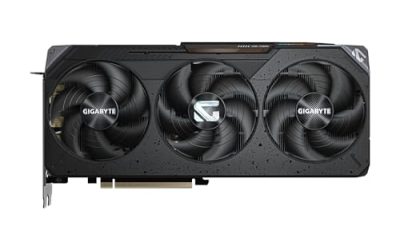
| GIGABYTE Radeon RX 7600 XT Gaming OC 16G | 1080p players planning to keep one card for years | 16GB 128-bit GDDR6, triple-fan cooler |
| GIGABYTE GeForce RTX 5060 WINDFORCE OC 8G | Players who specifically want the NVIDIA ecosystem | 8GB 128-bit GDDR7, PCIe 5.0 |
| ASRock Radeon RX 7600 Challenger 8GB OC | Tight-budget 1080p builds with a single 8-pin connector | 8GB GDDR6, boost clock up to 2695 MHz |
How to Choose
Rank value inside the segment, not across the whole market
A card only looks like good value next to the alternatives in its own segment. Street pricing shifts week to week, retailer by retailer, so a ranking printed with fixed amounts would mislead almost immediately. Judge each model by what its segment normally offers: the performance class of the GPU, the memory fitted, and the generation of the architecture. Then open the current listings yourself on the day you buy and check which of the cards ranked here sits lowest in its segment that day. If two cards end up close, the one with more VRAM and the newer architecture is usually the safer long-term buy.
Treat VRAM as the value multiplier
Memory capacity decides how long a value card stays a value card. At 1080p, 8GB still runs current games, but texture settings are the first thing you will lower as new titles arrive. Cards with 12GB or 16GB in this list, such as the Arc B580 and the two 16GB Radeon models, give you room to keep textures high and to move to 1440p later without replacing the card. When you compare listings, read the exact capacity in the title rather than the GPU name alone, because the same GPU name can appear with different memory amounts, and the larger version is often the better value over time.
Compare memory type, bus width and upscaling support
Beyond capacity, look at how the memory is attached. A 128-bit bus is standard across this group, so the memory type separates them: GDDR7 on the RTX 5060 moves data faster per pin than the GDDR6 fitted to the Radeon and Intel cards, which partly offsets its smaller 8GB capacity. Upscaling support matters just as much for value, because a good upscaler extends the useful life of a mainstream GPU at 1440p. Each ecosystem has its own approach, and the listings here reference features such as DLSS on the NVIDIA card and XeSS support on Intel Arc, so match the card to the features your games actually use.
Check power, size and platform fit before calling anything a bargain
A card is not good value if it needs a new power supply or will not fit your case. Check the power connector against your existing unit: the ASRock RX 7600 Challenger listed here uses a single 8-pin connector, which suits many older builds, while larger triple-fan models need you to confirm both connector and clearance. Measure length as well, since the Sparkle B580 Titan OC is listed at 12.4 inches long. Finally, note the interface: cards listed with a PCIe x8 connection lose little in a modern x16 slot, but very old boards deserve a compatibility check before you order.
The 5 Best Options
GIGABYTE Radeon RX 9060 XT Gaming OC 16G
The RX 9060 XT takes first place because it combines the newest Radeon architecture in this group with the joint-largest memory capacity, and it does so inside the mainstream segment rather than a step above it. Sixteen gigabytes of GDDR6 means 1440p texture settings are not a negotiation, and the RDNA 4 design described on its Amazon page is built for current games rather than last-generation leftovers. For a buyer who wants one card to carry a system through several years of releases, this is the specification sheet that reads most like a higher segment than the one it sits in.
Specs
- GPU: AMD Radeon RX 9060 XT, RDNA 4 architecture
- Memory: 16GB GDDR6
- GPU clock speed listed: 2700 MHz
- Memory clock speed listed: 20000 MHz
- Outputs: DisplayPort and HDMI
- Interface: PCI-Express x16
- Dimensions listed: 11.06 x 4.65 inches
- Model: GV-R9060XTGAMING OC-16GD
Best for: 1440p players who want maximum memory headroom in the mainstream segment.
Watch out for: At just over 11 inches long, confirm your case has the clearance before ordering.
ASIN: B0F91KM1CK
Sparkle Intel Arc B580 Titan OC
Intel’s entry in this ranking earns second place on a simple argument: 12GB of GDDR6 is memory you normally expect a segment higher, and the B580 pairs it with a 2760 MHz boost clock and a triple-fan cooler on this Sparkle Titan OC model. That combination suits 1080p players who suspect they will try 1440p later, because the memory is already there when the monitor changes. The three DisplayPort 2.1 outputs also make it unusually flexible for multi-monitor desks at this level, and the metal backplate and included sag bracket are touches rarely bundled in the entry segment.
Specs
- GPU: Intel Arc B580
- Memory: 12GB GDDR6
- Boost clock listed: 2760 MHz
- Memory clock speed listed: 19 GHz
- Outputs: 1x HDMI 2.1, 3x DisplayPort 2.1
- Interface: PCI-Express x8
- Cooling: 3 fans, Torn Cooling 2.0, metal backplate
- Dimensions listed: 12.4 x 4.61 inches
- Model: SB580T-12GOC
Best for: Builders who want 12GB of memory and three DisplayPort outputs from the entry segment.
Watch out for: This is a long card at 12.4 inches, and Intel Arc drivers reward keeping them up to date, so budget a few minutes for updates after installing.
ASIN: B0DNMH4KQM
GIGABYTE Radeon RX 7600 XT Gaming OC 16G
The RX 7600 XT makes its value case differently: the GPU itself sits in the entry class, yet Gigabyte fits it with 16GB of memory, double what most cards at this level carry. That trade suits players who know their favourite genres are texture-heavy and who would rather have memory headroom than a newer architecture badge. The triple-fan WINDFORCE cooler is also larger than entry cards usually get, which helps in warm rooms or compact cases with modest airflow. If your priority is keeping one affordable card in service for as long as possible at 1080p, the memory capacity here is the whole argument, and it is a convincing one.
Specs
- GPU: AMD Radeon RX 7600 XT
- Memory: 16GB 128-bit GDDR6
- Memory speed listed: 18000 MHz
- Cooling: 3X WINDFORCE fans
- Outputs: HDMI and DisplayPort, per listing details
- Model: GV-R76XTGAMING OC-16GD
Best for: 1080p players who value long service life and texture headroom over architecture age.
Watch out for: The GPU is an older generation than the RX 9060 XT above, so compare current listings carefully; if the two sit close, the newer card is the better buy.
ASIN: B0CSVJZNNX
GIGABYTE GeForce RTX 5060 WINDFORCE OC 8G
The RTX 5060 is the value pick for buyers committed to the NVIDIA side of the market. Its 8GB of GDDR7 is the smallest capacity in this ranking, but GDDR7 on a 128-bit bus is fast memory, and the listing highlights DLSS 4 support, which is the feature that stretches this card at 1440p in games that support it. The WINDFORCE OC model is a dual-fan design with a 2512 MHz GPU clock listed on its page. Choose it when your games and software are built around NVIDIA features, and accept that texture settings at higher resolutions will need watching sooner than on the 16GB cards.
Specs
- GPU: NVIDIA GeForce RTX 5060
- Memory: 8GB 128-bit GDDR7
- GPU clock speed listed: 2512 MHz
- Memory clock speed listed: 28000 MHz
- Outputs: DisplayPort and HDMI
- Interface: PCIe 5.0
- Model: GV-N5060WF2OC-8GD
Best for: Players whose games lean on DLSS and who want a current-generation NVIDIA card in the mainstream segment.
Watch out for: The 8GB capacity is the tightest here, so check the requirements of the specific games you play most before choosing it for 1440p.
ASIN: B0F8LDHQ7Y
ASRock Radeon RX 7600 Challenger 8GB OC
The original RX 7600 closes the ranking as the straightforward entry option: an 8GB GDDR6 card with a boost clock up to 2695 MHz, a dual-fan cooler and a single 8-pin power connector that drops into a wide range of existing builds. ASRock’s Challenger version adds a metal backplate and 0dB silent cooling, where the fans stop under light load, which suits a PC that doubles as a media machine. Its value case rests on the segment it sits in: when current listings place it clearly below the newer cards here, it covers 1080p gaming with the least demanding install in the group.
Specs
- GPU: AMD Radeon RX 7600, RDNA 3 architecture
- Memory: 8GB GDDR6
- Boost clock listed: up to 2695 MHz, game clock 2280 MHz
- Outputs: 3x DisplayPort 1.4, 1x HDMI 2.1
- Power connector: 1x 8-pin
- Interface: PCI Express 4.0
- Cooling: dual fan, 0dB silent cooling, metal backplate
- Model: RX7600 CL 8GO
Best for: Tight-budget 1080p builds and upgrades where a single 8-pin connector matters.
Watch out for: With 8GB on an older architecture, this is a 1080p card; if 1440p is a near-term plan, the B580 or RX 9060 XT above will serve you longer.
ASIN: B0C626FFG2
Which One Fits Your Situation
You are upgrading an old 1080p build and keeping your power supply
Start with the ASRock RX 7600 Challenger. Its single 8-pin connector and dual-fan design fit the pattern of older mid-tower builds, and its 8GB covers 1080p today. If your current listings show the Sparkle Arc B580 within comfortable reach, take it instead: the extra 4GB of memory is the difference between adjusting settings this year and adjusting them several years from now.
You are building new for 1440p and want the card to last
Choose the GIGABYTE RX 9060 XT Gaming OC 16G. It pairs the newest architecture in this list with 16GB of memory, which is the combination most likely to stay comfortable as game requirements climb. Measure your case for its 11-inch length, confirm your power supply matches the listing requirements, and this is the one-and-done option in the ranking.
Your games live on NVIDIA features and streaming tools
Pick the GIGABYTE RTX 5060 WINDFORCE OC 8G. DLSS 4 support is the deciding feature, and in titles that use it the card plays above what its 8GB specification suggests. Go in with eyes open about memory: at 1080p it is a non-issue for most current games, while at 1440p you should expect to balance texture settings in the most demanding releases.
You run several monitors and play at 1080p
The Sparkle Intel Arc B580 Titan OC fits a desk that mixes work and play. Three DisplayPort 2.1 outputs plus HDMI cover a triple-monitor setup without adapters, and 12GB of memory is generous for 1080p gaming after hours. Just measure first, because at 12.4 inches it is the longest card in this ranking and small cases will not take it.
Common Mistakes
- Judging value by the GPU name alone and missing that two cards with similar names can carry very different memory amounts.
- Quoting a ranking from months ago as if street pricing stood still, instead of comparing current listings on the day you buy.
- Buying an 8GB card for 1440p without checking the texture requirements of the games you actually play.
- Forgetting to measure case clearance, then discovering a triple-fan card is longer than the space between the front panel and the drive cage.
- Spending the whole budget on the card and leaving nothing for the power supply upgrade a larger model may require.
Frequently Asked Questions
How can a GPU be ranked for value without quoting prices?
Value here is judged by what a card offers inside its segment: performance class, memory capacity, architecture generation and features, compared with what that segment normally provides. Pricing changes too quickly for a printed figure to stay honest, so the ranking tells you which specifications deserve your money, and you confirm the final order against live listings before buying.
Is 8GB of VRAM still enough for gaming in 2026?
For 1080p in most current games, yes, provided you are willing to adjust texture settings in the heaviest titles. The picture changes at 1440p, where larger textures fill 8GB quickly. That is why this ranking places 12GB and 16GB cards above the 8GB models for anyone planning to keep a card for several years or change monitors soon.
Why does the older RX 7600 XT rank above the newer RTX 5060?
Because the ranking weighs memory heavily. The RX 7600 XT carries 16GB, twice the capacity of the RTX 5060, and that headroom protects texture quality over time. The RTX 5060 answers with faster GDDR7 memory and DLSS 4, which many buyers will prefer. Neither order is wrong for everyone; the ranking simply rewards the specification that ages slowest.
Should I wait for prices to drop before buying a value GPU?
Waiting only helps if you have a working card now and a specific model in mind. A practical approach is to shortlist two cards from this ranking, watch their live listings for a short period, and buy when the better-specified one moves into your segment budget. Endless waiting has a cost too: the games you bought the upgrade for sit unplayed.
FAQ
How can a GPU be ranked for value without quoting prices?
Is 8GB of VRAM still enough for gaming in 2026?
Why does the older RX 7600 XT rank above the newer RTX 5060?
Should I wait for prices to drop before buying a value GPU?
More from Amazon
Programs that pair well with the guide above. Offers and eligibility are set by Amazon and may change.
Free shipping on eligible items, Prime Video and more. Eligible new members can start with a free trial.
Start a Prime free trialAd-free music streaming. Eligible new subscribers can start with a free trial.
Try Music Unlimited freeA Prime membership for ages 18-24 with a trial period. Eligibility is set by Amazon.
See Prime for Young AdultsAudiobooks and podcasts to listen to on the go. Eligible new members can start with a free trial.
Try Audible freeAs an Amazon Associate we earn from qualifying purchases.