
Key takeaways
- Peak cooling: A 360mm AIO like the ARCTIC Liquid Freezer III Pro can out-cool most air towers on very hot chips.
- Reliability: Air coolers have no pump or coolant to fail; an AIO’s pump is a potential long-term failure point.
- Noise: A big air tower like the Thermalright Peerless Assassin 120 SE runs quietly; AIO noise depends on fan and pump quality.
- Clearance: Tall air coolers can conflict with RAM and case width; AIOs free up space around the socket.
- Price: Air coolers deliver more cooling per dollar; AIOs cost more for equivalent mainstream performance.
- Aesthetics: Liquid coolers offer a cleaner CPU area and RGB radiator looks that many builders prefer.
When it comes to keeping a gaming CPU cool, the eternal question is air or water. Air coolers use a metal heatsink and fans to pull heat away, while all-in-one liquid coolers circulate coolant through a pump to a radiator. Both can keep a modern processor perfectly cool, but they differ in noise, aesthetics, price, and how they handle the hottest, highest-wattage chips. Choosing the wrong one wastes money or leaves performance on the table.
This comparison lays out the real trade-offs between air and liquid cooling for gaming PCs in 2026, from performance and reliability to looks and value. Whether you are building a compact rig or a flagship overclocking monster, understanding these differences will help you pick the cooler that fits your CPU, case, and budget.
Our top picks
 ARCTIC Liquid Freezer III Pro 360 A-RGB
- CONTACT FRAME FOR INTEL LGA1851 | LGA1700: Optimized…
- ARCTIC's P12 PRO FAN: More power at any…
- Shifting the cold plate center towards the CPU…
 BXQINLENX 24-Piece Silver Chrome G1/4" Fittings Kit
- G1/4" Universal Compatibility: Precision-engineered threads ensure seamless compatibility…
- Durable Electroplated Finish: Silver chrome plating provides corrosion…
- Hand-Tighten Design: User-friendly, tool-free installation—simply screw fittings by…
 Thermalright Aqua Elite 240 V3 Water Cooling
- 【Better Cooling】 The cooler adopts the fourth generation…
- 【Unique Pump Head】 The octagonal shaped cold pump…
- 【Excellent LED Lighting Effect】Fan and water-cooling header ARGB…
| Product | Key specs | |
|---|---|---|
| ARCTIC Liquid Freezer III Pro 360 A-RGB | CONTACT FRAME FOR INTEL LGA1851 | LGA1700: Optimized… ARCTIC's P12 PRO FAN: More power at any… Shifting the cold plate center towards the CPU… | Check price |
| BXQINLENX 24-Piece Silver Chrome G1/4" Fittings Kit | G1/4" Universal Compatibility: Precision-engineered threads ensure seamless compatibility… Durable Electroplated Finish: Silver chrome plating provides corrosion… Hand-Tighten Design: User-friendly, tool-free installation—simply screw fittings by… | Check price |
| Thermalright Aqua Elite 240 V3 Water Cooling | 【Better Cooling】 The cooler adopts the fourth generation… 【Unique Pump Head】 The octagonal shaped cold pump… 【Excellent LED Lighting Effect】Fan and water-cooling header ARGB… | Check price |
 DIYhz Water Cooling Computer Radiator DIYhz Water Cooling Computer Radiator | ★ Product Name: Water Cooling Radiator ★ Fan Installation Size: 120 x 120 ★ Efficiently pulling heat away from cycling coolant… | Check price |
 MUSETEX ATX PC Case 7 PWM ARGB MUSETEX ATX PC Case 7 PWM ARGB | 【MUSETEX presents the K2 gaming pc case】both a… 【Tower Case Powerful Space Layout】The internal structure of… 【Upgrade High Speed IO Panel】1 x Type-C, 2… | Check price |
 Thermalright Peerless Assassin 120 SE CPU Cooler Thermalright Peerless Assassin 120 SE CPU Cooler | [Brand Overview] Thermalright is a Taiwan brand with… [Product specification] Thermalright PA120 SE 【2 PWM Fans】TL-C12C | Check price |
 DIYhz Water Cooling Computer Radiator DIYhz Water Cooling Computer Radiator | ★ Product Name: Water Cooling Radiator ★ Fan Installation Size: 120x120(This product does not… ★ Efficiently pulling heat away from cycling coolant… | Check price |
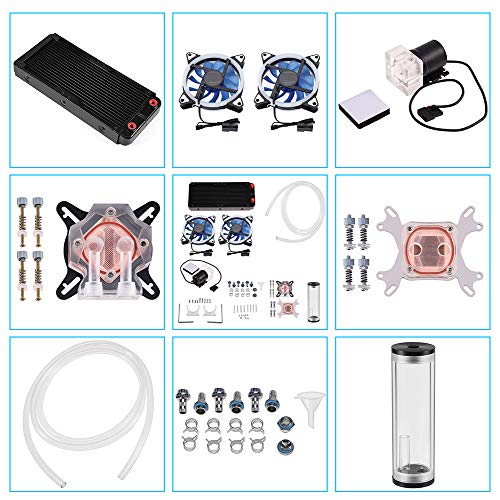 DIY 240mm Water Cooling Kit DIY 240mm Water Cooling Kit | 【Professional Water Cooling Kit】This liquid CPU cooler kit… 【High Performance】The CPU/GPU block is constructed with a… 【Super Water Circulation Cooling System】240mm Heat Sink: Provide… | Check price |
As an Amazon Associate we earn from qualifying purchases at no extra cost to you.
⚡ Save on Your Next PC — Amazon Prime
Prime members get fast free shipping on the systems above, plus early access to Prime Day & Black Friday PC deals. New members get a 30-day free trial.
Watch: Air vs Water Cooling for Gaming PCs — Video Review
Quick Verdict
For most gamers, a high-quality air cooler is the smarter buy: it is cheaper, has no pump to fail, runs quietly, and keeps mainstream and even high-end chips comfortably cool. Liquid AIO cooling pulls ahead on the hottest, highest-wattage overclocked processors and in cases where a big tower will not fit, plus it offers a cleaner look and lower CPU-area clutter. Choose air for value and reliability, liquid for maximum thermal headroom and aesthetics.
Key Differences
- Peak cooling: A 360mm AIO like the ARCTIC Liquid Freezer III Pro can out-cool most air towers on very hot chips.
- Reliability: Air coolers have no pump or coolant to fail; an AIO’s pump is a potential long-term failure point.
- Noise: A big air tower like the Thermalright Peerless Assassin 120 SE runs quietly; AIO noise depends on fan and pump quality.
- Clearance: Tall air coolers can conflict with RAM and case width; AIOs free up space around the socket.
- Price: Air coolers deliver more cooling per dollar; AIOs cost more for equivalent mainstream performance.
- Aesthetics: Liquid coolers offer a cleaner CPU area and RGB radiator looks that many builders prefer.
Air Cooling for Gaming PCs
Air cooling is proven, affordable, and remarkably capable. A modern dual-tower cooler like the Thermalright Peerless Assassin 120 SE, with six heat pipes and dual 120mm fans, can tame all but the most extreme chips while costing a fraction of a premium AIO. There is no pump to wear out, no risk of a leak, and maintenance is as simple as occasionally dusting the fins. For the overwhelming majority of gaming builds, a good air cooler is all you will ever need.
The downsides are size and looks. Large towers are heavy, can crowd tall RAM, and dominate the view inside your case. On the very hottest overclocked flagships pushing 250 watts or more, even a great air cooler can hit its limits where a big radiator would not. For those edge cases, and for builders who want a specific aesthetic, air is not always the answer.
Water Cooling for Gaming PCs
All-in-one liquid coolers shine when heat output is extreme or space around the socket is tight. A 240mm or 360mm AIO like the ARCTIC Liquid Freezer III Pro or Thermalright Aqua Elite 240 moves heat from the CPU to a large radiator, giving high-wattage chips more sustained thermal headroom and often a cleaner, more open look inside the case. The radiator mounts to the case, freeing the area around the CPU from a massive heatsink.
The trade-offs are cost, complexity, and a pump that represents a long-term point of failure. AIOs are pricier than equivalent air coolers, and while modern units are very reliable, a dead pump means no cooling at all. For overclockers, flagship chips, and builders who prioritize aesthetics and socket clearance, though, a quality AIO is a worthwhile investment.
Which Should You Buy?
- Choose air if: you want the best value and reliability with no pump to worry about.
- Choose air if: you run a mainstream or moderately high-end chip that a good tower handles easily.
- Choose liquid if: you overclock a high-wattage flagship that needs maximum thermal headroom.
- Choose liquid if: a tall air cooler will not fit your case or you want a cleaner look with RGB radiator flair.
- Either works if: your CPU is efficient and your temperatures are already well within safe limits.
Frequently Asked Questions
Is water cooling better than air cooling?
Only for the hottest chips or specific build needs. A large AIO out-cools air on very high-wattage processors, but for most gaming CPUs a quality air tower matches it while costing less and being more reliable. Better depends entirely on your chip and priorities.
Can an AIO leak and damage my PC?
Modern all-in-one coolers are sealed and very reliable, so leaks are rare. The more realistic long-term concern is pump failure, which stops cooling entirely. Air coolers avoid both risks since they have no liquid or pump.
Do I need liquid cooling for gaming?
Rarely. Most gaming CPUs stay comfortably cool on a good air cooler. Liquid cooling becomes worthwhile mainly for extreme overclocking, flagship high-wattage chips, or when you want the aesthetics and socket clearance an AIO provides.
Which is quieter, air or water?
It depends on the specific model. A large air tower with quality fans can be extremely quiet since it runs fans at low speeds. An AIO adds pump noise but spreads heat over a big radiator. Both can be near-silent when well chosen.
Final Verdict
For the vast majority of gamers in 2026, a high-quality air cooler wins on value, reliability, and quiet operation, easily handling mainstream and high-end chips. Reach for a 240mm or 360mm AIO when you are cooling an extreme overclocked flagship, fighting tight clearance, or chasing a specific aesthetic. Match the cooler to your CPU’s heat output and your case, and both approaches will keep your gaming rig running cool and stable.









