Key takeaways
- First-Party or Premium Pro Controllers: Fully integrated rear paddles or buttons built directly into high-end pads ($180 to $200+). These usually retain full wireless capability, weigh between 11.5 and 12.2 ounces, and feature custom firmware configuration.
- Direct Clip-On Attachments: Modular adapter shells ($40 to $50) that attach directly to standard stock controllers (such as the standard PlayStation 5 DualSense). These add approximately 1.5 to 2.2 ounces (42 to 62 grams) of hardware to your grip and provide 2 to 4 programmable rear tactile switches. To maintain low-latency signal speeds and power the expansion board, these attachments typically require a physical 7.2-foot USB cable running directly to your console or PC.
The Short Answer
Yes—if you play fast-paced first-person shooters, battle royales, or competitive action games where taking your right thumb off the aiming stick to press face buttons costs you reaction time. However, if you primarily play turn-based strategy, cozy simulators, or slow-paced narrative games, back buttons offer minimal functional benefit and are generally not worth the added cost or hand adjustment.
What You Actually Get
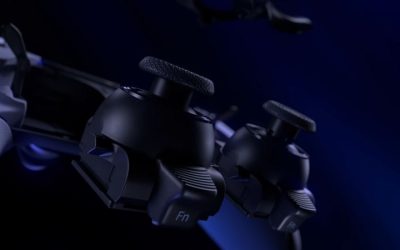
In modern gaming setups, ergonomic efficiency dictates performance. Standard controllers force a mechanical trade-off: your right thumb manages both camera movement via the right analog stick and essential actions via the face buttons (A/B/X/Y or Cross/Circle/Square/Triangle). Every time you move your thumb to jump, crouch, or reload, you lose control over your aim for 200 to 400 milliseconds. Back buttons—whether built directly into a premium custom pad or added via clip-on rear attachments—solve this spatial dilemma by transferring those face-button inputs to your middle or ring fingers on the underside of the controller shell.
Our top picks

 IWGAME Back Paddles for PS-5 Controller
- 【Pre-use Notice】𝗚𝗼 𝘁𝗼 𝘁𝗵𝗲 for 𝗣𝗦-𝟱 𝗦𝘆𝘀𝘁𝗲𝗺 𝗦𝗲𝘁𝘁𝗶𝗻𝗴𝘀…
- 【Microphone Function】The back paddles supports the controller’s headphone…
- 【Plug and Play Wired Connection】Unlike other remap kits…
As an Amazon Associate we earn from qualifying purchases at no extra cost to you.
As game mechanics become increasingly movement-heavy in 2026, rear-actuation inputs allow you to jump, slide, reload, and swap weapons without ever compromising your thumb stance on the analog sticks. Physically, adding back buttons generally takes one of two paths:
- First-Party or Premium Pro Controllers: Fully integrated rear paddles or buttons built directly into high-end pads ($180 to $200+). These usually retain full wireless capability, weigh between 11.5 and 12.2 ounces, and feature custom firmware configuration.
- Direct Clip-On Attachments: Modular adapter shells ($40 to $50) that attach directly to standard stock controllers (such as the standard PlayStation 5 DualSense). These add approximately 1.5 to 2.2 ounces (42 to 62 grams) of hardware to your grip and provide 2 to 4 programmable rear tactile switches. To maintain low-latency signal speeds and power the expansion board, these attachments typically require a physical 7.2-foot USB cable running directly to your console or PC.
Beyond simple 1:1 button remapping, many dedicated back button systems support advanced features such as rapid-fire Turbo modes, custom macro execution sequences, and full controller button swapping. This turns a standard controller layout into an customizable input hub suitable for high-tempo gaming desks or living room setups.
Pros
- Uninterrupted Aim Control: Keeps your right thumb permanently on the analog stick during jumps, slides, crouches, and reloads, granting instant spatial awareness and target tracking.
- Reduced Strain Compared to “Claw” Grip: Eliminates the need to contort your index finger over the face buttons (the traditional claw grip), offering a far more natural, neutral wrist alignment during long gaming sessions.
- Extensive Customization: Modern systems support multi-button remapping, macro inputs, and turbo functions, letting you tailor inputs specifically to individual game genres.
- Cost-Effective Upgrade Paths: Modular 4-button clip-on attachments ($42.99 to $49.99) allow players to gain pro-tier functionality on existing controllers without buying a complete $200 custom controller.
- Low Signal Latency: Wired back-button adapters operate via direct USB pass-through (using 7.2-foot cables), delivering imperceptible input lag (under 1 millisecond) crucial for competitive matches.
Cons
- Initial Learning Curve: Retraining built-in muscle memory takes time; most players experience 3 to 10 days of degraded performance while learning not to reach for face buttons.
- Tethering Requirements for Add-ons: Budget-friendly clip-on paddle attachments generally require a wired connection via a 7.2-foot USB cable to operate, which may restrict players sitting far from a TV across a large living room.
- Added Weight and Bulk: Clip-on modules add up to 2.2 ounces of hardware and alter the rear contour of your controller, which can feel bulky for smaller hands.
- Accidental Actuations: Highly sensitive microswitches on rear paddles can be accidentally triggered when gripping the controller tightly during intense gameplay moments.
Who Should Buy It
Back buttons are an ideal investment for competitive first-person shooter (FPS) enthusiasts playing titles like Call of Duty, Apex Legends, or Halo, where jump-shotting and slide-canceling are essential mechanics. They are equally valuable for action-heavy titles requiring quick dodging while keeping camera control centered. Furthermore, budget-minded gamers who want pro-level competitive tools without shelling out $180–$200 for a flagship pro controller will find immense value in $40 to $50 clip-on rear attachments.
Who Should Skip It
Casual players focused on single-player narrative games, turn-based RPGs, sports simulators, or cozy games should pass. The mechanical advantage of simultaneous aiming and action-button pressing is negligible in slow-paced environments. Additionally, gamers who sit more than 7 feet away from their display console and dislike long running cables should avoid wired adapter modules, as standard 7.2-foot cords may stretch uncomfortably across a living room space.
Cheaper Alternatives
If you aren’t ready to invest in an expensive custom controller or dedicated clip-on paddle accessories, several practical layout workarounds and low-cost alternatives exist:
| Option | Cost | Trade-off |
|---|---|---|
| In-Game Software Remapping (Bumper Jumper) | $0 | Reallocates jump/crouch to shoulder bumpers (L1/R1); breaks traditional muscle memory for grenade throwing. |
| “Claw” Hand Grip Technique | $0 | Curling index finger across face buttons causes physical hand fatigue and long-term joint strain. |
| DIY Internal Ribbon Shell Modifications | $25 – $35 | Requires opening the controller housing, soldering/ribbon installation, and voids manufacturer warranty. |
| Wired Clip-On Paddle Attachments | $40 – $50 | Requires a physical 7.2-foot USB cable connection to the console; adds 1.5–2.2 oz of physical bulk. |
| Full First-Party Pro Controller | $180 – $200+ | High financial investment; built-in rechargeable battery longevity varies over heavy use. |
FAQ
How long does it take to get used to using controller back buttons?
Most players require between 3 and 7 days of consistent play (about 5 to 10 total gaming hours) to build reliable muscle memory. During the first few sessions, it is common to accidentally press the rear switches or revert back to standard face buttons during high-stress encounters. Practicing in casual, low-stakes game modes accelerates this adjustment period.
Do back button attachments add significant weight to the controller?
Integrated pro controllers weigh roughly 11.5 to 12.2 ounces overall. Clip-on attachments typically add between 1.5 and 2.2 ounces (42 to 62 grams) to your existing controller. While this weight gain is relatively light, the altered physical contour at the back of the controller handles is often more noticeable than the weight itself.
Are back button attachments better than buying a $200 pro controller?
For value-focused gamers, yes. Clip-on attachments priced around $42.99 to $49.99 offer roughly 80% of the functionality found on $200 pro controllers—including 4 remapping paddles, turbo features, and macro support—at a quarter of the price. The main compromise is that budget attachments typically require a 7.2-foot wired USB connection, whereas dedicated pro pads maintain wireless capability.
Do back buttons cause hand cramping or finger strain?
No, when used properly, back buttons actually reduce hand strain compared to alternative competitive grips like the “claw” hold. Because rear paddles align naturally with where your middle and ring fingers rest on the back grip handles, pressing them requires minimal joint movement, promoting a more natural, relaxed posture for your hands.