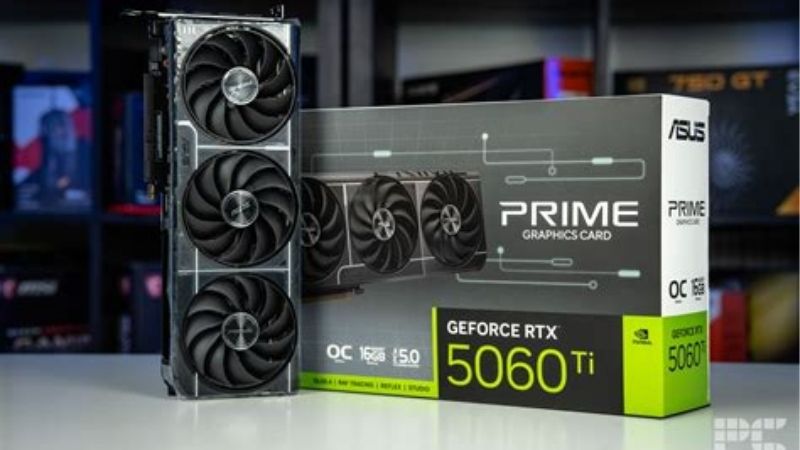
The RTX 5060 Ti 8GB vs 16GB choice is not about buying a faster GPU chip. Both desktop cards use the same Blackwell graphics processor, but the 16GB model gives demanding games room to keep more textures, ray-tracing data, and working assets in local video memory. For a new 1440p gaming PC, the 16GB version is usually the safer technical choice; for budget-focused 1080p gaming with adjusted settings, the 8GB model can still make sense. The price difference matters enormously, however, because current US retail pricing may be very different from NVIDIA’s original $50 launch-price gap. This guide compares the two desktop cards—not the ordinary RTX 5060 or laptop variants.
Quick answer: which RTX 5060 Ti should you buy?
Choose the RTX 5060 Ti 16GB when you play recent single-player games at 1440p, use high-resolution texture packs, prefer ray tracing, keep games for several years, or run memory-intensive creation tools. In these situations, the extra memory can protect frame-time consistency and prevent aggressive settings reductions. It is the version we would prioritize at a reasonable premium, not at any price.
Choose the RTX 5060 Ti 8GB when your games are mostly esports titles or less demanding releases at 1080p, you are comfortable using Medium or High presets instead of Ultra, and the actual selling price is substantially lower. It is not automatically a poor gaming GPU. Its limitation is that its graphics processor can be capable of more than its memory capacity comfortably supports in certain modern games.
Choose neither if a 16GB RTX 5060 Ti is priced near a materially faster class of GPU, or if an 8GB model costs too much for the compromises it requires. Compare the actual US checkout prices of specific board-partner cards before accepting either configuration. Historical launch prices are not live purchase offers.
| Buyer or workload | Better default | Why | Important qualification |
|---|---|---|---|
| Competitive gaming at 1080p, tuned settings | 8GB if deeply discounted | Many games fit within the smaller memory budget | Check 1% lows, not just average FPS |
| New 1440p AAA build | 16GB | Higher presets and larger assets are less likely to hit a VRAM limit | More VRAM does not guarantee high FPS |
| High-quality ray tracing | 16GB | Ray tracing can raise memory demand significantly | The GPU still has finite RT processing power |
| Gaming on an older PCIe 3.0 desktop | 16GB if keeping this GPU | Less dependence on transfers over a narrow link when VRAM fills | Confirm motherboard, slot, and firmware compatibility |
| Video editing, local AI or 3D scenes | 16GB | More projects or model data may fit on the card | Application-specific acceleration still matters |
| Extremely large price difference | Reconsider both | Paying a huge premium for the same GPU core can be poor value | Compare other GPUs at the same real price |
RTX 5060 Ti 8GB vs 16GB specifications
The baseline RTX 5060 Ti specifications listed by NVIDIA are shared across the two capacities. The major design difference is how much GDDR7 memory is installed; there is no secret extra set of CUDA cores in the 16GB model. Figures below describe NVIDIA’s reference-level GPU specifications, not every factory-overclocked retail board.
| Specification | RTX 5060 Ti 8GB | RTX 5060 Ti 16GB |
|---|---|---|
| Architecture | NVIDIA Blackwell | NVIDIA Blackwell |
| CUDA cores | 4,608 | 4,608 |
| Published boost clock | 2.57 GHz | 2.57 GHz |
| Video memory | 8GB GDDR7 | 16GB GDDR7 |
| Memory bus | 128-bit | 128-bit |
| Memory data rate | 28 Gbps | 28 Gbps |
| Theoretical memory bandwidth | 448 GB/s | 448 GB/s |
| PCIe interface | PCIe 5.0 x8 | PCIe 5.0 x8 |
| Published total graphics power | 180W | 180W |
| NVIDIA recommended system PSU | 600W | 600W |
| DLSS / Multi Frame Generation family | Supported in compatible games | Supported in compatible games |
| Original US launch MSRP, April 2025 | $379 | $429 |
Both versions use the same GPU architecture and support the same families of NVIDIA graphics features. A board partner can change the cooling design, dimensions, power connector arrangement, factory clock, display-port selection, or power limit. Do not assume two cards have identical physical fit merely because the GPU name matches.
What identical bandwidth does—and does not—mean
Each model uses a 128-bit interface and 28 Gbps GDDR7, yielding 448 GB/s of theoretical memory bandwidth. Therefore, the 16GB option does not double the rate at which the GPU reads its video memory. If a game already fits comfortably into 8GB, simply installing the 16GB configuration will not magically double performance. Small differences between retail cards can also reflect clock, power, cooling, or run-to-run variance rather than the memory capacity itself.
Capacity becomes crucial when a game needs more working data than the smaller card can hold. The GPU may evict assets or retrieve them from slower system memory, forcing additional traffic across the PCIe link. Games may respond with stutters, delayed textures, lower minimum frame rates, or a sharper average-FPS drop. Some engines instead lower texture quality silently; a seemingly acceptable frame rate can mask reduced visual fidelity.
How much faster is the 16GB card in actual games?
There is no honest universal percentage for this comparison. Performance depends on which games and graphics modes are measured, whether ray tracing is enabled, which driver and game builds are installed, and whether an individual scene exceeds 8GB of VRAM. Comparing numbers from separate websites as if they formed one test suite would be misleading.
For a broad starting point, Tom’s Hardware compared the two RTX 5060 Ti capacities in a 21-game gaming suite published in August 2025. The following rows report the 8GB model’s deficit relative to the 16GB model within that publication’s methodology; they are historical third-party results, not benchmarks performed by Geek Gaming Tricks.
| Test mode in that 21-game suite | 8GB relative to 16GB | How to read it |
|---|---|---|
| 1080p Medium, all games | About 2.3% slower | Similar speed while the memory demand is controlled |
| 1080p Ultra, all games | About 11% slower | High-quality settings begin separating the cards |
| 1080p Ultra, raster-only subset | About 5% slower | Traditional rendering is often less memory-stressed |
| 1080p Ultra, ray-tracing subset | About 26% slower | RT content can be much more sensitive to memory limits |
| 1440p Ultra, all games | About 18% slower | Bigger average penalty and more demanding outliers |
| 1440p Ultra, ray-tracing subset | About 39.6% slower | Severe pressure in the tested RT-heavy games |
| 4K Ultra, all games | About 42% slower | Memory is a major bottleneck, though neither is a universal 4K-Ultra solution |
These suite averages must not be read as a forecast for your particular library. For example, a lightweight esports game can show a small gap at 1080p, while a large open-world game with high textures and ray tracing may behave much worse on the 8GB card. A disastrous result in one demanding title can also move a small-suite average substantially. Choose your purchase based on the games and settings you will actually use.
A newer 2026 example: averages versus 1% lows
A separate March 2026 PC Gamer investigation illustrates why smoothness matters as much as headline FPS. In its Kingdom Come: Deliverance 2 1440p High test with Quality upscaling, the 16GB RTX 5060 Ti recorded 118 average FPS and 110 FPS for its 1% lows. The 8GB version recorded 110 average FPS and 90 FPS for 1% lows. This is an example from one publication’s specific test, not a cross-game average and not a result we reproduced.
The average difference there is relatively modest, but the lower 1% low indicates a less consistent worst-percentile experience. The same publication’s Cyberpunk 2077 ray-tracing tests illustrated a different kind of gap: at 1440p Ultra RT with Quality upscaling and frame generation enabled, the 16GB card reached 92 average FPS and 69 FPS for 1% lows, compared with 80 and 43 on the 8GB card. Frame-generated averages should not be interpreted as equivalent to native game-engine responsiveness.
These two examples highlight the right way to read GPU reviews. When both cards are already smooth with your preferred settings, a large capacity premium may be hard to justify. When the 8GB option repeatedly drops into uneven frame times while the 16GB version remains steadier, memory capacity becomes a practical difference rather than a specification-sheet talking point.
Is 8GB of VRAM enough for 1080p gaming in 2026?
Yes, for many games—but the phrase “1080p gaming” is too broad to answer without settings and game types. At 1080p Medium, a large group of games fits within 8GB, and the RTX 5060 Ti’s underlying GPU remains capable. Fast-paced multiplayer games often benefit more from a sensible competitive graphics preset than from maximizing every texture and ray-tracing toggle. If your target is a stable 120 or 144 FPS in games whose VRAM demands are modest, 8GB can be a reasonable purchase at the right price.
The situation changes when “1080p” also means maximum textures, ray tracing, high-resolution texture packs, or newer asset-heavy releases. Games can exceed 8GB even without a 1440p monitor. The memory budget must hold render targets, resources, and other data beyond the visible texture setting. Running out of that budget can make the 8GB model look unexpectedly weak despite its otherwise identical GPU core.
If you buy 8GB, treat graphics tuning as part of ownership rather than a rare emergency fix. Start with a High or Medium preset, examine texture quality and ray tracing separately, and test a busy scene. Keep an eye on frame-time consistency and visual asset loading. You may find the practical image-quality trade-off small in one game and very noticeable in another.
Is the RTX 5060 Ti 16GB worth it for 1440p?
For a new system focused on modern single-player games, 16GB is the better-balanced configuration. The underlying RTX 5060 Ti core is competent enough for many 1440p experiences using sensible settings and upscaling, so avoidable memory restrictions are frustrating. The 16GB version gives you a larger margin for high-resolution assets and can allow the GPU to perform closer to what its shader and RT hardware otherwise permit.
That does not transform it into a premium 1440p or 4K GPU. In especially demanding releases, you may still need DLSS Quality, lower ray-tracing settings, or reductions to shadows and effects. Extra VRAM helps when VRAM is the binding constraint; it does not overcome limited shader throughput, memory bandwidth, or RT performance. Buy the card for a realistic target—such as solid 1440p play at a well-chosen quality level—rather than assuming 16GB means every setting can stay on Ultra.
If the 16GB model is massively overpriced, a faster GPU from another tier may deliver more useful performance at the same total cost. That is why the price recommendation later in this guide is conditional rather than an automatic endorsement of any 16GB listing.
Ray tracing and high-resolution textures: where capacity matters most
Ray tracing often expands the GPU’s memory footprint because it uses additional acceleration structures, buffers, and denoising-related resources. High texture settings add another demand. In combinations such as 1440p Ultra plus ray tracing, the 8GB model can cross its capacity limit while the 16GB version remains inside local VRAM. That explains why some matched tests find a relatively small gap without ray tracing and a far larger one with it.
TechSpot’s RTX 5060 Ti 8GB review illustrated the issue in titles such as Final Fantasy XVI and Indiana Jones and the Great Circle. In its Final Fantasy XVI native 1440p Ultra test, the 16GB option delivered significantly higher average frame rates and much stronger lows. Moving to DLSS Quality did not automatically erase the VRAM problem at those settings. This is not evidence that every game will behave the same way; it is evidence that capacity can override the usual expectation of similar speed between identical GPU cores.
Texture settings are often the first sensible adjustment on 8GB hardware because texture residency can be a direct source of pressure. But do not assume lowering resolution alone will solve everything. Games allocate memory differently, and certain combinations of texture packs, ray tracing, and frame generation remain expensive even when the output resolution is reduced.
Why a game can show acceptable FPS but still feel rough
Average FPS compresses an entire run into one number. A video-memory shortage may produce occasional long frames during camera turns, new-area traversal, explosions, or rapid asset streaming, rather than suppressing every frame equally. As a result, averages can look close while the experience feels less fluid on the 8GB version. Compare 1% lows, frame-time plots, repeat runs, and the appearance of loaded assets when judging these cards.
It is also important not to overinterpret an in-game VRAM overlay. Some tools show allocated memory rather than precisely how much capacity the current scene requires. An 8GB card reporting around 7GB does not prove that the 16GB model is wasting its larger allocation. Use measured behavior, texture quality, and reproducible settings to identify a real bottleneck.
DLSS 4, Multi Frame Generation, and the memory trade-off
Both desktop RTX 5060 Ti configurations support the NVIDIA DLSS feature family, including Super Resolution and Multi Frame Generation in compatible games. The 16GB version does not unlock a fundamentally different DLSS tier merely because it has more memory. What it can offer is a larger budget for the actual game workload plus graphics-enhancement features when those consume additional resources.
DLSS Super Resolution reduces the internal rendering workload by reconstructing a higher-resolution image from a lower-resolution input. It may ease some graphics and memory demands, but the amount varies by game, internal resolution, and asset management. It is not a guaranteed cure for a high-texture or ray-tracing VRAM overflow. Treat a boost in average FPS as promising, then look at frame-time data and image quality before deciding that the setting is fixed.
Multi Frame Generation generates displayed frames beyond traditionally rendered frames. That can raise the displayed frame-rate number, but it does not increase the game simulation rate by the same factor. It also does not supply missing video memory. If a game is already suffering from low real-frame throughput or memory-driven stuttering, generated frames should not be used to conceal the problem. Begin with adequate native or upscaled responsiveness and then decide whether frame generation improves the presentation on your display.
Reflex and latency: Both versions can use the relevant NVIDIA latency-reduction technologies when supported by the game and software configuration. Lower latency features are useful but do not remove VRAM limitations. This matters especially in competitive games, where latency and consistent base frame rate should take priority over the largest possible frame-generation counter.
PCIe 5.0 x8: a bigger consideration on older systems
Unlike some graphics cards using 16 PCIe lanes, the desktop RTX 5060 Ti connects over eight PCIe 5.0 lanes. It is backward compatible with earlier PCIe generations when the motherboard supports the card, but available link bandwidth declines with older standards. This does not automatically make the GPU slow on PCIe 3.0. It makes memory spills more painful when the 8GB card must fetch large amounts of data from system RAM.
TechSpot specifically compared both capacities across PCIe 3.0, 4.0, and 5.0. Its findings were conditional: the 16GB model was often relatively insensitive to the older link when its workload fit in VRAM, while the 8GB version could deteriorate dramatically in memory-heavy settings. In one Dragon Age: The Veilguard test, the 16GB card was smooth even on PCIe 3.0, while the 8GB configuration had substantially worse averages and 1% lows. PCIe 5.0 improved the smaller card somewhat but did not make its insufficient capacity disappear.
For someone upgrading an older desktop, the practical lesson is clear. First check the actual motherboard slot, link generation, and whether another device changes available lanes. Then match the card choice to the games and settings. An older PCIe 3.0 system can still run the RTX 5060 Ti, but the 16GB version has a stronger case if you intend to push modern asset-heavy games. Avoid buying a new motherboard solely to compensate for an 8GB card unless the entire platform upgrade makes sense independently.
What about 4K gaming?
The 16GB model is the clear choice between these two for memory-intensive 4K games, but neither card should be sold as a blanket 4K Ultra recommendation. The 4K image has far more pixels than 1080p, and demanding games can stress GPU compute, RT acceleration, and memory bandwidth simultaneously. The historical 42% overall 8GB deficit at 4K Ultra in one benchmark suite shows how severe capacity pressure can become—not that the 16GB model always runs those games smoothly.
If you occasionally connect your PC to a 4K television, a carefully tuned 16GB RTX 5060 Ti can still be useful with DLSS and reduced settings. If your primary goal is native 4K, heavy ray tracing, or high-refresh 4K, look at a faster graphics tier rather than treating VRAM capacity as a substitute for GPU performance. The 8GB variant is especially difficult to justify for a 4K-first build.
Streaming, editing, 3D, and local AI: does 16GB help?
For recording or livestream encoding, the two cards share the RTX 5060 Ti’s underlying NVENC generation and AV1 capability. Simply encoding a typical gameplay stream does not automatically require twice the VRAM. More memory can still provide headroom when a demanding game, recording software, browser overlays, and other GPU-accelerated tools run together. Check the precise application’s encoder support and workload rather than assuming a universal capacity threshold.
Video editing and 3D rendering are more sensitive to the size of particular projects. Large timelines, effects, textures, scenes, and GPU render datasets may benefit from keeping their working sets in local memory. An application that is fully comfortable within 8GB may show little speed advantage from the larger configuration, while a job that cannot fit can slow drastically or fail. Capacity is best evaluated against actual scenes and projects, not a generic “creative performance” percentage.
Local AI is another capacity-dependent use case. A model that fits in 16GB but not 8GB may be able to run with fewer compromises, though memory requirements depend on model size, quantization, runtime, context, and other software details. Having 16GB is not a promise that any particular model will fit or run well. For buyers primarily interested in professional compute, compare software compatibility, effective GPU compute, and VRAM against workstation or higher-tier options as well.
Power, cooling, power supply, and fit
NVIDIA lists 180W total graphics power and a 600W recommended system power supply for the RTX 5060 Ti family. These are published baseline figures, not proof that every retail variant draws exactly 180W at every moment or that any existing 600W PSU is adequate regardless of CPU, quality, age, and connectors. Factory-overclocked models can have different limits and thermal characteristics.
Both capacities can appear in compact dual-fan cards and larger triple-fan designs. Noise, card thickness, length, weight, and electrical connectors are properties of the exact board-partner SKU. A nominally cheaper card is not a bargain if it blocks another slot, collides with a front-mounted radiator, or demands a power connector your PSU cannot supply safely.
Before purchase, verify the full model number, physical measurements, PSU headroom, and required cable type on the manufacturer page. Use a proper native PSU lead or an officially supported adapter with the connector fully seated. Do not infer that a card uses the same power plug as a different RTX 5060 Ti listed by the same retailer. Display outputs can also vary by manufacturer, so match your monitor cable and desired refresh-rate mode to the actual board.
Price and value in 2026: the $50 launch gap is outdated
At the April 2025 launch, NVIDIA’s original US prices were $379 for the 8GB model and $429 for the 16GB model. At that narrow $50 difference, the extra capacity was easy to recommend to most buyers. Those were historical launch MSRPs, not verified prices at a US store today. A current purchase decision must compare in-stock cards with precise model names, warranty terms, and sellers.
The importance of this distinction grew in 2026. Tom’s Hardware’s August 10, 2026 Newegg-market survey reported medians of $529.99 for the 8GB RTX 5060 Ti and $804.99 for the 16GB model. These numbers describe a dated survey of listing medians, not two matched, purchasable SKUs or today’s checkout prices. The survey shows why a recommendation based on “just pay $50 more” can be badly wrong in the current market.
A sensible decision framework is to compare the actual premium against what you would gain and what competing GPUs cost. If a 16GB listing is only modestly more expensive, buy the memory headroom for a new 1440p system. If it costs dramatically more, look beyond the RTX 5060 Ti family—possibly at a faster Nvidia model, a Radeon with suitable VRAM, or a better-priced used card with a return window. The exact crossover depends on live local listings and the games you play; it cannot be established from launch MSRP alone.
Price-check checklist before paying
- Select a precise 8GB SKU and a precise 16GB SKU from reputable US sellers, not generic GPU-family advertisements.
- Record each item price, shipping, tax, condition, stock status, return terms, and whether the listing is from a marketplace third party.
- Confirm the memory capacity in both the manufacturer’s full part number and the seller’s specification panel. Product photography alone is not sufficient.
- Compare the total checkout prices, not percentages shown against an unverified reference price.
- Check a materially faster alternative in the same real price range before committing to an unusually expensive 16GB board.
- If a good offer is not available, set a personal price ceiling based on your budget and monitor for a better listing instead of assuming either version is a bargain.
Should you upgrade an existing 8GB RTX 5060 Ti to the 16GB model?
Not usually as a routine upgrade. These cards share the same core architecture, shaders, feature support, and published memory bandwidth. If your existing 8GB board already meets your frame-rate and visual-quality targets, replacing it with another RTX 5060 Ti is likely to offer limited value. Save for a larger GPU-class upgrade, or keep using settings that suit the card.
A same-family swap becomes more defensible if particular games or applications repeatedly run into demonstrable memory limits, and you can move to the 16GB card for a small net cost after resale. Even then, check whether a faster GPU with more memory is within reach. The extra 8GB is real, but it does not turn the rest of the hardware into a higher-tier GPU.
For new builders, the calculation is different: choosing enough VRAM from the outset may avoid an early replacement. The best choice, however, still depends on today’s actual retail premium. Paying too much to avoid future regret can create a different kind of regret immediately.
Who should skip each version?
Skip the 8GB if you prioritize new AAA releases at 1440p, ray tracing, large texture modifications, 4K gaming, or memory-heavy local projects. You would be purchasing a capable GPU core with a constraint likely to show up in precisely the situations you care about. An especially old PCIe platform makes the memory-risk argument stronger, not weaker.
Skip the 16GB if it carries an extreme price markup relative to the 8GB card or materially faster alternatives. Extra VRAM protects against one major bottleneck, but spending near upper-midrange money on a mainstream-tier GPU can be a poor investment. It is also unnecessary to pay a premium if all your games fit comfortably in 8GB and you plan to keep visual settings modest.
Skip both when your budget allows a substantially faster GPU suited to your resolution, or when the selling prices are inconsistent with the performance tier. A GPU comparison is only useful if it does not force a false two-option choice.
Frequently asked questions
Is the RTX 5060 Ti 16GB twice as fast as the 8GB version?
No. The two versions use the same GPU core configuration and memory bandwidth. The 16GB card can be dramatically faster in specific memory-constrained tests, but the gap can be negligible in lighter games that fit inside 8GB. Doubling capacity is not the same as doubling compute power.
Can the RTX 5060 Ti 8GB run games at 1440p?
Yes. Many games run well at 1440p with carefully chosen presets and upscaling. The concern is not a hard resolution lock; it is the higher chance that recent games at demanding settings will exceed 8GB and suffer stutters, visual compromises, or lower frame rates. Test your target games rather than treating every 1440p game alike.
Does DLSS solve the 8GB VRAM problem?
Not reliably. Upscaling can reduce rendering workload and may decrease memory use, but high-resolution assets, ray tracing, and game-specific allocations can still exceed capacity. Frame generation can also add workload without fixing poor base-frame pacing. Look at 1% lows and image quality, not just displayed FPS.
Do both versions support DLSS Multi Frame Generation?
Yes, in supported games and software configurations. The difference between these versions is memory capacity, not their access to the RTX 50-series feature family. Whether a given title offers a feature and whether it performs well with the selected preset are separate questions.
Is 16GB VRAM enough for 4K gaming?
It is more appropriate than 8GB for 4K asset demands, but memory capacity alone does not establish adequate 4K performance. Many intensive games still require upscaling or substantial setting reductions on this GPU class. If high-quality 4K gaming is the main goal, consider the overall performance tier first.
Should I buy the cheapest RTX 5060 Ti card regardless of memory size?
Only after checking the whole purchase. Verify the exact SKU, cooler dimensions, connector requirements, seller, warranty, return conditions, and your target game settings. When memory-intensive games matter, a cheap 8GB card can be a false economy. When the 16GB premium is enormous, a different GPU may be better than either.
Final thoughts
For most new 1440p buyers deciding between these exact GPUs, the RTX 5060 Ti 16GB is the better technical fit: it removes a significant memory limitation without pretending to add a faster GPU core. The RTX 5060 Ti 8GB remains workable for cost-conscious 1080p players who willingly tune settings. Before buying, compare exact in-stock US SKUs at checkout and check a faster alternative at the same total price. If the 16GB premium is too high, do not pay it simply because the memory number is larger.