Key takeaways
- Best for: An enthusiast who prioritizes usable quiet airflow over price or RGB.
- Strengths: Well-documented performance, anti-vibration accessories, six-year warranty.
- Drawbacks: Premium cost and non-RGB styling.
- Before buying: Measure 140 mm hole positions and fan-pad clearance.
The best 140mm quiet case fans are not necessarily the models with the lowest printed decibel number. A large fan often moves the required air at a slower speed than a smaller fan, but grille turbulence, bearing tone, case vibration, and a restrictive radiator can still make a PC noticeably loud. Our overall pick is the Noctua NF-A14x25 G2 PWM for controlled airflow with headroom; the G2 LS-PWM is a specialized option for very low heat loads. This roundup compares manufacturer-confirmed dimensions and intended uses, and keeps independent testing separate from advertising claims.
Quick verdict: quiet cooling is about airflow at tolerable noise
Choose the standard Noctua NF-A14x25 G2 PWM if a gaming PC needs to stay controlled under varying heat, or the lower-speed G2 LS-PWM only when the system can live within an 800 rpm limit. Be quiet! Silent Wings 4 PWM is an understated low-speed alternative, while ARCTIC P14 PWM PST offers more economical multi-fan coverage. Pure Wings 3 is a conservative budget choice and the Corsair RS140 MAX makes sense when a compatible radiator or chassis can handle a 30 mm frame.
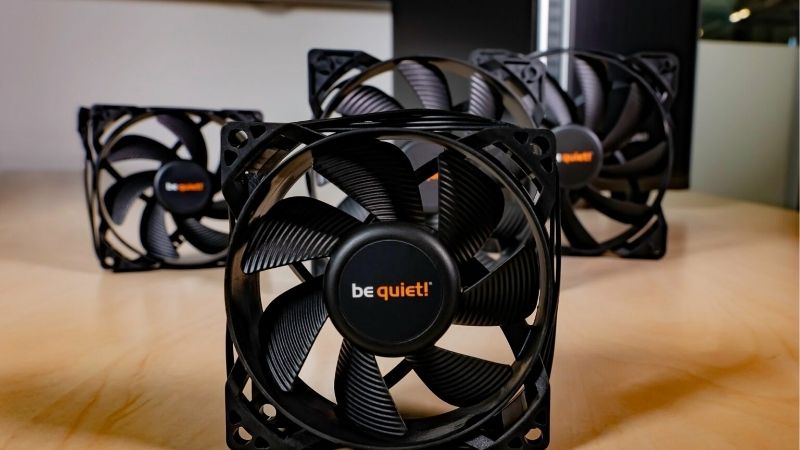
140 mm fan comparison: size and cooling envelope
| Model | Dimensions | Verified manufacturer speed / performance | Best role | US price / stock |
|---|---|---|---|---|
| Noctua NF-A14x25 G2 PWM | 140 x 140 x 25 mm | 1,500 rpm; 91.58 CFM; 2.56 mm H2O | Premium quiet case, radiator or heatsink | US price/stock: confirm seller |
| Noctua NF-A14x25 G2 LS-PWM | 140 x 140 x 25 mm | 800 rpm max; 48.03 CFM; 0.71 mm H2O | Light-load, open-airflow quiet workstation | US price/stock: confirm seller |
| be quiet! Silent Wings 4 140 mm PWM | 140 x 140 x 25 mm | 1,100 rpm max; six-pole motor | Black, non-RGB low-noise case | US price/stock: check retailer |
| ARCTIC P14 PWM PST | 140 x 140 x 27 mm | 200–1,700 rpm; 72.8 CFM; 2.40 mm H2O | Two or more affordable PWM case intakes | US price/stock: check seller and pack |
| be quiet! Pure Wings 3 140 mm PWM | 140 x 140 x 25 mm | 1,200 rpm max | Budget low-noise mesh-front case | US price/stock: confirm listing |
| Corsair RS140 MAX | 140 x 140 x 30 mm | 425–1,600 rpm; up to 104 CFM | 140 mm radiator with 30 mm fan clearance | US price/stock: check Corsair seller page |
Different manufacturers quote noise in dB(A), Sone, or under different operating conditions. They cannot be sorted into a universal “quietest” ranking without standardized measurement at similar delivered airflow and system resistance. In particular, the 11.4 dB(A) published for Noctua’s LS-PWM at 800 rpm is not evidence that it cools more quietly than a standard G2 at 1,500 rpm. Price and inventory are noted only when actually confirmed rather than inferred from old MSRP lists.
The best 140mm quiet case fans by practical use case
Noctua NF-A14x25 G2 PWM — best overall quiet high-performance 140 mm fan
The NF-A14x25 G2 PWM is the premium all-rounder when a case has a conventional square 140 mm mounting location and the owner cares about sound quality under actual airflow resistance. Noctua publishes a 140 x 140 x 25 mm frame, a maximum 1,500 rpm, 91.58 CFM and 2.56 mm H2O static pressure. Those figures represent separate maximum endpoints, but the design intent is clear: deliver useful airflow without relying on extreme rotational speed.
Noctua includes a low-noise adapter, anti-vibration mounting items and a radiator gasket. The standard PWM variant retains a useful speed range for a gaming system that alternates between desktop use and high GPU load. Independent fan databases such as Cybenetics provide an important second perspective on efficiency, although their measured dBA values should not be directly compared with manufacturer numbers because test setups differ. In a filtered case, the gasket and careful inlet spacing may have more value than a slightly lower specification-sheet noise rating.
Premium price and the familiar brown color may make this fan a poor visual choice for a glass-front RGB build. Even with excellent engineering, a fan pushed against restrictive stamped-metal grille openings can create turbulence. Noctua lists an overall depth up to 27 mm with installed pads, so mechanical clearance still needs checking. Use the low-noise adapter only if its capped airflow leaves acceptable component temperatures during the intended game load.
- Best for: An enthusiast who prioritizes usable quiet airflow over price or RGB.
- Strengths: Well-documented performance, anti-vibration accessories, six-year warranty.
- Drawbacks: Premium cost and non-RGB styling.
- Before buying: Measure 140 mm hole positions and fan-pad clearance.
Noctua NF-A14x25 G2 LS-PWM — best purpose-built ultra-low-speed choice
The LS-PWM version is different from running the standard G2 at full speed. Noctua limits this variant to 800 rpm, publishing 48.03 CFM, 0.71 mm H2O and 11.4 dB(A) at that speed; its included low-noise adapter reduces the published speed to 600 rpm. Those are useful specifications for a machine that mostly idles or performs light work, but they are not proof it can quietly cool a power-hungry graphics card through a restrictive filter.
For an open-front case, a large fan turning slowly can create pleasant background airflow without the pronounced tonal changes caused by frequent ramping. The LS-PWM motor still accepts PWM control, which gives finer tuning than a fixed three-pin fan. Its real advantage is being designed with low-speed operation as the default, not being a conventional high-speed fan that happens to have a low fan-curve setting.
This is a specialized rather than universal recommendation. If a 140 mm radiator must dissipate significant gaming heat, the LS-PWM’s 800 rpm ceiling may leave insufficient temperature headroom. The lower manufacturer dBA rating is linked to its much lower speed and cannot be used to claim it outperforms a full-speed G2 on noise-normalized cooling. Prefer the standard G2 PWM if you need the flexibility to ramp above 800 rpm under load.
- Best for: Silence-first systems with low-to-moderate heat and little flow restriction.
- Strengths: 800 rpm ceiling, published 11.4 dB(A), six-year warranty.
- Drawbacks: Limited pressure and cooling headroom for hot gaming systems.
- Before buying: Do not buy as a radiator high-load substitute without thermal planning.
be quiet! Silent Wings 4 140 mm PWM — best understated premium alternative
The non-high-speed Silent Wings 4 140 mm PWM focuses on quiet operation, understated styling, and flexible installation. Be quiet! identifies the PWM variant as BL096 and specifies a maximum 1,100 rpm, with a six-pole motor, fluid-dynamic bearing, and anti-vibration mounting. It is a different product from the high-speed Silent Wings 4 and the switchable-speed Silent Wings Pro 4, so those models’ ratings should never be pasted into its comparison row.
A lower designed top speed can make it easier to keep a case from suddenly getting loud, particularly when two large fans provide intake airflow through a fairly open mesh panel. The vibration-control mounting choices also matter in resonant aluminum panels. For a premium PC that is mostly about clean black aesthetics rather than illumination, this fan is a logical alternative to Noctua’s brown finish.
A 1,100 rpm cap is a compromise under very heavy gaming loads or dense radiator resistance. The vendor’s claims about silence do not establish a sound-pressure advantage against Noctua or ARCTIC in the same enclosure. Check the exact article number and whether the unit uses the preferred push-pin or screw mounting option for the intended position. If cooling demand is high, step up to a higher-headroom model instead of treating the low ceiling as universally beneficial.
- Best for: A dark non-RGB build with modest airflow resistance.
- Strengths: Low maximum speed, six-pole motor, anti-vibration mounting.
- Drawbacks: Less maximum airflow headroom than high-speed options.
- Before buying: Buy the BL096 PWM version, not a high-speed or DC variant.
ARCTIC P14 PWM PST — best budget 140 mm airflow setup
ARCTIC’s P14 PWM PST is the practical budget recommendation if you need multiple 140 mm fans and can accept a 27 mm-deep frame. The official product page specifies 200–1,700 rpm, 72.8 CFM, 2.40 mm H2O, a fluid-dynamic bearing and a six-year warranty. The PST cable arrangement allows fans to share a PWM control signal, which is particularly valuable on a board with limited convenient chassis headers.
Two larger fans operating at restrained speed can be a better acoustic starting point than one fan run aggressively, provided the case offers unobstructed mounting and the motherboard can power them safely. ARCTIC also supports stop-at-idle behavior below the specified PWM threshold. That can make office or browsing work nearly silent, though it should be tuned carefully in a hot case where stationary fans could let temperatures rise quickly between workloads.
The published 0.3 Sone noise figure is not a dB(A) value and should not be mixed into a ranking table beside another brand’s decibel rating. Also, many builders expect 140 mm fans to be 25 mm deep; this product is 27 mm, which may be enough to conflict with a radiator or tight side-panel bracket. The extra two millimeters and shared-header current budget are essential buying checks, not minor footnotes.
- Best for: Budget multi-fan setups with available 27 mm space.
- Strengths: PST chaining, broad PWM range, six-year warranty.
- Drawbacks: 27 mm depth; acoustics need real-case curve tuning.
- Before buying: Confirm 27 mm depth, pack quantity, and summed fan current.
be quiet! Pure Wings 3 140 mm PWM — best low-cost low-speed intake
Pure Wings 3 140 mm PWM is a less expensive design idea than Silent Wings 4: a simple black fan with modest maximum speed and a manufacturer focus on easy everyday quietness. Be quiet! specifies the 140 mm PWM family at 1,200 rpm and sells both single and three-pack configurations. A triple-pack can suit a larger tower that needs several consistent intake or exhaust points, but it is easy to pay for an extra fan if the case supports only two.
The low rotational ceiling helps a simple BIOS fan curve stay restrained and reduces the temptation to chase a peak-flow number that the case cannot use. A rifle bearing and practical black finish are appropriate for a work-and-play PC where the fan is mostly hidden behind mesh. It is especially sensible when you want to replace noisy worn fans and do not need a premium lighting system or a specialized radiator fan.
Pure Wings 3 is not a substitute for independently validated noise-normalized benchmarking, and its maximum speed alone does not prove that it is quieter at a given airflow than another fan. Users with thick radiators or densely filtered panels should check whether this relatively conservative-speed design supplies sufficient cooling at the desired noise level. Make sure the retail listing actually says PWM and 140 mm; similarly named Pure Wings models cover other sizes and power types.
- Best for: Affordable quiet cooling with an uncomplicated black appearance.
- Strengths: Moderate speed, normal 25 mm frame, available multi-pack configuration.
- Drawbacks: Less high-load headroom and fewer premium mounting extras.
- Before buying: Verify 140 mm PWM variant and exact pack quantity.
Corsair RS140 MAX — best thicker-frame radiator candidate
The RS140 MAX is the outlier because its 30 mm-thick frame is designed to deliver greater rotor depth than a normal 25 mm fan. Corsair lists roughly 425–1,600 rpm, up to 104 CFM, a Magnetic Dome bearing, five-year warranty and no required iCUE LINK controller. For a radiator-capable case with deliberate clearance planning, it is a useful option when the goal is to achieve enough airflow at a lower everyday speed.
The selling point is headroom under resistance, not the assumption that a thicker fan is always quieter. Corsair’s 30 mm design is likely to suit some radiator installations better than a conventional slim-frame fan, but the outcome depends on the radiator, grill and fan curve. Standard PWM control reduces the ecosystem complexity compared with many RGB-only choices. On an open front-panel intake, the extra frame thickness may add little practical benefit if a good 25 mm fan already does the job.
Full-speed noise can still be conspicuous; Corsair’s published specification reaches about 31 dBA at its rated speed, a value measured by its own method rather than a directly comparable rating. The more important downside is mechanical interference: 30 mm fans may conflict with radiator fittings, front panels, or an adjacent motherboard heatsink. Buy the RS140 MAX only if the exact case or cooler supports that added depth and the real benefit matters more than price.
- Best for: High-heat systems with room for thicker 140 mm radiator fans.
- Strengths: 30 mm frame, high airflow headroom, standard PWM, 5-year warranty.
- Drawbacks: Needs 30 mm space; high speed is not silent.
- Before buying: Verify 30 mm mounting depth and radiator screw compatibility.
How we selected quiet 140 mm fans
The first filter was genuine square 140 mm compatibility and manufacturer-published information for the exact PWM variant. Noctua’s NF-A14x25 G2 documentation, be quiet!’s Silent Wings and Pure Wings product materials, ARCTIC’s P14 specification, and Corsair’s RS140 MAX page provided dimensions, power-control details and design constraints. We then consulted independent fan work, including Cybenetics’ fan performance database, to avoid confusing attractive brochure acoustics with matched laboratory comparisons.
These are editorial recommendations based on evidence, not personal benchmark results. We did not measure sound pressure, install each fan in one standard case, or calculate degree-per-decibel charts ourselves. A more expensive option can still be wrong if it prevents a panel from closing, and a slower fan may be too weak for a warm gaming system. The buying recommendations therefore state the conditions under which each product makes sense rather than inventing a universal acoustic winner.
Buying guide: what makes a 140 mm case fan genuinely quiet?
Control the noise-producing restriction before replacing every fan
A tightly stamped grille, dusty filter, or solid front panel can produce an unpleasant rushing sound even with a well-designed rotor. Check whether the fan is starved of air, whether dust blocks the front intake, and whether cables interrupt the blade path. A small gap between the fan and a close grille can sometimes reduce tonal turbulence, but use purpose-built spacers only when the case and mounting hardware permit. Fixing a blocked path may deliver a larger improvement than buying a new premium fan.
Compare noise at similar cooling work, not maximum RPM
Noise values only make sense with their test conditions. A fan measured at 800 rpm will often have a much lower stated dB(A) rating than one measured at 1,500 rpm simply because it is moving less air. Cross-brand tests also differ in microphone distance, ambient noise, mounting and filtration. Prefer a trustworthy normalized review that reports airflow or cooling at a common sound level, then tune your installed system for stable temperatures. The manufacturer’s numbers are still useful for electrical and mechanical screening.
Decide whether you need 25, 27, or 30 mm of fan depth
Fan size is two measurements, not one. Noctua G2 and be quiet! Silent Wings 4 use 25 mm frames, while the ARCTIC P14 PWM PST is 27 mm and Corsair RS140 MAX is 30 mm. Some cases list 140 mm compatibility but leave little room for radiator tanks or side-panel structures. If you are attaching fans to a radiator, use screws of the exact length recommended by the radiator maker, because an overlong screw can damage a coolant channel. Also remember that anti-vibration pads can increase overall thickness.
Pick enough maximum speed for the real gaming workload
Ultra-low-speed fans are ideal for light loads and open airflow paths, but quiet operation is only useful if the CPU, GPU, VRM and storage remain in safe operating ranges. A machine with a hot graphics card benefits from fan-speed headroom, especially during sustained summer gaming. It is sensible to create a quiet baseline curve and a faster thermal-response region rather than force the fan to remain inaudible during an extreme load. An 800 rpm-capped model should not be chosen on noise claims alone for an unknown high-power gaming PC.
Understand PWM stop modes and thermal hysteresis
A PWM zero-rpm mode can eliminate fan sound at idle, but a hard start-stop threshold may produce repeated spin-ups when component temperatures hover near the trigger. Use BIOS or supported control software with an appropriate response delay where available, and check actual fan-start behavior because zero-rpm thresholds vary by model. If a system has poor passive ventilation, a steady low-speed airflow may be preferable to fan stop. Do not turn off fans in an enclosed gaming system merely to achieve a “silent” badge.
Choose bearing, vibration control and warranty sensibly
A fluid-dynamic or other quality bearing can contribute to long life and reduce certain mechanical tones, but bearing labels alone are not a performance ranking. Anti-vibration corners, proper screw tension and a rigid mounting bracket can reduce panel resonance. Manufacturer warranties range from several years to six years among the models here, so check the precise regional terms. If the existing fan makes grinding, ticking or persistent bearing noise, replacing it is more appropriate than setting an aggressive curve that masks the underlying problem.
A practical quiet fan curve for everyday gaming
Start by recording normal CPU and GPU temperatures, ambient conditions, and case fan speed at idle and during a repeatable game or system load. Fit the correctly sized fan with the PC unplugged, verify rotation direction and unobstructed blades, then set a gradual PWM curve with a steady low-speed idle region. Raise fan speed in modest increments during sustained load while monitoring component temperatures. The goal is a tolerable and stable balance, not the lowest audible number regardless of heat.
When testing multiple fans, change one variable at a time. Compare with the same game scene or reproducible workload and roughly similar room temperature. If the new arrangement is louder, check for grille turbulence, loose mounts, and one fan spinning faster than the others. If it is quieter but noticeably hotter, restore more speed or consider a better airflow path. Save the former curve so the test can be reversed easily. This approach produces meaningful personal evidence without pretending every computer will respond alike.
Frequently asked questions about quiet 140 mm fans
Is a 140 mm fan always quieter than a 120 mm fan?
No. A good 140 mm model can move the same required air at lower rpm in a compatible case, but blade design and mounting resistance also matter. Poorly matched 140 mm fans can sound worse than a well-tuned 120 mm fan. Do not force a larger fan into unsupported mounting holes just because the size sounds quieter.
Is the Noctua G2 LS-PWM the best gaming fan because it says 11.4 dB(A)?
Not automatically. Its 11.4 dB(A) claim is associated with a maximum 800 rpm speed and lower airflow/pressure headroom. A high-heat gaming PC may need a faster fan to remain cool. The standard NF-A14x25 G2 PWM is a more versatile choice when the workload changes significantly.
Can a 140 mm case fan be used on a liquid-cooling radiator?
Yes, where the radiator and case support square 140 mm mounting and there is enough total depth. Use the radiator maker’s screw guidance and keep clear of fittings and tubing. A low-speed case-intake fan may not have enough pressure headroom for a dense radiator, so match the fan choice to the cooler rather than the nominal size alone.
Does adding more fans make my PC quieter?
Sometimes. Two fans running slower can spread intake airflow and reduce the need for one high-speed fan, but unnecessary fans can add motor noise and turbulence. Evaluate the location and the restriction first. A balanced arrangement often matters more than the maximum number of mounts filled.
What is the difference between a fan’s CFM and static pressure?
CFM describes airflow rate, usually at a low-restriction or free-air point; static pressure reflects the ability to push against resistance, usually reported at another endpoint. They are not simultaneous values you can multiply to rank fans. A radiator or dense dust filter changes the operating point, which is why normalized independent testing is more informative than a simple spec-sheet sort.
Final thoughts
The Noctua NF-A14x25 G2 PWM is our best all-around recommendation for low-noise 140 mm case cooling that still needs gaming-load flexibility. If the system has genuinely light heat output, the G2 LS-PWM offers a deliberately limited speed ceiling. Be quiet! Silent Wings 4 is a refined black alternative, and ARCTIC P14 PWM PST is the practical budget route when multiple intakes are needed. Choose the Corsair RS140 MAX only after verifying its 30 mm clearance. The quietest finished PC is the one with a good airflow path and an appropriate fan curve.