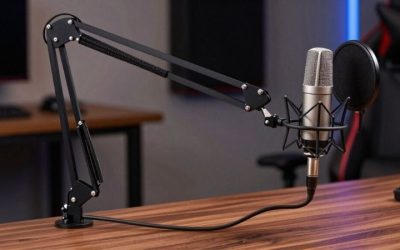
If you are comparing best low profile microphone arms for a gaming desk, choose the mounting geometry before the brand. The Elgato Wave Mic Arm LP gives broad reach with a low camera-facing profile; Elgato’s Mic Arm Pro adds a more adjustable suspension; Auray’s BA-LPR3 is a lower-priced riser design; and Shure by Gator SH-BROADCAST2 offers a clamp or drilled desktop mount. All four were listed as in stock by U.S. sellers during the October 29, 2026 research session. These are mounting options, not tested microphone sound-quality upgrades, and the seller’s stock label does not guarantee delivery to every ZIP code.
Low-profile microphone arms: desk reach, camera clearance, and mounting
Best overall for a typical gaming desk — Elgato Wave Mic Arm LP. It keeps the boom below the camera’s normal sightline while still offering 29.1 inches of horizontal reach. Choose it when the desk edge is accessible and you want to swing the mic away after a session. Its long reach can be excessive on a shallow table; do not confuse low profile with short overall length.
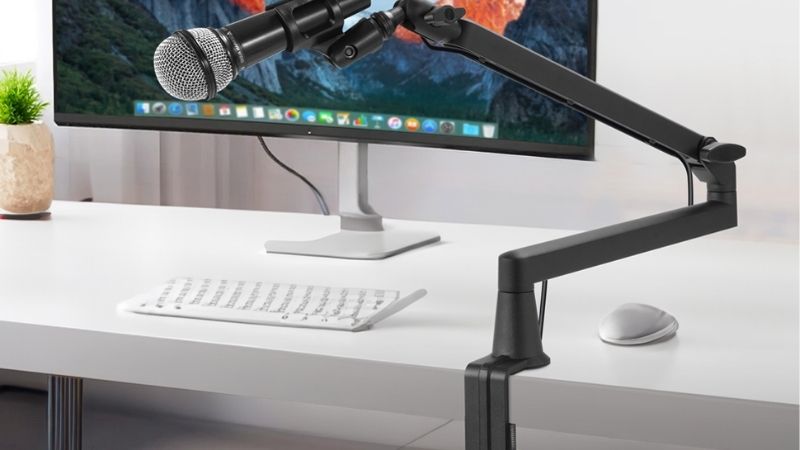
Best for repeated on-camera repositioning — Elgato Wave Mic Arm Pro. Its redesigned suspension and adjustable tension suit a streamer who changes speaking posture between gaming and recording. This is a genuinely different mechanical arm, not a color variation of the original LP. It costs more, and careful counterbalance remains necessary.
Best value with a useful riser — Auray BA-LPR3. The two-section low-profile body can rise above obstacles before extending toward the chair. Best for either clamping or an authorized permanent desk installation — Shure by Gator SH-BROADCAST2. Its direct-mount option is useful when the desk edge does not accept a conventional clamp, but drilling a table is an irreversible action and may void furniture warranties.
Compare four microphone arms on actual U.S. listings
| Product | Verified specification | Ideal setup | Seller price checked Oct. 29, 2026 | Stock status checked Oct. 29 | Main drawback |
|---|---|---|---|---|---|
| Elgato Wave Mic Arm LP, black, 10AAN9901 | Low-profile sections; up to 29.1-inch reach; clamp to 2.4-inch desk; supports 4.4 lb | Flat desktop, mic approaches from side | $99.99 — B&H | In stock | Long sweep; needs exposed desk lip |
| Elgato Wave Mic Arm Pro, black, 10AAT9901 | Two-section low-profile arm; adjustable suspension tension; full horizontal swing | Frequent changes of camera and mic position | $149.99 sale observed — B&H; older page $179.99 | In stock | Costs more; tension needs setup |
| Auray BA-LPR3 | Low-profile two-section boom with riser; 4.4-lb rating; about 19–29.7 inches reach | Budget desk with monitor clearance needs | $79.95 — B&H selected product; category showed $69.95 sale | In stock | Riser changes height; verify physical footprint |
| Shure by Gator SH-BROADCAST2, black | Low-profile steel arm; max 2.17-inch clamp; drill-mount alternative; up to 33-inch reach | Desk with constrained clamp access | $112.95 — B&H selected product; newer listing $129.99 | In stock | 33-inch reach is not compact; drilling requires approval |
Price-conflict note: B&H indexed price snapshots differ for the Auray and Shure products, while the Pro shows a sale versus its older standard price. The figures above are source-labeled observations, not guaranteed checkout totals or discounts that will remain available. Confirm the seller’s selected product and final cart before paying; taxes, shipping and bundled cables may change the cost.
Elgato Wave Mic Arm LP: the most straightforward low-profile layout
Elgato states that its Wave Mic Arm LP reaches about 740 mm horizontally and supports microphones and accessories up to 2 kg. The padded C-clamp expands to 60 mm, and mounting compatibility covers 1/4-inch, 3/8-inch and 5/8-inch formats using supported adapters. Those are useful purchase checks rather than decorative specifications: a wide desk lip, thick keyboard tray or under-desk brace can prevent the clamp sitting flat. The arm’s sections also need room to travel beyond the rear corner of a monitor.
For a one-monitor gaming desk, place the clamp at the rear-side corner and bring the microphone in from an angle that does not cross the main mouse hand. Check how much cable slack you need at full reach. Elgato’s magnetic routing channels conceal cable runs, but a thick, non-flexible XLR cable may still restrict movement. The LP design is excellent when the boom itself is the visual obstruction; it does not solve keyboard noise merely by sitting low.
Trade-off: the reach that makes it flexible can be awkward in narrow furniture alcoves. When the monitor is almost touching a wall, measure the available rotation arc rather than buying based on the word “LP.” Avoid placing the clamp over an unsupported particleboard lip.
Elgato Wave Mic Arm Pro: choose it for changing positions
The Pro is for creators who repeatedly swing a microphone between gameplay, conversation and voiceover. The manufacturer describes a redesigned non-mechanical spring tension system and fine positional control; B&H identifies the exact black 10AAT9901 as in stock and shows a $149.99 promotional price on the product page reviewed. It is not an electronic microphone interface and does not add software noise reduction or voice processing.
Before installation, weigh the actual microphone together with shock mount, windscreen and any XLR connector extension, rather than comparing a bare microphone’s marketing weight alone. Adjust the Pro’s tension with the supplied mechanism as directed, move it through every planned position, then leave it where it will not rebound into a screen. A premium articulated arm offers more adjustment, not immunity from incorrect counterbalance.
Trade-off: this is a questionable spend if your microphone stays in one fixed location. For a static mic just above the desk, a simpler LP or compact stand often does the same physical job at lower cost. That is a use-case judgment, not a measured lifetime durability ranking.
Auray BA-LPR3: an affordable arm with a riser
Auray’s BA-LPR3 is neither a basic vertical scissor arm nor a tiny travel boom. The retailer describes a low-profile two-stage broadcast arm with a riser, approximately 19–29.7 inches of horizontal placement and a 4.4-lb carrying limit. The extra rise is useful when a heavy monitor base blocks a flat line from the clamp to your mouth. It lets the boom clear some obstacles without pushing the microphone farther away.
A streamer who plays with a tall monitor stand should sketch the actual path: clamp location, elbow clearance, base of the display and intended mic position. The riser can help around one obstacle while worsening camera visibility on another desk. Check included threaded connectors and ask whether the microphone yoke needs an additional adapter. Its price has appeared as both $69.95 in a B&H comparison module and $79.95 on a selected product listing, so avoid presenting the lowest snapshot as a guaranteed live sale.
Trade-off: less-expensive mechanical sections may be entirely adequate, but the model does not become suitable for an unusually heavy microphone because the clamp looks sturdy. Keep a margin below the rated total load and do not hang headphones or other gear from the boom.
Shure by Gator SH-BROADCAST2: flexible mounting without claiming short reach
The Shure by Gator SH-BROADCAST2 is intended to move below the shoulder line while offering different mounting options. The manufacturer-specific B&H page lists a desk clamp for surfaces up to 2.17 inches and an alternative direct mount that can be screwed into the desk. Its maximum reach is around 33 inches, so this is a low-profile choice, not a short-arm choice. A metal body and cable routing channel may suit permanent streaming furniture where aesthetics and cable control matter more than portability.
For renters, shared desks or expensive veneer, favor the clamp if the edge geometry safely allows it. Drilled installation should be considered only after checking the desk maker’s installation advice, underside clearance and whether a bracket will interfere with drawers. Use a controlled assembly procedure, not an improvised hole drilled above electronics or live cables. The B&H seller showed in-stock signals with conflicting $112.95 and $129.99 snapshots; record the selected price before purchase.
Trade-off: a 33-inch arm can need much more swing clearance than a streamer expects from the words “low profile.” For a genuinely tiny corner, a short stand may fit better than any of these four long-reach designs. That different problem belongs to the compact-boom-arm guide, not this comparison.
How to check fit before buying any arm
- Measure desk thickness and clamp access. Put a ruler on the rear or side desk lip, including a reinforcing panel if it blocks the clamp screw. Compare that measured number against the specific model’s published maximum, allowing room for rubber pads and a flat contact area. If you cannot reach the underside, investigate an authorized grommet or direct-mount solution rather than forcing a C-clamp.
- Draw the microphone path. Mark the mouth position, expected shoulder line, monitor, screen edge, keyboard and mouse space. Determine whether the arm must pass behind the display or enter from the side. A “29-inch reach” describes extension, not the minimum folded dimension.
- Count the whole payload. Add microphone, shock mount, clip, pop filter and cable strain relief. Confirm the maker’s load rating, the thread size on the microphone’s yoke and whether an adapter ships in the exact package.
- Check swing and cable clearance. Move the unloaded arm through the intended route first. Leave a service loop in the USB or XLR cable so a sharp turn does not tug the connector. Never force the hinge past the manufacturer’s specified stops.
- Run a simple noise check. Position the mic close to your mouth, record speech while typing and tap the desk lightly. Desk-borne vibration depends on mounting and cable contact; none of these arm listings establishes a measured improvement in game chat without a same-room comparison.
- Verify product identity at checkout. Select the exact black or white SKU, not an adjacent kit with an XLR cable or a replacement adapter. Confirm the public in-stock flag is still shown and check final shipping and returns for your U.S. address.
Buying mistakes that create bad microphone positioning
A low-profile arm is chosen to keep the boom out of sight, not to guarantee the microphone disappears from the frame. The capsule may still need to be a few inches from your mouth, especially for quiet speaking; moving it farther away so it looks better can increase the relative amount of room noise. Put a small mark on the desk showing the speaking position and repeat a brief recording after adjustments.
Another mistake is using the payload number as the only compatibility proof. A microphone with an attached 90-degree USB connector or heavy XLR cable can collide with the yoke even when the weight is acceptable. The mounting thread might be convertible, but not necessarily with the adapter included in the box. Treat physical clearance, not nominal standards alone, as the final fit gate.
Finally, do not buy a long low-profile arm if the real request is “shorter than 20 inches at maximum extension.” The Wave LP, Auray and Shure by Gator options are designed to reach across a desktop. A compact desk footprint and short reach are separate filters; the compact boom-arm roundup addresses the second setup problem.
Frequently asked questions
Will a low-profile arm make a microphone sound clearer?
It can improve positioning and may reduce desk vibration if the microphone no longer sits on a noisy surface. That does not change the capsule’s native pickup pattern or remove airborne keyboard clicks, fan noise and roommate speech. Place the microphone properly and listen to your own recording before claiming an improvement.
Is a 29-inch arm too long for a small gaming desk?
Not necessarily, because a long arm can fold and swing away; however, the extension and rotation need physical clearance. Measure clamp-to-mouth distance and the space behind the monitor rather than inferring the folded footprint from the maximum reach.
Can I attach an XLR microphone to the Elgato LP?
Often yes if the mic mount thread and total load fit; the LP supports common thread sizes using adapters. XLR describes the audio connector, not the mechanical mount. Ensure the XLR cable can bend without pressing against the desk or stressing the socket.
Which one should I buy when drilling is prohibited?
Use a clamp-mounted option with a verified, accessible and sturdy desk lip. Elgato LP, Auray BA-LPR3 and Shure by Gator’s clamp configuration are relevant, but their allowable desk thickness and cable routing differ. If your desk cannot safely accept a clamp, look at a freestanding solution instead of drilling without permission.
How we selected these arms
This comparison separates low visual profile from short overall reach, examines real retail product identities and seller in-stock indicators on October 29, 2026, and prioritizes the manufacturer’s dimensions and interface claims when available. Different versions of Elgato LP and Pro are counted as mechanically different designs; colors, cable bundles and reseller listings are not. The company has not performed strength, noise, desk-damage or durability testing. These are evidence-bounded setup recommendations, not personal in-depth reviews.
Low-profile boom arms: clearance measurements first
Measure the underside of the monitor, desktop thickness and the horizontal path from clamp to mouth. A low-profile arm that fits under a screen may still hit a keyboard wrist rest or block mouse movement. Include the microphone and shock mount in the load calculation rather than comparing only the mic’s bare weight against the manufacturer rating.
If your desk has a rear cable tray, metal lip or unusual edge, photograph its underside before ordering. Check clamp jaw depth, thread adapter and cable channel access. This article’s target is the low camera sightline; the compact-arm article prioritizes a small travel or limited-footprint setup, and those constraints are not identical.
The monitor-clearance calculation before buying a low-profile arm
Elgato lists a maximum 740 mm (29.1-inch) horizontal reach, a 60 mm (2.4-inch) clamp opening and a total supported load of 2 kg (4.4 lb) for its Wave Mic Arm LP. The maker further specifies 70 mm lower-arm desk clearance and a 160 mm upper-arm clearance at the highest position. These numbers matter to a streamer with a monitor perched close to the tabletop: a low-profile label does not guarantee that the arm passes under every display.
Make a side-view sketch of the desk. Measure the monitor’s lower edge above the desktop, the actual clampable desk lip and the microphone’s mass including its shock mount and pop filter. If the monitor bottom sits under the arm’s required sweep, route from the opposite side rather than planning to force the elbow through the panel. A thin plywood or glass desk may need a manufacturer-approved mounting plate and load distribution; nominal clamp opening alone is not permission to attach to fragile furniture.
When comparing the LP to the Wave Mic Arm Pro, treat smooth one-hand adjustment as a specific mechanism difference, not proof that the more expensive arm is more stable with every microphone. Check that cable guides accept the thickness of your real XLR or USB lead and that the arm can park clear of the mousepad.
Buyer-specific decision matrix
| Buyer situation | Recommended action | Must-verify requirement |
|---|---|---|
| Low monitor above desk | Measure 160 mm arm-high clearance before purchasing LP | Consider side mounting if the path intersects the display |
| Heavy mic plus shock mount | Weigh the complete assembly against the maker’s load limit | Do not count microphone body weight alone |
| Desk with shallow or non-clampable edge | Investigate approved plate or freestanding option | Confirm structure and warranty before attaching |
Verification update (October 30, 2026): Maker and independently published source material used for the model-specific distinctions above is recorded with exact URLs and claim boundaries in the revised Evidence Log. This check does not certify live item-level US inventory or a buyer-specific ZIP checkout.
Final thoughts
For most one- or two-monitor desks, start with Elgato Wave Mic Arm LP if the clamp has room to work. Move to the Wave Mic Arm Pro only if frequent repositioning justifies its extra price. Consider Auray BA-LPR3 for a lower-cost riser path and Shure by Gator SH-BROADCAST2 when a permanent or alternative mounting arrangement is useful. Before ordering, photograph and measure the desk edge, check the full microphone payload and verify the selected product’s current price. These checks are more reliable than choosing solely by a product’s low-profile branding.
Before buying: the clearance and load numbers that actually separate low-profile arms
The Elgato Wave Mic Arm LP and Pro are not simply two colors or price tiers. Elgato specifies 29.1 inches of horizontal reach and a 4.4 lb total load for LP; the Pro reaches 29.5 inches and supports 6.6 lb. The LP upper section may occupy approximately 6.3 inches of space above the desktop; its lower section clears about 2.8 inches. A monitor with a 5-inch gap underneath may obstruct a frontal LP route even if the arm is advertised as low profile.
Wave Mic Arm Pro has a gas-piston design and Elgato lists 2.4 inches of surface clearance without its included riser and 3.9 inches with the riser, plus a 2.4-inch maximum clamp opening. These are reference measurements, not a guarantee that the arm passes under every monitor. Measure the actual bottom of the monitor, the rear bevel of the desk, the cable bundle and the point where the microphone capsule must sit near your mouth.
Both Elgato arms use a 1/4-inch mount and include 3/8- and 5/8-inch adapters. Count the microphone, shock mount, pop filter, adapters and cable strain in the load budget. A desk clamp maximum thickness describes its opening, not its suitability for a fragile glass edge or a desk with a metal cable channel immediately below the rear lip.
| Exact product | Verified fact | What to check before ordering |
|---|---|---|
| Elgato Wave Mic Arm LP (10AAN9901) | 29.1 in reach; 4.4 lb load; 2.4 in clamp | Approx. 6.3 in upper-arm desk clearance can conflict with a low monitor |
| Elgato Wave Mic Arm Pro | 29.5 in reach; 6.6 lb load; 2.4 in clamp | Gas piston; 2.4 in clearance without riser, 3.9 in with riser |
| Auray BA-LPR3 | Low-profile design with riser; seller specs vary by extension | Check actual clamp path, effective arm height and weight in chosen configuration |
| Shure by Gator SH-BROADCAST2 | Longer low-profile reach and alternate mounting options | Confirm desk-edge geometry and avoid treating max reach as guaranteed monitor pass-through |
Three-position installation rehearsal: (1) park the microphone completely outside the camera frame; (2) swing to speaking height while the monitor is at its lowest setting; and (3) move a standing desk through its travel without tugging a fixed cable. Return the arm if any position makes the mic tilt, blocks a screen or presses against the tabletop. These are buyer tests, not project-run stability measurements.
Evidence boundary: product manuals, US-facing maker pages and retailer pages are not hands-on GeekGamingTricks product tests, verified ZIP checkout or independent editorial certification.