Finding the best desk drawers for controllers starts with one measurement many desk-organizer listings leave out: usable interior height. A tray that comfortably holds a charging cable or replacement thumbsticks may be too shallow for a full-sized Xbox or PlayStation controller. For most PC gaming desks with a screw-compatible solid top, the VIVO DESK-AC03B offers a useful compromise between drawer size, documented load limits, and current U.S. ordering information. Gamers who cannot drill should consider VIVO’s clamp-on DESK-AC03C-W instead, provided the clamp clears the desk’s edge. We compare seven specific models, explain which are suitable for complete controllers versus small accessories, and show how to mount storage without weakening a desk or obstructing your knees.
Quick picks: which under-desk drawer solves your problem?
Best overall for a typical gaming desk: VIVO DESK-AC03B. This 18-inch pull-out steel drawer is a strong starting point for organizing controllers, cables and small devices when the desk has enough mounting room. The manufacturer lists an 11-pound contents capacity and a minimum desktop thickness of 5/8 inch. Confirm the actual opening height and your controller’s profile before assuming a bulky gamepad fits.
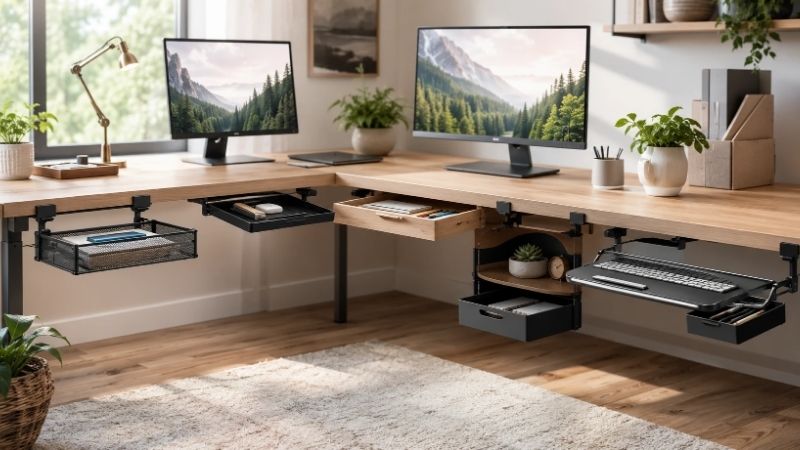
Best no-drill option: VIVO DESK-AC03C-W. The clamp-on drawer has a published 14.3-by-8.7-by-3.8-inch interior and up-to-2-inch desktop clamp compatibility. That stated interior height is particularly helpful for a controller with protruding sticks. It is not suitable where a rear or front apron blocks the clamps, or a sliding drawer would intersect the chair.
Best extra-wide shared storage: VIVO DESK-DR33-B. Its 30.1-inch-wide internal bay offers room to sort multiple peripherals, but its long bracket footprint demands a wide, clear tabletop underside. The front panel can be removed to use the unit as a keyboard tray; that flexibility is useful only if your desk layout actually needs it.
Best lockable slim storage for flat accessories: UPLIFT Slim Desk Drawer STR008. The 1.5-inch interior height and lock are more appropriate for charging cables, adapters, documents and handheld accessories than a complete console controller. A premium price does not remove that height restriction.
Best tiny valuables drawer: UPLIFT Compact Desk Drawer STR031. A 5.9-by-10-by-2-inch usable interior, lock and cable pass-through make sense for batteries, dongles and replacement parts. The dimensions make it the wrong first choice for most full-sized gamepads.
Best larger traditional pull-out: Mount-It MI-7290. Its 20.2-by-12.2-by-4.3-inch exterior, 11-pound published load limit and steel construction suit a more conventional stationery-style drawer. Some customer feedback on the official page complains about partial extension, which may make retrieving items at the back less convenient.
Best inexpensive screw-mounted open tray: VIVO DESK-AC03A-B. It is a shallow, shell-free alternative for cables, compact controllers or loose accessories. The 14.3-by-8.7-by-4-inch interior makes it a plausible full-size controller candidate if your measured controller fits, but its mounting geometry needs more planning than the clamp-on version.
Side-by-side comparison: controller storage and U.S. shopping
The specifications below come from manufacturer listings and published technical details checked October 29, 2026. Prices are visible U.S. seller-page observations, not tax-inclusive checkout totals or guaranteed availability in a specific ZIP code. An interior size is more informative than an exterior box measurement; still compare both with the controller’s maximum depth, stick height and cable plug.
| Product and exact model | Published usable dimensions or limit | U.S. listing snapshot | Controller fit and primary drawback |
|---|---|---|---|
| VIVO DESK-AC03B — overall | 18-inch class steel drawer; 11 lb contents; desk at least 0.625 in thick | $59.99, VIVO; In stock on selected page | Good general option; verify actual clearance against gamepad height |
| VIVO DESK-AC03C-W — clamp-on | Interior 14.3 W × 8.7 D × 3.8 H in; 11 lb capacity; desk up to 2 in | $39.99, VIVO; In stock on selected page | No drill, useful depth; clamps protrude and demand free edge |
| VIVO DESK-DR33-B — extra wide | Interior 30.1 W × 9 D × 2.4 or 3 H in; 11 lb | $79.99, VIVO; In stock on selected page | Multiple accessories fit side by side; requires 33.3-in wide bracket envelope |
| UPLIFT Slim STR008 — locked flat gear | Interior 15.5 W × 12.5 D × 1.5 H in; lock | $159, UPLIFT; Add to Cart / shipping message | Too shallow for most intact controllers; expensive |
| UPLIFT Compact STR031 — small gear | Interior 5.9 W × 10 D × 2 H in; 0.75-in minimum desktop | $79, UPLIFT; Add to Cart / shipping message | Safe for dongles and accessories; not for a standard full-size controller |
| Mount-It MI-7290 — traditional pull-out | Exterior 20.2 W × 12.2 D × 4.3 H in; 11 lb; desk over 0.71 in | $85.99, Mount-It; Add to Cart; delivery unchecked | Large footprint; extension can limit rear access |
| VIVO DESK-AC03A-B — open sliding drawer | Interior 14.3 W × 8.7 D × 4 H in; 11 lb; desk at least 0.75 in | $59.99, VIVO; In stock on selected page | Good low-profile access but drilling required |
No model here is a proprietary controller dock, charger, or universal case. A published internal dimension is not a promise that an Xbox controller with an attached charging cable, PlayStation DualSense, third-party gamepad, flight control module, or controller in a protective case will fit. Observe its widest and tallest points, and leave extra room for grasping it without hitting the sliding mechanism. A locked drawer also does not guarantee security against theft or a child opening it; keep batteries and small components according to their own safety instructions.
The seven best desk drawers for controllers in detail
VIVO DESK-AC03B — best overall storage for a fixed gaming desk
VIVO’s DESK-AC03B is an 18-inch steel drawer that mounts beneath the desktop and slides outward to expose gear. It weighs 10.2 pounds on its own, supports an additional 11 pounds of contents, and requires a surface of at least 5/8-inch thickness according to the manufacturer. Those numbers are meaningful when installing under a gaming desk: do not equate the accessory’s 11-pound payload with the entire force the desktop must support. Its fasteners and mounting location also matter, especially on particleboard or a lightweight honeycomb top.
A common controller-station use is keeping two gamepads, USB-C cables, a wireless adapter, spare grips and a charging brick out of the mouse zone. The steel shell protects small devices from being kicked accidentally below the desk, and it keeps controllers away from desktop drink spills. However, a good product for organizing controllers is not necessarily a product that fits all controllers. VIVO’s listing emphasizes the overall 18-inch format and 11-pound storage capacity rather than one independently confirmed controller-fit test. Measure the opening and any protruding trigger or stick before ordering. Do not assume a controller can be inserted vertically just because the drawer is wide.
On the manufacturer’s U.S. page, the selected black DESK-AC03B appeared at $59.99 with an In stock, ready to ship label. That is stronger orderability evidence than an undated product catalog, though it is not a completed checkout. Pros: clearly named SKU, all-steel build, published load information, direct U.S. offer. Cons: drilling, relatively substantial empty weight, potential under-desk interference. Choose it if your desk has an approved installation surface and you want a permanent, moderately sized storage zone. If the desk is rented, fragile, or has a metal apron where screws cannot go, a clamp-on option makes more sense.
VIVO DESK-AC03C-W — best clamp-on drawer for a no-drill setup
This is the most straightforward alternative when you do not want to place holes in a desktop. The DESK-AC03C-W uses C-clamps with two height settings for desks up to 2 inches thick. VIVO publishes interior dimensions of 14.3 by 8.7 by 3.8 inches and a maximum 11-pound payload. The exterior width grows to 21.4 inches when the clamps are counted, which is important beside monitor-arm clamps, cable baskets and an under-desk microphone mount. A white option was explicitly shown on the researched listing; do not assume the same price applies to a differently colored variant without checking.
The 3.8-inch interior height is the reason this model has a stronger case for a whole gamepad than very slim locking pencil drawers. That does not eliminate the need to measure the controller. Tall thumbsticks, triggers, charging connectors and rigid third-party grips can make real packed height larger than expected. Place a folded cloth or non-adhesive soft liner in the storage area if it does not obstruct the slides; that may reduce scuffs, but it consumes additional headroom. Keep cables coiled rather than wrapping them tightly around a controller’s sticks.
The direct U.S. page showed $39.99 and an in-stock label on October 29. The trade-off is physical intrusion: the drawer’s underside can hit knees, while clamp arms can stop the desk from reaching a wall. C-clamps may also mar delicate edges or fail to seat on beveled, curved or skirted desktops. Pros: no drilling, useful stated internal height, relatively low listed price, straightforward removal. Cons: extra clamp width, desk-edge restrictions, visually obvious mounting. Choose it for a sturdy flat-edged desk where reinstallability matters; skip it for a hollow-core tabletop or a very narrow knee well.
VIVO DESK-DR33-B — best wide drawer for two controllers and more
The extra-long DESK-DR33-B is aimed at people whose gaming desk doubles as a desk for work or video editing. The maker lists an internal area 30.1 inches wide by 9 inches deep, with a configurable internal height of approximately 2.4 or 3 inches. A 33.3-inch exterior bracket envelope means that finding one uninterrupted stretch of the desk underside is the first challenge. A dual-monitor desk may already have crossbars, monitor-arm brackets, a cable channel or a desktop reinforcement plate in this area.
For controller storage, the width offers a real organizational advantage. One side can hold controllers or a small portable grip, while the other can hold a charger, switchable USB cable and small capture accessories. Two charging-cable slots and a removable front panel are distinctive features; the drawer can convert into a narrow keyboard tray. Nevertheless, width does not compensate for insufficient height. The model’s 2.4-to-3-inch internal clearance means a particularly tall controller or a gamepad stored with bulky thumbstick caps might not fit without contact. Test the intended orientation first.
VIVO listed $79.99 for the selected black model and marked it in stock on the page checked. Pros: large horizontal storage, two pass-through slots, dual-purpose tray, clear manufacturer dimensions. Cons: consumes considerable under-desk width, 11-pound capacity, height may limit gamepad storage, not suitable for many small desks. Pick it when the desk is at least wide enough for its brackets and you have multiple peripherals to organize. For a 40-inch compact desk, choose a smaller drawer rather than dedicating nearly the entire usable underside to one accessory.
UPLIFT Slim STR008 — best lockable drawer for charging cables and accessories
UPLIFT’s Slim Desk Drawer STR008 is well made for a particular job: hide flat valuables, notebooks, small adapters, spare batteries in their proper cases, and charging cables under a workstation. Its official published interior is 15.5 inches wide, 12.5 inches deep and only 1.5 inches high. A locking mechanism and charging-cable pass-through set it apart from an open stationery tray, and mounting directly to the desk keeps the storage at the same relative height when an electric standing desk rises.
That slim interior is a deal-breaker for most conventional full-size console controllers. A DualSense or Xbox Wireless Controller has buttons, grips and thumbsticks that create considerable vertical depth. Do not spend $159 on STR008 expecting to slide in two fully assembled controllers just because the drawer can accept a thin laptop or 15-inch-wide item. Use a controller cradle elsewhere, or store only small detachable parts in this drawer. The optional bracket arrangement adds storage above the drawer but can increase its under-desk height, so the benefits depend on your monitor-arm or crossbar layout.
The UPLIFT U.S. listing displayed $159 with Add to Cart and a same-day shipping statement when ordered before the indicated cutoff. It does not guarantee final availability for the chosen color and shipping ZIP. Pros: lock, cable routing, low profile, documented accessory dimensions, standing-desk relevance. Cons: premium price, too shallow for normal gamepad bodies, needs structural mounting. Choose this model for a mixed-use work/gaming setup where tiny parts and paperwork matter more than storing the controller itself.
UPLIFT Compact STR031 — best for wireless dongles and smaller valuables
The Compact Desk Drawer STR031 is even more focused. UPLIFT publishes a 7.2-inch-wide exterior, 10.4-inch depth and 2.7-inch outer height, with a much smaller 5.9-by-10-by-2-inch usable interior. The body is steel, lined with felt, and provides a key lock and rear cable pass-through. The company says the desktop should be at least three-quarters of an inch thick. That small footprint lets it sit away from a larger keyboard tray or under a side return where a wider unit would block the seated user’s legs.
This is a useful accessory organizer, not a realistic default for complete gaming controllers. The 5.9-inch interior width alone may prevent certain gamepads from lying flat, and the 2-inch height is often inadequate for grips and sticks. Use it for a tiny wireless receiver, microSD card case, removable thumbsticks, USB hubs, cable adapters and earbud cases. Even for those items, avoid stuffing cables into the locking mechanism or trapping a battery pack against sharp hardware. A fitted, removable divider may help with loose pieces, but count its added space before buying.
The researched direct price was $79, with Add to Cart and UPLIFT shipping language. Pros: compact footprint, lock, felt lining, published fit dimensions, cable pass-through. Cons: cannot hold most standard full-size controllers, relatively expensive for its storage volume. Buy it when you have a wider desk and need only an organized place for small accessories. Skip it if the user intent is specifically to hide two full-sized controllers rather than their charging and customization equipment.
Mount-It MI-7290 — best conventional steel drawer for larger accessories
The Mount-It MI-7290 is a 20.2-by-12.2-by-4.3-inch exterior steel drawer that fastens beneath an appropriate desktop. The manufacturer specifies an 11-pound load capacity and a desk thickness greater than 0.71 inch. For gaming, this wider traditional tray may serve as a mixed storage spot for a wired controller, console remote, battery case, controller charging kit and small audio peripherals. Its conventional appearance is an advantage if the gaming desk is also used for school or work, where visible RGB accessories would be distracting.
The dimension in the seller’s specifications is the outside drawer envelope, not a verified internal gamepad clearance. You must measure the usable opening and sliding path. It is also worth taking the manufacturer’s own customer reviews seriously: some users reported that the drawer does not extend far enough to access items near its back comfortably. That is not a universal measured fault, but it is a concrete trade-off when you expect to grab a controller quickly between matches. You may end up storing the least-used cable bundles at the rear and the primary gamepad nearer the front.
Mount-It showed $85.99 with Add to Cart. Pros: sizeable traditional footprint, steel construction, manufacturer-listed 11-pound limit and desktop-thickness rule. Cons: potential partial-extension inconvenience, drill installation, wide knee-space footprint. Consider it if your workstation has plenty of mounting depth and you prefer one large storage bay. For quick access on a shallow desk, the clamp-on VIVO may be easier to place and inspect before committing to holes.
VIVO DESK-AC03A-B — best open drawer for straightforward accessory access
The DESK-AC03A-B is a 16-inch-class pull-out tray without an enclosed outer shell. Its published interior is 14.3 inches wide, 8.7 inches deep and 4 inches high, with an 11-pound capacity. The manufacturer also lists a 17.7-inch width including the side brackets and a minimum desk thickness of three-quarters of an inch. Because the drawer is visually open at the top, it is easy to see which controller or cable has been returned before you slide it beneath the tabletop.
The 4-inch stated interior height makes it a promising option for complete gamepads, but there is still a practical packing problem. A standard controller lying flat may fit, yet a controller with attached trigger extenders, a grip case or stiff charging cable may exceed the usable clearance under the desk and around the slide frame. Users with a wireless headset, capture card and controller in the same tray should separate sharp connectors from buttons and thumbsticks. The open design also means dust can collect on stored peripherals more easily than in a fully enclosed cabinet.
VIVO’s manufacturer page showed the black DESK-AC03A-B at $59.99 and listed it in stock. Pros: useful published interior height, transparent layout, modest direct price, 11-pound rated capacity. Cons: requires screws and adequate mounting thickness, exposed upper surface, sliding mechanism still occupies knee space. Choose it when you want quick access and can mount away from your chair path; otherwise consider DESK-AC03C-W if the desk edge supports a clamp.
How to choose a drawer that genuinely fits your controller
Measure the gamepad in the orientation you will store it
Set the controller on a clean flat surface the way it will lie in the drawer. Measure left-to-right across its grips, front-to-back across the handles and triggers, and height from the lowest resting point to the tallest stick, bumper or removable accessory. Do not use the console’s box dimensions, because packaging is dramatically larger than the controller, and do not assume the central body thickness equals maximum height. Add a little clearance on each side so your hands can lift the controller out without scraping sticks against the drawer roof. A manufacturer-stated drawer interior measures empty space; dividers, protective liners and cables reduce usable room.
If you keep two controllers, measure them side by side in the exact orientation that leaves access to their buttons and charging ports. A 30-inch-wide tray might fit two gamepads across its width, but it might still be too shallow vertically for one of them. Conversely, a taller 14-inch-wide bay may store one large controller more reliably than a wide tray with a 1.5-inch opening. When any dimension remains borderline, ask the seller for a precise opening measurement or plan to store the controller on a purpose-built wall or desk hook instead.
Choose the mounting method for the desktop, not your preference alone
Clamps avoid drilling but require a reachable, flat, structurally suitable desk edge. A desk with a rear privacy panel, apron, thick curved lip, power rail or cable management tray may defeat a clamp regardless of its nominal thickness range. Screw-mounted trays provide clean placement away from the edge, but fasteners must engage the actual desktop substrate. Hollow-core and honeycomb tops can have thin surface skins and little screw-holding strength even when their advertised total thickness seems sufficient. Ask the desk manufacturer before drilling where compatibility is unclear; do not infer that 0.75-inch thickness by itself authorizes a given screw length.
For an electric sit-stand desk, verify the full travel path. A drawer that clears your knees at standing height can collide with chair arms or a walking pad when the desk lowers. Place all fasteners away from lift columns, control wires and power channels, and never drill into a cable tray or structural metal beam. Keep a minimum safe clearance to moving mechanisms according to the desk’s manual. Installation should happen with the desk powered down, unplugged and cleared of expensive electronics, using the manufacturer’s hardware and instructions.
Do not confuse load rating with controller protection
An 11-pound contents rating is far more than one ordinary gamepad needs, but that rating does not guarantee a controller will survive being thrown into a steel tray or crushed under other equipment. A bare metal bottom can scuff controller shells, sticks and battery doors. Use a thin, removable, non-shedding liner when compatible, and keep spare USB plugs, charging bricks and screwdrivers from colliding with the controllers. Do not use thick padding that blocks a drawer closing properly. If you store a lithium-ion battery pack, follow its own storage and charging instructions and never leave damaged batteries in an enclosed charging space.
Locks are useful for keeping some casual access under control, but a screw-mounted drawer can potentially be removed or opened by someone determined. Do not treat it as a safe for valuable electronics, passports or sensitive data. Locking may also interfere with rapid access during gaming. If you must charge a controller while it is stored, verify ventilation, cable bend radius, connector strain, and the device maker’s charging guidance. Never pinch a live cable in the slides or use an unknown power accessory tucked against foam.
Plan the controller handoff between desk and drawer
Quick access matters more during gaming than it does for storing a stapler. Choose where your right and left hands naturally reach while seated, and make sure the opened drawer does not overlap your knees or wheel base. A deep unit may be impractical if you must stand to retrieve a controller from its rear. A side-mounted small drawer can be more convenient for a headset adapter or extra cable than a large center drawer. Test the layout with a cardboard template cut to the accessory’s outside dimensions, then imitate the opening travel and chair swivel before buying.
If your gaming desk has two screens, use a monitor arm or stand layout that leaves the desk itself safe; do not mount a heavy display on an unsupported edge simply to free storage space. A good drawer makes a controller easy to locate, reduces clutter near mouse movement and avoids collisions. It does not make the controller charge faster, reduce input lag, or increase game performance. Mechanical fit and daily convenience should drive the purchase rather than marketing that labels a tray as gaming-specific.
Three setup scenarios that change the recommendation
A rental apartment with a compact desk
Start with the no-drill VIVO DESK-AC03C-W, but check that its 21.4-inch clamp-inclusive width will not block your chair or external microphone boom. A 36-inch desk with drawer rails already installed may have nowhere suitable to clamp. Make a paper template and test access while seated. If the clamp would damage the finish or interfere with a wall, use a freestanding bin or a surface controller stand instead; drilling into a rental desk is not automatically more acceptable than using a clamp.
A wide dual-monitor standing workstation
The extra-long VIVO DESK-DR33-B can keep two controllers, spare cables and capture adapters organized horizontally if the underside offers more than 33 inches of free mounting width. A raised desk leaves more room to open the drawer temporarily, but the lower edge must still clear knees when seated. Do not place the drawer beneath the height-adjustable desk’s motor crossbar or power channel. A smaller drawer mounted off-center may be safer and easier to reach than a long, centrally located tray.
A mixed office and gaming room
If most items are flat and need to stay out of sight, the UPLIFT Slim STR008 has a credible role as a locking accessory area. However, it is not a full-size controller solution. Keep actual controllers in a properly sized VIVO drawer or on a dedicated stand, and use the slim unit for documents, wires and small devices. This separation avoids forcing controllers into a too-tight compartment and reduces damage risk from heavy office supplies.
Installation and maintenance checklist
- Confirm contents first. Measure the controller with sticks and accessories in place, not just the nominal console model; decide whether it will lie flat or sideways.
- Mark the mounting rectangle. Use the accessory’s outside envelope including clamps and brackets, then confirm chair clearance, cable path, desk lift mechanism and crossbars.
- Check the desktop structure. Respect the minimum or maximum thickness the manufacturer states. Never assume particleboard, honeycomb fill or a glass surface safely accepts screws.
- Power down nearby equipment. Unplug the sit-stand desk when mounting hardware and move cables out of the intended drilling area.
- Use the provided hardware. Follow the official assembly guide and confirm screw length before inserting fasteners into wood; do not force a clamp past its stated range.
- Test the slide empty. Check full extension and retraction before storing a gamepad, especially when your chair is in its usual position.
- Load gradually and inspect. Distribute accessories, avoid sharp connectors against controller sticks, and monitor fastening points for loosening or desktop deformation.
- Keep the path clean. Remove dust from rails, inspect charging cables for abrasion and stop using any slide that binds or tilts.
How we selected the products
We focused on genuine manufacturer-listed under-desk storage drawers with identifiable model codes, published dimensions or fit limits, and relevance to controller organization. The selection deliberately includes both full-controller candidates and smaller accessory-only drawers, because calling every desk organizer a gamepad drawer would give a misleading answer. We prioritized practical under-desk mounting, clear load information, retrieval convenience, current U.S. seller observations and the costs of an installation mistake. The listed prices and orderability labels are snapshots; we did not complete transactions or verify delivery to a particular ZIP code.
Geek Gaming Tricks did not physically test the drawer runners, controller fit, clamp holding strength, locked security, acoustic noise or long-term wear. Where we infer that a controller might fit from published dimensions, that is a planning judgment, not confirmed hands-on compatibility. Manufacturer ratings, claims and return terms are distinguished from a comparative benchmark. The official listings provide a better starting point than an anonymous marketplace photo but remain subject to selected color, stock and site changes.
Frequently asked questions
Will a regular Xbox or PS5 controller fit in an under-desk pencil drawer?
Often not. Many slim pencil drawers have only 1.5 to 2 inches of usable height, which can be insufficient once a controller’s sticks, grips, buttons and any charging cable are counted. Choose a drawer with published internal dimensions and compare with your actual controller before ordering.
Is a clamp-on controller drawer safe on a standing desk?
It can be appropriate when the desktop thickness, edge geometry, material and structural guidance allow the specific clamp. Check clearance through the desk’s complete travel range and avoid interference with lift columns and cable channels. Do not attach it to a fragile or unsupported top.
Can I use adhesive-only drawers for heavy controllers?
Do not assume ordinary self-adhesive trays will remain attached under repetitive sliding and changing temperatures. Follow the product’s adhesive load limits and surface requirements, and favor mechanically secured options for heavier electronics. Never exceed the indicated capacity.
Should I leave a controller charging inside the drawer?
Only where the controller and charging accessory manufacturers permit the arrangement and the wiring remains undamaged, accessible and adequately ventilated. Never pinch a cable in a moving drawer, cover damaged batteries or assume any cable pass-through is itself an electrical safety certification.
How much clearance should I leave under a gaming desk?
Enough for your knees, chair arms, clothing and the drawer’s full operating path in both standing and sitting positions. The manufacturer’s exterior height is only the starting point; brackets, clamps and the opened panel can protrude farther. Mock up the dimensions before drilling.
Is a lockable drawer worth it for controllers?
It may be worth it for small accessories or casual privacy in a shared room, but a keyed desk drawer is not a theft-proof safe. Prioritize actual controller fit and structural mounting before paying more for a lock.
Can I attach two drawers beneath the same tabletop?
Possibly, provided there is free structural mounting area, the combined weight is acceptable, screws do not collide with rails or cables, and the drawers clear your legs and chair. Follow each product and desk maker’s instructions rather than assuming a tabletop load rating guarantees screw holding strength.
Final thoughts
For most solid-top desks, start with VIVO DESK-AC03B as the broad all-around option and verify the gamepad’s total height against the opening. Choose VIVO DESK-AC03C-W when you need removable, no-drill installation and a published 3.8-inch interior, or DESK-DR33-B if you have a genuinely wide, unobstructed workstation. UPLIFT’s slim and compact locking drawers are better for accessories than for complete gamepads. Among the best desk drawers for controllers, the right purchase is the one that protects your equipment, opens without hitting your legs and mounts safely to the desk you actually own.