Our Top Picks
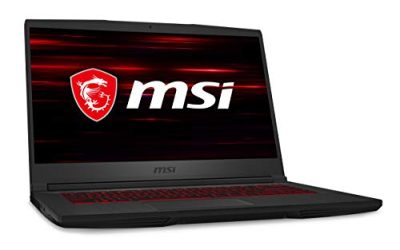
 msi Thin 15 15.6” 144Hz FHD Gaming Laptop:Core i7-12650H14.13 x 0.1 x 9.99 inches4.1 PoundsCheck on Amazon
A laptop in this tier is a trade-off puzzle, not a spec race. Every machine here carries the same dedicated RTX 4050 graphics chip, the same 16GB of DDR5 memory, the same 512GB drive, and a full-HD 144Hz screen, so the differences that matter are the processor, the cooling, the upgrade path, and the build. Pick wrong and you end up with a laptop that throttles in long sessions or cannot grow when your games get bigger.
This guide is for students buying their first real gaming laptop, first-time PC gamers, esports players who need a fast screen above all else, and anyone replacing an older laptop that can no longer keep up. The three machines below were chosen from the names and specifications on their Amazon pages, and all three pair the same RTX graphics chip with a high-refresh display, so the choice comes down to processor strength, cooling, and how far you can upgrade later.
Quick Picks
As an Amazon Associate we earn from qualifying purchases.
| Product | Best for | Key spec from title |
|---|---|---|
| Lenovo LOQ 15 | Upgrading memory and storage later | RTX 4050, 16GB DDR5, 144Hz IPS |
| MSI Thin 15 B12VE-2023US | Slim Intel laptop for games and multitasking | RTX 4050, 16GB DDR5, 512GB NVMe |
| MSI Cyborg 15 A13VE-218US | Carrying a gaming laptop every day | RTX 4050, i7-13620H, 144Hz display |
How to Choose
The graphics chip sets the ceiling
Every laptop in this tier uses the same RTX 4050 chip with 6GB of dedicated graphics memory, but the same name does not mean the same performance. The chip’s power limit changes between chassis: a thicker machine with dual fans can hold higher sustained clocks, while a slim chassis may throttle sooner in long sessions. DLSS upscaling is the feature that matters most here, because it lets the chip render at a lower resolution and rebuild a sharper image, which keeps newer games smooth at full-HD. Ray tracing is supported, but expect to use it sparingly at this level. Read the listing for the exact GPU power figure rather than assuming two laptops with the same chip name behave identically.
Memory and storage decide how long it lasts
Memory and storage are the same on all three machines, which makes the choice simpler and the trade-offs clearer. Every pick here ships with 16GB of DDR5 memory, which is the comfortable amount for modern games alongside a browser, voice chat, and a few background apps, so none of them needs a memory upgrade on day one. Storage is the constraint instead: all three come with a 512GB drive, and two or three large games can fill that fast. The LOQ stands out because its listing states support for up to 64GB of memory and up to 2TB of storage, so if you plan to keep the laptop for years, check which models let you add a larger drive later.
The screen is where you look all day
All three screens are full-HD IPS panels running at 144Hz, so refresh rate does not split this roundup at all. That is fast enough for competitive play, and the difference between 144Hz and faster panels is smaller than the jump from a 60Hz screen, so do not chase a higher number on its own. What does differ is brightness and colour: the LOQ lists 300 nits and full sRGB coverage, which makes games and video look richer and helps if you also edit photos on the same machine. Check the listing for the panel type and whether the screen is anti-glare, because a glossy screen in a bright room is a daily annoyance.
Cooling, weight, and ports shape daily use
A gaming laptop lives or dies by its cooling, and this tier is where fan noise and hot keyboards appear. The Cyborg uses MSI’s Cooler Boost 5 dual-fan system in the thinnest chassis here, while the LOQ and Thin 15 use their own dual-fan layouts, so read the listing for the cooling design rather than assuming the same chip means the same temperatures. Weight is the other daily factor: the Cyborg is the thinnest chassis here and the easiest to carry, while the LOQ and Thin 15 suit a desk setup better. Ports deserve a check too, because a laptop with only two USB-A ports needs a hub the moment you add a mouse, a headset, and an external drive.
The 3 Best Options
Lenovo LOQ 15

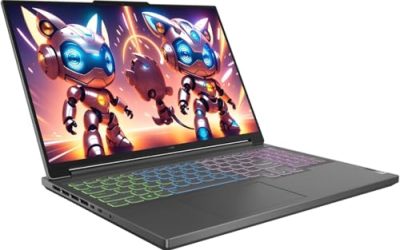
The LOQ 15 is the upgrade-friendly pick in this roundup, and it is the best choice if you like the idea of improving your laptop over time instead of replacing it. Its Ryzen 7 170 processor and RTX 4050 graphics deliver smooth full-HD gaming, and the 15.6-inch IPS screen runs at 144Hz with 300 nits of brightness and full sRGB coverage. The real strength is the upgrade path: the listing states support for up to 64GB of DDR5 memory and up to 2TB of PCIe storage, with a numeric keypad, backlit keyboard, and Wi-Fi 6 included. It is a practical machine that grows with you.
Specs
- 15.6-inch FHD IPS 144Hz display, 300 nits, full sRGB coverage
- AMD Ryzen 7 170 processor, up to 4.75GHz boost
- NVIDIA GeForce RTX 4050 Laptop GPU, 6GB GDDR6
- 16GB DDR5 RAM, upgradeable to 64GB
- 512GB PCIe SSD, upgradeable to 2TB
- Wi-Fi 6, backlit keyboard, numeric keypad, Windows 11 Home
Best for: Buyers who plan to add memory and storage later instead of buying a new laptop.
Watch out for: The listing’s size fields disagree between 15.3 and 15.6 inches, so confirm the exact screen size and configuration on the live listing before ordering.
ASIN: B0GZJXCT3P
MSI Thin 15 B12VE-2023US
The Thin 15 is a proven slim design, and it is the pick for anyone who wants Intel performance in a light chassis. Its Intel Core i7-12650H processor has ten cores, paired with the RTX 4050 and 16GB of DDR5 memory, so it handles games and heavy multitasking alike. The 15.6-inch full-HD screen runs at 144Hz, the 512GB NVMe drive is quick, and MSI’s Cooler Boost 5 dual-fan cooling is designed to keep the slim chassis from throttling during long sessions. It is the laptop to choose when a slim, proven design matters as much as frame rates.
Specs
- 15.6-inch FHD 144Hz display
- Intel Core i7-12650H processor, 10 cores
- NVIDIA GeForce RTX 4050 Laptop GPU, 6GB GDDR6
- 16GB DDR5 RAM
- 512GB NVMe SSD
- Cooler Boost 5 dual-fan cooling, Windows 11, Black
Best for: Commuters and students who want a slim Intel laptop for games and multitasking.
Watch out for: Confirm the listing is the factory B12VE-2023US configuration, because other Thin 15 listings are third-party upgraded machines with opened boxes.
ASIN: B0CXV8YGLV
MSI Cyborg 15 A13VE-218US

The Cyborg 15 is the most portable machine here, and it is the pick for anyone who carries a gaming laptop every day. Its Intel Core i7-13620H processor has ten cores, the most in this roundup, paired with the RTX 4050 and 16GB of DDR5 memory, so it handles games and heavy multitasking alike. The 15.6-inch full-HD screen runs at 144Hz, the 512GB NVMe drive is quick, and MSI’s Cooler Boost 5 dual-fan cooling is designed to keep the thinnest chassis here from throttling during long sessions. It is the laptop to choose when weight and desk space matter as much as frame rates.
Specs
- 15.6-inch FHD 144Hz display
- Intel Core i7-13620H processor, 10 cores
- NVIDIA GeForce RTX 4050 Laptop GPU, 6GB GDDR6
- 16GB DDR5 RAM, 5200MHz
- 512GB NVMe SSD
- Cooler Boost 5 dual-fan cooling, Windows 11 Home, Black
Best for: Commuters and students who carry their gaming laptop daily.
Watch out for: Confirm the listing is the factory A13VE-218US configuration, because other Cyborg 15 listings are third-party upgraded machines with opened boxes.
ASIN: B0C55DHXD2
Which One Fits Your Situation
First gaming laptop for a student
Pick the Lenovo LOQ 15. It has the most complete specification in this roundup with 16GB of memory and an upgrade path to 64GB, so there is nothing you need to change on day one and room to grow later. The numeric keypad and backlit keyboard suit coursework, and the 144Hz screen with full sRGB coverage is good for games and study alike.
A laptop that travels every day
Pick the MSI Cyborg 15. It is the thinnest machine in this roundup, and its ten-core i7 processor and 16GB of memory mean you are not giving up performance for portability. The Cooler Boost 5 fans keep it steady during long sessions, and the 144Hz screen is smooth enough for serious play after class.
Heavy multitasking as well as games
Pick the MSI Thin 15. Its ten-core i7 processor and 16GB of memory handle games alongside video calls, a browser full of tabs, and background apps without slowing down. Cooler Boost 5 keeps the slim chassis steady, and the 144Hz screen stays smooth for serious play after a long day at work.
You plan to keep it for years
Pick the Lenovo LOQ 15 again, because it is the only machine here whose listing states an upgrade path to 64GB of memory and 2TB of storage. Buy it with the standard 16GB and 512GB setup, add memory and a larger drive when your library grows, and you can stretch its useful life well past the other two.
Common Mistakes
- Buying on the GPU name alone: all three machines here use the same graphics chip, so the processor, cooling, and upgrade path are what split them.
- Ignoring the exact configuration in the listing: the same model name is sold with different CPUs, memory, and storage, and the wrong one changes everything.
- Filling a 512GB drive and blaming the laptop: two or three large games can fill it, so check the drive size and the upgrade options before you buy.
- Forgetting the charger and the weight: a heavy laptop with a large power brick is a desk machine, not a daily carry.
- Skipping the screen details: refresh rate, panel type, and colour coverage change what you see every day, and a glossy screen in a bright room is a constant annoyance.
Frequently Asked Questions
Is an RTX 4050 laptop enough for modern games?
Yes, at full-HD it is enough for modern games. The RTX 4050 with 6GB of graphics memory runs current titles smoothly at 1080p, and DLSS upscaling gives it extra headroom in newer games. You will need to lower a few settings in the most demanding titles, especially ray tracing, but for the games most people actually play, it is a capable chip.
Is 512GB of storage enough for a gaming laptop?
It is enough to start, but it fills fast. Two or three large games can take most of a 512GB drive, so you will be uninstalling games to make room for new ones. If you plan to keep a library installed, pick the LOQ, whose listing states support for up to 2TB of storage, or check whether your chosen model has a second drive slot before you buy.
Which processor should I choose in this tier?
The Cyborg’s Core i7-13620H and the Thin 15’s Core i7-12650H both have ten cores, which helps heavy multitasking and streaming while you play. The LOQ’s Ryzen 7 170 boosts to 4.75GHz and handles games well at full-HD. For gaming alone the differences are small, so choose by cooling, screen, and upgrade room instead.
What should I check on the listing before ordering?
Check the exact model code, CPU, memory, storage, and screen refresh rate, because the same laptop name is sold in many configurations. Confirm the memory is DDR5 and the drive is an SSD, check whether the box is factory sealed, and read the ports list if you plan to connect an external monitor, a headset, and a mouse at your desk.
FAQ
Is an RTX 4050 laptop enough for modern games?
Is 512GB of storage enough for a gaming laptop?
Which processor should I choose in this tier?
What should I check on the listing before ordering?
More from Amazon
Programs that pair well with the guide above. Offers and eligibility are set by Amazon and may change.
Free shipping on eligible items, Prime Video and more. Eligible new members can start with a free trial.
Start a Prime free trialAd-free music streaming. Eligible new subscribers can start with a free trial.
Try Music Unlimited freeA Prime membership for ages 18-24 with a trial period. Eligibility is set by Amazon.
See Prime for Young AdultsAudiobooks and podcasts to listen to on the go. Eligible new members can start with a free trial.
Try Audible freeAs an Amazon Associate we earn from qualifying purchases.