Our Top Picks
Pros & cons
- 180Hz WUXGA display covers 100% sRGB color
- RTX 5060 GPU supports DLSS 4 frame generation
- 32GB of DDR5 memory handles heavy multitasking
- 4.63-pound chassis adds bulk for travel
- Only one M.2 slot remains free for storage upgrades
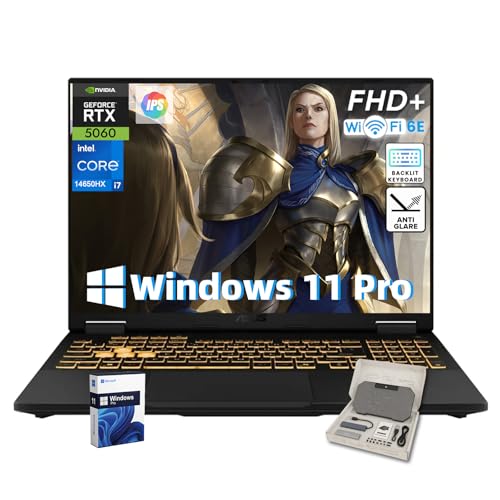 ASUS TUF F16 Gaming Laptop • Dedicated GeForce32 GB DDR5 | 2 TB SSD13.94 x 0.7 x 10.59 inches5 PoundsCheck on Amazon
Introduction
Finding the best gaming laptops 219 readers search for means sorting through machines that look similar on a spec sheet but behave very differently once a game is running. A laptop that pairs a capable graphics processor with a fast display, enough memory, and cooling that holds up during long sessions will feel smooth in everyday play. This guide covers five gaming laptops currently listed on Amazon US, each built around a modern dedicated graphics processor and a high refresh display.
Two of them use the GeForce RTX 5070 laptop graphics processor, a step above the RTX 5060 class in the other three, and that gap matters most at higher resolutions. Screen size matters too: a 15 inch machine is easier to carry, while a 16 inch machine gives a larger view and often more room for cooling. Memory is the third split: several laptops here ship with 32GB of DDR5 memory, which leaves headroom when a game, a browser, and a chat application run together, while the 16GB models still cover most current titles. Fast competitive titles reward a high refresh display, while large open world games reward graphics memory and steady cooling.
At a Glance
| Laptop | Graphics | Display | Memory | Storage |
|---|---|---|---|---|
| ASUS ROG Strix G16 (2025) | GeForce RTX 5060 | 16 inch, 165Hz, 1920 x 1200 | 16GB DDR5 | 1TB SSD |
| Lenovo Legion 5i | GeForce RTX 5070 | 15.1 inch OLED, 165Hz, 2560 x 1600 | 16GB DDR5 | 1TB SSD |
| Acer Nitro V 16S AI | GeForce RTX 5060 | 16 inch, 180Hz, WUXGA IPS | 32GB DDR5 | 1TB SSD |
| MSI Katana 15 HX | GeForce RTX 5070 | 15.6 inch, 165Hz, QHD | 32GB DDR5 | 1TB SSD |
| ASUS TUF Gaming F16 | GeForce RTX 5060 | 16 inch, 165Hz, FHD+ IPS | 32GB DDR5 | 2TB SSD |
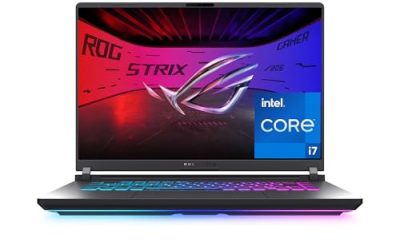
ASUS ROG Strix G16 (2025)

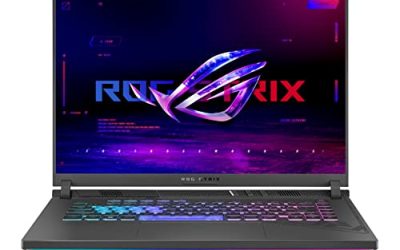
The ASUS ROG Strix G16 is the most balanced machine in this group. It uses an Intel Core i7-14650HX processor with 16 cores and a top speed of 5.2 GHz, alongside an NVIDIA GeForce RTX 5060 laptop graphics processor with 8GB of dedicated graphics memory. That pairing handles modern titles at the native resolution of its 16 inch display, which runs at 1920 x 1200 with a 165Hz refresh rate and a 3ms response time, so motion stays smooth.
ASUS ROG Strix G16 (2025) Gaming Laptop
The listing pairs the processor and graphics with 16GB of DDR5 memory at 5600 MHz and a 1TB PCIe Gen 4 solid state drive. The chassis weighs 2.65 kilograms, and the 90 watt hour battery suits a machine of this class. Connectivity covers Wi-Fi 7, Bluetooth, three USB ports, a Thunderbolt port, and HDMI output. It also includes a backlit gaming keyboard, Dolby Atmos audio, a customizable RGB light bar, and tool free access to the memory and storage bays for later upgrades. The ROG Intelligent Cooling system uses three fans, and Windows 11 Home is installed.
Considerations
The 16GB of memory is the main limit: it covers current games well, but running a game alongside streaming software, a browser, and a voice chat application is easier on the 32GB machines here. At 2.65 kilograms plus the adapter, it is a noticeable load in a bag. The 1920 x 1200 display is less sharp than the 2560 x 1600 panel on the Legion 5i.
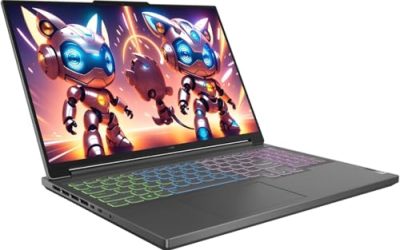
Lenovo Legion 5i

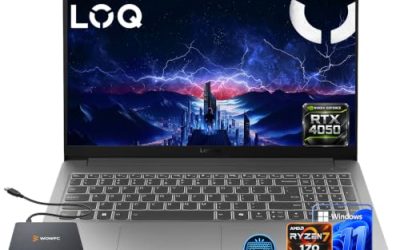
The Lenovo Legion 5i stands out because of its display. The 15.1 inch PureSight OLED panel runs at 2560 x 1600 with a 165Hz refresh rate and a peak brightness of 500 nits, giving deeper blacks and stronger contrast than the IPS panels on the other laptops here. It pairs that display with an Intel Core i7-14700HX processor and an NVIDIA GeForce RTX 5070 laptop graphics processor with 8GB of GDDR7 memory, a step up from the RTX 5060 machines.
Lenovo Legion 5i Gaming Laptop
The listing includes 16GB of DDR5 memory at 5600 MHz, expandable to 64GB, and a 1TB solid state drive. The chassis weighs 4.4 pounds, and the 80 watt hour battery has a listed life of 9 hours for light use, making the Legion 5i the easiest machine here to use away from a wall outlet. Legion Coldfront Hyper cooling keeps the processor and graphics at their intended speeds during long sessions. The Legion TrueStrike keyboard uses 24 zone RGB lighting, and the four speaker Nahimic audio system is tuned for spatial sound. Wi-Fi 7 and Bluetooth 5.3 are included, and Windows 11 Home is installed.
Considerations
The 16GB of memory is the same limit as on the Strix G16, though the Legion 5i is the only 16GB machine here with an upgrade path noted in the listing, expandable to 64GB. The OLED panel shapes how the laptop should be used: static images left on screen for very long stretches are worth avoiding, and brightness should sit at a comfortable level. The 15.1 inch screen is smaller than the 16 inch panels elsewhere, though the higher resolution keeps text sharp. The listed webcam capability is marked as absent in the listing details, so plan on an external camera for video calls.
Acer Nitro V 16S AI

The Acer Nitro V 16S AI is the memory leader in the lower graphics tier of this group. It pairs an AMD Ryzen 7 260 processor with an NVIDIA GeForce RTX 5060 laptop graphics processor and 32GB of DDR5 memory, so multitasking is where it shines: a game, a browser, a chat application, and a streaming tool can run together without the memory pressure a 16GB machine would feel. The 16 inch WUXGA IPS display runs at 180Hz, the fastest refresh rate in this group.
Acer Nitro V 16S AI Gaming Laptop
The listing includes a 1TB Gen 4 solid state drive, Wi-Fi 6, and a 4 zone RGB backlit keyboard. The model number for this configuration is ANV16S-41-R2AJ, and the machine ships with Windows 11. In competitive titles where the camera moves quickly, the 180Hz display makes motion look a touch smoother than a 165Hz panel, and the WUXGA resolution keeps the graphics processor in a range where it can hold high frame rates. HDMI and USB4 ports give room to connect an external display and peripherals when docked at a desk.
Considerations
The WUXGA resolution is lower than the 2560 x 1600 panels on the Legion 5i and the QHD panel on the Katana 15 HX, so fine detail is a little less crisp, though the 180Hz refresh rate compensates in motion. Wi-Fi 6 is a step behind the Wi-Fi 7 on the Strix G16, the Legion 5i, and the TUF F16. The 1TB drive is the same as most machines here, so a large library needs some management. The Ryzen 7 260 is capable for gaming, but in heavily processor bound scenes the Intel i7 and i9 parts here have a little more headroom.
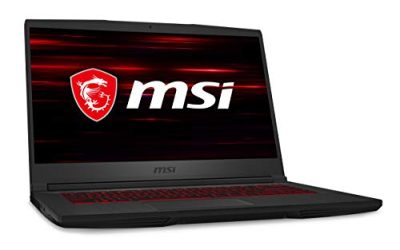
MSI Katana 15 HX

The MSI Katana 15 HX is the most powerful machine in this group, with a combination no other laptop here matches: an Intel Core i9-14900HX processor, an NVIDIA GeForce RTX 5070 laptop graphics processor, 32GB of DDR5 memory, and a 15.6 inch QHD display at 165Hz. The i9 has the most cores and the highest ceiling of any processor in this guide, which shows up in games that lean on the processor and in large strategy titles with many units on screen.
MSI Katana 15 HX Gaming Laptop
The listing for model B14WGK-016US includes 32GB of DDR5 memory, a 1TB NVMe solid state drive, and a 15.6 inch QHD display with full DCI-P3 color coverage, the widest color range in this group, suiting both games and photo work. The QHD resolution sits between the 1920 x 1200 panels and the 2560 x 1600 OLED of the Legion 5i, giving a good balance of sharpness and frame rate. The keyboard is a 4 zone RGB backlit unit, and the machine includes Wi-Fi 6E, DTS audio, and MSI Cooler Boost thermal technology. MSI OverBoost allows the processor and graphics to draw up to 170W combined, the highest total power ceiling in this group.
Considerations
The i9 processor and RTX 5070 graphics draw more power than the parts in the other machines, so fan noise under load is more noticeable, and the adapter should stay nearby during long sessions. The 15.6 inch screen is smaller than the 16 inch panels, though the QHD resolution keeps it sharp. Wi-Fi 6E is a step behind Wi-Fi 7. The 1TB drive is the same as most machines here, so storage management comes sooner than on the 2TB TUF F16.
ASUS TUF Gaming F16
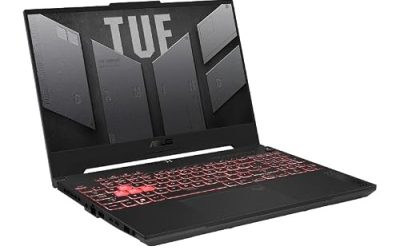
The ASUS TUF Gaming F16 is the storage leader in this group. This configuration ships with 32GB of DDR5 memory and a 2TB solid state drive, so it holds a large library of modern games without the regular uninstalling a 1TB drive demands. It pairs that storage with an Intel Core i7-14650HX processor, an NVIDIA GeForce RTX 5060 laptop graphics processor with 8GB of GDDR7 memory, and a 16 inch FHD+ IPS anti glare display at 165Hz.
ASUS TUF Gaming F16 Gaming Laptop
The listing for this configuration includes Windows 11 Pro rather than Windows 11 Home, which adds features for users who connect to a work network or use remote desktop tools, along with a backlit keyboard, facial recognition sign in, and Wi-Fi 6E. The FHD+ display uses a 1920 x 1200 resolution with an anti glare coating, which reduces reflections in bright rooms. The TUF line is built around durability, with a chassis designed to handle the knocks of daily travel, and the listing notes a 90 watt hour battery in the same class as the Strix G16. Accessories bundled with this listing add practical value for a new setup.
Considerations
The 1920 x 1200 display is less sharp than the QHD and 2560 x 1600 panels in this group, though the anti glare coating is a genuine advantage in bright rooms. The RTX 5060 graphics processor is a step below the RTX 5070 in the Legion 5i and the Katana 15 HX, so at higher resolutions and in the most demanding titles the frame rate ceiling is lower. The bundled accessories mean the listing is a configured bundle rather than a bare laptop, so confirm the included items match what you want.
How to Choose
Start with the graphics tier, because it sets the ceiling for how demanding a game can be before frame rates fall. The RTX 5070 machines, the Legion 5i and the Katana 15 HX, handle higher resolutions and heavier lighting better than the RTX 5060 machines, so if you play large open world games, those two deserve the first look. The RTX 5060 machines are strong at 1920 x 1200 and in competitive titles where a high refresh rate matters more than maximum detail, and they run cooler and quieter under load.
Next, weigh the display. The Legion 5i has the best display here, with an OLED panel, 2560 x 1600 resolution, and 500 nits of brightness, so if image quality is your first concern, it is the natural pick. The Katana 15 HX has the widest color range and a QHD panel, suiting both gaming and creative work. The Nitro V 16S AI has the fastest refresh rate at 180Hz, suiting competitive play. The Strix G16 and the TUF F16 share a 1920 x 1200 panel at 165Hz, and the TUF adds an anti glare coating.
Memory is the third decision. The 32GB machines leave room for a game, a browser, a chat application, and a streaming tool to run together, while the 16GB machines cover a game plus a couple of background applications. The Legion 5i is the only 16GB machine here with an upgrade path noted in the listing, expandable to 64GB. Storage is the fourth decision: the TUF F16 stands alone with 2TB, double the 1TB on every other machine here. Screen size is the last decision: the 15 inch class machines are easier to carry, while the 16 inch machines give a larger view.
Fit and Installation Considerations
Place the laptop on a hard, flat surface whenever it is running a game, because the cooling intakes sit on the underside and a soft surface like a bed blocks them. A simple stand that lifts the rear edge improves airflow and puts the screen at a more comfortable angle. Connect the laptop to power before launching a demanding game, because gaming laptops limit graphics performance on battery power.
Run the system updates and the graphics driver update that Windows prompts for on first setup, then restart before installing games. A separate mouse is more precise than a trackpad for most games, and a headset gives clearer sound than the built in speakers in a noisy room. All five machines here have HDMI output, so connecting an external monitor is straightforward. If you use one, set it as the main screen in Windows settings and close the lid only if the cooling intakes stay clear.
Plan storage from the start. A 1TB drive holds a working library, but modern games are large, so keep at least a tenth of the drive free so Windows and the game launchers have room to work. Keep the machine clean: compressed air on the vents every few months keeps dust from building up.
Frequently Asked Questions
Is 16GB of memory enough for a gaming laptop in 2026?
For most current games, 16GB is enough, and both the Strix G16 and the Legion 5i in this guide use 16GB. The limit appears when several demanding applications run alongside a game, such as a browser with many tabs, a voice chat application, and streaming software all at once. If that describes your routine, the 32GB machines here leave more headroom. The Legion 5i also notes memory expandable to 64GB.
Which of these laptops has the best display?
The Lenovo Legion 5i has the strongest display in this group, with a 15.1 inch OLED panel at 2560 x 1600, a 165Hz refresh rate, and 500 nits of brightness, giving deeper blacks and stronger contrast than the IPS panels here. The MSI Katana 15 HX comes next for color work, with a QHD panel covering the full DCI-P3 color range. The Acer Nitro V 16S AI has the fastest refresh rate at 180Hz, which matters most in fast competitive titles. The Strix G16 and the TUF F16 share a 1920 x 1200 panel at 165Hz, and the TUF adds an anti glare coating.
Does a higher graphics tier matter if I play at 1920 x 1200?
At 1920 x 1200, the difference between the RTX 5060 and the RTX 5070 is smaller than at higher resolutions, because the lower resolution asks less of the graphics processor. The RTX 5070 still gives more headroom for higher detail settings and for future titles, and it pairs better with the higher resolution displays on the Legion 5i and the Katana 15 HX. If you play mostly competitive titles at 1920 x 1200, an RTX 5060 machine with a fast display, like the Nitro V 16S AI at 180Hz, is a strong match.
How much storage do I need on a gaming laptop?
A 1TB solid state drive holds a working library of modern games alongside applications and media, and four of the five machines in this guide use 1TB. Modern games are large, so a 1TB drive needs occasional management, uninstalling finished games to make room for new ones. The ASUS TUF Gaming F16 here ships with a 2TB drive, which holds roughly twice as much and removes that chore for most users. Whichever size you choose, keep a portion of the drive free so Windows and your game launchers have room to work.
Conclusion
The best gaming laptops 219 readers are looking for are machines that balance graphics, display, memory, and storage without asking you to compromise on the parts that matter to the way you play. The ASUS ROG Strix G16 is the most balanced pick, with a proven processor and graphics pairing and a fast 165Hz display. The Lenovo Legion 5i has the best display here, with an OLED panel that makes dark scenes and colorful worlds look their best, and it is the most portable machine in the group. The Acer Nitro V 16S AI pairs a 180Hz display with 32GB of memory, suiting competitive play and heavy multitasking. The MSI Katana 15 HX is the most powerful machine here, with an i9 processor, RTX 5070 graphics, and 32GB of memory. The ASUS TUF Gaming F16 stands out for storage, with a 2TB drive and 32GB of memory.
Choose by ranking what matters most to you. If image quality leads, start with the Legion 5i. If raw performance leads, start with the Katana 15 HX. If memory and a fast display lead, start with the Nitro V 16S AI. If storage leads, start with the TUF F16. If balance across every area leads, start with the Strix G16.
As an Amazon Associate, we earn from qualifying purchases.
FAQ
Is 16GB of memory enough for a gaming laptop in 2026?
Which of these laptops has the best display?
Does a higher graphics tier matter if I play at 1920 x 1200?
How much storage do I need on a gaming laptop?
More from Amazon
Programs that pair well with the guide above. Offers and eligibility are set by Amazon and may change.
Free shipping on eligible items, Prime Video and more. Eligible new members can start with a free trial.
Start a Prime free trialAd-free music streaming. Eligible new subscribers can start with a free trial.
Try Music Unlimited freeA Prime membership for ages 18-24 with a trial period. Eligibility is set by Amazon.
See Prime for Young AdultsAudiobooks and podcasts to listen to on the go. Eligible new members can start with a free trial.
Try Audible freeAs an Amazon Associate we earn from qualifying purchases.