Our Top Picks
 HP Victus 15 Gaming Laptop 15.6" FHD IPS16GB RAM | 512GB SSD10.04 x 14.09 x 0.93 inches5.06 poundsCheck on Amazon
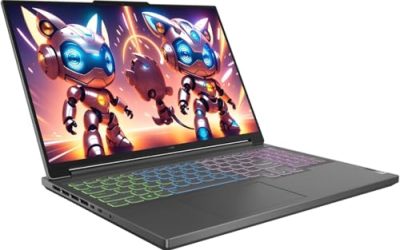
 Lenovo LOQ 16" 144Hz WUXGA Gaming Laptop16GB RAM | 1TB SSD14.16 x 10.93 x 0.83 inches5.73 poundsCheck on Amazon
A budget gaming laptop forces one honest trade: every dollar saved somewhere is a compromise you will feel somewhere else. The trick is choosing compromises that never touch the parts that decide whether a game runs well, which means the graphics card, the memory, the screen and the cooling matter far more than a slim shell or a flashy lid. A machine that holds a steady frame rate at 1080p, keeps its fans quiet and leaves room for more memory later will feel fast for years, while a laptop that leads with one strong specification and cuts the rest will frustrate you within weeks.
This guide is for students fitting games around lectures, first-time buyers stepping up from a shared family computer, and anyone replacing an older laptop that can no longer keep up. The five laptops below were chosen from the names and specifications on their Amazon product pages, favouring machines with a dedicated graphics card, a fast screen and a memory slot you can grow into.
Quick Picks
As an Amazon Associate we earn from qualifying purchases.
| Product | Best for | Key spec from title |
|---|---|---|
| HP Victus 15 | A balanced first gaming laptop | RTX 4050, 16GB DDR5, 144Hz IPS |
| ASUS TUF Gaming A15 | A durable first gaming laptop | RTX 3050, Ryzen 5 7535HS, 144Hz |
| Lenovo LOQ 16 | Desk-first play with the biggest screen | RTX 4050, 16GB DDR5, 1TB SSD |
| Acer Nitro V 15 | Upgrade-friendly gaming on a budget | RTX 4050, 8GB DDR5, 144Hz IPS |
| Lenovo IdeaPad Gaming 3 | Quiet games and study in one machine | RTX 4050, Ryzen 7 7735HS, 120Hz |
How to Choose
Graphics First: Match the Card to Your Games
Begin with the graphics card, because it sets the hardest limit on what a laptop can play well. An entry-level dedicated card handles competitive titles and many recent releases at 1080p, while integrated graphics struggle with the same games at low detail. Look for a card named clearly on the listing, check how much dedicated memory it carries, and be wary of listings that hide the card behind vague phrases about gaming performance. Then match the card to your library: fast-paced online games need steady frame rates more than rich shadows, and story-driven adventures reward a card that holds detail without stuttering. A stronger card than your games need wastes money better spent on memory or a screen.
Memory and Storage: Leave Room to Grow
A strong graphics card cannot rescue a laptop that stalls every time you open a browser beside your game. Look for a modern processor with enough cores for a game, voice chat and a few background tabs, and treat 16GB of memory as the comfortable standard at this budget, since it leaves headroom for newer titles and for the apps running around them. Where a listing ships with only 8GB, check for a free second memory slot, because an upgrade path matters more than a slightly faster chip. Also confirm the memory type on the page, since newer DDR5 modules and dual-channel layouts keep the processor fed, while a single slow stick can quietly hold back the whole machine.
Screen: Refresh Rate and Panel Quality
The screen is the part you look at for every hour of play, yet it is the easiest specification to skim past. A 144Hz panel makes motion in fast games look smoother and more readable than a basic 60Hz display, and an IPS panel keeps colours steady when you shift in your chair or share the screen with a friend. Brightness matters just as much, because a dim panel washes out in a bright room and forces you to play with the curtains drawn. Check the resolution too: 1080p is the sensible match for entry-level graphics, since a higher-resolution panel asks the card to work far harder for a gain your eyes may barely notice at this size.
Cooling, Keyboard and Ports: The Parts You Touch Daily
Cooling decides whether a laptop plays as well in the second hour as it did in the first, so look for dual fans, vents or heat pipes rather than a slim shell with nowhere for hot air to go. A machine that throttles under load drops frame rates exactly when a match gets busy. Storage deserves the same attention: a fast NVMe solid-state drive shortens loading times and leaves games ready to launch, while a small drive fills after only a handful of installs. Finally, count the ports you will use, including USB, HDMI and a headphone jack, and check the keyboard layout, because a laptop you carry daily should connect to your gear without a bag of adapters.
The 5 Best Options
HP Victus 15
The HP Victus 15 is the most balanced machine in this group, pairing a six-core Ryzen 7 processor with an RTX 4050 and a 144Hz IPS screen in a plain silver chassis that suits work as well as play. Its 16GB of DDR5 memory handles games, voice chat and a browser at the same time, while the 512GB drive loads games quickly and leaves room for a solid library. The backlit keyboard includes a numeric keypad, Wi-Fi 6 keeps online play steady, and the USB-C and HDMI ports connect a second screen without fuss. It is a first gaming laptop that asks for very little patience from its owner.
Specs
- 15.6-inch Full HD IPS 144Hz display
- AMD Ryzen 7 7445HS processor
- NVIDIA GeForce RTX 4050 graphics, 6GB GDDR6
- 16GB DDR5 memory
- 512GB SSD
- Backlit keyboard with numeric keypad
- Wi-Fi 6
- Windows 11 Home
Best for: a balanced first gaming laptop with a fast screen and a full keyboard.
Watch out for: other Victus 15 listings are seller-upgraded 32GB and 64GB bundles, so confirm the listing is the factory 16GB and 512GB configuration; the listing fields cap memory at 16GB, so confirm the upgrade path on the live listing.
ASIN: B0G2LWJ8YP
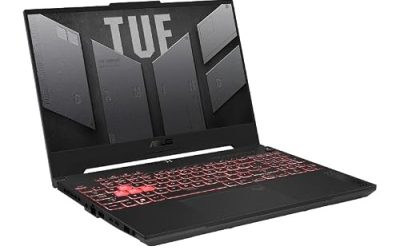
ASUS TUF Gaming A15

The TUF Gaming A15 is built for buyers who want durability first and flash second, with a military-tough chassis, a Ryzen 5 processor and an RTX 3050 that covers competitive titles and many recent releases at 1080p. Its 144Hz screen keeps fast games readable, the 512GB Gen4 drive loads quickly, and the keyboard layout suits long sessions. The 8GB of memory is the clear compromise here, so this laptop suits someone happy to add a second memory stick later, or a player whose library leans toward esports and older titles rather than the heaviest new releases.
Specs
- 15.6-inch Full HD 144Hz display
- AMD Ryzen 5 7535HS processor
- NVIDIA GeForce RTX 3050 graphics, up to 70W TGP with Dynamic Boost
- 8GB DDR5 memory
- 512GB PCIe Gen4 NVMe SSD
- Wi-Fi 6
- Windows 11
Best for: a durable first gaming laptop for competitive titles at 1080p.
Watch out for: 8GB of memory leaves little headroom, so check for a free second memory slot before buying; graphics power figures differ across sources, with the listing stating up to 70W and another source stating 75W.
ASIN: B0CRDB8G1G
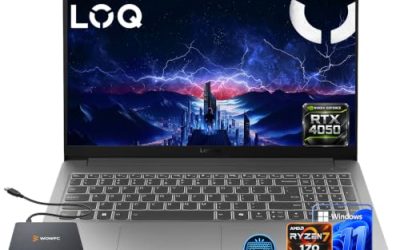
Lenovo LOQ 16
The Lenovo LOQ 16 is the only 16-inch laptop in this group, pairing a Ryzen 7 processor with an RTX 4050 and a taller 1920 x 1200 screen that gives games and documents more vertical room. Its 16GB of DDR5 memory handles voice chat, a browser and a game at the same time, while the 1TB drive holds the largest library here without reaching for external storage. The backlit keyboard, Wi-Fi 6 and a full set of ports, including USB-C with DisplayPort and HDMI, make it a practical single machine for a player who games mostly at a desk and wants the biggest screen in this bracket.
Specs
- 16-inch WUXGA 144Hz display (1920 x 1200)
- AMD Ryzen 7 7840HS processor
- NVIDIA GeForce RTX 4050 graphics, 6GB GDDR6
- 16GB DDR5 memory
- 1TB PCIe SSD
- Wi-Fi 6
- Backlit keyboard
- Windows 11 Home
Best for: a desk-first machine with the largest screen and the most storage here.
Watch out for: this model was verified from mirror listings only, with no returned amazon.com snippet, so confirm the listing and its availability live before publishing; the 16-inch screen makes it the least portable laptop here.
ASIN: B0CKTX9SZ7
Acer Nitro V 15

The Nitro V 15 is the most upgrade-friendly laptop here, with two memory slots and two drive slots behind a straightforward 15.6-inch IPS screen. Its Intel Core i5 processor and RTX 4050 cover competitive games and recent releases at 1080p, the 144Hz panel keeps motion smooth, and the dual-fan cooling handles long sessions without drama. The 8GB of memory in this configuration is the obvious place to spend later, since a second stick turns it into a far more capable machine, and the backlit keyboard and Wi-Fi 6 round out a laptop that asks for very little patience from its owner.
Specs
- 15.6-inch Full HD IPS 144Hz display
- Intel Core i5-13420H processor
- NVIDIA GeForce RTX 4050 graphics
- 8GB DDR5 memory
- 512GB Gen 4 SSD
- Wi-Fi 6
- Backlit keyboard
- Windows 11 Home
Best for: an upgrade-friendly laptop with two memory slots and a fast screen.
Watch out for: the 8GB configuration needs a memory upgrade for heavier multitasking; display refresh figures differ across sources, with the Amazon listing stating 144Hz and a tracker stating 165Hz, so confirm the panel on the live listing.
ASIN: B0CP8D4SM2
Lenovo IdeaPad Gaming 3

The IdeaPad Gaming 3 is the most discreet-looking laptop in this group, with a plain grey chassis that draws no attention in a lecture hall or an office, while the Ryzen 7 processor and RTX 4050 inside handle games and coursework with equal ease. Its 120Hz IPS screen is smooth enough for competitive play, the 16GB of DDR5 memory leaves room for background apps, and the 512GB drive holds a solid library. Backlit keys, Wi-Fi 6 and a full set of ports, including Ethernet and HDMI, make it a practical single machine for a student who games at night and studies by day.
Specs
- 15.6-inch Full HD IPS 120Hz display
- AMD Ryzen 7 7735HS processor
- NVIDIA GeForce RTX 4050 graphics
- 16GB DDR5 memory
- 512GB SSD
- Wi-Fi 6
- Backlit keyboard
- Windows 11 Home
Best for: a quiet, plain-looking laptop for games and study in one machine.
Watch out for: several upgraded listings share this model name with 32GB or 64GB of memory and larger drives, so confirm the listing is the factory 16GB and 512GB configuration, model 82SB00K9US, before buying.
ASIN: B0BX7JTK5T
Which One Fits Your Situation
You Play Competitive Games Most Evenings
Your evenings revolve around ranked matches, so favour a fast screen and a graphics card that holds steady frame rates at 1080p over a larger drive. The Victus 15, Nitro V 15 and TUF Gaming A15 all carry 144Hz screens, while the LOQ 16 adds a taller 16-inch panel for the same fast refresh. 16GB of memory keeps voice chat and a browser open without stutters, and a wired network port helps when household Wi-Fi gets crowded.
You Need One Laptop for Classes and Games
You need a machine that writes essays in the morning and runs games at night, so balance matters more than any single part. The HP Victus 15 is the natural pick, with 16GB of memory, a 144Hz screen and a plain chassis that travels well, while the Lenovo IdeaPad Gaming 3 suits buyers who prefer a plainer look and a quieter presence in class. Both handle documents, research tabs and evening play without asking you to carry a second device.
You Want the Strongest Graphics in This Bracket
If graphics power leads your decision, compare the RTX 4050 machines, since the RTX 3050 in the TUF Gaming A15 sits below them. The LOQ 16 pairs its RTX 4050 with the largest screen and most storage here, the Victus 15 pairs it with a balanced 16GB configuration out of the box, and the IdeaPad Gaming 3 pairs it with the strongest processor of the five. Pick the combination that matches your library, then check its memory and storage.
You Are Upgrading from an Older Laptop
Your old machine probably taught you exactly what frustrated you, so let those lessons lead. If loading screens dragged, prioritise a fast NVMe drive and enough memory, which points to the LOQ 16 or the IdeaPad Gaming 3. If games stuttered, put the graphics card first and accept a plainer screen, which points to the Victus 15. Resist matching every specification of a flagship model, and spend on the one weakness that bothered you most.
Common Mistakes
- Judging a laptop by its graphics card alone. A capable card paired with a single slow memory stick, a dim 60Hz panel or weak cooling will still stutter, wash out and throttle, so read the full specification list and check that no single part drags the rest of the machine down.
- Accepting 8GB of memory with no way to add more. Some budget models solder the memory in place, which leaves you stuck when newer games and background apps begin competing for room, so confirm a free slot or a 16GB configuration on the listing before you commit.
- Ignoring the screen until the laptop arrives. Brightness, panel type and refresh rate shape every hour you spend with the machine, yet buyers often discover a washed-out display only after unboxing, so compare those figures with the same care you give the graphics card.
- Forgetting how quickly storage fills up. Modern games are large, and a small drive means constant uninstalling or an external drive trailing from a USB port, so look for generous NVMe storage or a spare slot you can fill later without opening a maze of screws.
- Buying for the game you wish you played. It is easy to chase the highest settings for a demanding title you open twice a year, while the competitive or story games you play weekly would run happily on modest hardware, so spend the budget on the games that fill your evenings, not the ones on your wishlist.
Frequently Asked Questions
Is 8GB of memory enough for a budget gaming laptop?
It can run many games, but it leaves little room for anything else, and newer titles plus voice chat, a browser and background apps can push it to its limit. A 16GB configuration gives the machine comfortable headroom, and if a listing only ships with 8GB, check for a free memory slot, because a laptop you can upgrade stays useful far longer than one sealed at its original specification.
Should I choose an RTX 3050 or an RTX 4050 laptop?
The RTX 4050 is the stronger card, with more dedicated memory and newer frame-generation support, so it handles recent releases at 1080p with more headroom. The RTX 3050 still covers competitive titles and many older games well, and it appears in the cheapest machines here. If your library leans toward recent story-driven games, favour the RTX 4050; if you mostly play esports, the RTX 3050 is enough.
Can a budget gaming laptop run newer games?
Yes, provided you buy with headroom rather than for today alone, which means a dedicated graphics card, 16GB of memory and a fast NVMe drive with room to grow. Expect to play recent releases at 1080p with sensible settings rather than maximum detail, and keep drivers current, because a machine bought with sensible margins ages far more gracefully than one already stretched on the day it arrives.
What should I check on the listing before buying?
Confirm the exact configuration on the listing, since the same model name often covers several memory, storage and screen combinations, and upgraded seller listings can share a model name with the factory version. Check the graphics card, memory size and type, drive size, screen refresh rate and panel type, and confirm a free memory or drive slot if you plan to upgrade later.
FAQ
Is 8GB of memory enough for a budget gaming laptop?
Should I choose an RTX 3050 or an RTX 4050 laptop?
Can a budget gaming laptop run newer games?
What should I check on the listing before buying?
More from Amazon
Programs that pair well with the guide above. Offers and eligibility are set by Amazon and may change.
Free shipping on eligible items, Prime Video and more. Eligible new members can start with a free trial.
Start a Prime free trialAd-free music streaming. Eligible new subscribers can start with a free trial.
Try Music Unlimited freeA Prime membership for ages 18-24 with a trial period. Eligibility is set by Amazon.
See Prime for Young AdultsAudiobooks and podcasts to listen to on the go. Eligible new members can start with a free trial.
Try Audible freeAs an Amazon Associate we earn from qualifying purchases.