Our Top Picks
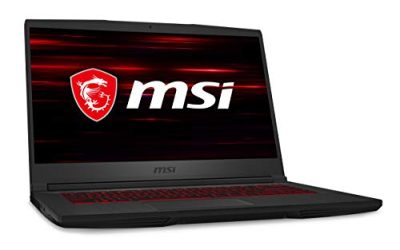
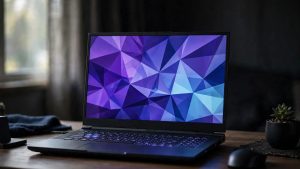
 MSI Katana 15 B13VEK-277US 15.6" Gaming Intel Core16GB RAM I 1TB SSD14.13 x 10.2 x 0.98 inches4.9 poundsCheck on Amazon
Choosing a gaming laptop in this tier is really a decision about where the hardware stops compromising. Machines one step down usually cut the graphics card, halve the memory, or fit a dim, slow screen, and each of those cuts shows up in every session. The listings gathered here hold a clearer line: a current RTX graphics card, DDR5 memory, a solid-state drive with real room on it, and a panel that refreshes fast enough for the games the hardware can run.
This roundup suits players moving up from an older laptop, students who need one machine for coursework and evening sessions, and anyone replacing a desktop with something that still travels. Each pick was selected from the name and specifications on its Amazon listing, so the configuration described is the configuration that listing describes, and the sections below compare the picks on those stated details rather than on reputation.
Quick Picks
As an Amazon Associate we earn from qualifying purchases
| Product | Best for | Key spec from title |
|---|---|---|
| ASUS TUF Gaming A15 FA507NV-EH74 | Colour-conscious players who also edit photos | GeForce RTX 4060 |
| GIGABYTE G6 KF-H3US853SH | Players who want a taller 16-inch screen | 16″ FHD 1920×1200 165Hz display |
| MSI Katana 15 B13VEK-277US | Storage-heavy game libraries | 1TB NVMe SSD |
| MSI Katana A15 AI B8VF-448US | Multitaskers who keep many apps open | 32GB DDR5 memory |
| Acer Nitro V ANV15-52-586Z | Fast-panel esports play on a 15.6-inch screen | 15.6″ FHD IPS 165Hz display |
How to Choose
Start With the Graphics Card, Not the Processor
In this tier the graphics card decides how a laptop ages, because it cannot be swapped later while storage and sometimes memory can grow. The listings here split between the GeForce RTX 4050 with 6GB of GDDR6 memory and the RTX 4060 with 8GB, and that extra memory matters once textures climb in newer releases. A sensible order is to fix the graphics card first, then check that the processor beside it is a recent H-series chip, such as the Ryzen 7 7735HS or Core i7-13620H named in these listings, rather than paying for a stronger processor paired with weaker graphics.
Read Memory and Storage as a Pair
Sixteen gigabytes of DDR5 is the working baseline in this group, and it covers gaming alongside a browser, chat and a launcher without strain. One listing doubles that figure, which suits players who record, edit or keep many applications open at once, while the Acer listing halves it, so its memory line deserves a hard look before anything else. Storage deserves the same attention: a 512GB drive fills quickly once two or three large games land on it, so the 1TB listings remove an early upgrade decision, whereas a 512GB pick asks you to manage the library from day one.
Match the Screen to the Games You Actually Play
Every panel here is a fast one, but the details differ in ways that change daily use. Refresh rates run from 144Hz to 165Hz, which suits competitive titles where motion clarity counts, and the GIGABYTE stretches to a 16-inch 1920×1200 panel that adds vertical room for documents and timelines. The ASUS listing states full sRGB coverage, which matters if the same screen handles photo work or design tasks. Resolution stays at full HD across the group, a sensible match for these graphics cards, since a sharper panel would demand more from the GPU in every game.
Check the Details Listings Quietly Downgrade
The compromises in this tier rarely appear in the headline; they hide in the second half of the specification table. Look for the memory configuration, because a single stick can limit a machine that otherwise reads well, and confirm whether the listing names Wi-Fi 6 or leaves wireless vague. Keyboard backlighting, port selection and the exact Windows edition also vary between listings that look identical at a glance. Finally, compare the model code letter by letter: ranges such as the Nitro V and Katana span several configurations, and the code is what ties the specifications to the machine actually being sold.
The 5 Best Options
ASUS TUF Gaming A15 FA507NV-EH74

This is the most rounded configuration in the group for a player who also does visual work. The listing pairs a Ryzen 7 7735HS with an RTX 4060 and a full terabyte of storage, then adds the panel detail most rivals skip: a stated full sRGB gamut on its 144Hz screen. That combination suits someone who edits photos or video on the same machine they game on, because the graphics card, memory and screen all pull in the same direction instead of one part lagging behind the rest.
Specs
- Processor: AMD Ryzen 7 7735HS
- Graphics: NVIDIA GeForce RTX 4060
- Memory: 16GB DDR5
- Storage: 1TB PCIe SSD
- Display: 15.6-inch FHD 144Hz, 100% sRGB
- Wireless: Wi-Fi 6
- Operating system: Windows 11
- Model: FA507NV-EH74
Best for: Players who edit photos or video on the same laptop they game on.
Watch out for: The design is a 2023 model, so confirm the listing configuration matches the FA507NV-EH74 code before ordering.
ASIN: B0CJSY4PLN
GIGABYTE G6 KF-H3US853SH

The GIGABYTE earns its place through its screen format as much as its graphics card. Its 16-inch panel runs at 1920×1200 rather than the usual 1920×1080, so strategy maps, documents and editing timelines gain vertical space that a standard panel crops away, and it refreshes at 165Hz for fast-moving play. Underneath, the listing states a Core i7-13620H and an RTX 4060 with 8GB of GDDR6 memory, a pairing that fits players who split time between games and coursework or office work on one larger display.
Specs
- Processor: Intel Core i7-13620H
- Graphics: NVIDIA GeForce RTX 4060 Laptop GPU, 8GB GDDR6
- Memory: 16GB DDR5 RAM, 4800 MHz
- Storage: 512GB SSD, Gen4 M.2
- Display: 16-inch FHD 1920×1200, 165Hz
- Operating system: Windows 11 Home
- Model: G6 KF-H3US853SH
Best for: Players who want a taller screen for mixed gaming, study and document work.
Watch out for: Storage is 512GB, the smaller figure in this group, so a large game library will need managing sooner.
ASIN: B0CJK3YVB2
MSI Katana 15 B13VEK-277US
MSI’s Katana 15 is the straightforward pick for a player whose library is the problem. The listing leads with a terabyte of NVMe storage, double the room of the 512GB machines here, alongside a Core i7-13620H and 16GB of DDR5 memory. Its RTX 4050 carries 6GB of GDDR6, a step below the 4060 listings, so this machine trades some graphics headroom for space and a strong processor. That balance suits players who rotate through many installed titles and would rather delete nothing than squeeze a library onto a smaller drive.
Specs
- Processor: Intel Core i7-13620H
- Graphics: NVIDIA GeForce RTX 4050, 6GB GDDR6
- Memory: 16GB DDR5
- Storage: 1TB NVMe SSD
- Display: 15.6-inch
- Ports: Type-C listed
- Operating system: Windows 11 Home
- Model: B13VEK-277US
Best for: Players with large installed libraries who hate uninstalling games.
Watch out for: The RTX 4050 is the lower graphics tier here, so check the listing’s full display details, which the title states only in part.
ASIN: B0BZBN3857
MSI Katana A15 AI B8VF-448US

This second Katana is a different machine from the Intel model above, built around a Ryzen 7-8845HS and aimed at heavier multitasking. The listing states 32GB of DDR5 memory, twice the figure on most of this group, together with an RTX 4060, a terabyte of storage and MSI’s Cooler Boost 5 cooling named in the title. It fits the player who streams, records or keeps editing software open beside a game, and who would rather have memory headroom in place now than plan an upgrade around a machine bought for the long term.
Specs
- Processor: AMD Ryzen 7-8845HS
- Graphics: NVIDIA GeForce RTX 4060
- Memory: 32GB DDR5
- Storage: 1TB SSD
- Display: 15.6-inch FHD 144Hz
- Cooling: Cooler Boost 5
- Model: Katana A15 AI B8VF-448US
Best for: Streamers and multitaskers who run recording or editing apps beside their games.
Watch out for: Two Katana lines sit close together in MSI’s range, so verify the B8VF-448US code and Ryzen processor on the listing, not the Katana name alone.
ASIN: B0CXVGSY2H
Acer Nitro V ANV15-52-586Z

The Nitro V is the esports-leaning pick here, built around the fastest panel in the group relative to its graphics card. Its 15.6-inch IPS screen refreshes at 165Hz and the RTX 4050 is enough to feed high frame rates in competitive titles at full HD, while the Core i5-13420H and Gen 4 SSD keep loading and menus snappy. The compromise sits in the memory line: the listing states 8GB of DDR5, half the group norm, so this is a machine for focused play rather than heavy multitasking.
Specs
- Processor: Intel Core i5-13420H
- Graphics: NVIDIA GeForce RTX 4050 Laptop GPU
- Memory: 8GB DDR5
- Storage: 512GB Gen 4 SSD
- Display: 15.6-inch FHD IPS 165Hz
- Wireless: Wi-Fi 6
- Keyboard: Backlit
- Model: ANV15-52-586Z
Best for: Competitive players who value a 165Hz panel for fast, lighter titles.
Watch out for: The listed 8GB of memory is the lowest here, so confirm the configuration and upgrade path on the listing before choosing it for multitasking.
ASIN: B0F5KTGDS9
Which One Fits Your Situation
You Play Competitive Titles Most Nights
Choose the Acer Nitro V. Its 165Hz IPS panel is the point of the machine, and lighter competitive games at full HD are exactly what its RTX 4050 and Core i5-13420H are set up to drive at high frame rates. Accept the smaller memory figure as the trade, keep background applications closed while you play, and the configuration makes sense as a focused esports laptop rather than an all-purpose one.
You Want One Laptop for Games and Coursework
Take the GIGABYTE G6. The taller 1920×1200 screen gives documents, spreadsheets and reading material more vertical room than a standard gaming panel, and the RTX 4060 with a Core i7-13620H covers evening play without asking you to lower everything. Its 512GB drive is the one figure to plan around, so keep coursework files organised and reserve the internal space for the games in current rotation.
You Record, Stream or Edit Between Sessions
The MSI Katana A15 AI is built for your desk habits. Its 32GB of memory is the figure that matters most once capture software, a browser and an editor sit open beside a game, and the RTX 4060 plus a terabyte of storage back that up for project files and footage. If your sessions are purely play with nothing else running, the ASUS below covers you with less headroom to spare.
You Care About Colour for Photo or Design Work
Pick the ASUS TUF Gaming A15. It is the only listing here that states full sRGB coverage for its screen, and that stated figure is what makes it credible for photo editing and design tasks between games. The RTX 4060, Ryzen 7 processor and terabyte drive mean the rest of the configuration does not undermine the panel, so colour work and play genuinely share one machine.
Common Mistakes
- Comparing laptops by processor name alone while ignoring the graphics card, which decides gaming performance and cannot be upgraded later.
- Assuming every listing in a model range shares one configuration, when the model code at the end of the title is what fixes the actual specifications.
- Overlooking a low memory figure in an otherwise strong listing, then discovering multitasking suffers once chat, browsers and launchers pile up.
- Filling a 512GB drive with two large games and an editing project, then having no room left for updates or new installs.
- Judging a screen by size only and missing the refresh rate and stated colour coverage that shape how games and photos actually look.
Frequently Asked Questions
Is an RTX 4050 enough, or should I hold out for an RTX 4060?
For full HD play, both cards in these listings are workable, and the difference shows in texture settings and longevity rather than basic playability. The 4060 listings carry 8GB of graphics memory against 6GB on the 4050 models, which gives newer, heavier titles more room. Choose the 4050 machines for lighter or competitive games, and the 4060 listings if you play demanding releases and keep a laptop for years.
How much memory does a gaming laptop in this tier need?
Sixteen gigabytes of DDR5, the figure on most listings here, covers gaming alongside the usual background applications without fuss. The 32GB MSI listing suits recording, streaming and editing layered on top of play. The Acer’s listed 8GB is the exception to plan around: fine for focused gaming sessions, tight once several demanding applications run together, so weigh that line carefully against how you actually use a machine.
Does a 165Hz screen matter if I do not play competitively?
It still smooths everyday motion, from scrolling to fast camera movement in single-player games, provided the graphics card can feed those frame rates at full HD, which the cards here can in lighter titles. In heavier games the panel simply runs below its ceiling, which harms nothing. Treat refresh rate as a ceiling worth having, but weigh it beside graphics memory and storage rather than choosing on that number alone.
What should I check on the listing before ordering?
Match the full model code in the title against the specification table, since ranges like Katana and Nitro V span several configurations under one name. Confirm the memory size, drive capacity and graphics card memory exactly as listed, and check which Windows edition the listing states. If any figure conflicts with the title, question the seller about the product details section before ordering.
FAQ
Is an RTX 4050 enough, or should I hold out for an RTX 4060?
How much memory does a gaming laptop in this tier need?
Does a 165Hz screen matter if I do not play competitively?
What should I check on the listing before ordering?
More from Amazon
Programs that pair well with the guide above. Offers and eligibility are set by Amazon and may change.
Free shipping on eligible items, Prime Video and more. Eligible new members can start with a free trial.
Start a Prime free trialAd-free music streaming. Eligible new subscribers can start with a free trial.
Try Music Unlimited freeA Prime membership for ages 18-24 with a trial period. Eligibility is set by Amazon.
See Prime for Young AdultsAudiobooks and podcasts to listen to on the go. Eligible new members can start with a free trial.
Try Audible freeAs an Amazon Associate we earn from qualifying purchases.