Key takeaways
- Pro: USB-C and cardioid pickup
- Pro: tap-to-mute
- Pro: 24-bit/96 kHz listed
- Con: no pop filter or arm listed
- Con: fewer extras than kits
The best gaming microphones under $75 are the HyperX SoloCast 2 for simple USB-C cardioid capture and the FIFINE AmpliGame A6T if you want a full kit with boom arm and pop filter. Both fit the budget. This guide compares six picks from listing specifications, covering voice chat, streaming, and small desks.
A gaming microphone has to do a few things well: pick up your voice clearly, ignore as much keyboard and fan noise as possible, and be easy to mute when a teammate talks over you. Under $75 the choices are mostly USB condenser mics, which plug straight into a PC or console with no interface, plus one dynamic USB and XLR model for noisier rooms. We compare features that the listings actually state, such as cardioid pattern, tap-to-mute, gain control, and included stands. Where a listing is silent, for example on frequency response or self-noise, we mark it as not listed.
Quick Comparison
| Model | Key specs per listing | Best for |
|---|---|---|
| HyperX SoloCast 2 | USB-C condenser, cardioid, 24-bit/96 kHz, tap-to-mute | Plug-and-play voice chat |
| Razer Seiren V3 Mini | Supercardioid condenser, tap-to-mute with LED, shock absorber | Small desks |
| MAONO DGM20S | Condenser, noise reduction, tap-to-mute, gain, RGB, boom arm | Streaming setups |
| FIFINE AmpliGame A6T | Condenser kit, mute button, boom arm, pop filter, shock mount | Complete starter kit |
| FIFINE AmpliGame AM8 | USB/XLR dynamic, RGB, mute, headphone jack | Noisy rooms |
| MAONO A04 | 192 kHz/24-bit condenser, cardioid, metal body | Recording and content |
HyperX SoloCast 2
Specs per listing: USB condenser gaming microphone, 24-bit/96 kHz, cardioid, USB-C, tap-to-mute, PC compatible.
The SoloCast 2 is the easiest first purchase. The listing gives cardioid pickup, USB-C, and a tap-to-mute control, which covers the basics of voice chat and streaming. 24-bit/96 kHz sampling is a solid listed spec for this budget. It plugs into a PC without extra software, so setup takes minutes. The listing does not state whether a stand or arm is included beyond the mic itself, and it does not mention a pop filter, so consider an add-on if you sit close. It is a fine fit when you want fewer features and fewer things to configure.
- Pro: USB-C and cardioid pickup
- Pro: tap-to-mute
- Pro: 24-bit/96 kHz listed
- Con: no pop filter or arm listed
- Con: fewer extras than kits
Razer Seiren V3 Mini
Specs per listing: USB supercardioid condenser, tap-to-mute sensor with LED indicator, shock absorber, ultra compact, works with OBS, Discord, Zoom, and Teams.
The Seiren V3 Mini is the compact option with a tighter pickup. Supercardioid narrows the focus to your voice, which can help in rooms where a second person or a speaker sits to the side. The listing names a tap-to-mute sensor with an LED indicator and a built-in shock absorber that reduces desk thumps. Its small body fits almost anywhere and the compatible app list covers OBS, Discord, Zoom, and Teams. Supercardioid mics are fussier about placement, so aim the front at your mouth. Gain and sample rate details are not in the listing text we compared.
- Pro: supercardioid pickup
- Pro: tap-to-mute with LED
- Pro: ultra compact with shock absorber
- Con: placement is less forgiving
- Con: sampling spec not listed
MAONO DGM20S
Specs per listing: USB condenser gaming microphone, noise reduction, RGB lighting, tap-to-mute, gain control, headphone monitoring, boom arm.
This model is built for streamers who want a boom arm and controls in one box. The listing includes noise reduction, RGB lighting, tap-to-mute, gain control, headphone monitoring, and a boom arm for Discord, gaming, and streaming. Headphone monitoring helps you catch problems in your own voice. The RGB lighting suits a visible desk setup, while a boom arm places the capsule close to your mouth for better voice pickup. As with all condensers, a noisy room will leak in, so use the gain control carefully rather than turning it up.
- Pro: boom arm included
- Pro: gain control and headphone monitoring
- Pro: noise reduction listed
- Con: RGB may not suit minimal desks
- Con: condenser picks up room noise
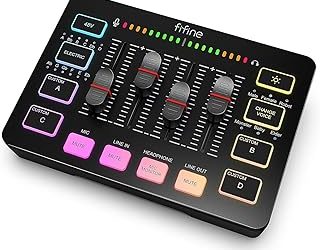
FIFINE AmpliGame A6T
Specs per listing: USB gaming microphone kit, condenser, mute button, RGB indicator, boom arm, gain control, pop filter, shock mount.
The A6T is a complete kit: boom arm, pop filter, and shock mount arrive with the mic according to the listing. That cuts accessory shopping and cleans up the desk because the arm lifts the mic off the surface. A mute button with an RGB indicator makes status obvious during streams, and gain control lets you set levels at the mic. The listing names PS4 and PS5 along with PC, which helps console players. It is the safest choice if you have no stand and want everything in one purchase.
- Pro: boom arm, pop filter, and shock mount listed
- Pro: mute button with indicator
- Pro: works with PC and PlayStation per listing
- Con: arm needs a desk edge to clamp
- Con: condenser capsule is sensitive to room noise
FIFINE AmpliGame AM8
Specs per listing: USB/XLR dynamic microphone, RGB light, mute button, headphone jack, desktop stand.
The AM8 is the dynamic option here, and the listing says it supports both USB and XLR. Dynamic microphones tend to reject more background noise than condensers, which helps in untreated rooms with fans and keyboards. The listing includes RGB lighting, a mute button, a headphone jack, and a desktop stand. Dynamic mics generally need you to speak closer to the capsule, so place it near your mouth. The XLR output gives an upgrade path to an interface later. If your room is noisy, this is the pick to weigh first.
- Pro: dynamic capsule suits noisy rooms
- Pro: USB and XLR outputs
- Pro: mute button and headphone jack
- Con: needs close placement
- Con: sampling spec not listed
MAONO A04
Specs per listing: USB condenser mic kit, 192 kHz/24-bit, cardioid, metal body, plug and play, for recording, gaming, content creation, and streaming.
The A04 is more general than the gaming-styled options, and that is its charm. The listing describes a cardioid metal mic with a pro sound chipset and a 192 kHz/24-bit figure, the highest sampling spec among these six. It is also plug and play, so it works with a PC without drivers. Use it if you record content for YouTube as well as stream, and prefer a plain, metal body over RGB. The listing text we compared does not describe mute or gain controls, so check the maker page if you need hardware mute.
- Pro: 192 kHz/24-bit listed
- Pro: cardioid and metal body
- Pro: plug and play
- Con: mute and gain controls not described
- Con: no gaming-style lighting
How to Choose a Gaming Microphone Under $75
Condenser or dynamic
Condensers capture more detail and suit quiet rooms. Dynamic mics like the AM8 reject more noise and suit loud rooms. Choose by your room, not by brand.
Look for quick mute
Tap-to-mute or a mute button saves you during a family interruption. The SoloCast 2, Seiren V3 Mini, and MAONO DGM20S list this feature.
Add up accessories
A kit with arm, pop filter, and shock mount can keep the total near Under $75, while a bare mic may need extras. Check the listing for what is in the box.
Check platform support
Most USB mics work on PC. If you play on PlayStation, confirm support in the listing, as the FIFINE A6T states.
Gaming Microphones for Home Office, Small Spaces, and Gaming
Home office
The Razer Seiren V3 Mini lists Zoom and Teams compatibility and a tap-to-mute LED, which fits calls.
Small spaces
Choose the Seiren V3 Mini for the smallest body, or a boom-arm kit like the A6T to free the desk surface.
Gaming
For chat with teammates, the SoloCast 2 and DGM20S keep things simple. For streaming, the kits with arms give better placement.
Getting Clean Voice Chat From Any Mic
Hardware only goes so far. Place the mic about a fist to a hand width from your mouth and slightly off to the side to reduce breath pops. Set the gain so your loudest shout does not clip, then lower the speakers or wear headphones to stop echo. Closing a window and turning off a nearby fan can help more than any setting change. If your keyboard is loud, put the mic on an arm or stand away from the desk surface, because a shock mount only handles part of that noise.
In your chat or streaming app, enable noise suppression sparingly. Heavy processing can clip the start of words. A short test recording and playback through headphones will show whether your setup is clear before you go live.
Cardioid vs Supercardioid: Which Pickup Fits You
Most mics in this list use a cardioid pattern, which hears the area in front of the capsule and rejects part of the sound from behind. The Razer Seiren V3 Mini lists a supercardioid pattern, which is narrower still. A narrower pattern can help if a second monitor, speaker, or a family member sits beside you, but it asks for more careful aim. If you move around while gaming, a standard cardioid mic is more forgiving because small movements keep your voice inside the pickup area.
The dynamic AM8 works differently again. Its capsule needs you to speak closer, and in exchange it hears less of the room. If you stream with a loud mechanical keyboard, a dynamic mic on an arm is often a better answer than a sensitive condenser on the desk.
Mute Controls and Why They Matter
Mute features sound minor until a doorbell rings mid-match. Tap-to-mute sensors, as listed on the SoloCast 2, Seiren V3 Mini, and MAONO DGM20S, let you silence the mic with a light touch, and an LED or RGB indicator shows whether it is live. A physical mute button, as the FIFINE kit lists, is easier to find by feel. Whichever style you prefer, make sure the indicator is visible from where you sit, since a muted mic you think is live is the most common cause of silent teammates.
Software mute in chat apps is a useful backup, but a hardware control works even when a game takes focus. For streamers, set a hotkey too, so the mic and the scene can change together.
FAQ
What is the best gaming microphone under $75?
The HyperX SoloCast 2 for simplicity, or the FIFINE AmpliGame A6T if you want a boom arm, pop filter, and shock mount in one kit.
Are USB mics good enough for gaming?
Yes. USB mics connect directly and offer clearer voice than headset boom mics for many players. No interface is needed.
Do I need a boom arm?
It helps. An arm puts the mic closer to your mouth and away from keyboard noise, and it frees up desk space.
Will these work on PlayStation?
Only some listings say so. The FIFINE A6T names PS4 and PS5, so check support for others on the maker page.
Dynamic or condenser for a noisy room?
Dynamic mics like the AM8 usually reject more background noise, so they are the safer choice in a noisy room.
Last updated: November 2026
FAQ
What is the best gaming microphone under $75?
Are USB mics good enough for gaming?
Do I need a boom arm?
Will these work on PlayStation?
Dynamic or condenser for a noisy room?
More from Amazon
Programs that pair well with the guide above. Offers and eligibility are set by Amazon and may change.
Free shipping on eligible items, Prime Video and more. Eligible new members can start with a free trial.
Start a Prime free trialAd-free music streaming. Eligible new subscribers can start with a free trial.
Try Music Unlimited freeA Prime membership for ages 18-24 with a trial period. Eligibility is set by Amazon.
See Prime for Young AdultsAudiobooks and podcasts to listen to on the go. Eligible new members can start with a free trial.
Try Audible freeAs an Amazon Associate we earn from qualifying purchases.