Key takeaways
- Shopping by console label alone: “PS5 Pro compatible” describes the console family, not necessarily DualSense Edge fit.
- Confusing the USB-C input with controller USB-C charging: a dock may use USB-C to receive power but still charge the controller through underside contacts.
- Assuming an AC adapter is included: check the box contents; USB-powered units and wall-powered units have different needs.
- Treating sale prices as permanent: check the seller’s current checkout total, including shipping and tax, rather than comparing old screenshots.
- Buying a cooling stand only to charge controllers: combined stands add bulk and may create console-placement constraints unrelated to controller charging.
- Forcing a controller with a thick protective case into the cradle: remove the case if the maker’s fit instructions require it; stop when contacts do not align.
The best PS5 Pro controller chargers are docks designed for the DualSense controllers you use with your console—not special chargers built into the PS5 Pro itself. For most households, the Sony DualSense Charging Station is the safest pick: it charges two standard DualSense or DualSense Edge controllers, includes its own power adapter, and keeps the console’s USB ports free. PowerA’s Twin Charging Station is the closest officially licensed alternative. If you only own one controller, the PowerA Solo is more compact; if price matters most, Fosmon offers a much cheaper two-slot option with a different connector design. Here is how to choose without paying for features you do not need.
Quick verdict: Which charger should you buy?
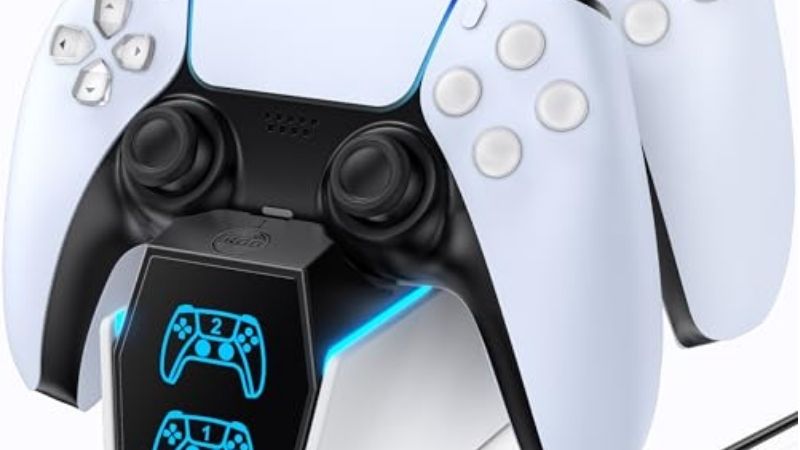
Best overall: Sony DualSense Charging Station (CFI-ZDS1). Its separate AC power supply, click-in contacts, and explicit DualSense Edge compatibility make it the simplest low-risk recommendation for PS5 Pro owners who rotate between two controllers. Sony documents roughly three hours to charge an empty standard DualSense; actual timing depends on the battery’s condition and charging circumstances.
Best licensed alternative: PowerA Twin Charging Station. Choose it for the snap-down cradle, included AC adapter, and two-year limited warranty. The current Twin-family instruction manual includes both DualSense and DualSense Edge, although buyers should still check the exact SKU and packaging because regional and older product listings vary.
Best for one controller: PowerA Solo. It is less bulky, supports both DualSense models in PowerA’s manual, and uses USB power. The trade-off is that charging through a PS5 Pro USB port in Rest Mode depends on the console’s power settings.
Best budget dual dock: Fosmon C-10764. Its two-slot USB-C contact design and low direct-store price are appealing, but it is not the conservative choice for DualSense Edge owners or people who want the same documented compatibility and warranty confidence as a first-party charger.
PS5 Pro controller charger comparison
US listing prices and visible purchase availability were checked on October 27, 2026. “In stock” means an opened US seller listing offered purchase or shipping at the time checked; fulfillment and local stock can change by ZIP code. Prices exclude tax and shipping. Neither a lower price nor a claimed charging time should be treated as permanent.
| Product | Verified defining feature | DualSense Edge | US price (seller, Oct. 27) | Stock status (Oct. 27) | Main drawback |
|---|---|---|---|---|---|
| Sony DualSense Charging Station CFI-ZDS1 | Two controllers; separate AC adapter | Yes, per Sony | $29.99, Best Buy | In stock (listing) | Only two slots; no extra storage |
| PowerA Twin Charging Station 1516956-04 | Two snap-down cradles; AC-powered | Supported in Twin-family manual; verify SKU | $27.99, PowerA | In stock (add-to-cart listing) | Price close to Sony; cradle action differs |
| PowerA Solo Charging Station 1522759-01 | One cradle; USB-A-to-USB-C power cable | Yes, per PowerA manual | $19.99, Walmart | In stock (listing) | One controller; USB power dependence |
| Razer Quick Charging Stand for PS5 (white) | Single curved cradle; USB-powered; multiple colors | Not explicitly verified | $39.99, Razer | In stock (add-to-cart listing) | More expensive than many two-pad docks |
| NEXT Dual Controller Charging Station NX-PS5CHRG2 | Two drop-in slots with separate status lights | Advertised in listing imagery; manual not independently verified | $21.99, Best Buy | In stock (listing) | Less technical documentation than Sony/PowerA |
| Fosmon Dual Charging Station C-10764 | Two USB-C charging connector positions; LEDs | Not explicitly verified | $9.99 sale, Fosmon | In stock (brand store) | USB-C seating needs care; Edge not confirmed |
How we selected these chargers
The starting point was controller compatibility, not the words “PS5 Pro” on a product box. The console uses the DualSense family, so a charging stand made for those controllers can work beside a PS5 Pro regardless of whether the stand mentions the newer console. We prioritized the manufacturer’s compatibility statement and instructions, then checked US retailer listings for exact models, price, and visible availability.
We also separated wall-powered chargers from USB-powered docks, counted charging positions, checked how the controller physically seats, and distinguished documented recharge times from marketing claims. A dock with four decorative lights is not necessarily a four-controller charger, and a “fast” claim does not establish a faster charge than Sony’s unit under comparable conditions.
These are specification- and listing-based recommendations, not hands-on measurements. We have not independently timed the six docks or measured battery temperature, electrical draw, contact wear, or long-term reliability. Where manufacturers do not clearly confirm Edge fit, that uncertainty remains visible instead of being converted into a compatibility promise.
Best PS5 Pro controller chargers reviewed
Sony DualSense Charging Station: Best overall
Sony’s CFI-ZDS1 is the easiest recommendation because its compatibility claim is unambiguous: the PlayStation Direct product listing specifies both DualSense and DualSense Edge wireless controllers. The click-in base charges two at once through the bottom charging terminals rather than requiring a USB-C plug in each controller. Its package includes the station, an AC adapter, an AC power cord, and a manual. This setup also avoids leaving the PS5 Pro powered for the sake of USB charging.
For someone who alternates between multiplayer sessions and solo play, the useful feature is not novelty; it is having a predictable parking spot for both controllers. After a session, seat each one until the contact engages and check for the slow orange pulse. Sony’s instruction manual documents about three hours from an empty standard controller. Do not assume a different advertised “two-hour” dock is faster unless both figures come from the same battery and test conditions.
Advantages: first-party compatibility disclosure, dedicated power supply, two-controller capacity, straightforward charging indicator behavior, and no console USB port required. Limitations: it is a dedicated charger rather than a headset rack or cable organizer; the controller must be seated correctly; it does not add battery capacity. Choose it if you want the least complicated answer rather than the lowest possible price.
PowerA Twin Charging Station: Best licensed alternative
PowerA’s Twin Charging Station is officially licensed for PlayStation 5 and holds two controllers in opposing cradles. Its snap-down mechanism is the distinguishing feature: a controller rests on the station and engages or releases the charging contact through the cradle action. It uses an included wall adapter, so it can keep charging when the PS5 Pro is completely off. PowerA lists a two-year limited warranty, which is an advantage for buyers who expect to keep a dock through several controller purchases.
The current Twin-family manual describes positioning a DualSense or DualSense Edge over the cradle terminals, with the controller light bar pulsing orange during charging and turning off afterward. However, a manual’s regional variant and the sales-page SKU are not interchangeable proof of every package revision. The US listing reviewed is SKU 1516956-04; if DualSense Edge support is a must-have, compare the packaging or instructions shipped with that exact SKU before discarding the receipt.
Its main buying dilemma is price. The manufacturer’s listed price is near Sony’s Best Buy listing, so buying PowerA only to save a small amount may not be worthwhile. Select it because you prefer the snap-down design, the warranty terms, or its appearance. If you do not care about those details, Sony’s direct confirmation for both controller models makes the first-party dock the simpler choice.
PowerA Solo Charging Station: Best compact one-pad dock
Paying for a two-controller dock makes little sense if you own a single DualSense and do not plan to add another. PowerA Solo uses one cradle and a supplied 3.3-foot USB-A-to-USB-C cable for power. Unlike the PowerA Twin, it does not rely on a wall adapter as its documented setup; the manual directs you to connect its USB-A plug to a PS5 USB port. The manufacturer expressly lists both DualSense and DualSense Edge compatibility for the Solo model.
Because the charger is USB-powered, it fits a desk setup where the console is nearby. However, a USB port connected to the console is not equivalent to a dedicated AC charger. If charging stops after entering Rest Mode, check the PS5 Pro’s USB power setting rather than treating the dock as defective. An alternative compatible USB power source may work, but the official manual’s referenced setup is the safest baseline.
The single slot is simultaneously the appeal and the limitation. You get a smaller charging footprint and a simple resting place for an everyday controller; you lose the ability to rotate instantly to a second charged pad. This is the best match for a one-controller household, including someone who owns only a DualSense Edge and wants its compatibility documented by the charger manufacturer.
Razer Quick Charging Stand for PS5: Best color-matched display
Razer’s Quick Charging Stand emphasizes presentation. The curved cradle is made to echo the shape of the standard DualSense, and Razer offers colors that coordinate with several controller finishes. It charges one controller from USB power connected to a PS5, computer, or compatible wall plug. Razer claims a full standard DualSense charge in under three hours and advertises overcharge and short-circuit protection; those are manufacturer statements, not independent comparative benchmarks.
This is a reasonable gift or display-focused pick for someone who wants the controller visible beside a themed console setup. It is less attractive on pure value. At the manufacturer’s listed price, it costs more than the Sony dual-controller dock checked for this guide, while offering only one position. A matching color may be worth that premium to some buyers, but it will not solve a two-controller charging problem.
Razer’s documented fit is for the standard PS5 DualSense. Do not assume the same curved support, mechanical clearance, or charging contacts will work with a DualSense Edge because both are Sony controllers. If Edge charging is nonnegotiable, pick Sony or a PowerA model with direct support documentation rather than extrapolating from the product name.
NEXT Dual Controller Charging Station: Best simple LED status dock
The NEXT dual station, model NX-PS5CHRG2, is a straightforward two-slot alternative sold through Best Buy. Its listing describes drop-in charging for two PS5 DualSense controllers and separate amber/blue indicators for the charging positions. That design helps when the controllers are parked near a TV: you can check each slot without waking the console to inspect an on-screen battery icon.
The listing also advertises protective circuitry. Those claims are useful but should not be mistaken for published charging-current measurements, a verified full-charge time, or laboratory safety testing. Manufacturer documentation is thinner than for Sony’s or PowerA’s products. Although the seller’s imagery references DualSense Edge, the textual specifications and manual evidence available for this exact model do not justify treating Edge compatibility as equally confirmed.
The main reason to choose NEXT is a modestly priced, no-frills two-pad dock from an accessible US retailer. It is less compelling when a nearby Sony or PowerA promotion narrows the price difference. If you use an Edge or have a tightly fitted controller shell, prioritize a charger with explicit model-level compatibility and seating instructions.
Fosmon C-10764 Dual Charging Station: Best low-cost option
Fosmon’s C-10764 is the budget outlier. The manufacturer’s US store lists it as a two-slot charger for standard PS5 DualSense controllers, and the brand also identifies this SKU in its manual catalog. Its distinctive charging approach uses USB-C connector positions that meet the controllers as they are placed into the dock, rather than Sony’s bottom-terminal click-in arrangement. Individual status LEDs indicate charging, which is helpful for checking two pads at a glance.
At a sharply discounted direct-store price, it offers a meaningful way to save money if you only charge standard DualSense controllers and understand the alignment trade-off. USB-C seating demands more care than simply pressing a pad onto purpose-built underside contacts. Check that the connector is aligned before applying pressure, especially if the controller has a protective shell or you often dock it one-handed.
It is not the best overall pick because the standard DualSense compatibility claim does not establish Edge support, and the low price does not prove better long-term durability or charging speed. Treat the advertised sale as temporary. For a household using premium Edge controllers, a more explicitly documented dock is a better place to spend the accessory budget.
Will a PS5 controller charger work with PS5 Pro?
Yes, if it is compatible with the controller you use. The PS5 Pro does not require a dedicated “Pro-only” charging station for a standard DualSense or DualSense Edge. Chargers connect electrically to the controllers; they do not become incompatible simply because the console sits on a different shelf or belongs to a newer PS5 model family. What matters is the controller model, connector layout, charging method, and any requirement for power from the console.
Do not confuse DualSense with DualShock 4, PlayStation VR2 Sense, or the PlayStation Portal. Those accessories have different shapes and charging requirements, and a dock marketed for one should not be assumed to accept another. Similarly, a PS5 cooling stand that includes “controller charging” should be judged as a charger on its own specifications, not on its fan or console-fit marketing.
How to choose the right charging station
Confirm DualSense Edge compatibility before anything else
The Edge costs enough that ambiguous fit is not a minor detail. Look for the exact phrase “DualSense Edge” in the official product page or instruction manual, not just “for PS5.” Check whether grips, thumbstick attachments, or third-party shells interfere with the charging cradle. Sony explicitly identifies both models; PowerA’s Solo manual does too. For the Twin, verify the sales SKU against the latest instructions. Treat unconfirmed Edge fit on the Razer and Fosmon models as a purchasing limitation.
Pick one slot or two based on real use
A one-slot charger is logical when one controller handles every game and you only recharge between sessions. A two-slot dock becomes more useful when local multiplayer is common, when two people share the console, or when one pad can charge while you use the other. Buying a two-slot station is not inherently wasteful, but its extra space and cost should serve a realistic use case.
Understand AC-powered versus USB-powered charging
Sony and PowerA Twin have dedicated AC adapters and do not need the PS5 Pro to keep a USB port live. PowerA Solo and Razer use USB power, so the supplied cable and the power source matter. Charging through the console in Rest Mode may stop if USB power is disabled or limited. Neither power arrangement is automatically faster: speed also depends on the dock’s electrical design and the controller’s charging behavior.
Look beyond advertised charging speed
Sony’s documented standard DualSense reference is about three hours from empty. Razer advertises under three hours, and some third-party sellers promote even shorter figures. Such claims may differ in battery state, controller model, temperature, or how “full” is measured. Unless identical testing conditions are available, prioritize reliable contacts, correct power, and a charging indicator over a marketing headline promising a few minutes saved.
Compare the contact system and available desk space
Bottom-terminal docks are tidy because they do not occupy the controller’s USB-C socket, but they require the pad to be seated in the correct position. USB-C connector-style docks may fit a smaller budget yet can be fussier around shells and accessories. Check the power-cord exit direction and how easily you can remove a controller in front of a monitor or TV; a dock that fits the shelf but is awkward to reach will not be convenient.
How to charge controllers safely on a PS5 Pro
For an AC-powered station, use the supplied adapter, place the dock on a level surface, and align the controller with the intended charging terminals. The Sony dock’s documented behavior is a slow orange light-bar pulse while charging, followed by the light turning off when full. For a USB-powered stand connected to the console, make sure the USB port remains powered when you expect overnight charging.
- From the PS5 Pro home screen, open Settings > System > Power Saving > Features Available in Rest Mode.
- Open Supply Power to USB Ports and choose 3 Hours or Always if you need power during Rest Mode. The available Adaptive option may differ by console model and settings.
- Connect the dock using its documented cable or adapter, seat the controller gently, and watch for the charging indication. If the light is off immediately, it might already be full; confirm battery status from the console rather than forcing the controller into the cradle.
- If it does not charge, first test the wall outlet or USB port, reseat the controller, inspect the contacts for dust, and try the manufacturer’s supplied cable. Only then consider a return or warranty request.
Do not use random power adapters that contradict the dock’s input rating, bend charging pins, or clean connected contacts with liquid. Keep the dock away from heat sources and do not cover it with fabric. For a USB-powered dock, changing the console’s power-saving setting is reversible; return the option to your preferred energy-saving value after testing.
Common buying mistakes to avoid
- Shopping by console label alone: “PS5 Pro compatible” describes the console family, not necessarily DualSense Edge fit.
- Confusing the USB-C input with controller USB-C charging: a dock may use USB-C to receive power but still charge the controller through underside contacts.
- Assuming an AC adapter is included: check the box contents; USB-powered units and wall-powered units have different needs.
- Treating sale prices as permanent: check the seller’s current checkout total, including shipping and tax, rather than comparing old screenshots.
- Buying a cooling stand only to charge controllers: combined stands add bulk and may create console-placement constraints unrelated to controller charging.
- Forcing a controller with a thick protective case into the cradle: remove the case if the maker’s fit instructions require it; stop when contacts do not align.
Frequently asked questions
Does the Sony charging station support DualSense Edge?
Yes. The current PlayStation Direct product description explicitly names DualSense and DualSense Edge. The station charges two compatible controllers simultaneously without needing a console USB connection. The relevant purchase check is that you are buying the DualSense Charging Station, not Sony’s separate charging accessory for PlayStation VR2 Sense controllers.
Is a special controller charger required for PS5 Pro?
No. There is no separate charging standard implied by the PS5 Pro name. Select a charger that supports your exact controller model and power setup. A reputable station sold for standard PS5 DualSense controllers can serve a PS5 Pro owner, provided that its manufacturer’s compatibility and electrical instructions are followed.
Can I leave a DualSense on its dock between gaming sessions?
Modern controller charging is managed electronically, and leaving a controller docked between sessions is the intended convenience of these accessories. Follow the dock manufacturer’s instructions, avoid excessive heat, and do not treat third-party overcharge-protection marketing as proof that every charger behaves identically. For extended storage, consult the controller’s battery-care guidance rather than leaving hardware connected indefinitely without need.
What if the controller will not charge in Rest Mode?
If your dock is powered by a PS5 Pro USB port, open Settings > System > Power Saving > Features Available in Rest Mode > Supply Power to USB Ports and select an enabled setting. Then inspect cable seating and dock alignment. An independently AC-powered station should not require this console setting, so troubleshoot its outlet, included adapter, and charging contacts first.
Are two-controller chargers faster than one-controller chargers?
Not necessarily. Capacity is the number of controllers a station can handle, not its charge rate. A dual dock might charge both pads concurrently without doubling the speed of either one. Compare documented charge-time conditions before making a speed-based decision, and prefer the correct power supply and secure docking mechanism over unsupported “fastest ever” claims.
Final thoughts
For most PS5 Pro owners, buy the Sony DualSense Charging Station: it offers two slots, dedicated power, and explicit support for both standard DualSense and DualSense Edge. Choose PowerA Twin if its cradle and warranty appeal more, or PowerA Solo for one controller. Razer is a design-first one-pad option; NEXT and Fosmon offer lower-priced dual docks with more compatibility caveats. Before checkout, confirm your controller model, number of slots, power source, and the seller’s live stock and price. That short checklist matters more than the phrase “PS5 Pro” on the packaging.