
Key takeaways
- Route through grommets: Pass each cable through the rubber grommet closest to its connector to minimize visible length.
- Use Velcro over zip ties: Reusable hook-and-loop straps let you adjust later; save zip ties for permanent bundles.
- Comb your PSU cables: A cable comb kit aligns 24-pin and PCIe wires into a flat, professional-looking ribbon.
- Bundle behind the tray: Gather excess length into the rear cavity and cinch it down at the case’s tie points.
Good cable management is not just about looks, though a clean build does look fantastic through a glass side panel. Tidy cables improve airflow to your components, make future upgrades painless, and stop a rat’s nest from trapping heat around your GPU and drives. The best part is that it costs almost nothing, just a handful of ties, sleeves, and patience.
This guide walks through cable managing a gaming PC from scratch, whether you are building fresh or cleaning up an existing tangle. With an inexpensive kit of Velcro straps, cable combs, and sleeves, you can transform the inside of your case and the mess under your desk in an afternoon.
Our top picks
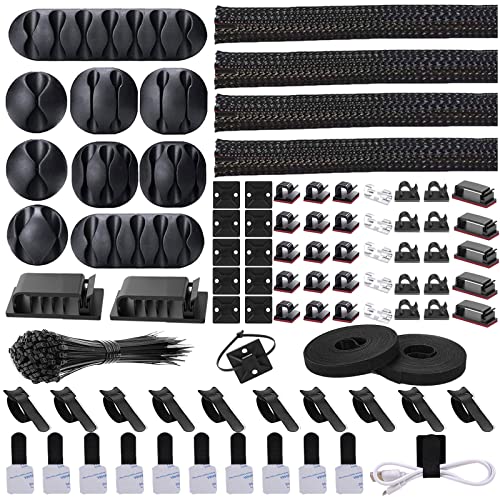
 N NOROCME 192 PCS Cable Management Kit
- Cable Management Kit: 4pcs Cable Sleeves( 20 in…
- 6 kinds of Cable Clips:46pcs wire Clips is…
- Premium Material: Made of highly sturdy and quality…
 Cord Management Organizer Kit 4 Cable Sleeve
- Cable Management Organizer Kit: This comprehensive kit includes…
- Safety Material: Made of highly sturdy and quality…
- 3 kinds of Black Cable Clips:36pcs wire Clips…
 311Pcs Cable Management Organizer Kit 4 Cable
- Cable Management Kit:4pcs Cable Sleeves( 20 in L…
- 6 kinds of Cable Clips:65pcs wire Clips is…
- Premium Material:The sleeve is made from PET material,…
| Product | Key specs | |
|---|---|---|
| N NOROCME 192 PCS Cable Management Kit | Cable Management Kit: 4pcs Cable Sleeves( 20 in… 6 kinds of Cable Clips:46pcs wire Clips is… Premium Material: Made of highly sturdy and quality… | Check price |
| Cord Management Organizer Kit 4 Cable Sleeve | Cable Management Organizer Kit: This comprehensive kit includes… Safety Material: Made of highly sturdy and quality… 3 kinds of Black Cable Clips:36pcs wire Clips… | Check price |
| 311Pcs Cable Management Organizer Kit 4 Cable | Cable Management Kit:4pcs Cable Sleeves( 20 in L… 6 kinds of Cable Clips:65pcs wire Clips is… Premium Material:The sleeve is made from PET material,… | Check price |
 Alex Tech 10ft Alex Tech 10ft | Size: Diameter: 1/2"| Length: 10 Feet | Color:… Operating temp (degree F.):-103 to 257|Melt temp: 446 Our cord protector keeps cat from chewing cables | Check price |
 Sirlyr Black 24-PCS PSU Cable Combs Kit Sirlyr Black 24-PCS PSU Cable Combs Kit | 【Premium Cable Management Kit】✔️ Includes 24 PCS of… 【Durable & Flexible PP Material】✔️ Made of reinforced… 【Clean PC Builds, Better Airflow】✔️ Eliminates tangled cables,… | Check price |
 494 PCS Cable Management Kit 494 PCS Cable Management Kit | 【Cable Management Kit】 4 cable sleeve split (15.7… 【Make Your Life Easier and Tidy】 To break… 【High-Quality Materials】 Our cable management kit is made… | Check price |
 80PCS Hook and Loop Cable Ties 80PCS Hook and Loop Cable Ties | Flexible Cord Management: With more and more appliances… Strong Back-Glue: Hook and loop cable clips is… Easy Adjustment: The hook and loop cable clips… | Check price |
 Cable Management Under Desk Cable Management Under Desk | 【NO DRILL & INSTANT CLAMP INSTALLATION】 Say goodbye… 【LARGE CAPACITY CABLE MANAGEMENT TRAY】 The 25.3-inch wire… 【PREMIUM METAL WIRE ORGANIZER】 Constructed from high-quality metal,… | Check price |
As an Amazon Associate we earn from qualifying purchases at no extra cost to you.
⚡ Save on Your Next PC — Amazon Prime
Prime members get fast free shipping on the systems above, plus early access to Prime Day & Black Friday PC deals. New members get a 30-day free trial.
Watch: How to Cable Manage Your Gaming PC — Video Review
Plan Your Route Before You Tie Anything
The golden rule of case cable management is to use the space behind the motherboard tray. Modern cases include routing channels, tie-down points, and a gap behind the tray specifically for hiding cables. Before connecting anything, plan which cables run where, feed them through the nearest grommet, and keep the bulk hidden behind the panel so the front chamber stays clean.
Inside the Case
- Route through grommets: Pass each cable through the rubber grommet closest to its connector to minimize visible length.
- Use Velcro over zip ties: Reusable hook-and-loop straps let you adjust later; save zip ties for permanent bundles.
- Comb your PSU cables: A cable comb kit aligns 24-pin and PCIe wires into a flat, professional-looking ribbon.
- Bundle behind the tray: Gather excess length into the rear cavity and cinch it down at the case’s tie points.
Under the Desk
- Sleeve the runs: A split cable sleeve gathers your monitor, peripheral, and power cables into one tidy tube.
- Mount a tray: A no-drill under-desk cable tray hides your power strip and adapters off the floor.
- Label as you go: Tag both ends of each cable so you can trace them later without unplugging everything.
- Leave slack for standing desks: If your desk raises, give cables room to travel so nothing pulls tight.
Tips
- Do not overtighten: Snug, not crushing; pinched cables can be damaged over time.
- Work top to bottom: Route power first, then data, then peripherals to avoid redoing bundles.
- Keep a few spare ties: A big kit means you never stop mid-job hunting for one more strap.
- Photograph the finish: A reference photo helps you restore order after any future upgrade.
Frequently Asked Questions
Does cable management actually improve performance?
Indirectly, yes. Tidy cables improve airflow, which lowers component temperatures slightly and reduces dust buildup. The bigger wins are easier maintenance, quieter fans, and a cleaner-looking build.
Should I use zip ties or Velcro straps?
Velcro (hook-and-loop) straps are best for most jobs because you can reopen and adjust them during future upgrades. Use permanent zip ties only for bundles you are sure will not change.
How do I hide cables if my case has no rear space?
Route what you can behind the tray, then use sleeves to consolidate visible runs and tuck excess into empty drive bays. A cable comb also makes unavoidable front-chamber cables look intentional.
What is the easiest first step for a messy desk?
Gather all the loose cables into a single split sleeve and mount a no-drill tray for your power strip. That one step removes most of the visible clutter instantly.
Conclusion
Cable management is a cheap, high-impact upgrade: route cables through grommets and behind the tray inside the case, then sleeve and tray your desk runs outside it. Use reusable Velcro straps, comb your PSU cables, and leave a little slack. An afternoon of tidying pays off in better airflow, easier upgrades, and a build you are proud to show off.









