Our Top Picks
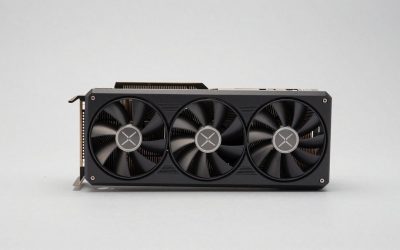
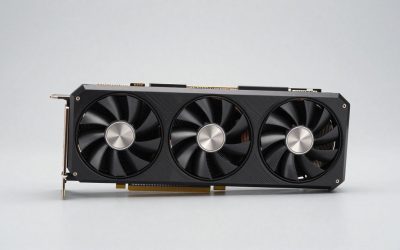
 ASUS TUF Gaming GeForce RTX 5060 8GB GDDR7RTX5060|8GB|OC11.9 x 5.3 x 2.4 inches2.5 PoundsCheck on Amazon
Pick the RX 6750 XT if you play at 1440p or run texture-heavy new releases, because its 12 GB of VRAM avoids the stutter that 8 GB cards hit; pick the RTX 5060 if you play at 1080p, care about ray tracing, DLSS 4 and frame generation, or want a cool 145 W card in a smaller PC. In average rasterized performance the two land within roughly 10% of each other, so the decision rests on VRAM versus features and efficiency.
This is a classic “older high-tier card vs newer mid-tier card” matchup. The RX 6750 XT launched in 2022 at $549 as a refreshed RDNA 2 part, while the RTX 5060 arrived in May 2025 at $299. Today the 6750 XT is mostly found used or as leftover stock, which makes the comparison very price-sensitive.

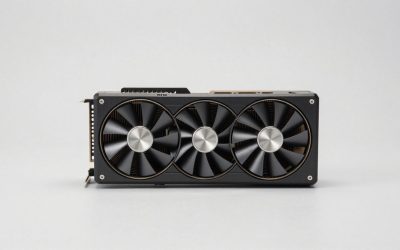
PowerColor Red Devil AMD Radeon RX 6750 XT Graphics Card with 12GB GDDR6 Memory
Picked as a relevant option in this category.
View on Amazon
MSI Gaming Radeon RX 6750 XT 192-bit 12GB GDDR6 Boost Clock 2600MHz Dual Torx 3.0 Fans DP/HDMI FreeSync DirectX 12 VR Ready OC Graphics Card (RX 6750 XT MECH 2X 12G V1)
Picked as a relevant option in this category.
View on Amazon
ASUS Prime GeForce RTX 5060 8GB GDDR7 Gaming Graphics Card | PCIe 5.0, HDMI/DP 2.1, 2.5-slot, Axial-tech Fans, Dual BIOS
Chosen because it specifies PCIe 5.0 and HDMI/DP 2.1.
View on AmazonASUS TUF Gaming GeForce RTX 5060 8GB GDDR7 OC Edition Gaming Graphics Card | PCIe 5.0, HDMI/DP 2.1, 3.1-slot, Military-grade Components, Protective PCB Coating, Axial-tech Fans
Chosen because it specifies PCIe 5.0 and HDMI/DP 2.1.
View on AmazonHardware Compared
| Specification | RX 6750 XT | RTX 5060 |
|---|---|---|
| Architecture | RDNA 2 | Blackwell |
| Release date | 3 March 2022 | 19 May 2025 |
| Launch MSRP | $549 | $299 |
| Shader units | 2,560 stream processors | 3,840 CUDA cores |
| Boost clock | 2,600 MHz | 2,497 MHz |
| Process node | 7 nm | 5 nm |
| VRAM | 12 GB GDDR6 | 8 GB GDDR7 |
| Memory bus | 192-bit | 128-bit |
| Memory bandwidth | 432.0 GB/s | 448.0 GB/s |
| Cache | 3 MB L2 + 96 MB Infinity Cache | 32 MB L2 |
| TDP | 250 W | 145 W |
| PCIe interface | PCIe 4.0 x16 | PCIe 5.0 x8 |
| Power connectors | 1x 6-pin + 1x 8-pin | 1x 8-pin |
| Reference length | 267 mm | 241 mm |
| Slot width | 2-slot | 2-slot |
| Display outputs | 1x HDMI 2.1, 3x DP 1.4a | 1x HDMI 2.1b, 3x DP 2.1b |
Interesting detail: despite the narrower bus, the RTX 5060’s fast GDDR7 gives it slightly more raw bandwidth than the 6750 XT. The real hardware split is capacity (12 GB vs 8 GB) and power (250 W vs 145 W).
Frame Rates in Practice
Average raster performance
Published data puts these cards close together on average, with the winner depending heavily on resolution and game selection. Hardware Unboxed’s RTX 5060 review (published on TechSpot) criticized the card for barely moving past the previous generation, and broader comparison data places the RTX 5060 and RX 6750 XT within about 5–10% of each other at 1080p. At 1440p, the 6750 XT tends to pull ahead, and in games that exceed 8 GB of VRAM at high settings it can lead by a wide margin, sometimes more than double the RTX 5060’s frame rate when the NVIDIA card runs out of memory.
As a rough guide, both cards run a typical modern AAA game at high settings at 1080p somewhere in the 60–90 FPS range. At 1440p high, the 6750 XT usually stays in a playable 50–70 FPS band in titles where the RTX 5060 may need lower texture settings to avoid stutter. These ranges vary with settings, CPU and game patches.
Ray tracing
The RTX 5060 wins clearly with ray tracing enabled. RDNA 2’s first-generation ray accelerators fall behind NVIDIA’s fourth-generation RT cores, and the gap grows as RT effects get heavier. That said, ray tracing also raises VRAM use, so the RTX 5060 can still hit its 8 GB wall in RT-heavy games at higher settings. Hardware Unboxed showed Dying Light 2 at 1440p with RT averaging under 50 FPS on the RTX 5060, rising to the low 70s with upscaling from 1080p.
Upscaling and Frame Generation Compared
- RTX 5060: DLSS 4 Super Resolution (transformer model), DLSS Frame Generation, DLSS 4 Multi Frame Generation and NVIDIA Reflex. DLSS appears in far more games than any rival upscaler, and its image quality at “Balanced” or “Performance” mode is excellent at 1440p output.
- RX 6750 XT: FSR 3.1 upscaling and frame generation in supported games, plus AMD Fluid Motion Frames (AFMF) at driver level for almost any DX11/DX12 game. It does not support FSR 4, which is limited to RDNA 4 (RX 9000) cards.
This is the RTX 5060’s strongest argument. DLSS 4 lets it render internally at a lower resolution with less visible quality loss than FSR 3, which partly offsets the VRAM limit. Multi Frame Generation can push frame counters very high, but it works best from a solid base of around 50–60 FPS and adds memory overhead, which an 8 GB card has little of.
The 8 GB Question, Quantified
A simple rule of thumb for VRAM in current games:
| Resolution and settings | Typical VRAM need | RTX 5060 (8 GB) | RX 6750 XT (12 GB) |
|---|---|---|---|
| 1080p medium | 5–7 GB | Fine | Fine |
| 1080p high/ultra textures | 7–10 GB | Borderline in new games | Fine |
| 1080p high + RT + frame gen | 9–11 GB | Often over budget | Fine (but RT is weak) |
| 1440p high | 9–12 GB | Needs texture compromise | Comfortable |
Add one more wrinkle: the RTX 5060 uses a PCIe 5.0 x8 link. On PCIe 4.0 boards it is fine, but on an older PCIe 3.0 motherboard, the penalty when VRAM spills over is larger because bus bandwidth is halved. The 6750 XT’s full x16 link is more forgiving on older platforms.
Power Draw, PSU and Size
PSU sizing with GPU TDP + CPU + roughly 150 W of headroom, using a 105 W-class CPU:
- RX 6750 XT: 250 + 105 + 150 = about 505 W, so a quality 600–650 W unit is sensible
- RTX 5060: 145 + 105 + 150 = about 400 W, so a quality 500–550 W unit is enough
The 6750 XT needs a 6-pin plus an 8-pin; the RTX 5060 needs only one 8-pin. The 105 W TDP difference also means more heat and fan noise from the AMD card in small cases. At three hours of gaming a day and $0.15 per kWh, the difference works out to roughly $15–$18 a year.
On size, the reference RTX 5060 is 241 mm and the 6750 XT is 267 mm, both dual-slot. Many RTX 5060 partner cards are compact dual-fan designs suitable for Mini-ITX cases; most 6750 XT partner cards are longer, with some triple-fan models exceeding 300 mm.
Drivers, Software and Extras
Both vendors offer mature drivers for these cards. AMD’s Adrenalin suite includes Radeon Anti-Lag, Radeon Super Resolution for driver-level upscaling and Fluid Motion Frames, which can add frame generation to games that do not support it natively. NVIDIA’s app bundles DLSS overrides, which let you force the newer DLSS 4 upscaling model in older DLSS games, plus Reflex and the NVENC encoder with AV1 support. RDNA 2 still receives regular game-ready drivers, but new AMD features increasingly target RDNA 4 first, while the RTX 5060 sits at the front of NVIDIA’s feature roadmap. For buyers who plan to keep a card for four or more years, that difference in feature support is worth weighing alongside raw performance.
Buying Used vs New
The RX 6750 XT is a previous-generation card, so most buyers will find it used. Used prices usually sit roughly in the $220–$280 range. At the lower end of that range, it undercuts a new RTX 5060 while offering 4 GB more VRAM. Ask sellers about mining or heavy use, look for even fan behavior and stable temperatures, and remember there is usually no transferable warranty. The RTX 5060 comes new with a full warranty and will receive feature updates for longer.
Pick X If, Pick Y If
| Choose the RX 6750 XT if… | Choose the RTX 5060 if… |
|---|---|
| You play at 1440p | You play at 1080p |
| You want high textures in new AAA releases | You want ray tracing and DLSS 4 |
| You found one used for less than an RTX 5060 | You want a warranty and a new card |
| Your PSU is 650 W or more | Your PSU is 500–550 W |
| You have an older PCIe 3.0 motherboard | You build in a small case |
| You mostly play raster-only games | You stream with NVENC or use CUDA apps |
Frequently Asked Questions
Is the RTX 5060 faster than the RX 6750 XT?
On average they are close, within roughly 5–10% at 1080p, with results trading back and forth by game. The RTX 5060 wins in ray tracing. The RX 6750 XT tends to lead at 1440p and in games that need more than 8 GB of VRAM.
Does the RX 6750 XT support FSR 4?
No. FSR 4 is limited to AMD’s RDNA 4 RX 9000 series. The 6750 XT supports FSR 3.1 upscaling and frame generation, plus driver-level AMD Fluid Motion Frames.
Is 8 GB of VRAM on the RTX 5060 a problem?
At 1080p with sensible texture settings, it is usually manageable. In newer games at high or ultra textures, especially with ray tracing or frame generation, 8 GB can cause stutter and texture pop-in. At 1440p it is a real limitation.
What power supply does the RX 6750 XT need?
A quality 600–650 W unit with a 6-pin and an 8-pin PCIe connector is recommended for most systems. The card is rated at 250 W. Partner models with factory overclocks may draw a bit more.
Which card is better for streaming?
The RTX 5060 has the edge thanks to NVIDIA’s NVENC encoder, which offers excellent quality and supports AV1. The RX 6750 XT can stream with AMD’s encoder, but RDNA 2 lacks AV1 encoding.